 English
 Deutsch
 Español
 Italiano
 Français
 Português do Brasil
 Tiếng Việt
 ไทย
 Bahasa Indonesia
 Русский
 العربية
 हिन्दी

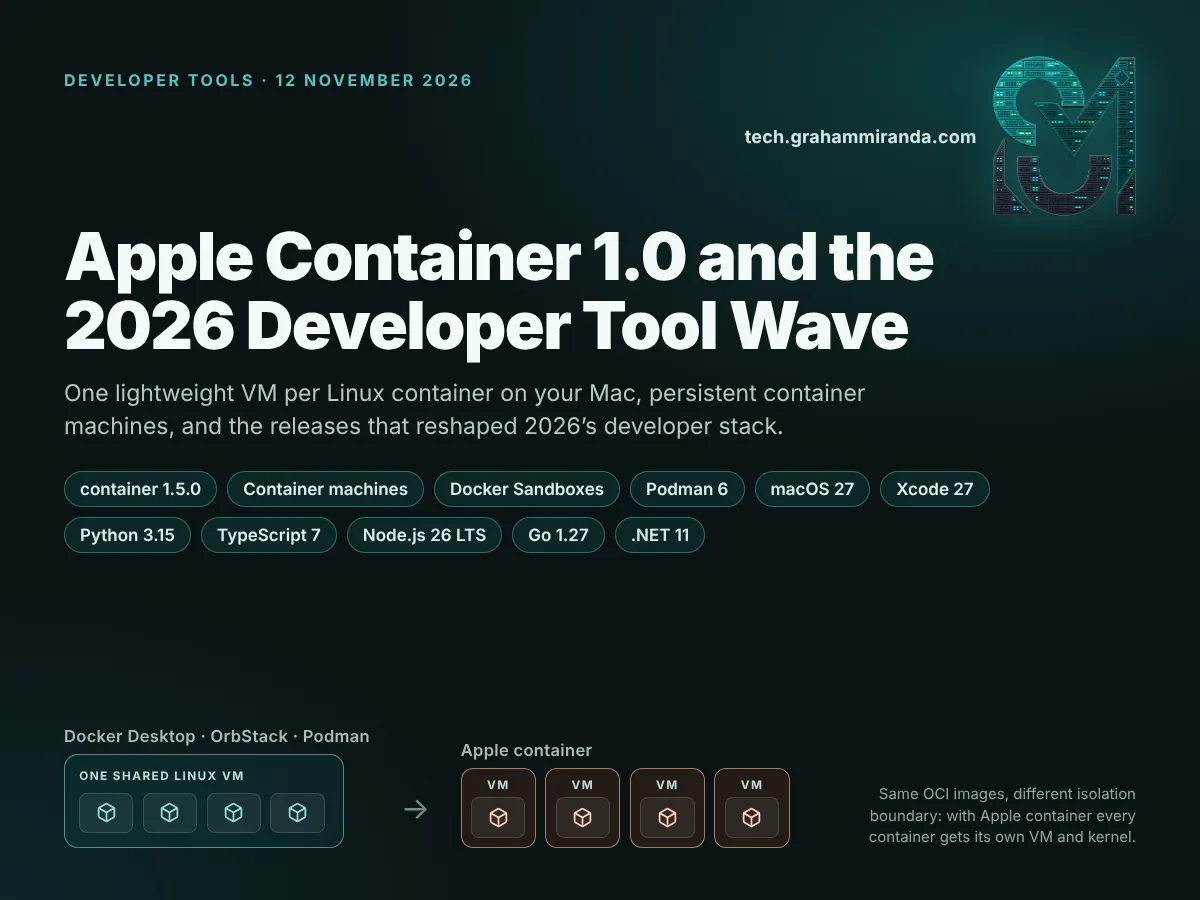
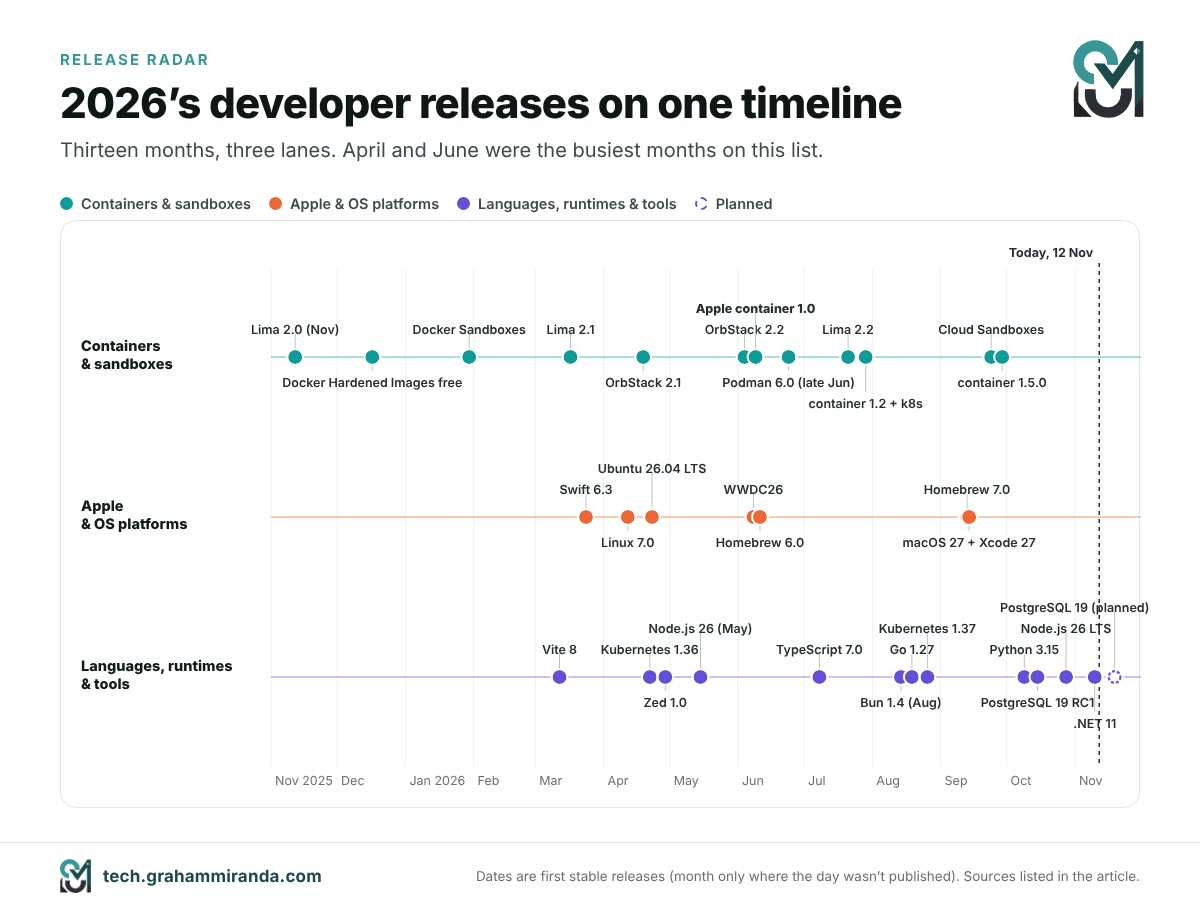
Apple container 1.0 is the most interesting thing Apple has shipped for developers in years, and most people outside the container crowd missed it. Released on 9 June 2026, during WWDC week, it runs every Linux container in its own lightweight virtual machine on your Mac, speaks standard OCI images, and brings a new idea called container machines: persistent Linux environments that share your username and home directory, much like WSL does on Windows. Five months and eight releases later it’s at version 1.5.0, with a Kubernetes plugin, a security patch release and an official skill file for AI coding agents in its repository.
It didn’t arrive alone. 2026 has been an unusually dense year for developer tools. Docker rebuilt itself around microVM sandboxes for AI agents. Podman 6 ripped out a decade of legacy networking. macOS 27 dropped Intel, and Homebrew set a date to follow. Python 3.15 made UTF-8 the default, TypeScript 7 rewrote its compiler in Go, Bun rewrote itself in Rust with an AI doing most of the typing, and PostgreSQL 19 did something almost nobody does any more: it slipped its release on purpose, to get things right.
This guide covers both halves of that story. The first half is a practical deep dive into Apple’s container tool: what it is, how it works, what changed between 1.0 and 1.5, how to install and use it step by step, how to translate your Docker habits, how it compares with Docker Desktop, OrbStack, Podman and Lima, and where it fits if you run AI models or AI agents on a Mac. The second half is a release radar of the other 2026 releases in the same spirit, what each one changes, and what you should actually do about it.
Every version number, date and price below was checked against release notes, official documentation and vendor pages on 12 November 2026. Developer tools move fast: a version that’s current today can be two releases behind by the time you read this, so volatile figures are dated where they appear.
Disclosure: This article contains no affiliate links and no sponsored content. My company, Graham Miranda UG (haftungsbeschränkt), provides hosting and IT services and earns nothing from any tool, subscription or company mentioned here. No company mentioned here has reviewed or approved this article.
TL;DR — Apple Container 1.0 and 2026’s Developer Releases in Ten Bullets
- Apple container 1.0 shipped on 9 June 2026. It runs each Linux container in its own lightweight VM, using Apple’s open-source Containerization Swift package, pulls and pushes standard OCI images, and is Apache-2.0 licensed. It needs an Apple silicon Mac and is supported on macOS 26. The current release is 1.5.0 (29 September).
- Container machines are the headline feature. One command gives you a persistent Linux environment that boots the image’s init system and maps your Mac username and home directory into Linux, so you edit on macOS and build inside Linux with no copy step. It’s the closest the Mac has come to WSL.
- Since 1.0, Apple has added an experimental
container k8splugin that spins up local Kubernetes clusters,container export, SSH forwarding for builds, a security release that fixed six advisories, and an official agent skill that teaches AI coding agents how to use the tool instead of Docker. - What it still can’t do: there’s no Compose, no
--restartpolicy, no GUI, no GPU access for Linux containers, container names resolve only on the default network, and memory freed inside a container isn’t handed back to macOS. For multi-service stacks, Docker Desktop and OrbStack remain the better daily drivers. - Docker’s year was about AI agents. Hardened Images went free and open source (December 2025), Docker Sandboxes give each coding agent its own microVM (January), Cloud Sandboxes move them to Docker’s cloud (September), and Model Runner runs local LLMs on the host GPU, because containers on a Mac can’t see Metal.
- Podman 6 (June) removed cgroups v1, CNI, slirp4netns, BoltDB and Intel Mac support, and made libkrun the macOS default, which is also the only mainstream route to near-native GPU inference inside a Mac container. OrbStack 2.2 added USB passthrough; Lima 2.x turned itself into an AI-agent sandbox.
- The platform moved under everyone’s feet. macOS 27 Golden Gate (14 September) runs only on Apple silicon; Xcode 27 needs macOS Tahoe 26.6 and ships Swift 6.4 with agent planning built in; Homebrew 7 moved Intel Macs to Tier 3 and stops running on them on 1 September 2027; Linux 7.0 and Ubuntu 26.04 LTS landed in April.
- Languages and runtimes: Python 3.15 (lazy imports, UTF-8 by default, a faster JIT), TypeScript 7 (compiler rewritten in Go, 8–12× faster builds), Node.js 26 LTS (Temporal on by default), Go 1.27 (generic methods, JSON v2), .NET 11 (C# 15 union types), Vite 8 (Rolldown) and Bun 1.4 (rewritten from Zig to Rust).
- Six patterns explain the wave: the virtual machine became the new container boundary; Intel is leaving the Mac toolchain; tools are being rewritten in native languages for speed; AI is now both builder and bug-finder; security defaults got stricter; and release trains are slowing down to support versions for longer.
- What to do now: if you’re on Apple silicon and macOS 26 or later, try a container machine this week; keep Docker Desktop or OrbStack for Compose stacks; put your AI coding agents in a sandbox; test Python 3.15, TypeScript 7 and Node 26 on a branch before you switch; and plan the retirement of any Intel Mac before September 2027.
The 2026 Developer Release Radar at a Glance
| Release | Shipped | What changed | Who should care |
|---|---|---|---|
| Apple container 1.0 → 1.5 | 9 Jun → 29 Sep 2026 | One VM per Linux container, container machines, local Kubernetes | Mac developers on Apple silicon |
| Docker Sandboxes / Cloud Sandboxes | 30 Jan / 24 Sep 2026 | A disposable microVM for every AI coding agent | Anyone running coding agents unattended |
| Docker Hardened Images, free | 17 Dec 2025 | 1,000+ minimal, signed images under Apache 2.0 | Anyone shipping container images |
| Podman 6.0 | late Jun 2026 | cgroups v1, CNI and slirp4netns gone; libkrun default on macOS | Podman users, Fedora and RHEL shops |
| OrbStack 2.1–2.2 | Apr–Oct 2026 | Isolated machines, USB passthrough, sound | Mac developers who want speed and a GUI |
| Lima 2.0–2.2 | Nov 2025–Jul 2026 | AI-agent sandboxing, macOS and Windows guests | Lima and Colima users, agent builders |
| macOS 27 Golden Gate | 14 Sep 2026 | Apple silicon only; the last full Rosetta 2 | Every Mac developer |
| Xcode 27 + Swift 6.4 | 14 Sep 2026 | Agent plans, Device Hub; needs Tahoe 26.6+ | Apple-platform developers |
| Swift 6.3 | 24 Mar 2026 | Official Android SDK, @c C interop |
Cross-platform Swift teams |
| Linux 7.0 | 12 Apr 2026 | Rust no longer experimental; XFS self-healing | Server and container hosts |
| Ubuntu 26.04 LTS | 23 Apr 2026 | sudo-rs, Rust coreutils, CUDA in the archive | Servers, CI runners, WSL users |
| Homebrew 6.0 and 7.0 | 11 Jun / 13 Sep 2026 | Tap trust, brew vulns, BrewUI, Intel to Tier 3 |
Every Mac command-line user |
| Python 3.15 | 9 Oct 2026 | Lazy imports, UTF-8 default, faster JIT | Python developers |
| TypeScript 7.0 | 8 Jul 2026 | Go-based compiler, 8–12× faster full builds | JavaScript and TypeScript teams |
| Node.js 26 LTS “Lithium” | LTS 28 Oct 2026 | Temporal on by default; last twice-a-year major | Node.js backends |
| Go 1.27 | 19 Aug 2026 | Generic methods, JSON v2, post-quantum TLS | Go services |
| .NET 11 | 10–12 Nov 2026 | C# 15 union types; .NET 8 and 9 out of support | .NET shops |
| Bun 1.4 | Aug 2026 | Rewritten from Zig to Rust, mostly by AI agents | Bun users, and AI-coding sceptics |
| Vite 8 | 12 Mar 2026 | Rolldown replaces esbuild and Rollup | Front-end teams |
| Kubernetes 1.36 / 1.37 | 22 Apr / 26 Aug 2026 | User namespaces GA; 67 enhancements in 1.37 | Platform teams |
| PostgreSQL 19 | RC1 15 Oct; GA planned 19 Nov 2026 | Delayed, with 53 features reverted for quality | Database owners |
| Zed 1.0 | end of Apr 2026 | The Rust-built editor reaches 1.0 on three platforms | Editor switchers |
Dates are first stable releases unless noted. Versions move quickly: Apple container, OrbStack, Zed and Python have all shipped point releases since. Every figure is credited where it appears.
Table of Contents
- Part 1 — What Apple Container 1.0 Is, and Why It’s Different
- Part 2 — From 1.0 to 1.5: Eight Releases in Under Four Months
- Part 3 — Container Machines: Apple’s Answer to WSL
- Part 4 — How to Install and Use Apple Container: Step by Step
- Part 5 — Apple Container vs Docker: The Migration Cheat Sheet
- Part 6 — Apple Container vs Docker Desktop, OrbStack, Podman and Lima
- Part 7 — Containers and Local AI on a Mac: Where Does the GPU Go?
- Part 8 — The Sandbox Era: Why Every Container Tool Became an AI-Agent Tool
- Part 9 — The Platform Layer: macOS 27, Xcode 27, Swift, Linux 7.0, Ubuntu 26.04 and Homebrew
- Part 10 — The Languages and Runtimes: Python 3.15, TypeScript 7, Node.js 26, Go 1.27, .NET 11, Bun and Vite
- Part 11 — Infrastructure and Editors: Kubernetes, PostgreSQL 19 and Zed 1.0
- Part 12 — Six Patterns Behind the 2026 Release Wave
- Part 13 — Your Upgrade Plan for November 2026
- Frequently Asked Questions
- The Bottom Line
Part 1 — What Apple Container 1.0 Is, and Why It’s Different
Containers are a Linux feature. A container is just a set of ordinary Linux processes, fenced off from everything else by kernel features called namespaces and cgroups, and started from an image that holds its files. macOS isn’t Linux, so every tool that runs Linux containers on a Mac has to run a Linux virtual machine somewhere. The interesting question is how many.
One VM for everything, or one VM per container
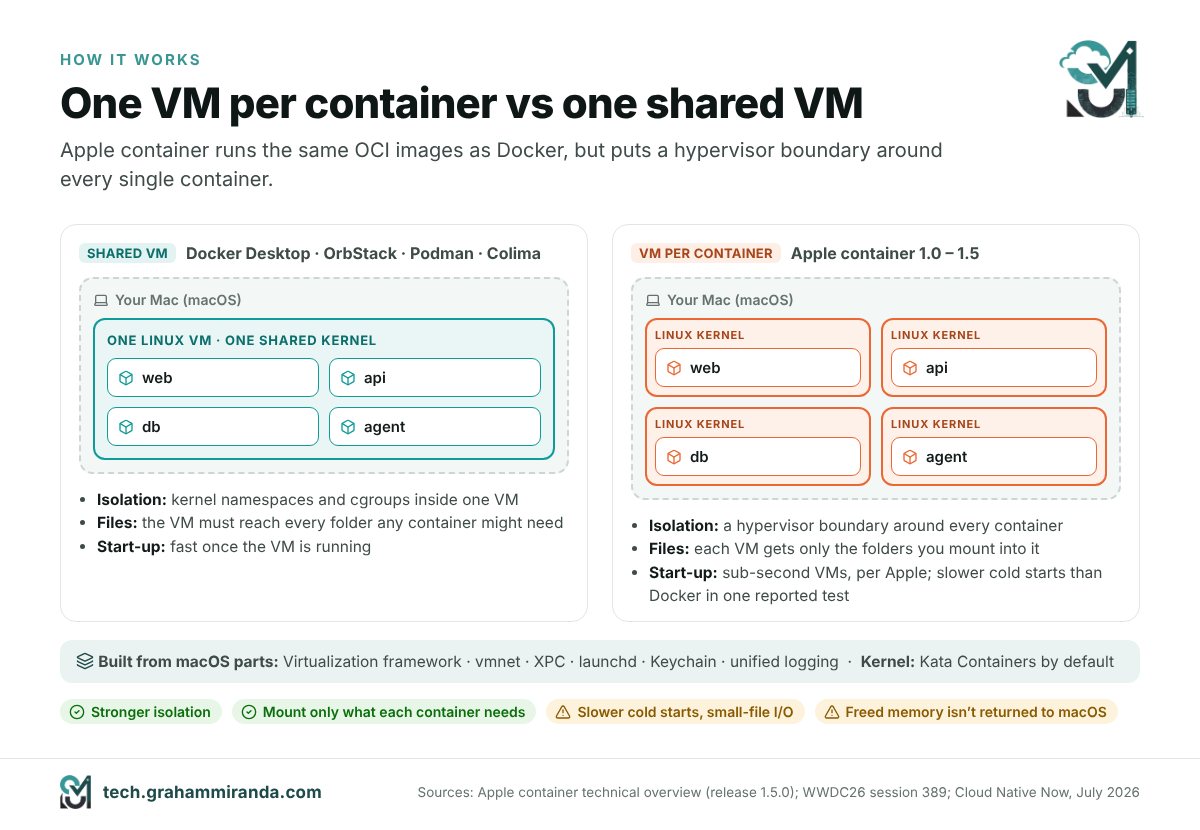
Docker Desktop, OrbStack, Podman’s machine and Colima all take the classic approach: they start one Linux VM and run all your containers inside it, side by side on the same Linux kernel. That’s efficient, it’s fast to start a container once the VM is running, and it’s how containers work on a Linux server too. The catch is that the isolation between containers is only as strong as that shared kernel, and that the VM has to be able to see every folder any container might ever need, because the VM is the thing your Mac shares files with.
Apple container inverts this. It uses Apple’s open-source Containerization package to start a separate lightweight VM for every container. Apple’s documentation lists three reasons:
- Security. Each container gets the isolation of a full virtual machine, with a minimal set of core utilities and libraries inside, which shrinks the attack surface.
- Privacy. You mount only the data each container needs into that container’s VM. With a shared VM, the VM has to be able to reach everything any container might ever use.
- Performance. Apple says these VMs need less memory than full VMs and boot in times comparable to containers in a shared VM. At WWDC26 it described the lightweight VMs as having sub-second start times.
Everything else is standard. Apple container consumes and produces OCI images, so it pulls from Docker Hub, GitHub’s container registry or any other registry, builds from ordinary Dockerfiles, and pushes images that run anywhere else.
What’s actually running on your Mac
Apple container is built from the same macOS pieces Apple uses everywhere else, which is part of why it feels native:
- The Virtualization framework runs the Linux VMs and their virtual devices.
- The vmnet framework provides the virtual network. Every container gets its own IP address (by default in
192.168.64.0/24), reachable from your Mac and, on macOS 26, from other containers. - XPC connects the command-line tool to its background services, launchd manages them, Keychain stores your registry passwords, and the unified logging system collects the logs.
- When you run
container system start, a launch agent calledcontainer-apiserverstarts, together with helpers for images, the network, container machines and Kubernetes clusters. Each container you create gets its owncontainer-runtime-linuxhelper. - The Linux kernel inside each VM comes from the Kata Containers project by default. The first
container system startoffers to download it.
Why the VM-per-container model matters now
For years, one VM per container sounded like overkill for a developer laptop. Two things changed that. First, Apple silicon made lightweight VMs cheap enough to start in under a second. Second, developers started letting AI coding agents run commands and code they haven’t read. Mitch Ashley of The Futurum Group put it in terms of where the security boundary sits: it moves from the shared kernel’s namespaces to the hypervisor, which is a more defensible way to run untrusted workloads. If a compromised process breaks out of a container in a shared VM, it’s in the VM with all your other containers. If it breaks out of an Apple container, it’s in a VM with nothing else in it.
The trade-offs
Nothing is free, and the per-container design has real costs:
- Cold starts. Cloud Native Now cited independent benchmarks in which Docker Desktop started containers about four times faster, while Apple container showed about 33% higher memory throughput. Treat both as indicative: they’re one set of tests, the article didn’t name who ran them, and both tools have shipped several releases since.
- Small-file I/O. Because each container has its own filesystem, workloads that touch tens of thousands of small files, such as a big
npm install, can feel slower than in a mature shared-VM tool. - Memory isn’t handed back. The Virtualization framework only partly supports memory ballooning. A container’s VM grows as its application uses memory, but memory freed inside Linux isn’t returned to macOS. Apple’s own documentation suggests restarting memory-hungry containers from time to time.
- macOS 26 only, Apple silicon only. Apple says the tool is supported on macOS 26 and that maintainers usually won’t fix problems they can’t reproduce there. It does run on macOS 15, but containers there can’t talk to each other and you get only one network. Intel Macs aren’t supported at all.
Part 2 — From 1.0 to 1.5: Eight Releases in Under Four Months
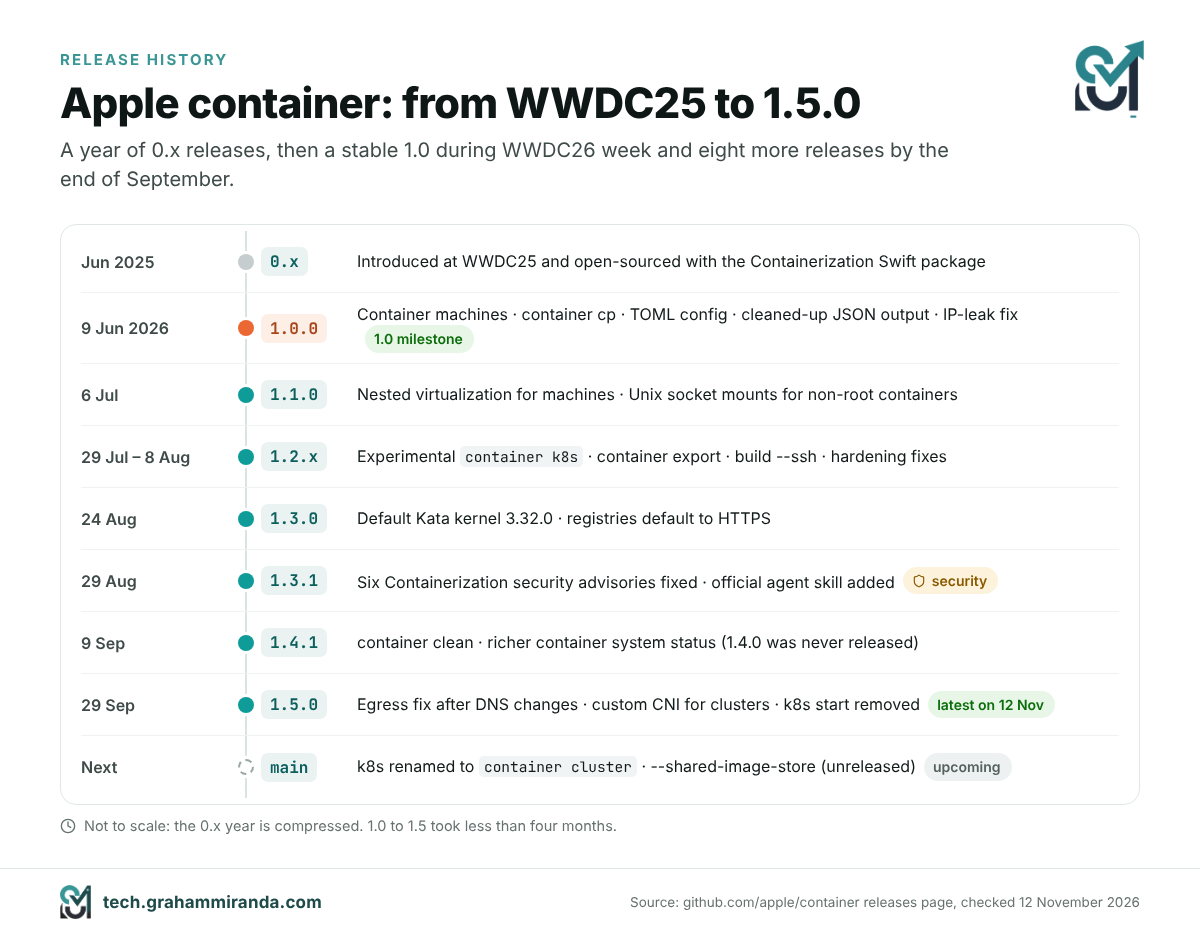
Apple introduced container and Containerization at WWDC25 in June 2025 and released them as open source. A year of 0.x releases followed, each with the occasional breaking change. Version 1.0.0 arrived on 9 June 2026, and Apple has kept up a steady pace since:
| Version | Date | Headline changes |
|---|---|---|
| 1.0.0 | 9 Jun 2026 | container machine; container cp; --stop-signal and --shm-size; configuration moved to a TOML file; cleaned-up JSON/YAML/TOML output; fix for leaked IP addresses |
| 1.1.0 | 6 Jul 2026 | Nested virtualization for container machines; Unix socket mounts for non-root containers |
| 1.2.0–1.2.2 | 29 Jul–8 Aug 2026 | Experimental container k8s plugin for local Kubernetes; container export; build --ssh; read-only and masked paths; several hardening fixes |
| 1.3.0 | 24 Aug 2026 | Default Kata kernel updated to 3.32.0; image operations default to HTTPS |
| 1.3.1 | 29 Aug 2026 | Security release fixing six advisories in Containerization; the official agent skill added to the repository |
| 1.4.1 | 9 Sep 2026 | container clean; container system status reports host, paths and resources (1.4.0 was never released) |
| 1.5.0 | 29 Sep 2026 | Fix for lost network access after DNS changes; custom CNI for Kubernetes clusters; k8s start removed for now |
Latest release on 12 November 2026: 1.5.0. Apple notes that its version numbers are product versions, not semantic versions.
What 1.0 broke, and why you should care if you upgraded from 0.x
Version 1.0 was the moment Apple cleaned house, and three changes can bite anyone with scripts:
- Configuration moved to a TOML file at
~/.config/container/config.toml. The oldcontainer system property getandsetsubcommands are gone. - Structured output changed. If you parse the JSON from
container lsorinspectin scripts, check them against 1.x. - The background API dropped compatibility with 0.x clients. Any third-party tool built against the 0.x XPC API needs an update.
Since 1.0, Apple says the command-line interface generally preserves backward compatibility within a major release, with one exception that matters: features marked experimental, such as the Kubernetes subcommand, may change without warning.
The security release
Version 1.3.1 fixed six advisories in the Containerization package. In plain words: a container ID that wasn’t checked could let container creation delete files outside its own folder; unvalidated image digests allowed path traversal in the local image store; loading an image layout could follow a symlink and read files from your Mac; the registry client followed an authentication redirect without checking its host (CVE-2026-65388); and two malformed image layers could crash the unpacker. None of these is exotic. They’re exactly the kind of bugs you’d expect in a young tool that handles untrusted images, and they’re a good argument for staying current. The 1.2 releases had already added integrity checks for kernel downloads and validation for container IDs and plugin names, and 1.5.0 fixed a security issue in the Kubernetes plugin’s kubeconfig handling.
Apple ships a skill for your AI coding agent
The most 2026 detail in the whole project is a file called skills/container/SKILL.md, added in 1.3.1. It’s an agent skill: a set of instructions that AI coding agents such as Claude Code and Codex can load when a task involves containers. It tells the agent that container replaces Docker, Lima, Colima and Podman on a Mac, gives it a Docker-to-container command map, and warns it about the traps a model would otherwise fall into: command groups are singular (container image ls, not container images), container build needs -t or you get an image named after a random UUID, there’s no Compose and no --restart, and container names only resolve on the default network.
It’s a small file, but it says something about how Apple expects the tool to be used: increasingly not by a developer typing commands, but by an agent typing them on the developer’s behalf. Part 5’s cheat sheet draws on the same mapping.
What’s coming next
The project’s main branch is already renaming the experimental container k8s subcommand to container cluster and adding a --shared-image-store option that lets cluster nodes use your local images without a registry. Apple’s own documentation warns that, with sharing turned on, anything with root on a node can read every image in your local store, including private images you pulled with your registry credentials. If you script against the Kubernetes plugin today, expect the name to change in a future release.
Part 3 — Container Machines: Apple’s Answer to WSL
A normal container is modelled on an application: one process, usually short-lived, thrown away when it stops. A container machine is modelled on a Linux environment. Apple introduced it with 1.0 and gave it its own WWDC26 session, which described it as fast and lightweight like a container, and persistent like a virtual machine.
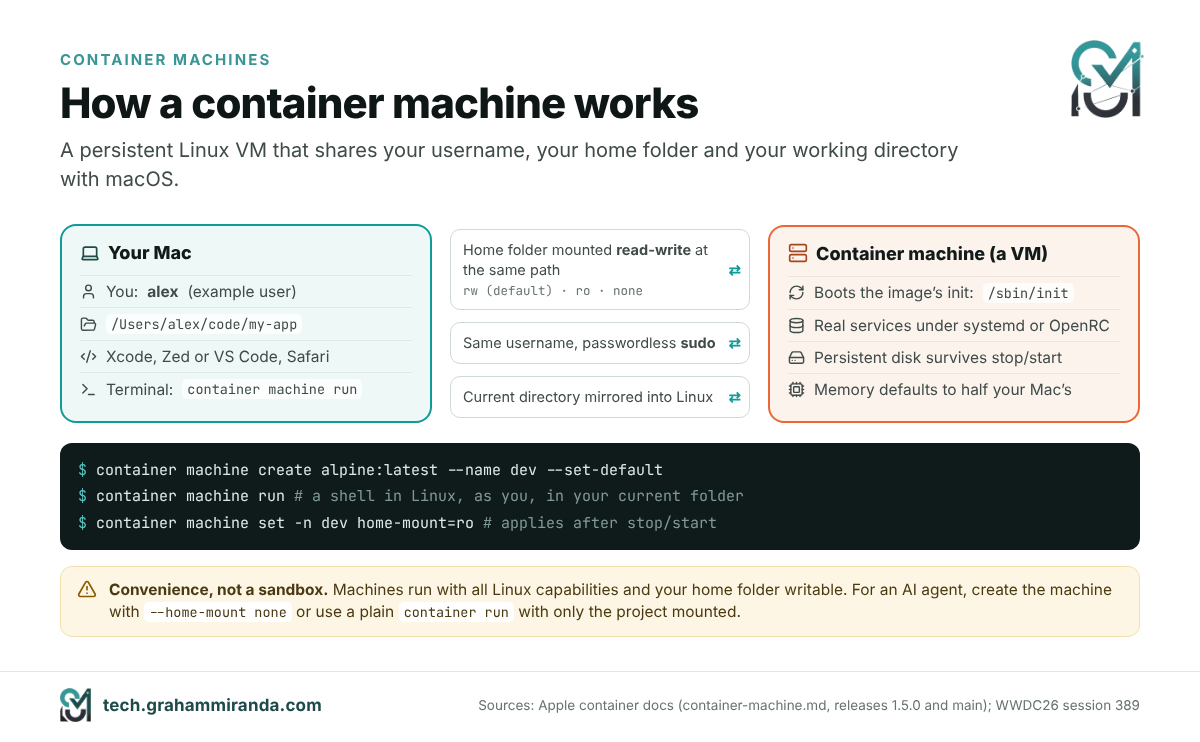
What a container machine gives you
- It boots the image’s init system, so long-running services work. On an image with
systemd,systemctl start postgresqldoes what you’d expect. - Your Mac username and home directory are mapped in. Inside the machine you’re your own user, not root, with passwordless
sudo, and your Mac’s home folder is mounted at the same path. Your repositories and dotfiles exist on both sides at once. - Your working directory follows you. Run a command from a project folder on your Mac and it runs in the same folder inside Linux.
- It persists. Packages you install, services you configure and files outside your home directory survive a stop and start.
- It’s built from ordinary OCI images, including ones you build yourself with
container build.
In practice that means you edit in Xcode, Zed or VS Code on macOS, and compile, run and test inside Linux, with no copy step in between. Apple’s WWDC demo built a Swift web server inside a machine, edited it in Xcode on the Mac and loaded it in Safari.
The commands
# Create a machine from an image and make it the default
container machine create alpine:latest --name dev
container machine set-default dev

# Run a single command, or open a shell (boots the machine if it's stopped)
container machine run uname -a
container machine run whoami        # your Mac username, not root
container machine run               # interactive shell

# Manage it
container machine ls
container machine inspect dev
container machine set -n dev cpus=4 memory=8G   # applies after the next stop/start
container machine stop dev
container machine rm dev            # deletes the machine AND its storage
Every container machine command also answers to the short alias m, so container m ls works. Memory defaults to half of your Mac’s memory, which is generous; on a 16 GB machine, set a limit.
Bring your own machine image
Any Linux image that contains /sbin/init works. Apple’s documentation includes a Dockerfile that turns Ubuntu 24.04 into a full systemd machine with SSH and common tools; the short version looks like this:
FROM ubuntu:24.04
ENV container container
RUN apt-get update && \
    apt-get install -y dbus systemd openssh-server iproute2 curl sudo && \
    apt-get clean && rm -rf /var/lib/apt/lists/*
RUN systemctl set-default multi-user.target
container build -t local/ubuntu-machine:latest .
container machine create local/ubuntu-machine:latest --name ubuntu
Apple’s full example also masks a handful of systemd units that make no sense in a VM and resets the machine ID; copy it from the documentation rather than from here if you want systemd to boot cleanly. On first boot, the tool runs a setup script that creates your user. You can replace it with your own script at /etc/machine/create-user.sh.
Nested virtualization
Since 1.1, a container machine can run virtual machines of its own, which is useful for testing KVM-based tooling or running Kubernetes-in-VM setups. You need an M3 or later Mac, macOS 15 or later, and a Linux kernel built with KVM support, because the default kernel doesn’t include it. You then create the machine with --virtualization --kernel /path/to/vmlinux-kvm and check for /dev/kvm inside.
The limitations to know before you move in
- The machine has its own network. Servers inside must listen on the machine’s external interface, not just
localhost, and you reach them through the machine’s IP address, whichcontainer machine listshows. - Deleting a machine deletes its disk. Anything outside your mounted home folder is gone after
container machine rm. - It’s a convenience environment, not a sandbox. Apple’s documentation is explicit: a machine mounts your whole home folder read-write at the same path, runs with all Linux capabilities and without the usual masked
/procand/syspaths, and gives your user passwordlesssudo. Root inside the machine can therefore write anywhere in your home folder with your macOS permissions. That’s exactly what you want for your own work and exactly what you don’t want for an AI agent. For an agent, either create a machine with--home-mount none(or switch an existing one withcontainer machine set -n dev home-mount=none, then restart it) and clone the project inside it, or skip machines and use a plaincontainer runwith only the project folder mounted. Part 8 comes back to this. - It’s Linux on Apple silicon, so x86-only binaries need Rosetta (
container run --rosettaexists for containers) or an arm64 build.
Who should use one
If you build server software that runs on Linux, test against more than one distribution, or run services such as PostgreSQL, Redis or a message queue for local development, container machines replace a lot of what people used Lima, Multipass, UTM or a remote VPS for. Create one machine per target distribution (alpine, ubuntu, debian), keep the same home folder in all of them, and test your code across all three without leaving your Mac.
Part 4 — How to Install and Use Apple Container: Step by Step
This is the shortest path from nothing to a working setup, with the commands from Apple’s own documentation for release 1.5.0. Everything runs in Terminal.
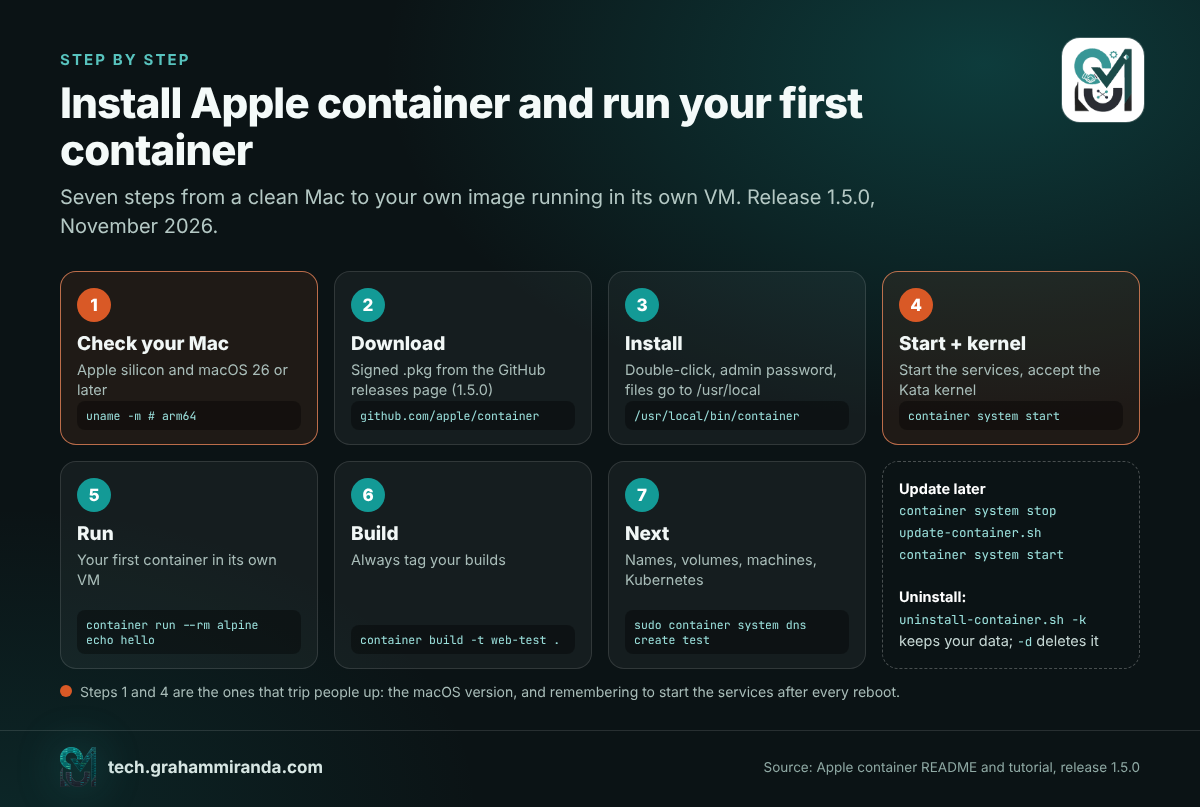
Step 1 — Check your Mac
You need Apple silicon and, for full functionality, macOS 26 Tahoe or later. It also runs on macOS 27 Golden Gate.
uname -m               # must print arm64
sw_vers -productVersion  # 26.x or 27.x for full support
On macOS 15 Sequoia the tool runs, but containers can’t reach each other and you only get one network. On an Intel Mac it doesn’t run at all; skip to Part 6 for the alternatives.
Step 2 — Download the signed installer
Open the Apple container releases page and download the signed installer package (.pkg) attached to the latest release, 1.5.0 at the time of writing. Apple’s documentation describes only this package as the install route, so that’s the one to use.
Step 3 — Install it
Double-click the package, follow the installer and enter your administrator password when asked. It installs everything under /usr/local, including two helper scripts you’ll need later: update-container.sh and uninstall-container.sh.
Step 4 — Start the services and install a kernel
container system start
The first start asks whether to download the recommended Linux kernel from the Kata Containers project. Answer y. Then check that everything is up:
container system status    # host, paths and resources since 1.4.1
container system version
container ls -a            # an empty list means it's working
container system start starts a launch agent, so you need to run it again after a reboot. If a command later fails with “Plugins are unavailable. Start the container system services and retry”, check the spelling of your command first: Apple’s own agent skill warns that a mistyped subcommand produces exactly this message, and it’s only a real service problem if container system status also says the service is down.
Step 5 — Run your first containers
container run --rm alpine echo hello      # pulls alpine, runs it in its own VM, removes it
container run -it --rm ubuntu:24.04 bash  # an interactive shell; type exit to leave
By default, images come from Docker Hub, so short names such as alpine and postgres:16 work as they do in Docker.
Step 6 — Build and run your own image
Create a folder with this Dockerfile (it’s the same tiny web server Apple’s tutorial uses):
FROM docker.io/python:alpine
WORKDIR /content
RUN echo '<h1>Hello from Apple container</h1>' > index.html
CMD ["python3", "-m", "http.server", "80", "--bind", "0.0.0.0"]
Build it, run it and open it:
container build -t web-test .                       # always pass -t
container run -d --name web -p 8080:80 web-test     # detached, port 8080 on your Mac
open http://localhost:8080
Two differences from Docker are worth knowing straight away. First, always tag your builds: without -t, the image gets a freshly generated UUID as its name. Second, every container has its own IP address. container ls shows it, and you can open http://<that-ip> without publishing any port at all; -p is only needed when you want the familiar localhost:8080 or when a macOS app expects a local port.
Step 7 — Give containers friendly names (optional)
Apple container has a built-in DNS service. Set a local domain once, and every container becomes reachable as <name>.<domain>:
mkdir -p ~/.config/container
printf '[dns]\ndomain = "test"\n' >> ~/.config/container/config.toml   # edit the [dns] table if the file already has one
container system stop && container system start
sudo container system dns create test
open http://web.test
Names resolve only for containers on the default network, and always with the domain: web.test works, a bare web doesn’t. Containers on a network you created with container network create can’t resolve each other by name at all at the moment (tracked as issue #1809); use those networks for isolation and connect by IP.
Step 8 — Keep data and set limits
# Bind-mount the current folder
container run -it --rm -v "$PWD":/app -w /app node:22 bash

# A named volume for a database, with CPU and memory limits
container volume create pgdata
container run -d --name db --cpus 2 --memory 2g \
  -e POSTGRES_PASSWORD=change-me \
  -v pgdata:/var/lib/postgresql/data \
  postgres:16
Set --memory on anything long-running. Because memory freed inside a container’s VM isn’t handed back to macOS, an unlimited container that once spiked keeps that memory until you restart it.
Step 9 — Reach a service running on your Mac
Containers can’t use localhost to reach your Mac, because inside the VM localhost is the container. To reach, say, Ollama or a dev server on your Mac, create a host domain once:
sudo container system dns create host.container.internal --localhost 203.0.113.113
container run -it --rm alpine/curl curl http://host.container.internal:11434/api/tags
Apple’s documentation lists two catches: creating such a domain disables iCloud Private Relay, and the packet-filter rule behind it is removed when you restart, so you may need to recreate it. Any address from the documentation ranges (192.0.2.0/24, 198.51.100.0/24, 203.0.113.0/24) is a safe choice.
Step 10 — Try a container machine
container machine create alpine:latest --name dev --set-default
container machine run          # a shell in Linux, as you, in your current folder
Part 3 has the details, including the security caveats before you let an agent in.
Step 11 — Run local Kubernetes (experimental)
brew install kubectl                   # if you don't have it yet
container k8s create                   # creates a cluster called k8s-dev
kubectl get nodes                      # the cluster is already in ~/.kube/config
container build -t my-app:latest .
container k8s load-image my-app:latest # use imagePullPolicy: Never in your pod spec
container k8s delete                   # when you're done
Clusters use the kindest/node:v1.35.5 image by default and get a quarter of your Mac’s CPUs and memory (at least 2 CPUs and 2 GB). In 1.5.0, a cluster whose node has stopped can’t be restarted; delete and recreate it. And remember that this subcommand is experimental and is being renamed to container cluster on the main branch.
Step 12 — Update, clean up or uninstall
container stats --no-stream          # live CPU, memory, network and disk per container
container logs -f web                # follow a container's output
container system df                  # disk usage
container prune && container image prune && container volume prune && container network prune

container system stop && /usr/local/bin/update-container.sh && container system start   # update
/usr/local/bin/uninstall-container.sh -k   # uninstall, keep your data
/usr/local/bin/uninstall-container.sh -d   # uninstall and delete your data
Troubleshooting
| Symptom | Likely cause | Fix |
|---|---|---|
| “Plugins are unavailable. Start the container system services and retry” | A mistyped subcommand (e.g. container images), or the services really are stopped |
Check container --help for the right name; run container system start only if container system status says it’s down |
| Your freshly built image has a random name | You built without -t |
container image ls, then rebuild with -t name:tag |
| Containers can’t reach each other by name | Names only resolve on the default network, with the domain | Use name.test, or connect by IP from container inspect |
| Containers can’t reach each other at all | You’re on macOS 15 | Upgrade to macOS 26 or later |
| Memory use only ever goes up | Partial memory ballooning in the Virtualization framework | Set --memory; restart the container to give memory back |
exec format error |
An x86-only image on Apple silicon | Use an arm64 or multi-arch image, or try --rosetta |
| Network stops working after a VPN or DNS change | A bug fixed in 1.5.0 | Update with update-container.sh |
| A container can’t reach a dev server on your Mac | localhost inside a container is the container |
Create a --localhost host domain (Step 9) |
Part 5 — Apple Container vs Docker: The Migration Cheat Sheet
For most people, the Apple container vs Docker question comes down to habits, and most of what you type every day translates one to one. The command groups are singular (image, volume, network, registry, machine, system), which is the first thing that trips up Docker muscle memory, and a few things don’t exist at all. This table covers the commands that matter; Apple’s documentation has the complete mapping.
| What you want | Docker | Apple container |
|---|---|---|
| List running / all containers | docker ps / docker ps -a |
container ls / container ls -a |
| Run in the background with a port | docker run -d -p 8080:80 --name web img |
container run -d -p 8080:80 --name web img |
| Open a shell inside | docker exec -it web sh |
container exec -it web sh |
| Follow the logs | docker logs -f web |
container logs -f web |
| Stop and remove | docker stop web / docker rm web |
container stop web / container delete web (or rm) |
| Build an image | docker build -t app . |
container build -t app . |
| List, pull, push, remove images | docker images, pull, push, rmi |
container image ls, image pull, image push, image rm |
| Log in to a registry | docker login |
container registry login |
| Copy files in or out | docker cp |
container cp |
| Resource usage | docker stats |
container stats |
| System info / disk usage | docker info / docker system df |
container system status / container system df |
| Clean everything up | docker system prune |
four commands: container prune, image prune, volume prune, network prune |
| Volumes and networks | docker volume … / docker network … |
container volume … / container network … |
| Multi-container app | docker compose up |
No equivalent: use a shell script (below) |
| Restart a container | docker restart web |
container stop web && container start web |
| Restart policy | --restart unless-stopped |
None: use launchd on the Mac, or an init system inside a container machine |
| Save a changed container as an image | docker commit |
None: build from a Dockerfile |
| Watch events, rename, pause, attach | docker events, rename, pause, attach |
None (exec -it replaces attach) |
And a few things only Apple container does:
container machinefor persistent Linux environments (Part 3).container run --sshforwards your Mac’s SSH agent into the container, and keeps the socket working across logouts.container run --publish-socket host_path:container_pathpublishes a Unix socket to your Mac instead of a TCP port.container run --rosettaruns x86-64 Linux binaries through Rosetta.container run --virtualizationexposes virtualization to the container for nested use (M3 or later).container system kernelmanages the Linux kernel your containers boot.
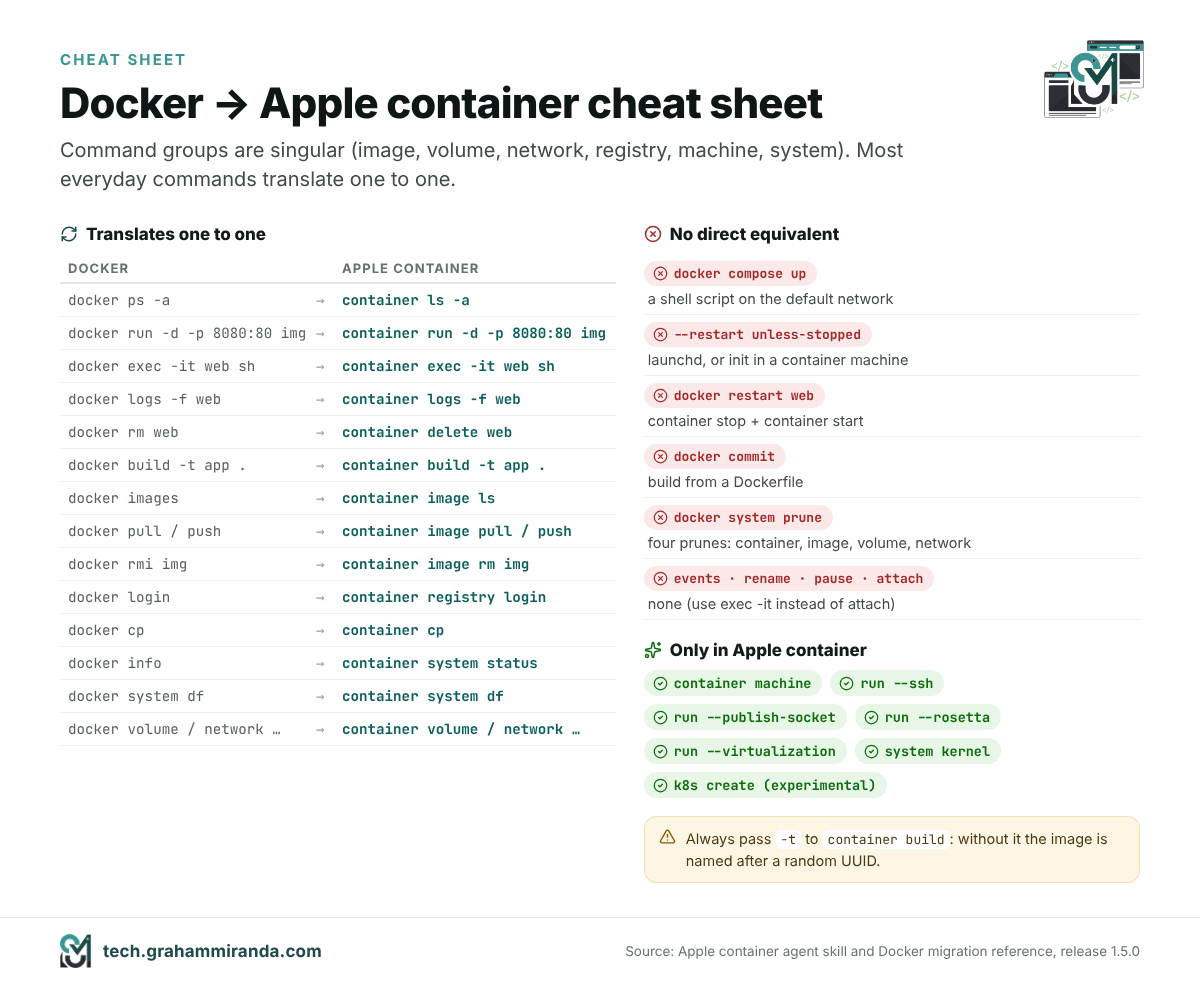
commit are the three you’ll miss.Replacing a Compose file with a script
There’s no container compose, and Apple hasn’t given a timeline: Cloud Native Now counted more than 150 replies in the project’s Compose discussion by July. Until then, a small Compose file becomes a shell script. Take a typical two-service stack:
services:
  cache:
    image: redis:7
  api:
    image: my-api:latest
    ports: ["3000:3000"]
    environment:
      REDIS_URL: redis://cache:6379
    depends_on: [cache]
With the test DNS domain from Step 7 set up, the equivalent is:
#!/usr/bin/env bash
set -euo pipefail

# Both containers stay on the default network, where name resolution works
container run -d --name cache redis:7

# depends_on becomes an explicit readiness check
until container exec cache redis-cli ping >/dev/null 2>&1; do sleep 1; done

# The name must include the domain: cache.test, not cache
container run -d --name api -p 3000:3000 \
  -e REDIS_URL=redis://cache.test:6379 \
  my-api:latest
Three translation rules cover most files: every service name becomes name.domain in your configuration (cache.test), depends_on becomes a readiness loop (which is more correct than Compose’s start-only ordering anyway), and build: becomes a container build -t … line before the run. Tear down with container stop api cache && container delete api cache.
For anything bigger than three or four services, that script gets tedious quickly, and that’s the honest reason most teams with Compose-heavy stacks should keep Docker Desktop or OrbStack for now.
Let your coding agent do the translation
If you use an AI coding agent, Apple’s repository already contains the instructions it needs. The skill in skills/container/ in the 1.5.0 release, with its reference file on Docker migration, maps the commands, lists what doesn’t exist and explains the DNS rules above. Copy that folder into your agent’s skills directory and ask the agent to convert your Compose file; then read what it wrote before you run it.
Part 6 — Apple Container vs Docker Desktop, OrbStack, Podman and Lima
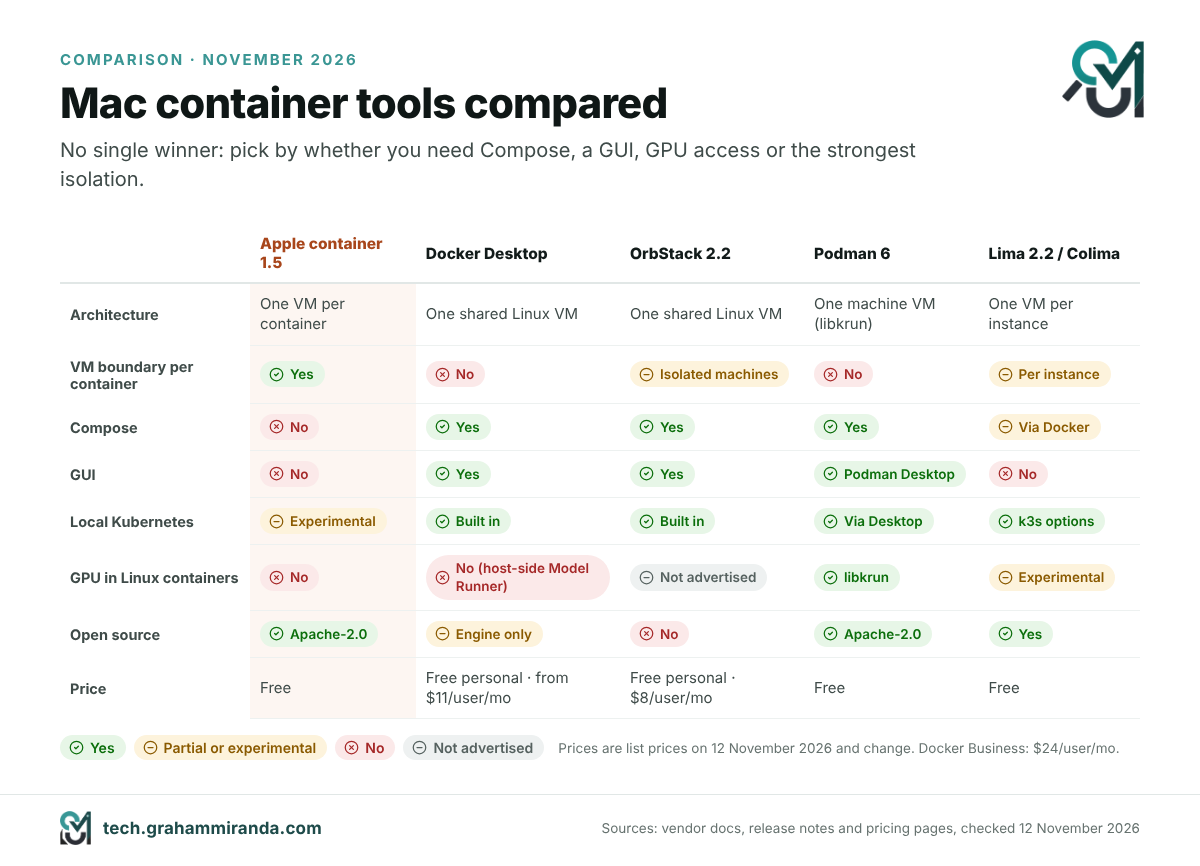
Apple container isn’t trying to be Docker Desktop, and Apple hasn’t presented it as a replacement. It competes for a different job: running Linux workloads on a Mac with the strongest isolation and the least extra software. If you’re comparing Docker Desktop alternatives for your Mac, here’s how the field looked on 12 November 2026.
| Apple container 1.5 | Docker Desktop | OrbStack 2.2 | Podman 6 | Lima 2.2 / Colima | |
|---|---|---|---|---|---|
| Architecture | One lightweight VM per container | One shared Linux VM | One shared lightweight Linux VM | One Podman machine VM (libkrun by default on Macs) | One VM per Lima instance; Colima runs Docker or containerd inside one |
| Isolation between containers | Hypervisor | Kernel namespaces in the shared VM | Kernel namespaces; “isolated machines” since 2.1 | Kernel namespaces in the machine VM | Per instance |
| Compose | No | Yes | Yes (Docker-compatible) | Yes (podman compose, or Docker Compose against its API) |
Through Docker inside the VM (Colima) |
| GUI | No | Yes | Yes | Podman Desktop | No |
| Local Kubernetes | Experimental container k8s |
Built in | Built in (1.34) | Via Podman Desktop (kind, minikube) | k3s-based options |
| GPU for Linux containers | No | No Metal passthrough; Model Runner runs models on the host instead | Not advertised | Yes, via libkrun (Vulkan and llama.cpp API remoting) | Experimental krunkit driver |
| 2026 headline | Container machines, local Kubernetes, agent skill | Sandboxes for AI agents, Model Runner, free Hardened Images | Isolated machines, USB passthrough, sound | Big cleanup; libkrun default; Intel Macs dropped | AI-agent sandboxing; macOS and Windows guests |
| Price | Free, Apache-2.0 | Free for personal use; paid plans from $11 per user per month (Pro, monthly) | Free for personal use; Pro $8 per user per month | Free, Apache-2.0 | Free, open source |
| Best for | Single containers, Linux dev environments, maximum isolation | Teams, Compose stacks, enterprise controls | A fast, polished daily driver for individuals | Linux parity, rootless containers, GPU inference | Scriptable VMs, CI runners, agent sandboxes |
Prices are list prices on 12 November 2026 and change; Docker’s Business plan costs $24 per user per month. Docker’s licensing has long required a paid plan for commercial use above a company-size threshold (250 employees or $10 million in annual revenue since 2021); check the current terms before you rely on that.
Docker Desktop: the incumbent turned AI-agent platform
Docker spent 2026 repositioning itself around AI agents, and three of its moves matter here. In December 2025 it made Docker Hardened Images free and open source under Apache 2.0: more than a thousand minimal images with signed bills of materials, which you can use with any tool, Apple’s included. On 30 January 2026 it launched Docker Sandboxes, which give each AI coding agent its own microVM (more in Part 8). And in February it added a vLLM backend for Apple silicon to Docker Model Runner, which runs language models directly on the Mac’s GPU rather than in a container, for the reason Part 7 explains.
What Docker Desktop still has that nobody else matches is the whole ecosystem: Compose, a mature GUI, Kubernetes, extensions, enterprise management and the muscle memory of every developer you’ll ever hire. If your team’s local environment is a Compose file with eight services, that’s where you should stay for now.
OrbStack: the fast one
OrbStack built its reputation on speed and low memory use, and its 2026 releases added features rather than reinventing it: version 2.1 (April) brought a macOS 26-style interface and isolated machines, Linux machines that see only the folders you share with them and can be blocked from reaching your Mac; 2.2 (June) added USB passthrough and sound, so webcams, microcontrollers and audio devices work inside Linux; and the October releases fixed problems on macOS 27 and moved to Linux 7.2. It’s free for personal use and costs $8 per user per month for commercial use. For an individual developer who wants Docker compatibility and Compose without Docker Desktop, it’s still the default recommendation.
Podman 6: the big cleanup
Podman 6.0, released at the end of June, is the most disruptive release on this list, and deliberately so. It drops support for cgroups v1, replaces CNI networking with Netavark, swaps slirp4netns for pasta for rootless networking, requires nftables instead of iptables and migrates its old BoltDB database to SQLite. Network isolation is now on by default. On the Mac, the default machine provider is now libkrun, and Intel Macs are no longer supported; on Windows, Windows 10 is dropped. On Linux, --gpus now supports AMD GPUs as well as NVIDIA.
Upgrade with care: existing Linux Podman machines need to be recreated, and anything that relied on the old networking stack needs testing. The payoff is a much simpler, more Linux-native tool, and on the Mac it’s the one with a real story for GPU-accelerated containers.
Lima and Colima: the toolkit underneath
Lima is the open-source VM manager many other tools build on, and it became a CNCF incubating project in November 2025. Its 2.x series has leaned hard into AI: Lima 2.0 added an experimental GPU-capable krunkit driver and MCP tools so AI agents can use a Lima VM as their sandbox; 2.1 (March) added experimental macOS guests and a limactl shell --sync mode designed to stop AI agents from damaging files on your Mac; 2.2 (July) added experimental Windows guests. Colima, which wraps Lima to give you a Docker or containerd runtime with one command, remains the lightest free route to a Docker-compatible setup on a Mac.
Which one should you use?
- You live in Compose files, or your company standardises on Docker: Docker Desktop.
- You want the fastest, lightest Docker-compatible setup for yourself: OrbStack (or Colima, if it must be free and open source).
- You want GPU-accelerated Linux containers, rootless containers or parity with Fedora and RHEL servers: Podman 6.
- You want the strongest isolation, no extra daemon, and Linux dev environments that feel like part of macOS: Apple container, with container machines.
- You run AI coding agents unattended: a sandbox built for it (Part 8), whichever runtime you use underneath.
Nothing stops you combining them. Apple container doesn’t touch Docker’s socket or Docker’s VM, so you can keep Docker Desktop or OrbStack for your Compose stack and use container machines for everything else.
Part 7 — Containers and Local AI on a Mac: Where Does the GPU Go?
If you run language models locally, this is the part that matters most, and it’s the one most container guides skip: Linux containers on a Mac can’t use the GPU the way native apps can. Docker says it plainly in its Model Runner documentation: there’s no Metal GPU passthrough into containers. Apple’s Virtualization framework doesn’t hand Metal to Linux guests, and Apple container doesn’t add it. A model running inside an Apple container runs on the CPU, which for a 7-billion-parameter model is the difference between fluent and painful.
There are four sensible ways to deal with that:
- Run the model natively and containerise everything else. Ollama, LM Studio, MLX and llama.cpp all use Metal directly on macOS. Run them there, put your application, database and tools in containers, and let the containers call the model over HTTP. With Apple container, that’s Step 9 in Part 4: create a
host.container.internaldomain and point your app athttp://host.container.internal:11434for Ollama. - Let Docker do the same thing for you. Docker Model Runner runs models on the host, outside any container, using llama.cpp, MLX or, since February, a vLLM backend for Apple silicon (Docker Desktop 4.62 or later). It exposes OpenAI-compatible and Anthropic-compatible APIs, and you manage models with
docker model pulllike images. - Use Podman with libkrun if the model must live in a container. libkrun gives its Linux guest a virtual GPU. Red Hat’s engineers first reached about 75–80% of native llama.cpp speed through Vulkan, then built “API remoting”, which forwards llama.cpp’s GPU calls from the container to Metal on the host. In their tests on an M4 Pro MacBook Pro, prompt processing ran at native speed and token generation reached at least about 95% of native. It’s the only mainstream route to GPU inference inside a container on a Mac, and RamaLama packages it up. Red Hat notes it isn’t designed for multi-tenant use.
- Experiment with Lima’s krunkit driver, which is built on the same libkrun technology and offers GPU acceleration as an experimental option.
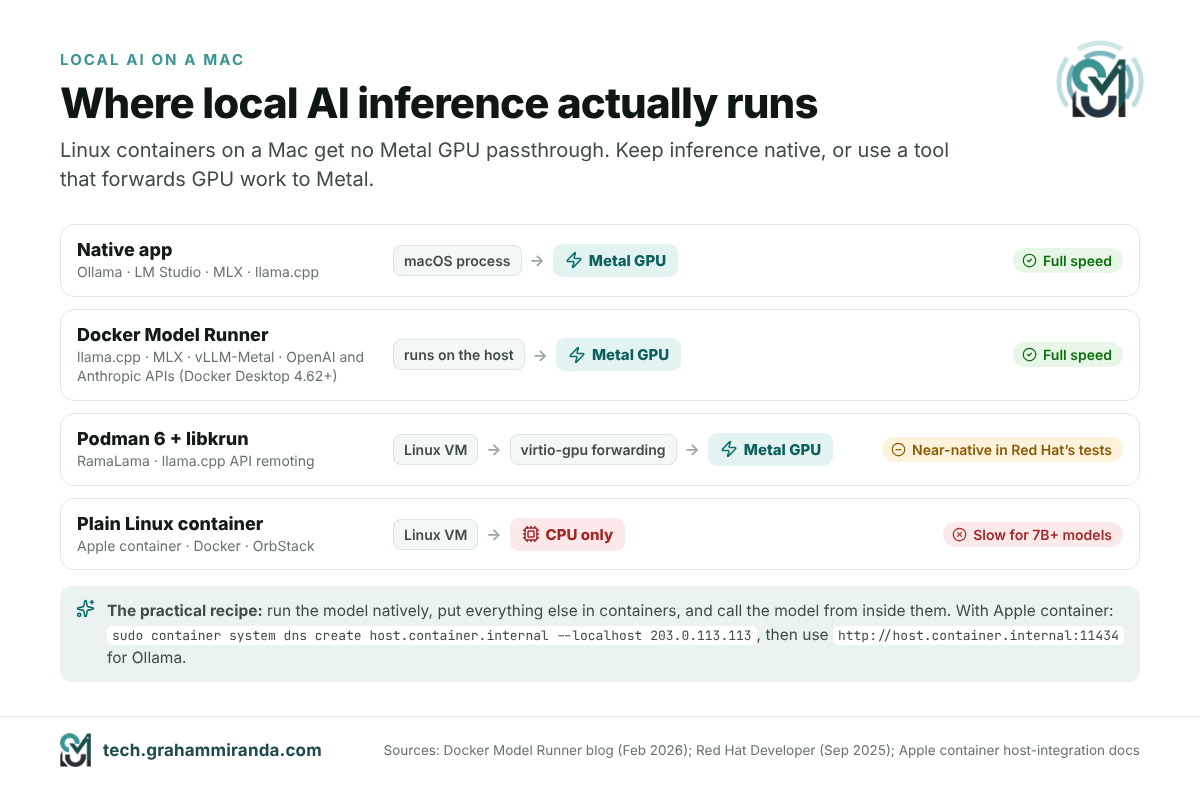
The practical recipe for most people: run Ollama or LM Studio natively, put everything around it in containers, and treat containers as the place for your code and services, not your weights. If you’re choosing hardware for this, my guide to MacBooks for local LLMs covers how much memory each model size needs, and the M5 Pro 64 GB local AI guide goes deeper on one configuration.
Part 8 — The Sandbox Era: Why Every Container Tool Became an AI-Agent Tool
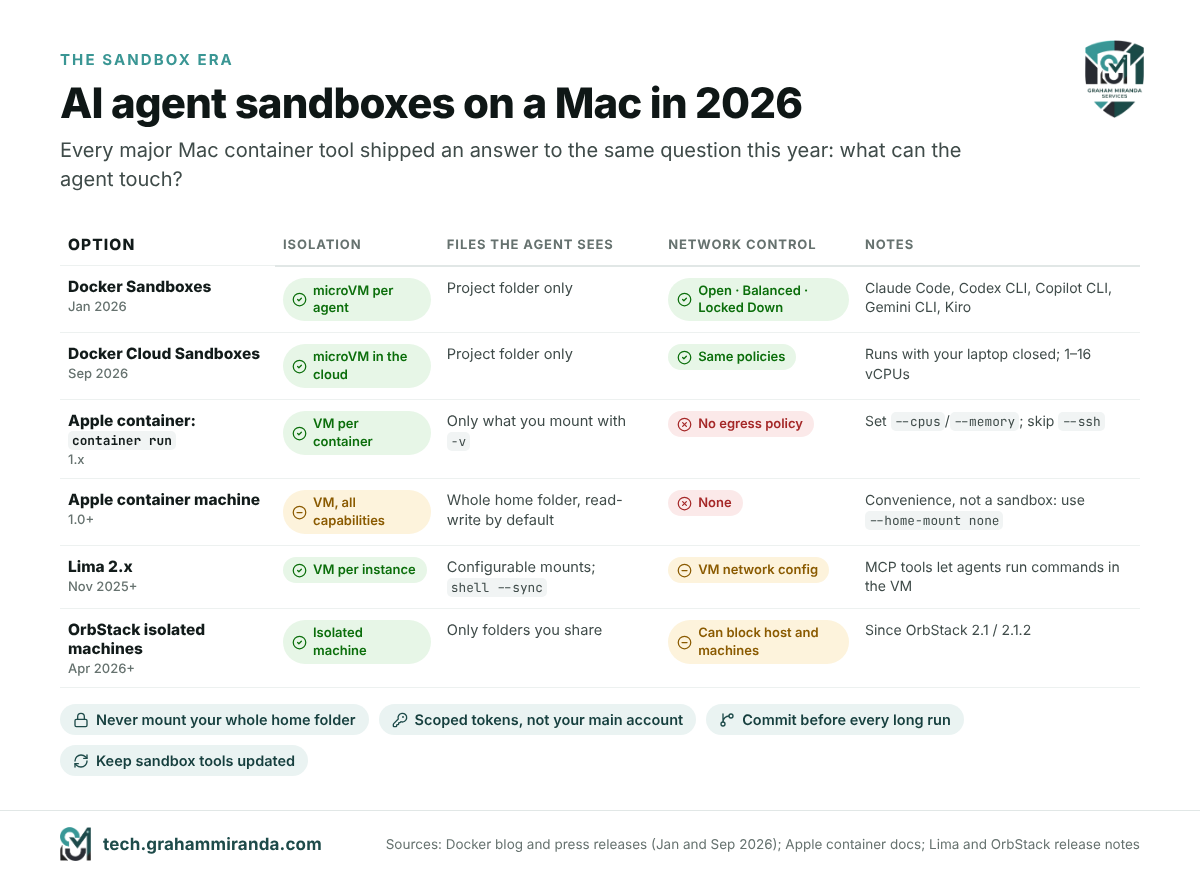
Look at the 2026 release notes of every tool in Part 6 and the same theme keeps coming up: isolating AI agents. That’s not a coincidence. Coding agents now run for hours, install packages, execute code they wrote themselves and read files they weren’t pointed at. The question stopped being “can the agent write good code?” and became “what can it touch while it does?” In 2026, the answer every vendor converged on was an AI agent sandbox: a disposable environment with its own kernel, only the files the task needs and, ideally, limits on where it can send data.
Five ways to give an agent its own box
- Docker Sandboxes (30 January 2026) give each agent a disposable microVM with only your project folder mounted and its own Docker engine inside, with no access to your host’s Docker daemon. At launch they supported Claude Code, Codex CLI, Copilot CLI, Gemini CLI and Kiro on macOS and Windows. The
sbxcommand-line tool lets you choose a network policy (Open, Balanced or Locked Down), allow specific destinations and manage secrets withsbx secret. Release 0.53.0 shipped on 11 November. - Docker Cloud Sandboxes (24 September 2026) run the same sandboxes in Docker’s cloud with the same isolation and policies, so an agent can keep working overnight with your laptop closed. They scale from 1 to 16 vCPUs and, according to Docker, boot in the low hundreds of milliseconds.
- Apple container gives every container a VM boundary by design. A plain
container runwith only your project mounted is a reasonable agent box; a container machine, as Part 3 explained, is not, unless you turn off its home mount. - Lima 2.x ships MCP tools that let an agent run commands inside a Lima VM, and a
--syncshell mode built to keep agents from damaging files on the host. - OrbStack 2.1 added isolated machines, which see only the folders you choose to share and, since 2.1.2, can be blocked from reaching your Mac and your other machines.
A minimal agent box with Apple container
If you want to try it with the tool from this article, this gives an agent a VM of its own, your project folder and nothing else from your Mac:
cd ~/code/my-project
container run -it --rm --name agent-box \
  --cpus 4 --memory 8g \
  -v "$PWD":/work -w /work \
  node:22 bash
# inside: install your agent CLI, sign in, and run it in /work
What this does and doesn’t protect, honestly:
- It protects the rest of your Mac’s files, your SSH keys (as long as you don’t add
--ssh), your Keychain and your other containers. - It doesn’t protect the project folder itself, which the agent can still change or delete, so commit before you start. It doesn’t restrict outbound network traffic either: Apple container has no egress policy, so an agent that’s been tricked by a malicious web page or README can still send data out. Docker Sandboxes’ network policies are the better choice if that worries you.
- Credentials you paste in are inside the box. Use a scoped token for the agent, not your main account.
The security reality check
Sandboxes reduce the blast radius; they don’t make a compromised agent harmless. Apple’s own 1.3.1 release fixed six advisories in the code that unpacks images, and the 2026 crop of exposed AI tools turned into crypto miners is a good reminder of what happens when isolation is an afterthought: in April, Censys documented more than a thousand ComfyUI servers left open on the internet being targeted, as I covered in Is Crypto Mining Worth It in 2026?. Keep sandbox tools updated, give agents scoped credentials, review what they commit, and never expose an agent’s control interface to the internet. If you’re picking an agent in the first place, my comparison of AI coding harnesses covers which ones offer built-in sandboxing.
Part 9 — The Platform Layer: macOS 27, Xcode 27, Swift, Linux 7.0, Ubuntu 26.04 and Homebrew
Apple container was the most interesting release of the year for Mac developers, but it wasn’t the only one that changed how you work. The rest of this guide is the release radar: the 2026 releases that matter most to people who build software, grouped by layer, with what changed and what to do about each.
macOS 27 Golden Gate: Apple silicon only
Apple announced macOS 27 Golden Gate at WWDC26 on 8 June and released it on 14 September 2026. For developers, the headline isn’t Siri, which now runs on Google’s Gemini, or the faster app launches Apple advertises; it’s the list of what’s gone:
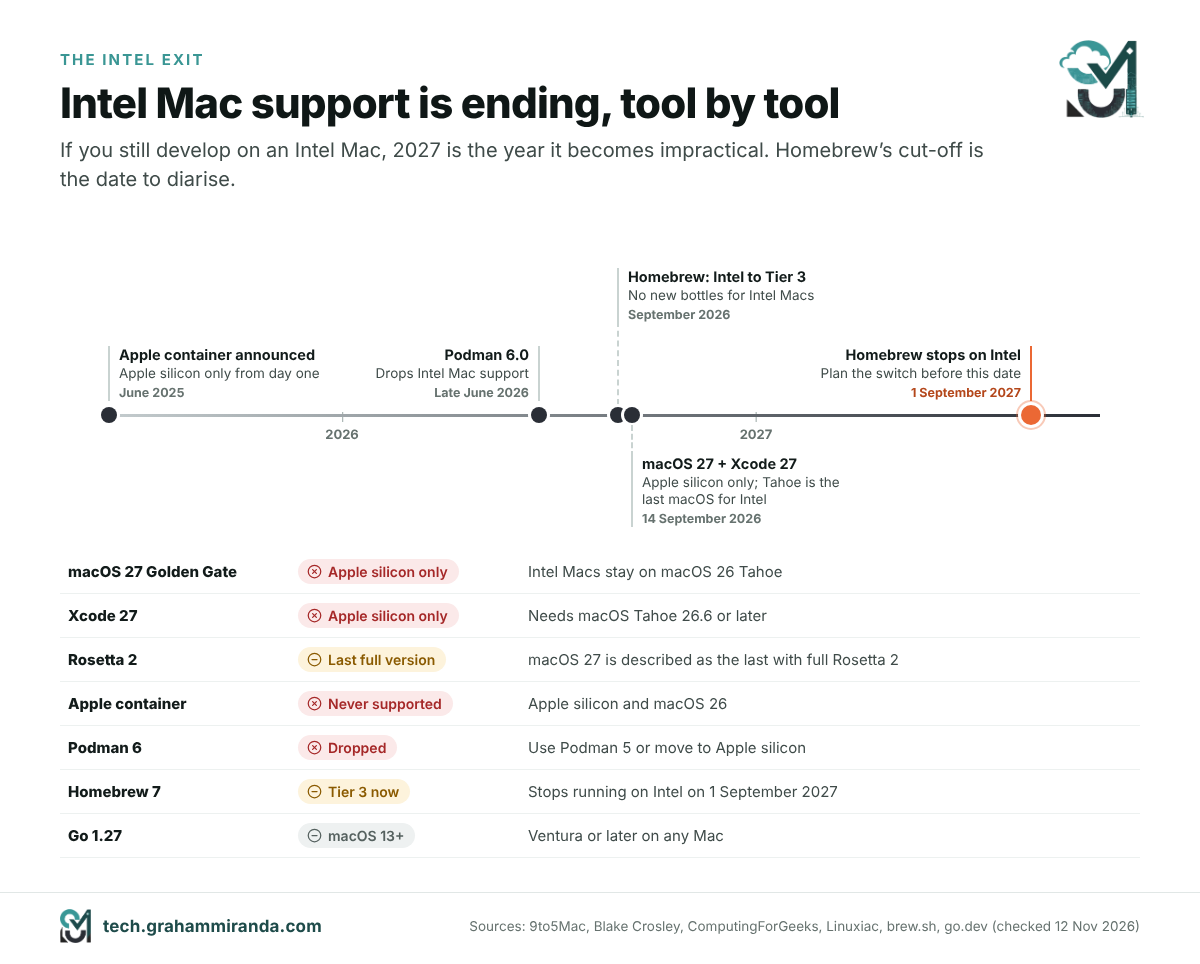
- Intel Macs are out. Golden Gate runs only on Apple silicon. macOS 26 Tahoe is the last release for Intel Macs, which stay on it for the rest of its security-update window.
- Rosetta 2 is on notice. On upgrade, Rosetta is removed and reinstalled on demand the first time an x86-only app launches. Golden Gate is widely described as the last macOS with full Rosetta 2 support, so x86-only tools in your workflow need a replacement plan.
- Old scripting runtimes keep disappearing. A clean install has no Python 2 and no PHP;
python3is the 3.9.6 that comes with the Command Line Tools and doesn’t change. Use Homebrew,uvorpyenvfor real Python work, and Homebrew for PHP. - There’s no downgrade. If something breaks, the clean way back is a Time Machine restore. Back up first, and wait if you depend on a VPN client, driver or kernel extension that isn’t certified for 27 yet.
One specific warning if you write Python: the python.org release notes for 3.15 warn that IDLE and other tkinter apps can hang when opening dialogs on macOS 27.0, and suggest waiting for a fix before upgrading if you rely on them.
Xcode 27 and Swift 6.4: agents with a plan
Xcode 27 shipped on 14 September with Swift 6.4. It needs macOS Tahoe 26.6 or later on Apple silicon, so it’s also the end of the road for Xcode on Intel. The changes that matter:
- Agentic coding grew up. Agents can now plan before they act: the plan is an editable Markdown document you approve before the agent changes anything. Google’s Gemini joined the list of supported models, and integrations with outside providers are opt-in, because they send your code to someone else’s servers.
- Device Hub replaces the Simulator app, bringing simulators and real devices into one window.
xcrun simctlstill works, so scripted simulator automation survives. - Some projects won’t build unchanged. The classic
ld64linker is gone (the-ld64flag now fails the link), a couple of Swift source breaks affect@Stateinitialisers andinitaccessors, and for macOS 27 targetsARCHS_STANDARDno longer includes x86_64, silently.
Swift 6.3, released on 24 March, deserves a mention of its own: it made the Swift SDK for Android official, so you can build native Android code in Swift and call it from Kotlin or Java, added an @c attribute that exposes Swift functions to C, and previewed the new Swift Build system inside Swift Package Manager. Combined with container machines, it’s now realistic to write server-side Swift on a Mac, build and test it on real Linux next door, and share code with an Android app.
Linux 7.0: a round number with real changes
Linus Torvalds released Linux 7.0 on 12 April 2026. The version jump from 6.19 was a numbering reset rather than a sign of upheaval, but the release carried real milestones: Rust support lost its “experimental” label, XFS gained autonomous self-healing, kernel modules can be signed with the post-quantum ML-DSA algorithm while SHA-1 module signing was removed, and zram can now write compressed pages back to storage without decompressing them first. By October, OrbStack was already shipping a 7.2 kernel inside its VM.
Ubuntu 26.04 LTS “Resolute Raccoon”
Canonical released Ubuntu 26.04 LTS on 23 April 2026, built on Linux 7.0. It’s the release that put Rust at the heart of a mainstream distribution: sudo-rs and the uutils Rust coreutils replace the classic sudo and core command-line tools. TPM-backed full-disk encryption is now generally available in the installer, Livepatch covers Arm64 servers for the first time, and NVIDIA’s CUDA is in Ubuntu’s own repositories for the first time, alongside AMD’s ROCm. For containers, that means ubuntu:26.04 is the base image new projects should start from; for Windows users, Ubuntu on WSL gained cloud-init and Ubuntu Pro integration. If you’re building a new server this winter, most of my Debian 12 server hardening checklist applies to 26.04 as well.
Homebrew 6.0 and 7.0: two majors in one summer
Homebrew shipped two major versions three months apart, and between them they changed its defaults more than any release in years:
- Homebrew 6.0 (11 June) made you explicitly trust third-party taps before their code runs (official taps stay trusted), made “ask” mode the default for developers so
brew installandbrew upgradeshow what will change before they change it, brought a Bubblewrap sandbox to Linux and addedbrew exec, which runs a package without installing it permanently, much likenpx. - Homebrew 7.0 (13 September) built in
brew vulns, which checks your installed packages against the OSV.dev vulnerability database, released BrewUI, Homebrew’s official graphical app (brew install homebrew-app, macOS Tahoe 26 or later), switched the Linux sandbox to Landlock and sped up installs with more parallel work. - The Intel timeline is now fixed. Golden Gate, Tahoe and Sequoia are Tier 1 on Apple silicon. Intel Macs moved to Tier 3, with no new bottles, and Homebrew stops running on Intel on 1 September 2027; it suggests MacPorts for anyone who has to stay. macOS 10.15 and older are no longer supported at all, and Sonoma 14 dropped to Tier 3.
Two commands worth running today: brew vulns --severity=high to see what’s exposed, and brew tap to review which third-party taps you’ve been trusting all along.
Part 10 — The Languages and Runtimes: Python 3.15, TypeScript 7, Node.js 26, Go 1.27, .NET 11, Bun and Vite
Python 3.15: faster to start, faster to run
Python 3.15.0 arrived on 9 October 2026 (the current release is 3.15.2). The headline features:
- Explicit lazy imports (PEP 810). You can mark an import as lazy, so the module loads only when it’s first used. For command-line tools and serverless functions that import heavy libraries they rarely touch, start-up time drops noticeably.
- UTF-8 is the default encoding (PEP 686).
open()without anencodingargument now means UTF-8 everywhere. Mostly a fix for Windows, but check any code that relied on the old locale-dependent default. - New built-ins:
frozendict(PEP 814), an immutable dictionary, andsentinel(PEP 661), a proper way to create unique marker values. - Unpacking in comprehensions (PEP 798), a new statistical profiler called Tachyon (PEP 799) with a new
profilingpackage, frame pointers on by default for better profiling, and several typing improvements. - A faster experimental JIT: about 7–8% faster than the standard interpreter on x86-64 Linux and 11–12% faster than the tail-calling interpreter on Apple silicon Macs, by the core team’s geometric-mean measurements.
- Free-threading moves closer to normal. The official macOS installer now installs free-threading support by default, and new stable-ABI work makes it easier for C extensions to support the build without the global interpreter lock.
Container images are python:3.15. Test on a branch first: lazy imports and the encoding change are the two most likely to surprise existing code.
TypeScript 7.0: the compiler, rewritten in Go
Microsoft released TypeScript 7.0 on 8 July 2026, after a release candidate in June. It’s the native port of the compiler and language service to Go, known during development as Project Corsa, and Microsoft says it typically makes full builds 8 to 12 times faster, helped by real multithreading. Because the team ported the existing code’s structure and logic rather than redesigning it, the two compilers produce consistent results.
You install it the usual way (npm install -D typescript), and the package now ships the native tsc. For tools that still need the old JavaScript API, Microsoft publishes @typescript/typescript6, which provides a tsc6 command and the 6.0 API side by side with 7.0. Microsoft now plans feature releases every three to four months. If your editor feels faster this autumn, this is why.
Node.js 26 LTS: Temporal arrives, and the release train slows down
Node.js 26 came out in May and became LTS on 28 October 2026 as version 26.13.0, codename “Lithium”, supported until the end of April 2029. It enables the Temporal API by default, the long-awaited replacement for JavaScript’s notoriously awkward Date object, and ships the V8 14.6 engine and Undici 8, the HTTP client behind fetch().
Node 26 is also the end of an era. It’s the last major release under the old twice-a-year schedule. From Node.js 27, there will be one major release a year, every release will become LTS, and each line will get 30 months of LTS out of 36 months of total support. Node 27’s alpha phase began in October 2026, its first release is due in April 2027 and it will be supported until April 2030.
Go 1.27: generic methods at last
Go 1.27 shipped on 19 August 2026. Methods can now have their own type parameters, one of the most requested features since generics arrived in Go 1.18 (interface methods still can’t). encoding/json now runs on the faster v2 implementation underneath, with new encoding/json/v2 and jsontext packages; unmarshalling is significantly faster, though some error messages read differently. There’s experimental, portable SIMD support behind GOEXPERIMENT=simd, and the crypto packages gained post-quantum ML-DSA signatures and ML-KEM-1024 key exchange in TLS 1.3. One platform note: Go 1.27 needs macOS 13 Ventura or later.
.NET 11: union types, and two versions out of support
Microsoft launched .NET 11 at .NET Conf 2026 (10–12 November). It’s a standard-term release with 24 months of support. The developer-facing star is C# 15’s union types, which let a value be exactly one of several declared types, with the compiler checking that switch expressions handle every case. .NET MAUI now runs on the CoreCLR runtime by default, using precompiled code plus an interpreter on Apple platforms, where JIT compilation isn’t allowed, and the dotnet command itself starts faster thanks to a Native AOT host.
The urgent part isn’t .NET 11 itself: .NET 8 and .NET 9 both reached end of support on 10 November 2026. Anything still running on them needs a move to .NET 10 (long-term support) or .NET 11.
Bun 1.4: rewritten in Rust, mostly by AI
The year’s most argued-about release is Bun 1.4, published in August. Bun, the JavaScript runtime that Anthropic acquired in December 2025, was ported from Zig to Rust. According to InfoQ’s account, the original code base was about 535,000 lines of Zig; the port took about four months instead of the year a small human team would have needed; and the work was done mostly by a pre-release version of Anthropic’s Claude Fable 5, orchestrated as roughly 50 workflows with an implementer agent, two adversarial reviewer agents and a fixer agent, running up to 64 instances in parallel. Getting the test suite to pass cost about $165,000 in API usage.
The results cut both ways. The mechanical port introduced 19 subtle regressions. It also resolved 128 long-standing bugs, and in a test of 2,000 consecutive builds, memory use levelled off at 609 MB instead of climbing past 6.7 GB as before. Zig’s creator, Andrew Kelley, criticised the project for shipping code no human had fully reviewed. Whatever you think of it, Bun 1.4 is now the reference case for AI rewriting infrastructure at scale, and the argument about what “reviewed” means for AI-written code is far from settled.
Vite 8: one bundler instead of two
Vite 8, released on 12 March 2026, replaced the pair of bundlers Vite had always used, esbuild in development and Rollup for production, with a single Rust-based bundler, Rolldown, plus the Oxc compiler toolchain. In benchmarks, Rolldown is 10 to 30 times faster than Rollup, and early adopters reported big real-world wins: Linear’s production build went from 46 seconds to 6. Vite now needs Node.js 20.19+ or 22.12+, ships as ESM only and is about 15 MB larger to install; a compatibility layer translates most existing configurations automatically.
Part 11 — Infrastructure and Editors: Kubernetes, PostgreSQL 19 and Zed 1.0
Kubernetes 1.36 and 1.37
Kubernetes kept its three-releases-a-year rhythm. Version 1.36 “Haru” (22 April 2026) shipped 70 enhancements, 18 of them graduating to stable, the most important being user namespaces, which map a container’s root user to an unprivileged user on the host. Fine-grained authorisation for the kubelet API and pressure-stall (PSI) metrics also went stable, and Service ExternalIPs were deprecated. Version 1.37 “Garhwal” (26 August 2026) followed with 67 enhancements: 16 stable, 23 beta and 27 alpha.
For Mac users, one practical detail: Apple container’s Kubernetes plugin uses the kindest/node:v1.35.5 image by default, so it’s a release or two behind. Pass --node-image with a newer kind node image when you need to test against current Kubernetes.
PostgreSQL 19: the release that waited
PostgreSQL ships a major version every autumn like clockwork. Not this year. During the 19 beta cycle, the project reverted 53 commits, including headline features such as SQL property graph queries (SQL/PGQ), MERGE/SPLIT PARTITION, temporal UPDATE/DELETE … FOR PORTION OF and GROUP BY ALL, which returned wrong results in some cases. Most are expected back in version 20. A September analysis on Snowflake’s engineering blog pointed to an interesting cause: AI-assisted bug detection was surfacing late-stage problems that would previously have shipped. The first release candidate came on 15 October, and general availability is planned for 19 November 2026, unless another candidate is needed.
It’s the opposite of the “ship it and patch it” instinct, and for a database that’s the right call. Stay on PostgreSQL 18 in production until 19 has had at least its first minor release.
Zed 1.0: a new editor reaches stable
Zed, the Rust-built, GPU-accelerated editor from the team behind Atom, reached 1.0 at the end of April 2026, after about five years of development. It runs on macOS (12 or later), Windows and Linux, and its AI features include support for outside coding agents through the open Agent Client Protocol. It moves fast: the current release on 12 November is 1.28.1.
Part 12 — Six Patterns Behind the 2026 Release Wave
Taken one by one, these are just release notes. Taken together, they say where developer tooling is heading.
1. The virtual machine is the new container
Apple container gives every container its own VM. Docker Sandboxes and Cloud Sandboxes give every agent a microVM. Lima, OrbStack and Podman all spent the year adding VM-level isolation features. The cause is the same everywhere: AI agents run code nobody has read, and the kernel-namespace boundary that was fine for your own trusted services isn’t a comfortable place to stop an untrusted one. Apple silicon made lightweight VMs cheap enough to do it by default.
2. Intel is leaving the Mac toolchain
macOS 27, Xcode 27 and Apple container run only on Apple silicon. Podman 6 dropped Intel Macs. Homebrew moved Intel to Tier 3 and set a date, 1 September 2027, after which it stops running there at all. Golden Gate is the last macOS with full Rosetta 2. If you or your company still develop on Intel Macs, 2027 is the year that becomes impractical.
3. Rewrite it in a faster language
TypeScript’s compiler moved from JavaScript to Go and got 8–12 times faster. Vite swapped two bundlers for one written in Rust. Bun moved from Zig to Rust. Ubuntu replaced sudo and the core utilities with Rust versions, Rust lost its experimental label in the Linux kernel, and Zed proved a native editor can compete with Electron-based ones. Speed is half the motive; memory safety is the other.
4. AI is now both the builder and the bug-finder
An AI did most of the typing in Bun’s rewrite. AI-assisted bug detection helped delay PostgreSQL 19. Apple ships a skill so coding agents can drive its container tool, Xcode 27 has agents that plan before they write, and Docker reorganised its product line around sandboxing them. The tools increasingly assume that an agent, not a person, is on the other end of the command line, and that’s changing what “good documentation” and “good defaults” mean. (For the workflow side of that shift, see my vibe coding guide.)
5. Secure by default, finally
Homebrew now makes you trust third-party taps and scans for known vulnerabilities. Docker gave its hardened images away. Podman turned network isolation on by default. Apple container now defaults to HTTPS for registries and fixed six advisories in a single release. Linux 7.0 and Go 1.27 adopted post-quantum signatures, and Ubuntu swapped in memory-safe tools. None of this is glamorous, and all of it reduces the number of ways a bad dependency or a confused agent can hurt you.
6. Slower trains, longer support
Node.js is moving to one major release a year with LTS for every release. .NET’s standard-term releases now get 24 months of support. PostgreSQL chose quality over its usual release window. After years of ever-faster release cycles, the platforms people build businesses on are deliberately slowing down, while the tools on top, from TypeScript to Zed to Apple container, keep shipping every few weeks.
Part 13 — Your Upgrade Plan for November 2026
Here’s what I’d do, by the kind of developer you are.
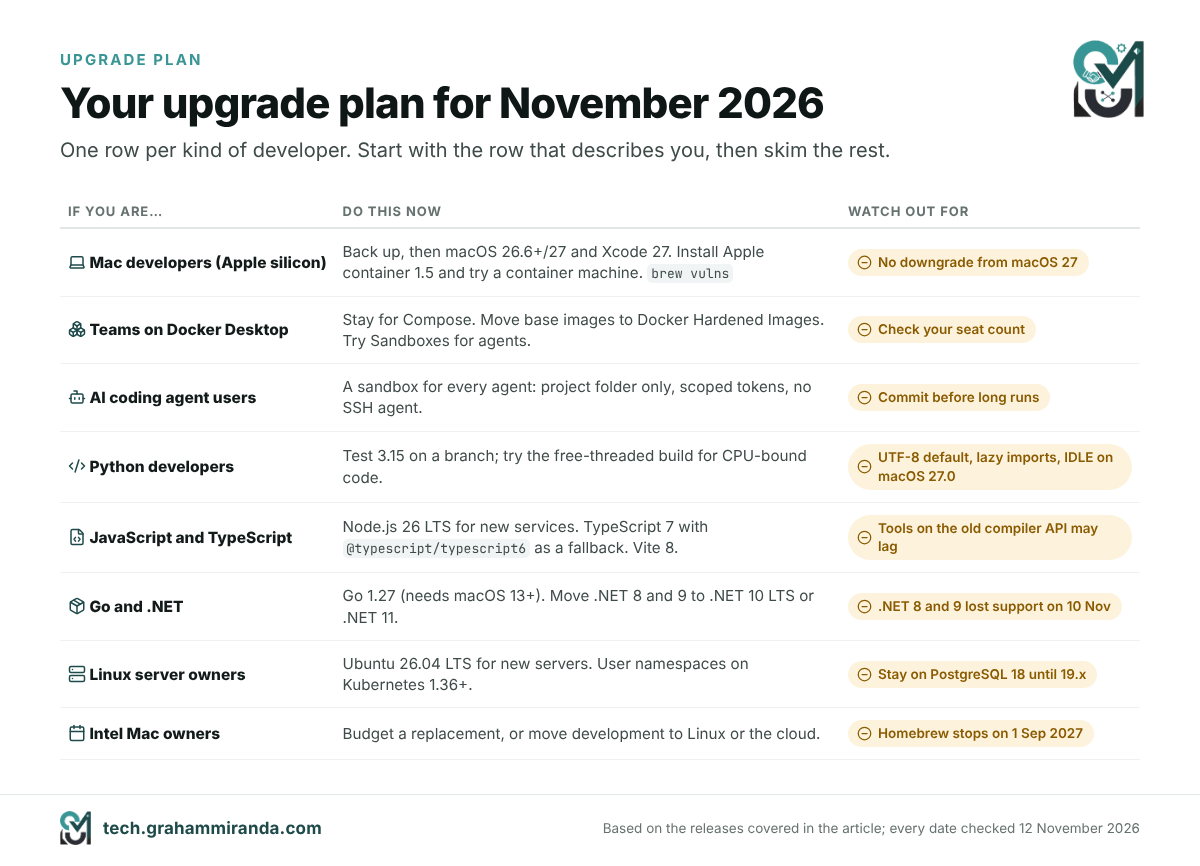
Mac developers on Apple silicon. Make a Time Machine backup, then move to macOS 26.6 or 27 and Xcode 27 when your critical tools support them. Install Apple container 1.5 and create a container machine for your Linux builds. Run brew update && brew upgrade, then brew vulns and brew tap.
Teams on Docker Desktop. Stay where you are for Compose-based development. Move base images to Docker Hardened Images where it makes sense, try Docker Sandboxes for agent work, and check that your seat count still matches Docker’s licence terms.
Anyone running AI coding agents. Give every agent a sandbox: Docker Sandboxes, a plain Apple container with only the project mounted, or a Lima VM. Never give an agent your whole home folder, your SSH agent or an unscoped token. Commit before every long run.
Python developers. Test 3.15 on a branch. Watch the UTF-8 default and any code that might break under lazy imports, try the free-threaded build if you have CPU-bound code, and keep IDLE away from macOS 27.0 until the tkinter fix ships.
JavaScript and TypeScript developers. Move new production services to Node 26 LTS. Try TypeScript 7 with @typescript/typescript6 as your safety net for tools that need the old API, and upgrade to Vite 8 if your builds are slow.
Go and .NET developers. Upgrade to Go 1.27, keeping in mind that it needs macOS 13 or later. Move anything still on .NET 8 or 9 to .NET 10 LTS or .NET 11 now: they’re already out of support.
Linux server owners. Use Ubuntu 26.04 LTS for new servers, turn on user namespaces where your Kubernetes version supports them, and stay on PostgreSQL 18 until 19 has had a point release.
Intel Mac owners. Tahoe is your last macOS, and Homebrew stops running on Intel on 1 September 2027. Plan a replacement in 2027’s budget, or move your development work to a Linux machine or cloud environment. If you’re weighing the new MacBook Pro displays for that replacement, I explained why I chose mini-LED over OLED, and I compared the M1 MacBook Pro with the 16-inch M5 Pro in full.
Frequently Asked Questions
Apple container is Apple’s open-source command-line tool for creating, running, building and publishing Linux containers on a Mac. Version 1.0 was released on 9 June 2026. It runs each container in its own lightweight virtual machine using Apple’s Containerization Swift package, works with standard OCI images from any registry, and added container machines: persistent Linux environments that share your Mac username and home folder. The current release is 1.5.0.
Not yet for most teams. Apple container runs the same images and covers everyday commands such as run, build, exec, logs and push, but it has no Compose, no restart policies, no GUI and no GPU access for containers. Docker Desktop and OrbStack remain better for multi-service Compose stacks. Apple container is the better fit for single containers, Linux development environments and workloads where VM-level isolation matters.
Container machines, new in Apple container 1.0, are persistent Linux environments built from ordinary OCI images. Each runs in its own lightweight VM, boots the image’s init system and maps your Mac username, home folder and current directory into Linux, so you can edit on macOS and build inside Linux with no copy step. They’re created with container machine create and are the closest thing the Mac has to Windows’ WSL.
It doesn’t run on Intel Macs at all; it needs Apple silicon. Apple supports it on macOS 26 Tahoe, and it also runs on macOS 27 Golden Gate. It does run on macOS 15 Sequoia, but with real limitations: containers can’t talk to each other over the network, only one network is available, and Apple’s maintainers generally won’t fix problems they can’t reproduce on macOS 26.
Yes. Apple container and the Containerization package are open source under the Apache 2.0 licence, with no subscription, seat licence or account required. You download the signed installer package from the project’s GitHub releases page. Images still come from registries such as Docker Hub, whose own rate limits and terms apply when you pull from them.
No. There’s no container compose command, and Apple hasn’t given a timeline, although the project’s Compose discussion is one of its busiest. A small Compose file can be rewritten as a shell script that starts each container on the default network, uses name.domain hostnames such as db.test and replaces depends_on with a readiness loop. Larger Compose stacks are better off staying on Docker Desktop or OrbStack.
Yes. Apple container consumes and produces standard OCI images, so images from Docker Hub, GitHub’s container registry or a private registry run unchanged, and images you build with container build from an ordinary Dockerfile run anywhere else. Use arm64 or multi-architecture images where possible; x86-only images need the --rosetta option.
Not in Apple container or a standard Docker container: Linux containers on a Mac get no Metal GPU passthrough, so models inside them run on the CPU. Run the model natively with Ollama, LM Studio or MLX and call it from your containers, or let Docker Model Runner run it on the host. Podman with libkrun is the exception, forwarding llama.cpp’s GPU work to Metal at near-native speed in Red Hat’s tests.
Its design gives stronger isolation between containers. Each Apple container runs in its own VM, so a process that escapes its container lands in a VM with nothing else in it, while in Docker Desktop all containers share one Linux VM and kernel. That doesn’t make it bug-free: release 1.3.1 fixed six security advisories in image handling. Keep it updated, and remember that container machines deliberately trade isolation for convenience.
Check that your Mac has Apple silicon and macOS 26 or later, download the signed .pkg installer from the Apple container GitHub releases page, run it with your administrator password, then run container system start and accept the recommended Linux kernel. Test it with container run --rm alpine echo hello. Update later with /usr/local/bin/update-container.sh, after stopping the services with container system stop.
Docker Sandboxes, launched on 30 January 2026, run AI coding agents such as Claude Code, Codex CLI, Copilot CLI and Gemini CLI inside disposable microVMs. Each sandbox mounts only your project folder, has its own Docker engine with no access to your host’s, and can enforce network policies through the sbx tool. Docker Cloud Sandboxes, launched on 24 September 2026, run the same sandboxes in Docker’s cloud.
macOS 27 Golden Gate, released on 14 September 2026, runs only on Apple silicon, which makes macOS 26 Tahoe the last release for Intel Macs. It’s described as the last macOS with full Rosetta 2, a clean install has no Python 2 or PHP, and Xcode 27, which ships Swift 6.4 with agent planning, requires macOS Tahoe 26.6 or later. There’s no in-place downgrade, so back up before upgrading.
Test it first, then upgrade. Python 3.15, released on 9 October 2026, adds explicit lazy imports, frozendict and sentinel built-ins, a faster experimental JIT and UTF-8 as the default encoding. The encoding change and lazy imports are the most likely to affect existing code, so run your test suite on a branch. On macOS 27.0, python.org warns that IDLE and other tkinter apps can hang when opening dialogs.
Mostly not for type-checking results, which Microsoft kept consistent by porting the existing compiler’s logic to Go, but tools that use the compiler’s JavaScript API may need time to catch up. TypeScript 7.0, released on 8 July 2026, typically makes full builds 8 to 12 times faster. Microsoft’s @typescript/typescript6 package provides a tsc6 command and the 6.0 API side by side for tools that need them.
Homebrew 7.0, released on 13 September 2026, moved Intel Macs to Tier 3, which means no new prebuilt bottles, and Homebrew stops running on Intel Macs after 1 September 2027. It suggests MacPorts for anyone who has to stay on Intel. On Apple silicon, macOS 15 Sequoia, 26 Tahoe and 27 Golden Gate are fully supported Tier 1 platforms.
The project chose quality over its usual autumn release date. During the beta cycle it reverted 53 commits, including SQL property graph queries, partition merge and split, FOR PORTION OF and GROUP BY ALL, most of which are expected in version 20, and AI-assisted bug detection surfaced late problems. The first release candidate arrived on 15 October 2026, and general availability is planned for 19 November 2026.
The Bottom Line
Apple container 1.0 is the clearest signal in years that Apple takes Linux development on the Mac seriously. One VM per container is a genuinely different design from Docker Desktop’s, and the right one for a world where AI agents run code nobody has read. Container machines turn a Mac into a comfortable Linux workstation without a separate VM manager. The pace since June, eight releases, a Kubernetes plugin, a security release and an agent skill, suggests Apple means to keep going.
It’s also young. No Compose, no restart policies, no GUI and no GPU mean that most teams with multi-service stacks should keep Docker Desktop or OrbStack for now, and treat Apple container as the tool for single containers, Linux environments and isolation-sensitive work. That’s not a criticism; it’s what 1.x looks like.
Around it, 2026 reshaped the rest of the stack: Intel’s exit from the Mac toolchain now has dates attached, the core tools got faster by being rewritten in Go and Rust, security defaults got stricter, and AI went from writing your code to rewriting your runtime and finding the bugs in your database. The developers who’ll feel this least are the ones who move deliberately: back up, test on a branch, sandbox the agents, and retire the Intel Macs before Homebrew does it for them.
Using Apple container, OrbStack or Podman on your Mac? I’d like to hear what you run, what broke, and what you measured. Corrections and counter-evidence are welcome: this article gets updated as these tools ship new releases.
Disclosure: This article contains no affiliate links and no sponsored content. My company, Graham Miranda UG (haftungsbeschränkt), provides hosting and IT services and earns nothing from any tool or company mentioned. No company mentioned here reviewed or approved this article.
Last updated: 12 November 2026.