 English
  Deutsch
  Español
  Italiano
  Français
The pitch goes like this. A top-tier AI subscription costs $200 a month, which is $2,400 a year. A MacBook Pro with 128 GB of unified memory can run large language models locally, privately and with no usage limits. So cancel the subscription, buy a MacBook for local LLMs instead, and in a year or two it has paid for itself.
You’ll find versions of it all over 2026: in YouTube videos asking whether you should cancel your $200 AI plan and buy a $9,499 Mac, in Medium posts that divide a Mac’s price by $200, and in a Forbes column that ran the numbers when Apple launched its new Mac Studio in August. At the M5 Max MacBook Pro launch, Apple’s hardware chief John Ternus said the new machines let professionals “run advanced LLMs on device”.
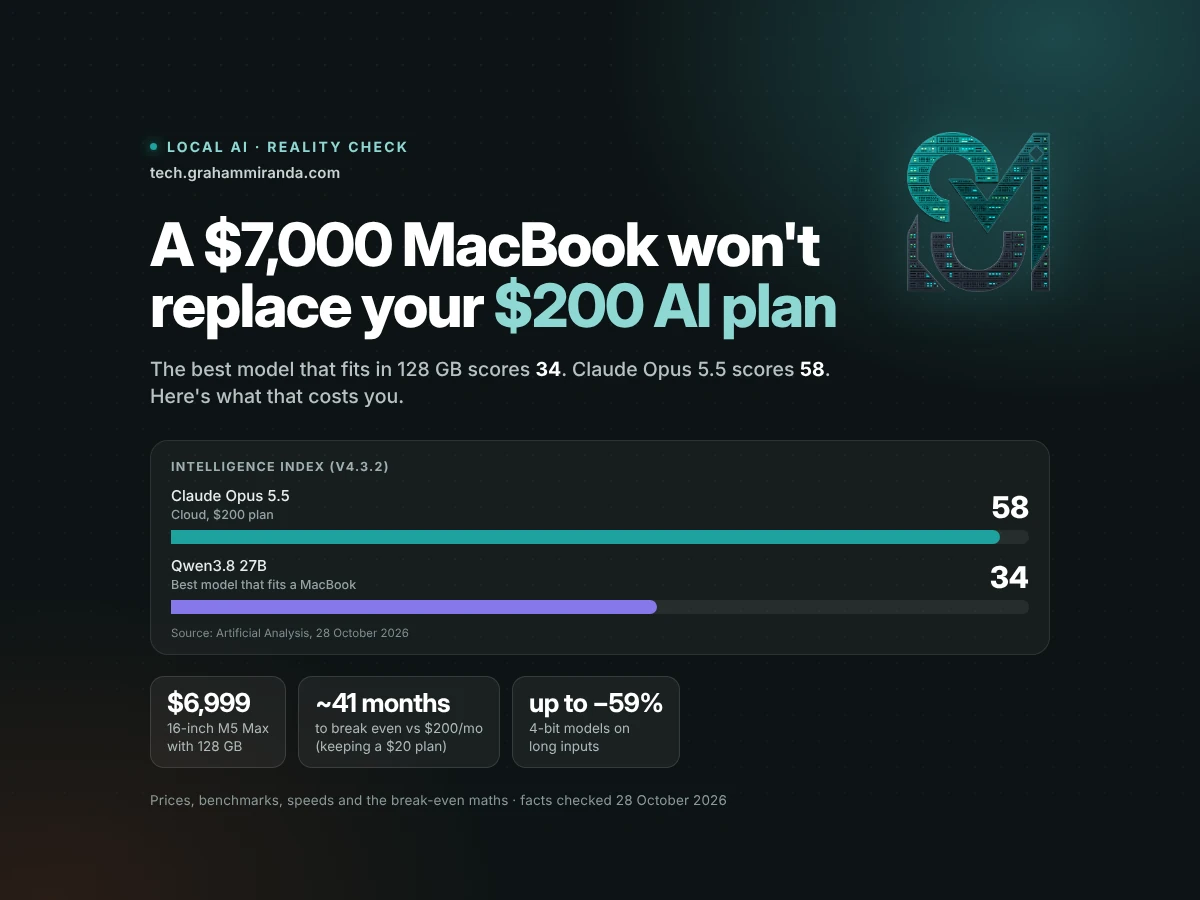
Buying a MacBook for local LLMs is a perfectly good idea for some people. As a replacement for a $200 Claude or ChatGPT plan, it fails, and it fails on the one thing the pitch never prices in: quality. The subscription rents you the best models in the world. The Mac runs the best models that fit in 128 GB. As of yesterday, we can measure the distance between those two things more precisely than ever, and it’s wider than the hype suggests.
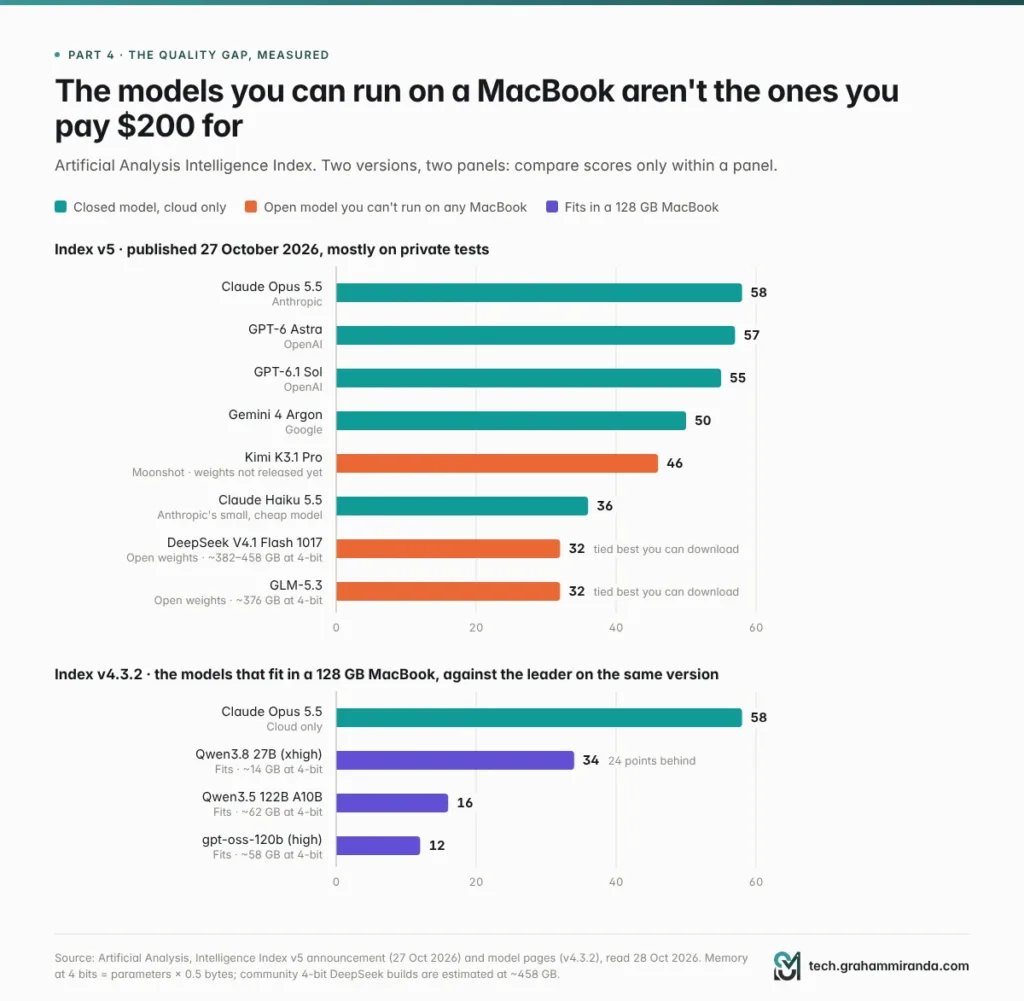
On 27 October, Artificial Analysis rebuilt its Intelligence Index around mostly private tests. Claude Opus 5.5 leads with 58. The best open-weight models you can actually download, DeepSeek V4.1 Flash 1017 and GLM-5.3, score 32, below Claude Haiku 5.5, Anthropic’s small and cheap model, at 36. Neither of those open models fits in any MacBook: at 4-bit they need somewhere between 375 and 460 GB. The strongest model I could find that does fit in a 128 GB MacBook, Qwen3.8 27B, scores 34 on the previous version of the index, the one on which Opus 5.5 also scores 58.
Meanwhile the hardware got more expensive. In June, Apple doubled the price of the 128 GB memory upgrade on the M5 Max. A 16-inch MacBook Pro with 128 GB now costs $6,999 in the US and, by my estimate, about €8,199 in Germany.
So this is the honest version of the maths: what $200 a month actually buys, what $7,000 actually buys, how big the quality gap is and why it exists, how fast an M5 Max really is, what quantization costs you, when buying a Mac for local AI does make sense, and cheaper ways to cut a $200 bill if that’s what you’re really after. Every figure was checked against its source on 28 October 2026.
TL;DR — The 60-Second Version
- The models you pay $200 for can’t be downloaded, and the best ones you can download don’t fit in a MacBook. On Artificial Analysis’s new Intelligence Index v5, Claude Opus 5.5 scores 58. The top downloadable open models, DeepSeek V4.1 Flash 1017 and GLM-5.3, score 32 and need roughly 375–460 GB of memory at 4-bit.
- What fits scores far lower. The strongest model I found for a 128 GB MacBook, Qwen3.8 27B, scores 34 to Opus 5.5’s 58 on the same index version (v4.3.2). The 120B-class models that actually need the extra memory score lower still: 16 for Qwen3.5 122B, 12 for gpt-oss-120b.
- The 128 GB MacBook got pricier. Apple doubled the 128 GB upgrade to $2,000 in June, so a 16-inch M5 Max with 128 GB is now $6,999 (about €8,199 in Germany, my estimate). The same chip and memory in a Mac Studio cost $4,799.
- The break-even is three to four years, not one. Even if the Mac replaced the subscription completely, it would take about 37 months to beat a $200 plan, 41 if you keep a $20 plan for hard work, and more than six years against a $100 plan.
- Writing is fast; reading is slow. An M5 Max generates 55–88 tokens a second on mixture-of-experts models, not far off Opus 5.5’s 98 on Anthropic’s API. But it needs 13–55 seconds just to read a 32,000-token prompt, and AI agents re-read long prompts all day.
- Squeezing big models in costs quality. 4-bit quantization is close to lossless on short tasks, but in an EMNLP 2025 study it cost up to 59% on long inputs, and more in languages other than English. At 3 bits, a small reasoning model’s maths score fell from 85.6% to 47.0%.
- Public benchmarks seem to flatter open models. When Artificial Analysis moved to mostly private tests, four leading open-weight models lost 13 points on average. Four leading closed models barely moved.
- Local still wins on privacy, offline use, no rate limits and bulk jobs, and when you were buying a Mac anyway. Buy one for those reasons, not to cancel a subscription.
- There are cheaper ways to save. Drop to a $100 tier and save $1,200 a year, pay per token for open models (DeepSeek V4.1 Flash costs $0.60 per million output tokens off-peak), or use a coding plan from $18 a month.
The Pitch vs the Reality
| The pitch | The reality, October 2026 |
|---|---|
| “It pays for itself in a year” | A 16-inch MacBook Pro with 128 GB costs $6,999. At $200 a month that’s 35 months before electricity, and 41 months once you add the $20 plan you’ll keep for hard tasks |
| “Local models are basically as good now” | Opus 5.5 scores 58. The best model that fits in 128 GB scores 34 (Qwen3.8 27B, index v4.3.2). The best downloadable open models score 32 on the new v5 |
| “128 GB runs the big open models” | GLM-5.3 needs about 376 GB at 4-bit, DeepSeek V4.1 Flash about 380–460 GB, Kimi K3 about 1.5 TB. None fits in any MacBook |
| “The M5 Max is fast” | At writing, yes: 55–88 tokens a second on mixture-of-experts models. At reading a 32K-token prompt: 13 to 55 seconds |
| “4-bit is lossless” | On short benchmarks, nearly. On inputs over 64K tokens, up to 59% worse in one study, and worse again outside English |
| “No limits, total privacy” | True. That’s the real reason to buy one |
Table of contents
- TL;DR — The 60-Second Version
- The Pitch vs the Reality
- Part 1 — The “Cancel Your $200 Plan” Pitch, and Why It Sounds So Right
- Part 2 — What $200 a Month Actually Buys in October 2026
- Part 3 — What a 128 GB MacBook Actually Costs Now
- Part 4 — The Quality Gap, Measured
- Part 5 — Why the Models You Actually Want Don’t Fit
- Part 6 — Quantization: The Quality Tax You Pay to Fit
- Part 7 — Speed: Fast at Writing, Slow at Reading
- Part 8 — The Laptop Problem
- Part 9 — The Software Gap: What You’d Have to Rebuild
- Part 10 — The Break-Even Maths, Done Honestly
- Part 11 — The Fair Case: When Buying a Mac for Local AI Makes Sense
- Part 12 — Cheaper Ways to Cut a $200 AI Bill
- Part 13 — Should You Buy a MacBook for Local LLMs? A Decision Guide
- Part 14 — If You Buy One Anyway: How to Get the Most From It
- Frequently Asked Questions
- Can a MacBook replace a ChatGPT Pro or Claude Max subscription?
- What is the best local LLM for a 128 GB MacBook Pro in 2026?
- How much does a MacBook Pro with 128 GB cost now?
- How long does a MacBook take to pay for itself versus a $200 AI subscription?
- Is the M5 Max fast enough for local LLMs?
- Are local LLMs as good as ChatGPT or Claude now?
- Does quantization make local models worse?
- Can I run DeepSeek V4.1 Flash or GLM-5.3 on a MacBook?
- Is 64 GB enough for local AI, or do I need 128 GB?
- Should I buy a Mac Studio instead of a MacBook Pro for local LLMs?
- Is running AI locally better for privacy and GDPR?
- Can I use Claude Code with a local model?
- Will the new OLED MacBook Pro change any of this?
- The Bottom Line
Part 1 — The “Cancel Your $200 Plan” Pitch, and Why It Sounds So Right
Start with why this argument travels so well, because most of it is reasonable.
Three labs converged on $200. Anthropic’s Claude Max 20× costs $200 a month. OpenAI’s ChatGPT Pro comes in $100, $200 and $500 versions. Google’s AI Ultra has a $100 tier and a $200 one. Pay that every month and the number sticks: $2,400 a year, $7,200 over three.
The hardware got serious. The M5 Max MacBook Pro, on sale since March, takes up to 128 GB of unified memory with 614 GB/s of bandwidth, and Apple put a Neural Accelerator, dedicated matrix-maths hardware, into every GPU core. In August, the Mac Studio arrived with an M5 Ultra option rated for up to 512 GB. Apple’s marketing leans on local AI harder than it ever has.
The subscriptions got stingier. Claude Max’s weekly limits, added months after the plan launched, are the subject of a class action filed on 8 September, which argues that the “5×” and “20×” labels don’t make the weekly caps clear enough. OpenAI reportedly cut the allowance on its $200 Pro plan for new subscribers from 20 times ChatGPT Plus to 10 times. When the thing you rent keeps shrinking, owning starts to look attractive.
Privacy is a real concern. Anything you paste into a cloud model leaves your machine. For a German business holding client data, that isn’t paranoia; it’s the GDPR.
And the arithmetic is easy. The version that gets shared most: a $2,499 Mac Studio divided by $200 a month is about 12.5 months. Forbes ran a far more careful version in August, with real configurations and three years of electricity, and concluded that a Mac probably won’t let you cancel your Claude or ChatGPT plan if you code with agents. But the short version is the one people remember.
Here’s the flaw. The pitch compares a price with a price. It should compare a product with a product. That’s what the rest of this article does, starting with what the $200 actually pays for.
Part 2 — What $200 a Month Actually Buys in October 2026
| Provider | $20 tier | $100 tier | $200 tier | Above $200 |
|---|---|---|---|---|
| Anthropic (Claude) | Pro: $20 ($17 a month billed annually) | Max 5×: $100 | Max 20×: $200 | Team and Enterprise |
| OpenAI (ChatGPT) | Plus: $20 (Go: $8) | Pro 100: $100 | Pro 200: $200 | Pro 500: $500 |
| Google (Gemini) | AI Pro: $20 | AI Ultra: $100 | AI Ultra: $200 | — |
US prices per month, excluding VAT. Claude from claude.com; ChatGPT from AI Business Weekly’s tracker, updated 4 October; Google from Engadget’s report on the May relaunch. Prices and allowances change often, so check before you subscribe.
What the money actually pays for
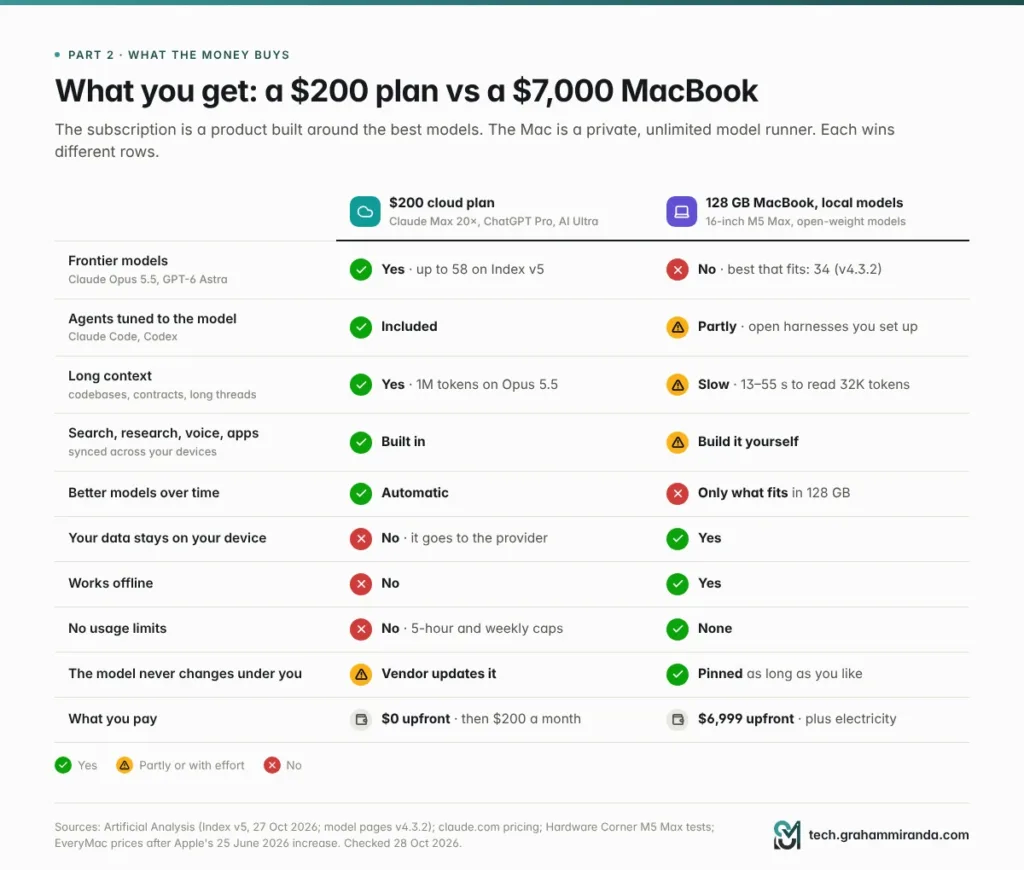
1. The frontier models, which you can’t get anywhere else. On Artificial Analysis’s new index, Anthropic and OpenAI hold all of the top five places. None of those models can be downloaded at any price. The subscription is the cheapest way most people will ever get to use them.
2. Agents built around those models. Claude’s paid plans include Claude Code; ChatGPT’s include Codex. The harness and the model are tuned together, which helps explain why they sit at the top of the agentic-coding leaderboards. (I compared 28 of these tools in Every AI Coding Harness Compared.)
3. Enormous context. Claude Opus 5.5 takes a one-million-token context window, according to Artificial Analysis: whole codebases, whole contracts, whole quarters of email.
4. The product around the model. Web search and deep research, file analysis, voice, memory, image generation, connectors to your mail and documents, and apps that sync across your phone, laptop and browser. None of that comes with a model file.
5. Upgrades you don’t have to install. The model behind your subscription next quarter will be better than today’s. The model on your Mac changes only when you download a different one, and only if the new one fits.
6. Some of the money back. Anthropic’s pricing page now lists monthly API credits with Max: $100 on the 5× plan and $200 on 20×.
What it doesn’t buy
Unlimited use. Claude’s plans run on rolling five-hour windows plus weekly caps, and OpenAI and Google mostly describe their top tiers as multiples of the cheaper ones, when they describe them at all. Control over where your data goes, which matters a great deal for personal and client data. And predictability: allowances have moved more than once this year.
Keep those three in mind. They’re the honest case for local AI, and Part 11 gives them a full hearing.
Show Image The subscription is a product; the Mac is a model runner. Each one wins different rows, which is why the right answer for most people is both.
Part 3 — What a 128 GB MacBook Actually Costs Now
Only one chip gets you to 128 GB. In the M5 generation, that much unified memory comes only with the M5 Max with the 40-core GPU, which has 614 GB/s of memory bandwidth. The 32-core-GPU M5 Max is fixed at 36 GB and 460 GB/s, and the M5 Pro tops out at 64 GB and 307 GB/s.
| Configuration | US price | Germany |
|---|---|---|
| 16″ M5 Max (18-core CPU, 40-core GPU), 48 GB, 2 TB | $4,999 | €5,699 |
| Upgrade to 128 GB | +$2,000 (was +$1,000 until 25 June) | about +€2,500 (was +€1,250 at launch), estimated |
| 16″ M5 Max, 128 GB, 2 TB | $6,999 | about €8,199 (estimated; €6,249 at launch) |
| Maxed out: 128 GB, 8 TB, nano-texture display | $10,149 | — |
| For comparison: Mac Studio, M5 Max, 128 GB | $4,799 | — |
US prices exclude sales tax; German prices include 19% VAT. The German 128 GB upgrade is my estimate: Apple charged €1,250 for it at launch, and the dollar upgrade doubled in June. Check Apple’s configurator before you buy.
Three things stand out.
Memory is now the expensive part. Apple raised prices across the Mac line on 25 June and blamed memory and storage costs. It told Reuters it had “never seen a component price increase this much, this quickly”. The M5 Max’s 64 GB and 128 GB upgrades both doubled. The one component local AI needs most is the one that got twice as expensive.
The laptop premium is $2,200. The same M5 Max with the same 128 GB in a Mac Studio cost $4,799 when Forbes priced it in August. If you want the memory for AI, the laptop form factor costs 46% more.
The 14-inch is a compromise. You can order the 14-inch with 128 GB too, but in Notebookcheck’s review its chassis struggled to cool the M5 Max under sustained load. More on that in Part 8.
New Macs this week. On 27 October Apple announced a 14-inch MacBook Pro with the base M6 chip: up to 32 GB and 170 GB/s, from $1,999. It’s a fine laptop, not an LLM machine. And tonight (28 October, 10:00 Pacific, 18:00 in Germany) Apple holds its “Pro and Tell” event, where an OLED touchscreen MacBook Pro is widely expected. Reports say it uses the same M5 Pro and M5 Max chips, which would leave the 128 GB ceiling and 614 GB/s unchanged.
Part 4 — The Quality Gap, Measured
How do you compare a model on your desk with one in a datacentre? Not with vibes, and not with a vendor’s own benchmark table. Artificial Analysis (AA) runs the same battery of tests on hundreds of models, through the same harness, and condenses the results into a single Intelligence Index. No index is perfect, but AA’s is independent, and it’s the nearest thing the industry has to a common yardstick.
On 27 October, AA published version 5. The headline change: about 60% of the index now runs on private test sets or held-out answers, so a model can’t have seen the questions during training. Knowledge work, coding, science and general knowledge count for a quarter each.
The new leaderboard
| Model | Can you download it? | Intelligence Index v5 |
|---|---|---|
| Claude Opus 5.5 (max) | No | 58 |
| GPT-6 Astra (max) | No | 57 |
| GPT-6.1 Sol (max) | No | 55 |
| Gemini 4 Argon (high) | No | 50 |
| Kimi K3.1 Pro | Not yet; weights unreleased | 46 |
| Claude Haiku 5.5 (max) | No | 36 |
| DeepSeek V4.1 Flash 1017 (max) | Yes, MIT licence | 32 |
| GLM-5.3 (max) | Yes | 32 |
Source: Artificial Analysis, Intelligence Index v5 announcement, 27 October 2026.
Three things in that table matter if you’re pricing a MacBook.
- The top five places all belong to Anthropic and OpenAI, and none of those models can be downloaded at any price.
- The best open model, Kimi K3.1 Pro, hasn’t released its weights. Among models you can actually download, the best score is 32, which leaves them 26 points behind the leader. On the previous version the gap between the best open and the best closed model was 3 points. Now it’s 12, or 26 if you only count weights you can download.
- Claude Haiku 5.5 beats every downloadable open model. That’s Anthropic’s small, fast, cheap tier, not its flagship.
Coding, specifically
The new index includes FrontierCode 2.0, 132 private coding tasks from Cognition. Claude Opus 5.5 solved 46%; DeepSeek V4.1 Flash 1017, joint-strongest among downloadable models, solved 28%. On Terminal-Bench-Science, 70 agentic science tasks, it’s 59% against 13%.
To be fair to open models: Kimi K3.1 Pro leads Terminal-Bench 4.0 with 67%, ahead of every closed model. Open models can and do win individual benchmarks. But that one isn’t downloadable yet, and its predecessor, Kimi K3, has 2.8 trillion parameters. You won’t be running it on a laptop.
Why the gap just got wider
The jump from v4.3 to v5 didn’t treat everyone equally.
| Model | Type | v4.3 | v5 | Change |
|---|---|---|---|---|
| Claude Opus 5.5 | Closed | 58 | 58 | 0 |
| GPT-6 Astra | Closed | 53 | 57 | +4 |
| Claude Sonnet 5.5 | Closed | 56 | 54 | −2 |
| Gemini 4 Argon | Closed | 53 | 50 | −3 |
| Kimi K3.1 Pro | Open (unreleased) | 55 | 46 | −9 |
| DeepSeek V4.1 Flash 1017 | Open | 45 | 32 | −13 |
| Muse Spark Open (Meta) | Open | 39 | 25 | −14 |
| MiMo-V2.6-Pro (Xiaomi) | Open | 46 | 30 | −16 |
v4.3 and v5 figures as reported by Trending Topics on 28 October, with the v5 scores matching AA’s announcement.
On average, those four open models lost 13 points. The four closed ones moved by a quarter of a point.
AA hasn’t said why. The obvious reading is that when the test questions are secret, a model can’t have seen them, and that public benchmarks flatter models trained heavily on public data. The counterpoint is fair too: private tests can’t be checked from outside, and how you weight the categories moves the rankings. Don’t treat any single index as gospel. But when four open models fall by double digits and four closed ones don’t, that’s a signal worth taking seriously: the published benchmark tables, and especially the vendors’ own, overstate how close open models are.
And the models that actually fit in a MacBook
The models AA re-scored for its announcement are mostly far too big for a laptop. For the ones that fit, AA’s model pages still show v4.3.2 scores, and on that version Opus 5.5 also scores 58. So here’s the comparison on one consistent scale:
| Model | Fits in a 128 GB MacBook? | Intelligence Index v4.3.2 |
|---|---|---|
| Claude Opus 5.5 (max) | No, cloud only | 58 |
| Qwen3.8 27B (xhigh) | Yes, at 4-bit even on a 32 GB Mac | 34 |
| Qwen3.5 122B A10B (reasoning) | Yes, about 70 GB at 4-bit | 16 |
| gpt-oss-120b (high) | Yes, about 64 GB | 12 |
Source: Artificial Analysis model pages, read on 28 October 2026.
AA ranks Qwen3.8 27B first of 141 comparable models. It’s genuinely excellent for its size, and an open model released under Apache 2.0. It’s still 24 points behind.
Show Image Two index versions, two separate panels, never one axis. Top: Artificial Analysis Intelligence Index v5 (27 October 2026). Bottom: models that fit in a 128 GB MacBook, on v4.3.2, the version their scores are published on.
The 128 GB paradox
Look at that last table again. The best model for a 128 GB MacBook fits in 32 GB. The models that actually need the extra memory, 120-billion-parameter mixtures of experts, score lower, mainly because they’re older: gpt-oss-120b came out in August 2025, and Qwen3.5 122B was already being benchmarked on the M5 Max in March, months before Qwen3.8 27B arrived.
So what does the $2,000 upgrade from 48 GB to 128 GB buy you today? Room: longer contexts, 8-bit precision instead of 4-bit, several models loaded at once, and the option to run a strong 100-billion-class model if one ships. Those are real benefits. A smarter model is not one of them, at least not on today’s leaderboard. Check AA before you buy; this is the kind of fact that changes with one release.
What 34 versus 58 feels like in practice
Index points aren’t “percent smarter”, and they don’t land evenly across tasks.
For short, well-defined jobs, such as rewriting an email, summarising a document you paste in or pulling fields out of an invoice, a good 27B model is often indistinguishable from a frontier one. The gap opens on long, multi-step work: an agent that has to read a codebase, plan, edit five files, run the tests and recover from its own mistakes; research that has to reconcile sources; reasoning where one wrong step poisons the rest. That’s exactly the work people buy $200 plans for.
Forbes’s August column gave a concrete example from Qwen’s own research paper: Qwen3-Coder-Next running in Claude Code scored 30.9% on Terminal-Bench 2.0, against 53.9% for Claude Opus 4.5 in the same paper. Those are last year’s models, but the shape hasn’t changed: on agentic tasks, the local setup failed far more often.
Part 5 — Why the Models You Actually Want Don’t Fit
A model’s size in memory is simple to estimate:
text
weights (GB) ≈ parameters (billions) × bytes per parameter
               8-bit → × 1.0     4-bit → × 0.5     2-bit → × 0.25
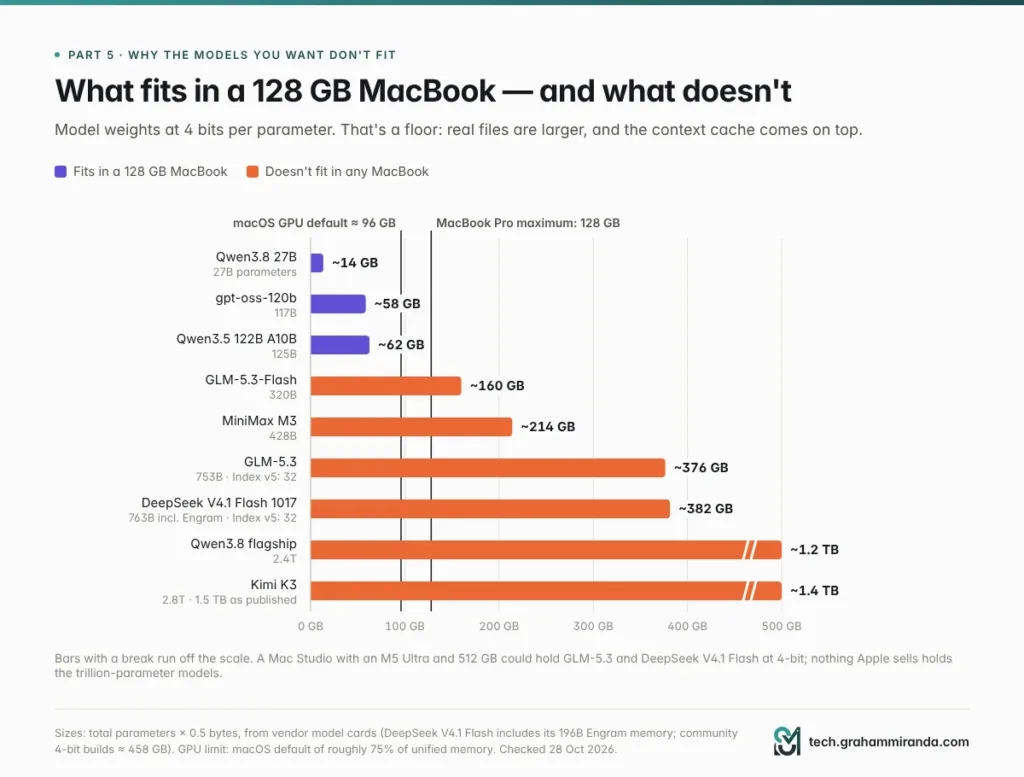
Then add the KV cache, the model’s working memory for your conversation, which grows with context length. And remember that macOS doesn’t hand all of your unified memory to the GPU: by default it lets the GPU wire roughly 75% on large-memory Macs, about 96 GB of a 128 GB machine. You can raise the limit with sudo sysctl iogpu.wired_limit_mb=…, at your own risk; whatever you give the model, your browser, editor and operating system don’t get.
Here’s what that means for the models people actually talk about:
| Model | Total parameters | 4-bit weights (floor) | Fits in a 128 GB MacBook? |
|---|---|---|---|
| Qwen3.8 27B | 27B | ~14 GB | ✅ Easily |
| gpt-oss-120b | 117B | ~58 GB (64 GB file) | ✅ Yes |
| Qwen3.5 122B A10B | 125B | ~62 GB (69.6 GB file) | ✅ Yes |
| GLM-5.3-Flash | 320B | ~160 GB | ❌ No |
| MiniMax M3 | 428B | ~214 GB | ❌ No |
| GLM-5.3 | 753B | ~376 GB | ❌ No |
| DeepSeek V4.1 Flash 1017 | 763B incl. Engram memory | ~382 GB (community 4-bit builds estimated at ~458 GB) | ❌ No |
| Qwen3.8 flagship | 2.4T | ~1.2 TB | ❌ No |
| Kimi K3 | 2.8T | ~1.5 TB as published (native MXFP4) | ❌ No |
The 4-bit column is parameters × 0.5 bytes: weights only, before the KV cache and file overhead, so real files are larger. The file sizes are from Hardware Corner’s M5 Max tests.
The models that score 32 on the new index, the best you can download, need three to four times what a MacBook has. And the ones in between don’t squeeze in either. If you gave the model weights 100 GB of your 128 GB, here’s how many bits per weight you could afford:
| Model | Bits per weight in a 100 GB budget |
|---|---|
| GLM-5.3-Flash | 2.5 |
| MiniMax M3 | 1.9 |
| GLM-5.3 | 1.1 |
| DeepSeek V4.1 Flash | 1.0 |
| Kimi K3 | 0.3 |
At around three bits and below, quality falls off a cliff (Part 6 has the research). One bit per weight isn’t quantization. It’s amputation.
The context costs memory too. In Hardware Corner’s tests, Qwen3-Coder-Next at 8-bit used 87.1 GB at a 4K context and 92.6 GB at 64K: five and a half extra gigabytes just to hold a longer conversation. Agents that read whole repositories need long contexts, so that headroom disappears fast.
What about a 512 GB Mac Studio? An M5 Ultra Mac Studio with 512 GB could hold GLM-5.3 or DeepSeek V4.1 Flash at 4-bit. Apple said that configuration would arrive in late October; MacRumors expects it to cost well above $10,000, and Apple hadn’t published a price when I checked. You’d be paying five figures to run models that score 32 on the new index, probably more slowly than their makers serve them. My Kimi K3 vs Fable 5.1 vs GLM-5.3 comparison goes deeper on what self-hosting the big open models really takes.
Show Image Weights only, at 4 bits per parameter; the context cache comes on top. Everything to the right of the 128 GB line needs a Mac Studio or a server.
Part 6 — Quantization: The Quality Tax You Pay to Fit
Quantization stores a model’s weights in fewer bits, 8 or 4 instead of the 16 they were trained in, so it takes less memory and runs faster. Every local model you’ll run on a Mac is quantized. The question is what it costs, and the research gives a clear and slightly uncomfortable answer.
The good news: 8-bit is nearly free, 4-bit is mostly fine
- One of the largest studies so far, by Eldar Kurtic and colleagues, ran more than 500,000 evaluations on quantized Llama 3.1 models. FP8 was effectively lossless at every size; INT8 cost about 1–3% with careful tuning; and 4-bit weight-only quantization was “more competitive than expected”, close to 8-bit.
- For reasoning models, a 2025 study by Ruikang Liu and colleagues found that 8-bit weights and activations, or 4-bit weights with 16-bit activations, can be lossless on maths, science and coding benchmarks. Lower bit widths brought what the authors call significant accuracy risks, and task difficulty strongly affected how much was lost.
If you only ever ask short questions in English, a 4-bit model will feel close to the original.
The bad news: long inputs, other languages and anything below 4 bits
- Long context. Anmol Mekala and colleagues tested five quantization methods on 9,700 examples with inputs of 64,000 tokens or more (EMNLP 2025). 8-bit cost about 0.8% on average. 4-bit cost up to 59%, and the damage depended heavily on the model: under one 4-bit method, Llama 3.1 70B dropped 32% on a task where Qwen 2.5 72B held up.
- Languages other than English. The same study found degradation tended to be worse when the input wasn’t in English. If you work in German, test in German.
- Below 4 bits, reasoning collapses. Researchers at Meta FAIR published a study in June 2026 showing that quantized reasoning models overthink. Under 3-bit AWQ, a 1.5B reasoning model’s score on the MATH-500 benchmark fell from 85.6% to 47.0%, and its chain of thought grew from 5,200 to 23,400 tokens, 4.5 times longer. On a laptop that writes at 20 to 80 tokens a second, a model that thinks four times longer is also roughly four times slower.
Show Image What the research says each step down in precision costs. The squeeze that would fit a bigger model into 128 GB is exactly the one that hurts most.
What that means for a 128 GB MacBook
The quantization you can afford for a model you’d want is the quantization that hurts most. A 27B model can run at 8-bit on a Mac with room to spare, and should. The 120B-class models run at 4-bit, which is fine for chat and risky on long documents. And the only way to get anything from the 300B-plus class onto a laptop is two or three bits per weight, where the studies above say reasoning falls apart.
My rules of thumb:
- Use 8-bit for anything you’ll rely on, especially long documents and agent work.
- 4-bit is fine for chat, drafting and short tasks. Check its long-context behaviour on your own documents.
- Don’t run reasoning or coding models below 4-bit unless you’re experimenting.
- Test in the language you work in.
Part 7 — Speed: Fast at Writing, Slow at Reading
An LLM does two different jobs at two different speeds. Prefill reads your prompt, everything you pasted plus the conversation so far, and it’s limited by raw compute. Generation writes the answer one token at a time, and it’s limited by memory bandwidth. Apple’s own machine-learning researchers measured both on the M5: its new GPU Neural Accelerators made the time to the first token 3.3 to 4.1 times faster than on the M4, while generation improved by only 1.19 to 1.27 times, roughly in line with the extra bandwidth.
So what does an M5 Max with 128 GB actually do? Hardware Corner published tests run with Apple’s MLX framework on a 14-inch M5 Max with 128 GB:
| Model | Context | Reading (prefill), tok/s | Time to read the whole prompt | Writing, tok/s |
|---|---|---|---|---|
| gpt-oss-120b (MXFP4, 64 GB) | 4K | 1,325 | 3.1 s | 87.9 |
| 32K | 2,537 | 12.9 s | 64.5 | |
| Qwen3.5 122B A10B (4-bit) | 4K | 881 | 4.6 s | 65.9 |
| 32K | 1,068 | 30.7 s | 54.9 | |
| Qwen3.5 27B (dense, 6-bit) | 4K | 811 | 5.1 s | 23.6 |
| 32K | 591 | 55.4 s | 14.9 | |
| Qwen3-Coder-Next (8-bit) | 64K | 1,432 | 45.8 s | 48.2 |
Measured by Reddit user cryingneko and published by Hardware Corner. “Time to read the whole prompt” is the context length divided by the measured prefill speed.
Writing speed is fine now, at least on MoE models
Mixture-of-experts models only use a fraction of their weights for each token, so they write quickly: 55 to 88 tokens a second on the M5 Max. For comparison, Artificial Analysis measures Claude Opus 5.5 at 98 tokens a second on Anthropic’s API. For chatting with a 120B-class model, the M5 Max is genuinely pleasant. Dense models are another story: a 27B model that uses every weight for every token writes at 15 to 24 tokens a second.
Two smaller effects pile up, too. Writing slows as the conversation grows: 17% to 37% slower at 32K than at 4K across those three models. And reasoning models spend hundreds or thousands of tokens thinking before they answer.
Reading is where the wait is
Look at the time-to-read column again. A 32,000-token prompt (a few source files, a long contract, a big email thread) takes 13 to 55 seconds to read before the first word of the answer appears.
That matters most for exactly the work a $200 plan is bought for. AI coding agents send the model a large system prompt, the definitions of every tool, the files they’ve opened and the conversation so far, and they do it on every step. Local servers can reuse the part of the prompt that hasn’t changed, which helps a lot. But whenever something early in the context changes, for example when the agent compacts its history or you switch to a new task, everything after that point has to be read again. Forbes quoted one developer who waited about 90 seconds for the first token on a 512 GB M3 Ultra with a 16,000-token system prompt, and another who saw about 20 seconds from cold on a 48 GB M4 Pro laptop. M5-generation chips are much faster at this than older Macs, by Apple’s own measurements, but the shape of the problem is the same.
For perspective, the same Hardware Corner tests ran on an Nvidia RTX Pro 6000 workstation card, which costs about $8,800 on its own: it read prompts 2 to 2.4 times faster and wrote 1.7 to 2.8 times faster than the M5 Max.
Show Image Measured with MLX on an M5 Max with 128 GB. Writing is fast enough; reading long prompts, which agents do constantly, is where the waiting happens.
Part 8 — The Laptop Problem
Even if the models were good enough, a laptop is an awkward place to run them.
Heat. Running a large model is sustained load: minutes or hours of the GPU and memory working flat out, not a ten-second burst. Notebookcheck’s review of the 14-inch M5 Max concluded that its chassis and cooling “simply cannot handle the M5 Max adequately”: performance in a 30-minute CPU stress test dropped by 24%, and the fans reached 53.2 dB(A) in High Power mode. That review measured CPU and graphics loads rather than LLMs, and Notebookcheck itself suggests the M5 Max belongs in the 16-inch. If you do buy a MacBook for local AI, buy the 16-inch. My MacBook Pro M5 Pro 64 GB guide came to the same conclusion about sustained work on the smaller chassis.
It’s also your everyday computer. Load a 70 GB model plus its context and you still have room for a browser and an editor. Push towards the roughly 96 GB the GPU gets by default, or raise the limit to squeeze in something bigger, and the rest of your work starts competing with the model for memory. Every model you keep loaded is memory your other apps don’t get.
Batteries don’t like it. Sustained GPU load drains a laptop battery quickly, so long local-inference sessions end up happening plugged in, which rather undercuts the “AI anywhere, offline” pitch.
You buy your ceiling on day one. Unified memory can’t be upgraded after purchase. If next year’s best open model needs 160 GB, a 128 GB MacBook simply can’t run it.
And it depreciates fast. The UK refurbisher MacFinder analysed six years of its own purchase data and found most MacBooks lose about half their value in the first year, with high-end models often falling harder: a 16-inch M4 MacBook Pro lost up to 60% in a year. A $6,999 machine is a $6,999 bet that today’s memory ceiling will still be useful in three years.
A desktop is a better LLM box. If local AI is the point, a Mac Studio with the same M5 Max and 128 GB costs $2,200 less, has no battery to cook and no lid to close, and can run around the clock as a private server for your laptop and phone. Pair it with whatever laptop you already like.
Part 9 — The Software Gap: What You’d Have to Rebuild
A subscription is a model plus a product. A local setup gives you the model and leaves the product to you.
| What the subscription does for you | What you’d do locally |
|---|---|
| Hosts and updates the model | Download, convert and update models yourself (LM Studio, Ollama or MLX) |
| Web search and deep research | Wire up a search API or self-hosted search, plus an agent to drive it |
| Reads PDFs, spreadsheets and images | Pick models with vision, add document parsing |
| Voice, memory, image generation | Separate models and apps for each (Whisper for speech, Draw Things or ComfyUI for images) |
| Apps on every device, synced | Run a server and a front-end, and expose it to your phone safely |
| Claude Code or Codex, tuned to their own models | Point an open harness, or Claude Code itself, at a local server |
| Chat templates, tool-call formats and safety handled | Debug them when a new model ships with a template your tools don’t understand |
The tooling is genuinely good now. LM Studio is the easiest start on a Mac, Ollama gives you one API for local and cloud models, and Apple’s MLX is usually the fastest. Ollama even exposes an Anthropic-compatible API, so you can point Claude Code at a local model by setting ANTHROPIC_BASE_URL=http://localhost:11434. Its documentation is candid about the gaps, though: Anthropic’s prompt-caching controls, token counting, batches and PDF input aren’t supported. And Claude Code is tuned for Claude models; a local model has to cope with Claude Code’s long system prompt and tool definitions, which is where Part 7’s prefill times bite.
None of this is impossible. My OpenCode v2 vs Hermes Agent vs OpenClaw piece covers open agents that work with local models. But it’s real work, and your hours aren’t free. Budget a weekend to set it up and a few hours a month to keep it current.
Part 10 — The Break-Even Maths, Done Honestly
Here’s the calculation the pitch usually skips.
Step 1: the naive version
$6,999 ÷ $200 a month = 35 months. Not twelve. Almost three years, and that’s the most flattering version.
Step 2: add electricity
Forbes estimated about $10 a month for a Mac running AI eight hours a day at average US rates. In Germany, at the October average of 29.68 cents per kWh, a laptop averaging 60–150 W for eight hours a day costs about €4–11 a month. Small, but it pushes the break-even to about 37 months.
Step 3: keep a cheap plan for the hard stuff
You will. Few people who’ve used a frontier model for agentic coding or serious research go back to a 34-point model for everything. Keep a $20 plan for the hard 10% and the Mac saves you $170 a month, not $200: about 41 months.
Step 4: compare with what you’d really downgrade to
If you’re cost-conscious enough to consider a $7,000 laptop, you’re cost-conscious enough to drop to a $100 tier. Against $100 a month the break-even is about 78 months, over six and a half years, longer than many people keep a laptop.
| Scenario | Upfront | You still pay | Monthly saving | Break-even |
|---|---|---|---|---|
| MacBook vs $200 plan, no electricity | $6,999 | — | $200 | 35 months |
| MacBook vs $200 plan, with electricity | $6,999 | $10 | $190 | 37 months |
| … and you keep a $20 plan | $6,999 | $30 | $170 | 41 months |
| MacBook vs $100 plan | $6,999 | $10 | $90 | 78 months |
| Mac Studio (128 GB) vs $200 plan | $4,799 | $10 | $190 | 25 months |
| Mac Studio vs $200 plan, keep a $20 plan | $4,799 | $30 | $170 | 28 months |
All of these assume the Mac does the subscription’s job completely. Parts 4 to 9 explain why it doesn’t.
Show Image Cumulative cost over four years, assuming the Mac replaces the subscription completely, which it doesn’t. Electricity at about $10 a month.
Step 5: three years, with resale
Hardware has resale value, and that’s the strongest argument for buying. Assume you sell after three years for 35% of the purchase price. That’s my assumption, not a quote, informed by MacFinder’s data showing about half the value gone in year one and slower losses afterwards.
| Option | 36-month cost |
|---|---|
| $200 plan | $7,200 |
| MacBook (128 GB) + electricity, sold for 35% | $4,909 |
| … plus a $20 plan for frontier work | $5,629 |
| Mac Studio (128 GB) + electricity + $20 plan, sold for 35% | $4,199 |
| $100 plan | $3,600 |
| $20 plan | $720 |
So yes: over three years, a MacBook plus a $20 plan can come out about $1,600 cheaper than a $200 plan, if you sell it at a decent price. But look at what that money buys. On one side, the best models in the world with every tool around them. On the other, a 34-point model, a few thousand dollars of depreciation and a cheap plan for when you need the real thing. The $100 plan beats every hardware option on cost, and the $20 plan beats everything.
You aren’t saving much money with a MacBook for local LLMs. You’re spending a similar amount on a different product: privacy, control and freedom from limits, with less intelligence attached.
The marginal-cost view
There’s one framing where buying makes more sense: you need a new MacBook anyway. Then the AI-specific cost is just the memory upgrade from 48 GB to 128 GB, $2,000, or ten months of a $200 plan. That’s not crazy. But remember the 128 GB paradox from Part 4: on today’s leaderboard, that upgrade buys bigger models, not smarter ones. If you’re buying a MacBook regardless, 48–64 GB runs the best Mac-sized model at 8-bit with plenty of context.
What $6,999 buys instead
- 35 months of a $200 plan, 70 months of a $100 plan, or 29 years of a $20 plan
- About 11.7 billion output tokens from DeepSeek V4.1 Flash at its off-peak API price, a model that outscores everything that fits in a MacBook
- About 350 million output tokens of Claude Opus 5.5 through Anthropic’s API, at the $20 per million Artificial Analysis lists
Part 11 — The Fair Case: When Buying a Mac for Local AI Makes Sense
None of this means local AI is a gimmick. I write about it constantly on this blog because it’s useful. It’s just useful for different reasons than the pitch claims. These are the good ones.
1. Data that mustn’t leave your control
If you handle client files, health information, unpublished financials or anything covered by a confidentiality duty, a local model means nothing goes to a third party. No processor agreement, no international transfer, no wondering about training settings. In Germany, professionals bound by § 203 StGB, such as lawyers, doctors and tax advisers, need contractual safeguards before client data goes to any outside service provider, AI providers included. A local model sidesteps that question entirely. This is the strongest reason to own the hardware, and it doesn’t depend on whether the local model is as smart as Opus. My State of AI 2026 report goes through the cost and compliance side of running AI offline in more detail.
2. Offline work
On a plane, at a client site with no network, in a facility where the network is the thing that’s forbidden.
3. No limits, no policy drift, a model that never changes
No five-hour windows, no weekly caps, no class actions about how they’re disclosed. And a local checkpoint behaves the same in a year as it does today, which matters if you’ve built a workflow around how a model behaves.
4. Bulk, boring, well-defined work
Classifying thousands of support tickets, pulling fields out of invoices, summarising your own notes, translating drafts, tagging photos, generating embeddings for search over your own documents, transcribing meetings with Whisper. Mid-sized local models are excellent at these, and running a million of them costs nothing but electricity.
5. Learning and building
If you build local-first apps, fine-tune small models or just want to understand how this stuff works, owning the hardware is the best teacher there is. (If building apps with AI is your thing, I wrote up the whole process in How to Build an App From Scratch With AI in 2026.)
6. You were buying a Mac anyway
Then buy enough memory for the models you’ll actually run (see Part 14), and treat local AI as a bonus, not a business case.
What runs well locally
| Job | What to run | Memory that’s comfortable |
|---|---|---|
| Private chat, drafting, rewriting | Qwen3.8 27B at 8-bit | 48–64 GB |
| Summaries and Q&A over your documents | Qwen3.8 27B, plus an embedding model | 48–64 GB |
| Bulk extraction and classification | Smaller models (Gemma 4, gpt-oss-20b) | 16–32 GB |
| Speech-to-text | Whisper | 8–16 GB |
| Image generation | Draw Things or ComfyUI with FLUX-class models | 32 GB+ |
| A big, fast chat model | gpt-oss-120b or Qwen3.5 122B | 128 GB |
For local video generation, Macs remain slow compared with Nvidia hardware or cloud GPUs; my M5 Pro 64 GB guide has the numbers.
Part 12 — Cheaper Ways to Cut a $200 AI Bill
If what you really want is a smaller AI bill, there are cheaper routes than a $7,000 laptop.
1. Drop a tier. Claude Max 5× and ChatGPT Pro 100 cost $100, and Google’s AI Ultra now starts at $100. If you rarely hit your limits on a $200 plan, this saves $1,200 a year with no quality loss at all.
2. Combine two $20 plans. Claude Pro plus ChatGPT Plus costs $40 a month and gives you two separate pools of limits and two frontier model families to switch between.
3. Pay per token for open models. The same open-weight models you’d run on a Mac, and bigger ones that will never fit, are available by the token from many providers, at datacentre speed. DeepSeek V4.1 Flash, which outscores every model that fits in a MacBook, costs $0.15 per million input tokens and $0.60 per million output tokens off-peak on DeepSeek’s own API (twice that at peak times). Qwen3.8 27B is listed on OpenRouter from about $0.035 per million input tokens. For personal or client data, use a provider with EU hosting and a data processing agreement rather than DeepSeek’s own API, which processes data in China.
4. Use a flat-rate coding plan for open models. Z.ai’s GLM Coding Plan starts at $18 a month and includes GLM-5.3, joint-best among downloadable models on the new index, plus GLM-5.3-Flash, and it works in Claude Code, Codex, OpenCode and other tools. Get 10% off the GLM Coding Plan through my affiliate link. (Affiliate link — see the disclosure at the top.) It isn’t Opus 5.5, and the index says so plainly, but it costs less than a tenth of a $200 plan. I compared it with MiniMax’s offering in GLM-5.3-Flash vs MiniMax M3.
5. Use the Mac you already have. If your current Mac has 16 to 32 GB, small local models handle a surprising amount of the bulk work in Part 11 for free.
6. Route by task. The setup that works for most people: a local model for private and bulk jobs, a cheap plan or open model by the token for everyday work, and frontier access for the hard 10%. My AI coding harness comparison has five worked setups at different budgets.
Show Image Monthly cost of each option in US dollars, before VAT. Pay-per-token costs depend on how much you use; prices checked 28 October 2026.
Part 13 — Should You Buy a MacBook for Local LLMs? A Decision Guide
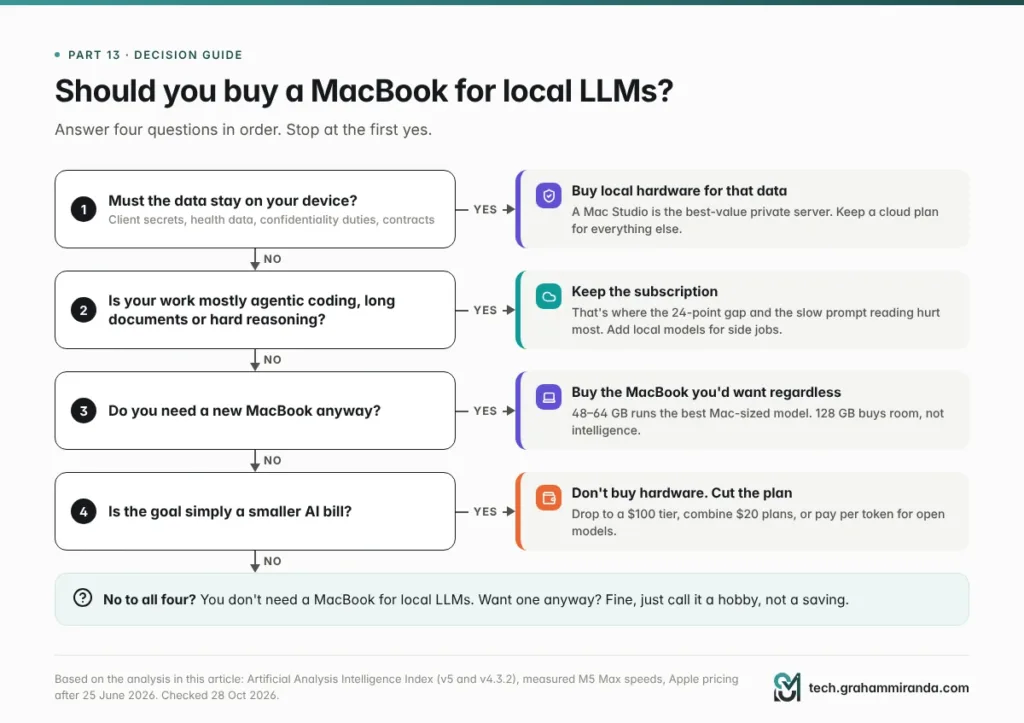
Show Image Start at the top. Most paths end with “keep a cloud plan”, and that’s the point.
Work through four questions in order.
1. Must the data stay on your device? If yes, because of client confidentiality, health data or a contract, buy local hardware: that requirement doesn’t care about benchmarks. Consider a Mac Studio as a private server, and keep a cloud plan for work that doesn’t involve that data.
2. Is your work mostly agentic coding, long documents or hard reasoning? If yes, keep the subscription. That’s precisely where the 24-point gap and the prefill times hurt most. A local model can still help with side jobs.
3. Do you need a new MacBook anyway? If yes, buy the one you’d want regardless. 48–64 GB runs the best Mac-sized model well. Go to 128 GB only if you specifically want 120B-class models or several models loaded at once, and know you’re paying $2,000 for room, not for intelligence.
4. Is the goal simply a smaller bill? Then don’t buy hardware. Drop a tier, combine $20 plans, or pay per token for open models (Part 12).
If you answered no to all four, you don’t need a MacBook for local LLMs. You might still want one, and that’s fine. Just call it a hobby, not a saving.
Part 14 — If You Buy One Anyway: How to Get the Most From It
Pick the right machine.
- Buy the 16-inch, not the 14-inch, if the M5 Max is for sustained AI work.
- Consider a Mac Studio instead. Same chip and memory for $2,200 less, better cooling, and it can serve your laptop and phone around the clock.
- Don’t overbuy memory for today’s models. 48–64 GB runs Qwen3.8 27B at 8-bit with long contexts. Buy 128 GB for 120B-class models, several models at once or headroom for future releases, knowing what it costs.
- If you’re buying this week, wait until after tonight’s event. You’ll know what the OLED MacBook Pro offers and costs before you commit.
Set it up properly.
- Start with LM Studio (MLX on Apple Silicon) for the easiest path, or Ollama if you want one API for local and cloud models.
- Prefer 8-bit for anything you’ll rely on; use 4-bit for speed on chat.
- Set the context length deliberately. Many runtimes default to small contexts; agents need far more.
- Raise the GPU memory limit only if you understand the trade-off, and leave room for macOS.
- Keep a $20 cloud plan for the hard 10%. It’s cheaper than your own time.
Test it on your own work. Take 20 real prompts from the past month: emails, documents, coding tasks, whatever you actually do. Run each through your local model and your cloud model, hide which is which, and grade them. Do it in the language you work in. That one hour will tell you more than any leaderboard, including the ones in this article.
Frequently Asked Questions
Can a MacBook replace a ChatGPT Pro or Claude Max subscription?
Not on quality. The models behind a $200 plan, such as Claude Opus 5.5 and GPT-6 Astra, can’t be downloaded, and the best open models that can be downloaded need 375–460 GB of memory at 4-bit, far beyond any MacBook. On Artificial Analysis’s index, Opus 5.5 scores 58; the strongest model I found that fits in a 128 GB MacBook, Qwen3.8 27B, scores 34 on the same version. A MacBook can replace a subscription for private, offline or bulk work, not for frontier tasks.
What is the best local LLM for a 128 GB MacBook Pro in 2026?
For quality, Qwen3.8 27B: Artificial Analysis ranks it first of 141 comparable models, with 34 on Intelligence Index v4.3.2, and it fits comfortably at 8-bit. For speed, gpt-oss-120b and Qwen3.5 122B are mixture-of-experts models that write 55–88 tokens a second on an M5 Max, but they score lower (12 and 16). Check Artificial Analysis before choosing, because new open models change this ranking every few weeks.
How much does a MacBook Pro with 128 GB cost now?
A 16-inch MacBook Pro with an M5 Max (18-core CPU, 40-core GPU), 128 GB and 2 TB costs $6,999 in the US, before sales tax. Apple raised Mac prices on 25 June 2026 and doubled the 128 GB upgrade from $1,000 to $2,000. In Germany the same configuration was €6,249 at launch and, by my estimate, costs about €8,199 now. A Mac Studio with the same chip and memory cost $4,799.
How long does a MacBook take to pay for itself versus a $200 AI subscription?
About 35 months at $6,999, if it replaced the subscription completely and cost nothing to run. With roughly $10 a month of electricity it’s about 37 months, and if you keep a $20 plan for frontier tasks it’s about 41 months. Against a $100 plan it’s more than six years. A Mac Studio with the same chip breaks even sooner, after about 25 to 28 months.
Is the M5 Max fast enough for local LLMs?
For writing answers with mixture-of-experts models, yes: measured with MLX, an M5 Max with 128 GB generated 55–88 tokens a second, close to Claude Opus 5.5’s 98 on Anthropic’s API. Reading long prompts is the weak spot. A 32,000-token prompt took 13 seconds with gpt-oss-120b, 31 seconds with Qwen3.5 122B and 55 seconds with a dense 27B model, and AI coding agents re-read long prompts constantly.
Are local LLMs as good as ChatGPT or Claude now?
Not the ones that fit on a laptop. On Artificial Analysis’s new Intelligence Index v5, published on 27 October 2026, the best downloadable open models scored 32 against 58 for Claude Opus 5.5, and below Claude Haiku 5.5 at 36. Models small enough for a MacBook scored 34 at best on the previous version of the index, where Opus 5.5 also scored 58. For short, simple tasks the difference is often small; for agentic coding, long documents and hard reasoning it’s large.
Does quantization make local models worse?
A little at 8-bit, more at 4-bit, a lot below that. A study of more than 500,000 evaluations found FP8 effectively lossless and 4-bit weight-only quantization close to 8-bit on standard benchmarks. But on inputs of 64,000 tokens or more, an EMNLP 2025 study measured drops of up to 59% at 4-bit, worse for non-English text, and at 3 bits a reasoning model’s maths score fell from 85.6% to 47.0%.
Can I run DeepSeek V4.1 Flash or GLM-5.3 on a MacBook?
No. GLM-5.3 has 753 billion parameters and DeepSeek V4.1 Flash 763 billion including its Engram memory, so even at 4-bit they need roughly 375–460 GB, far more than the 128 GB maximum of any MacBook. A Mac Studio with an M5 Ultra and 512 GB could hold them. The practical way to use them is through an API, ideally a provider with EU hosting and a data processing agreement.
Is 64 GB enough for local AI, or do I need 128 GB?
For most people, 48–64 GB is enough. The best Mac-sized model on Artificial Analysis’s index, Qwen3.8 27B, fits at 8-bit with room for long contexts. 128 GB lets you run 120B-class models such as gpt-oss-120b, keep several models loaded and use longer contexts, but on today’s leaderboard those bigger models score lower, so the $2,000 upgrade buys room rather than intelligence.
Should I buy a Mac Studio instead of a MacBook Pro for local LLMs?
If local AI is the main reason, usually yes. A Mac Studio with the same M5 Max and 128 GB cost $4,799, $2,200 less than the 16-inch MacBook Pro, with better sustained cooling and no battery to worry about. It can run around the clock as a private model server for your laptop and phone. Buy a MacBook Pro if you need the portability for other reasons.
Is running AI locally better for privacy and GDPR?
Yes, that’s its strongest advantage. With a local model, prompts and documents never leave your device, so there’s no processor agreement to sign and no international data transfer. That matters for client data, health information and professions bound by confidentiality, such as those covered by § 203 StGB in Germany. The privacy benefit holds whether or not the local model is as capable as a cloud one. This isn’t legal advice.
Can I use Claude Code with a local model?
Yes. Ollama provides an Anthropic-compatible API, so you can point Claude Code at a local model by setting ANTHROPIC_BASE_URL to http://localhost:11434. Expect trade-offs: Ollama doesn’t support Anthropic’s prompt-caching controls, Claude Code’s long system prompt and tool definitions make the local model read a lot on every step, and Claude Code is tuned for Claude models. Open harnesses such as OpenCode are often a smoother fit for local models.
Will the new OLED MacBook Pro change any of this?
Probably not much for local AI. Apple’s “Pro and Tell” event takes place on 28 October 2026 at 10:00 Pacific, and the OLED touchscreen MacBook Pro expected there is reported to use the same M5 Pro and M5 Max chips, which would keep the 128 GB ceiling and 614 GB/s of bandwidth. The 14-inch MacBook Pro with M6 announced on 27 October tops out at 32 GB.
The Bottom Line
The “cancel your $200 plan and buy a Mac” pitch gets two things right: the subscriptions are expensive, and local AI is genuinely useful. It gets the important thing wrong. A $200 plan rents you the best models in the world, the agents built around them and a product that improves every month. A $7,000 MacBook runs the best models that fit in 128 GB, and today those score 34 to the frontier’s 58, read long prompts slowly and lose quality in exactly the places you’d squeeze them hardest.
The maths doesn’t rescue it either. Even in the most generous case, the MacBook takes three to four years to break even, and over three years it costs within a couple of thousand dollars of the subscription, depending on what you can sell it for. That’s a similar bill for a less capable product.
So buy a MacBook for local LLMs if your data can’t leave the building, if you work offline, if you want no limits and a model that never changes, or if you were buying a Mac anyway. Those are good reasons, and plenty of people have them. Just don’t buy it to cancel your subscription. Keep a cloud plan for the hard 10%, put the private and boring 90% on your own hardware, and let the leaderboards tell you when that balance shifts.
Running local models for work, or found the opposite of what this article says? I’d like to hear which model, which machine and which tasks, with numbers if you have them. Corrections and counter-evidence are welcome; this article gets updated when the leaderboards and the prices move, which in 2026 means often.
Facts checked: 28 October 2026.