 English
  Deutsch
  Español
  Italiano
  Français
Table of contents
- What Is Vibe Coding, Really? (The 2026 Definition)
- The Honest Truth About “Vibe Coding Google or Facebook”
- How to Start Vibe Coding (The Absolute Basics)
- The Tools: What to Actually Use in 2026
- The Models: The 2026 Lineup (and When to Use Each)
- The File System That Makes Big Vibe-Coding Projects Possible (AGENTS.md, CLAUDE.md & Friends)
- A Realistic Roadmap: Vibe Coding a Large App, Phase by Phase
- The Pitfalls (a.k.a. Don’t Get a “Vibe Hangover”)
- A Smart 2026 Vibe-Coding Stack (My Recommendation)
- Frequently Asked Questions
- Where to Go From Here
Two years ago, “just describe what you want and let the AI write the code” sounded like a punchline. In 2026 it’s how a huge and still-growing share of the world’s software actually gets built. GitHub reports that roughly 46% of all new code is now AI-generated. Google has said about a quarter of its own codebase is AI-assisted. Gartner expects 60% of all new software code to be machine-written by the end of this year. Vibe coding didn’t just survive the hype cycle — it quietly ate the industry.
I build production software almost entirely by directing AI agents in plain English. No hand-typed syntax, no computer-science degree — just precise instructions, hard review, and a method that keeps the whole thing from collapsing under its own weight. This is the guide I wish someone had handed me on day one: what vibe coding really is in 2026, how to start from zero, the exact tools and models worth your time right now, and — the part everyone secretly wants to know — whether you can really use this to build something the size of Google or Facebook.
Short version: you can build astonishingly far with vibe coding, further than almost anyone expected. But the people shipping serious, large-scale software with AI aren’t the ones throwing prompts at a chatbot and praying. They’re running a disciplined process. By the end of this article you’ll know exactly what that process looks like, and you’ll have a stack you can start using today.

What Is Vibe Coding, Really? (The 2026 Definition)
The term was coined by Andrej Karpathy in February 2025 and went so mainstream that Collins Dictionary named it Word of the Year for 2025. His original framing was deliberately loose: you give in to the vibes, describe what you want, and accept whatever the model gives back without sweating the details.
That casual version is dead, and honestly, good riddance. In 2026 vibe coding means something more grown-up: you write precise natural-language specifications, an AI agent implements them, and you stay in the loop as architect, reviewer, and final authority. You’re not typing the code. You’re directing the system that types the code — and you’re responsible for what ships.
Karpathy himself moved the goalposts in early 2026, retiring “vibe coding” as passé and proposing “agentic engineering” instead: agentic because you’re orchestrating agents rather than writing code 99% of the time, engineering because doing it well is a genuine craft with real expertise behind it. The name hasn’t fully stuck — most people still say “vibe coding” — but the shift it describes is exactly right. The center of gravity moved from typing to directing.
Here’s the data that matters. About 92% of US developers now use AI coding tools daily, and 82% of developers globally use them at least weekly. Among Y Combinator’s recent batches, a striking share of startups have codebases that are over 90% AI-generated. This isn’t a fringe technique anymore. It’s the default, and you’re either fluent in it or you’re slow.
The Honest Truth About “Vibe Coding Google or Facebook”
Let’s deal with the dream directly, because it’s the question I get most.
Can you sit down this weekend and one-shot a working clone of google.com or facebook.com? No. Anyone who tells you otherwise is selling a course. Google is thousands of engineers, planet-scale infrastructure, a decade of accumulated systems, and search/ranking technology that is genuinely hard. A screenshot of a “Facebook clone built in one prompt” is a UI mockup with no real backend, no auth at scale, no data model that survives contact with users, and no security worth the name.
But here’s the part that is true, and it’s the more interesting truth: large, production-grade software is absolutely being built this way right now — including inside the companies you’re trying to imitate. Google’s own quarter-of-all-code stat is the tell. The difference between a throwaway demo and something real isn’t the prompts. It’s the method.
A demo is easy. Software that is secure, scalable, and maintainable is hard — and that gap is the defining tension of vibe coding in 2026. The teams crossing it treat AI agents as fast, tireless, occasionally overconfident junior engineers, and they wrap them in the same discipline a good engineering org applies to humans: clear architecture, decomposed work, persistent project context, automated tests, and security review where every line of AI output is treated as untrusted until proven otherwise.
So reframe the goal. You’re not going to poof a Google into existence. You can vibe code a real, ambitious, multi-feature product — a social network, a marketplace, a SaaS platform — up to genuine production quality, by yourself or with a tiny team, in a fraction of the time it used to take. That’s not a watered-down version of the dream. For a solo founder, it’s borderline magic. The rest of this guide is how you actually do it.
How to Start Vibe Coding (The Absolute Basics)
If you’ve never done this, here’s the whole mental model in one sentence: you are the architect and the director; the AI is the builder. Internalize that and everything else follows.
Here’s how to get your first real result, step by step.
- Pick one agent and one project. Don’t tool-shop for a week. Grab a single AI coding agent (recommendations below) and choose a small but real project — a personal website, a habit tracker, a tiny tool you actually want. Real beats tutorial.
- Describe the outcome, not the implementation. Tell the agent what you want and why, in plain language. “Build me a clean personal site with a homepage, a blog with individual post pages, dark mode, and a contact form that emails me.” You don’t need to know what React or PostgreSQL are yet. You need to know what you want.
- Read what it does — don’t just accept it. This is the single habit that separates people who ship from people who get a “vibe hangover.” When the agent explains its plan, read it. When it writes code, ask it to explain anything you don’t follow. You’re not memorizing syntax; you’re building judgment about whether the work is sane.
- Iterate in small, specific steps. “Now add a dark mode toggle.” “The contact form should validate the email before sending.” One change at a time. Small steps keep the agent accurate and keep you able to tell when something broke.
- Test the thing constantly. Click every button. Try to break your own forms. Ask the agent to write tests. The faster you catch a problem, the cheaper it is to fix.
- Treat the AI like a peer, not an oracle. Push back. Disagree. Ask “is there a simpler way?” The golden rule of 2026 vibe coding is blunt: never ship code you don’t understand at least at a high level. You don’t need to read every line. You do need to know what each part is for.
That’s it. That’s the loop. Everything else in this article is about doing this loop better, at larger scale, with the right tools.
The Tools: What to Actually Use in 2026
The agent is the thing you talk to. It reads your codebase, plans a change, edits multiple files, runs commands and tests, and iterates with minimal hand-holding. The field has split into three clear camps, and most heavy users I know run two or three and route work by task type.
Terminal-first agents (where the serious work happens)
These run in your terminal, edit files directly on your machine in a tight feedback loop, and tend to be the most capable for real engineering.
- Claude Code — My daily driver, and the raw-capability leader. Powered by Claude Opus 4.8, it tops the SWE-bench Verified leaderboard at 88.6%. It’s deeply programmable (hooks, scheduled “Routines,” the works) and reads a
CLAUDE.mdfile in your repo to load project context automatically on every session. Paid tiers start around $20/month. - OpenAI Codex — Backed by GPT-5.5, it leads the Terminal-Bench leaderboard and spans CLI, cloud, web, and mobile under one account, with entry pricing from around $8/month. Great if you live in the ChatGPT ecosystem.
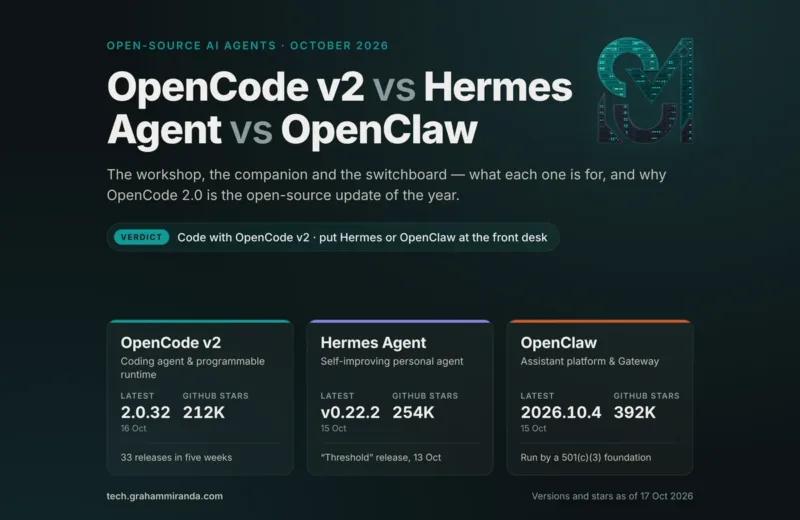
- OpenCode — The open-source standout (172K+ GitHub stars, MIT-licensed). It’s a real terminal agent, not a wrapper, and it’s model-agnostic: bring any model’s API key — Claude, GPT, Gemini, Kimi, GLM, DeepSeek, Qwen — and run it. Feature velocity is high because the community ships fast. This is the move if you want freedom from any single vendor.
- Aider, Cline, Hermes Agent, Goose, Kilo Code — A healthy open-source tier. All free to run; you pay only for the model tokens you route through them.
IDE-native and visual workspaces (where editing meets directing)
- Cursor — The cleanest all-around editor experience. Its Composer model is cheap per output, and Cursor 2.0 can run up to eight agents in parallel. If you want to see your code while you direct, start here.
- Google Antigravity — Google’s agent-first workspace, free for individuals in public preview, defaulting to Gemini 3.5 Flash, with visual parallel-agent management. The interesting wildcard. (Note: the old free Gemini CLI tier of 1,000 requests/day ends June 18, 2026 as Google folds it into the Antigravity CLI — so if you relied on that, today’s the day to switch.)
- GitHub Copilot — The GitHub-native option, strongest if your code already lives there and you want issue-to-PR automation. Pro is $10/month.
- Windsurf / Devin Desktop — Windsurf evolved into Devin Desktop, leaning into autonomous, parallel cloud agents that open pull requests while you do something else.
One technical note worth knowing: nearly every serious agent now supports the Model Context Protocol (MCP), an open standard that lets you plug the same external tools (web search, databases, your project management, etc.) into any agent with the same setup. Learn MCP once, use it everywhere.
The Models: The 2026 Lineup (and When to Use Each)
Your agent is the cockpit; the model is the engine. And mid-2026 has been an absolutely wild stretch for model releases — three of the most important ones below landed within the last few weeks of writing this.
The frontier closed models (top capability, premium price)
- Claude Opus 4.8 (Anthropic) — Shipped May 28, 2026. The reigning quality leader for complex, multi-file, long-context engineering: 88.6% on SWE-bench Verified. Priced at $5 per million input tokens and $25 per million output. This is what I reach for when a mistake would be expensive — architecture, big refactors, anything load-bearing.
- GPT-5.5 (OpenAI) — Neck-and-neck with Opus, and the Terminal-Bench leader. Excellent at producing usable output even when your prompt leaves out edge cases, which makes it great for fast prototyping.
- Gemini 3.1 Pro / 3.5 Flash (Google) — Strong, deeply integrated into Google’s ecosystem and Antigravity, with Flash optimized for speed.
The open-weight surge (the real story of 2026)
This is where it gets fun, and where the savings live. A wave of open-weight models — many from Chinese labs — has gotten genuinely competitive with the frontier, and they’re cheap or free to self-host. Geopolitics is part of the fuel here: recent US export restrictions on top American models abroad have made permissively licensed open models far more strategically attractive worldwide.
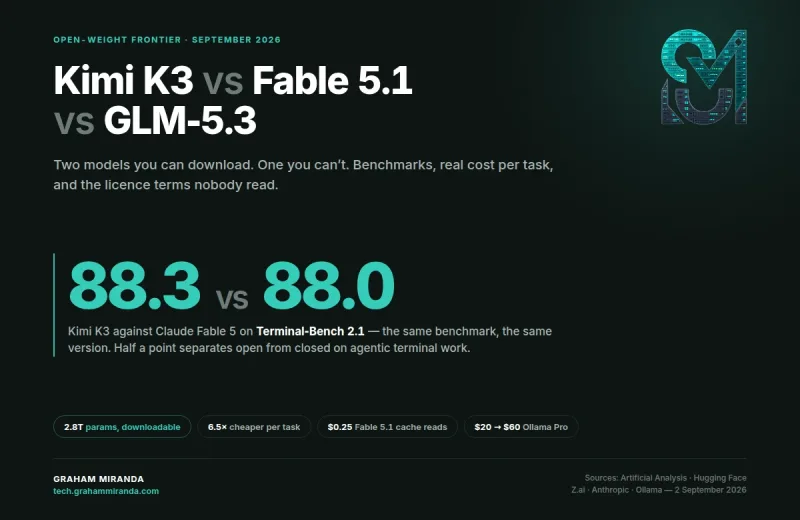
- Kimi K2.7-Code (Moonshot AI) — Released June 12, 2026. An open-weight, coding-first monster: a 1-trillion-parameter Mixture-of-Experts model (32B active per token), a 256K-token context window, multimodal input, and a Modified MIT license that allows commercial use. Moonshot claims roughly 30% lower reasoning-token usage than its predecessor plus double-digit benchmark gains, which matters because tokens are money. It pairs with the terminal-first Kimi Code CLI (plans from $19/month) and runs about $0.95 per million input tokens via API. Built specifically for long-horizon, plan-execute-debug agent loops. A strong pick for very long unattended runs.
- GLM 5.2 (Z.ai, formerly Zhipu AI) — Released June 13, 2026, one day after Kimi. A 744B-parameter MoE (≈40B active) with a usable 1-million-token context window — big enough to feed it an entire repository — and MIT-licensed open weights on Hugging Face. Z.ai claims it edges out GPT-5.5 on some long-horizon coding benchmarks at roughly a sixth of the cost, though note those benchmarks were vendor-reported and not yet independently verified at launch. The killer feature for vibe coders: it ships through an Anthropic-compatible endpoint and the GLM Coding Plan starts around $10/month, so it drops straight into Claude Code, OpenCode, Cline, Roo Code, Goose, and friends. Brilliant for front-end and UI-heavy work, and absurd value for the bulk of your agentic coding.
- DeepSeek V4 (and the cheaper V4-Flash) — The go-to for high-volume, cost-sensitive work where you want decent quality at rock-bottom prices.
- Qwen 3.5 — Excellent performance-per-parameter, especially the smaller variants that run fast on consumer hardware.
Running models yourself: Ollama and Ollama Cloud
If privacy, cost control, or just not depending on anyone’s API appeals to you, Ollama is the “Docker moment for local LLMs”: one command to download and run open models (Llama, Qwen, Mistral, DeepSeek, Gemma, and more) locally, with an OpenAI-compatible API at localhost:11434 that any agent can point to.
The catch with local has always been hardware — frontier-class open models need serious VRAM. That’s exactly what Ollama Cloud solves, and it’s now generally available. It’s managed inference: you run those same large open models on Ollama’s datacenter GPUs with no local GPU required, and — this is the clever part — it exposes the identical HTTP API as your local setup. No code rewrites, no new SDK. You just point at a cloud model and go. Pricing is approachable: a free tier, a Pro tier around $20/month, and a higher Max tier around $100/month, billed by GPU time rather than tokens. Ollama also commits to no logging, no training on your data, and zero retention with its hosting partners — which matters if you’re working on anything sensitive or under GDPR.
The multi-model routing strategy
Here’s the pattern that the best practitioners actually use, and it’s the single biggest cost lever in vibe coding: don’t run everything on the most expensive model. Route by task.
- Use a frontier model (Opus 4.8, GPT-5.5) for the small share of work where a mistake is genuinely costly: architecture, schema design, security-sensitive logic, big refactors.
- Use a cheap, strong open model (GLM 5.2, Kimi K2.7, DeepSeek V4) for the bulk of the grind: feature implementation, boilerplate, UI, tests.
- Use local or Ollama Cloud open models for high-volume, low-stakes inference: classification, summarization, simple edits.
Teams that route this way routinely cut their inference bills by 60–80% with no meaningful quality loss. With a model-agnostic agent like OpenCode, switching is as easy as changing an API key.
The File System That Makes Big Vibe-Coding Projects Possible (AGENTS.md, CLAUDE.md & Friends)
This is the most important section in the article, and — full disclosure — the part the rest of this guide exists to set up. It’s where almost everyone gets burned, myself very much included when I started. So let’s go slow and concrete, because this is the difference between a project that grows for months and one that quietly collapses in week two.
Here’s the brutal reality: AI agents have no memory between sessions. Close the terminal and everything the agent “knew” about your project evaporates. Open a new session tomorrow and it’s a total stranger again — it doesn’t remember your stack, your conventions, the decisions you made last week, or what it was halfway through building. Switch from Claude Code to Cursor, or swap one model for another, and you start from zero a second time. On a tiny project you can re-explain everything in a paragraph. On a large one, this single fact is what kills you: you spend more time re-briefing the agent than building, it contradicts choices you already made, and the codebase drifts into spaghetti.
The fix is the whole game, so I’ll say it plainly: your project’s memory must live in files in the repository, not in the chat. The chat is disposable. The files are permanent. Every session, the agent rebuilds its understanding by reading those files first — and because they’re plain Markdown sitting in your repo, any agent, any model, any tool can read them. You stop re-explaining your project forever and document it once, properly. This is what lets a project survive context resets, model swaps, and tool changes. It’s also, not coincidentally, what lets one person hold a Google-sized ambition: you don’t hold it in your head. You hold it on disk.
Here’s the documentation layer I put at the root of every serious project:
project-root/
├── README.md          # Front door: what it is, why it exists, how to run it
├── AGENTS.md          # Cross-tool AI agent operating instructions (the standard)
├── CLAUDE.md          # Claude Code-specific guidance (thin; imports AGENTS.md)
├── GEMINI.md          # Gemini CLI-specific guidance (thin; imports AGENTS.md)
├── CONVENTIONS.md     # Coding conventions (also auto-loaded by aider)
├── CONTEXT.md         # Long-form project context for humans + LLMs
├── llms.txt           # Machine-readable map of the repo/docs for agents
├── VISION.md          # The "why" and the long-term north star
├── ROADMAP.md         # Where the project is headed: phases and milestones
├── TASKS.md           # Active task list / working backlog (the "cursor")
├── TODO.md            # Loose, quick capture for things not yet planned
├── DECISIONS.md       # Index of architectural decisions (never reopened)
└── CHANGELOG.md       # Human-readable, versioned history of what shipped
That can look like a lot. It isn’t — once you see that these files do three different jobs. Think of them in three layers, from most permanent to most disposable.
Layer 1 — The rules (durable, rarely change)
These define how an agent should behave in your repo. You write them early and edit them occasionally.
AGENTS.mdis the heart of the system and the file that solves your portability problem. It’s the open, tool-agnostic standard for telling any AI coding agent how your project works: the tech stack, how to install and run it, how to run tests and linting, the conventions to follow, and the things to never do. It emerged in 2025 from a collaboration between Sourcegraph, OpenAI, Google, Cursor, and Factory, and it’s now stewarded under the Linux Foundation, adopted by 30+ tools and sitting in 60,000+ repositories. The whole point is portability: write it once and Codex, Cursor, Windsurf, Cline, Copilot, Gemini CLI and more read it natively. Everything shared lives here.CLAUDE.mdis Claude Code’s own native instructions file — and here’s the gotcha that bites everyone, which may be exactly what burned you: as of mid-2026, Claude Code does not automatically readAGENTS.md. It readsCLAUDE.md. If your repo has only anAGENTS.md, Claude Code loads zero project instructions, and it won’t warn you. You just get worse output and wonder why. The fix is dead simple and officially documented: makeCLAUDE.mda thin file that pulls in the shared one with a single line —@AGENTS.md— so Claude reads your universal instructions plus any Claude-only extras. (The other common approach is a symlink:ln -s AGENTS.md CLAUDE.md, which makes the two literally the same file.) One source of truth, no duplication, no drift.GEMINI.mdis the same idea for Google’s Gemini CLI — its tool-specific instructions file. Keep it thin and have it point back toAGENTS.mdas well. The pattern never changes: one shared file for the world, one thin file per tool.CONVENTIONS.mdholds your coding conventions — naming, formatting, patterns, the architectural rules of the road. It’s useful on its own and is the file the aider agent loads into context by convention. Reference it fromAGENTS.mdso every tool inherits the same standards.
The payoff of this layer is the exact thing you wanted: true tool independence. Because the shared rules live in AGENTS.md and each tool just points at it, you can hand the same project to Claude Code today, Cursor tomorrow, and OpenCode next week — and every one works from identical instructions. No re-briefing, no lock-in. That is what portability means in practice.
Layer 2 — The knowledge and the living state (this is the actual memory)
This layer is what the project is and where it stands right now. The “right now” files change every session — they’re the real cure for the amnesia.
README.md— the front door, written for humans first: what the project is, why it exists, how to run it. Every newcomer (and every agent) starts here.CONTEXT.md— long-form background for both humans and LLMs: the domain, the problem you’re solving, key concepts and terminology, the constraints. This is the deep context that doesn’t belong in a terse instructions file but that an agent needs to make good judgment calls.VISION.md— the north star: why this project exists and where it’s headed long-term. It keeps you and the agent pointed at the same goal when you’re buried in a single feature.llms.txt— a small, machine-readable Markdown map pointing agents (and doc-fetching tools) to your most important files with one-line descriptions, so they find the right context fast and burn fewer tokens. Honest caveat: as a public-website SEO tactic,llms.txtis still unproven — the major AI companies haven’t committed to reading it and studies show no measurable ranking benefit yet. But as a repo/docs index for coding agents, it earns its keep.ROADMAP.md— where the project is headed, broken into phases (see the next section) and milestones. Your map of the whole journey.TASKS.md— the single most important file for day-to-day continuity. This is the cursor: what’s done, what’s in progress right now, what’s next, and any blockers. When a fresh session reads this, it knows exactly where to pick up. Keep it terse and current — it’s for fast re-orientation, not prose.TODO.md— loose capture for ideas and small things not yet scheduled. KeepsTASKS.mdfocused on active work while nothing slips through the cracks.DECISIONS.md— an append-only log of the architectural choices you’ve made and why. “We chose Postgres over SQLite because we need concurrent writes.” This is what stops an agent from quietly relitigating settled questions or contradicting a choice three sessions later. Newest on top; never edited, only appended.CHANGELOG.md— a human-readable, versioned record of what actually shipped, in order. It’s both your project history and the fastest way for a returning session to see what changed recently.
Layer 3 — The session (ephemeral, lives only in the chat)
This is the conversation you’re having right now. It’s the only layer that doesn’t persist — and that’s fine, because everything important from it gets written back into Layer 2 before you close. Anything that lives only here is, by definition, about to be forgotten.
How a session actually flows
Put together, the daily rhythm is almost boring — which is the point. A normal session looks like this:
- Open the session. The first thing the agent does is read the rules and the state:
AGENTS.md(viaCLAUDE.md/GEMINI.md), thenROADMAP.md,TASKS.md, andDECISIONS.md. - Re-orient. It reports back: “We’re in Phase 2, the last task was the login flow, next is the auth middleware, no blockers.” You confirm or redirect. Thirty seconds, zero effort, no re-briefing.
- Do one task. It works a single item from
TASKS.md, following the conventions and respecting the locked decisions. - Write the memory back. Before you close, the agent updates
TASKS.md(move the cursor), adds a line toCHANGELOG.md(what shipped), and logs any new choice inDECISIONS.md. - Close. The context window empties — and it doesn’t matter, because nothing of value was in it. It’s all on disk.
Tomorrow you open a fresh session, or switch to a different tool entirely, and step 1 rebuilds the whole context in seconds. That is how the amnesia problem dies, and it’s the entire reason a solo builder can keep a large, multi-month project coherent.
This is “agentic engineering” made concrete. The era of the one mega-prompt is over; the era of strategic decomposition has arrived. You’re not just chatting with an AI — you’re building and running an operating system for your agents, with these documents as the single source of truth. Set it up once, and the day-to-day work feels effortless again while the project quietly scales past anything a single conversation could ever hold.

A Realistic Roadmap: Vibe Coding a Large App, Phase by Phase
So how do you point all of this at something ambitious — say, a real social network or marketplace? You don’t build it all at once. You move through phases, and you only let the agent work one small step at a time within each.
- Phase 0 — Foundation. Set up the repo, the documentation system above, and choose your stack. Get a “hello world” running locally. Lock your big architectural decisions before any features.
- Phase 1 — Architecture & data. Define how the system is shaped: the data model, the major components, how they talk. This is frontier-model work — get it right and everything downstream is easier.
- Phase 2 — Core features. Build the heart of the product end to end until the primary user journey works. (For a social network: accounts, profiles, posting, a feed.)
- Phase 3 — Integrations & auth. Real authentication, external services, persistence, the connective tissue.
- Phase 4 — Interface & polish. The front end, responsive design, internationalization if you need it. Great work for a UI-strong model like GLM 5.2.
- Phase 5 — Hardening. Tests, performance, error handling, and security — the part demos always skip and real products never can.
- Phase 6 — Deployment & operations. Ship it. Set up deployment, monitoring, backups, and the runbooks for when things break.
- Phase 7 — Launch & compliance. Legal pages, public docs, and (if you’re operating somewhere like the EU) the privacy and disclosure requirements that are non-negotiable for a commercial site.
- Phase 8 — Iterate. Now you’re a real product. Fix, improve, and grow, forever.
Notice what this does: it turns an impossible-feeling mountain (“build a social network”) into a long sequence of single, finishable sessions. That’s the whole trick. Massive projects aren’t built by massive prompts. They’re built by a thousand small, well-directed, well-documented steps.
The Pitfalls (a.k.a. Don’t Get a “Vibe Hangover”)
2025 earned a nickname: the year of the vibe hangover. Plenty of teams rushed to replace careful engineering with prompting and slammed straight into reality. Learn from it.
- Security is the big one. A security firm recently built 15 identical apps across five popular vibe-coding tools and found 69 vulnerabilities, six of them critical. AI-generated code is disproportionately prone to security holes. Treat every line of AI output as untrusted until it’s been reviewed and scanned. Never let an agent invent its own auth or handle secrets without your eyes on it.
- Code rot is real. Studies have tracked rising code churn and a multiplying of duplicated code as AI volume climbs. Refactoring discipline matters more, not less. Make the agent clean up after itself.
- The trust gap is healthy. Developer favorability toward AI tools actually fell from 77% in 2023 to about 60% in 2026, even as usage kept climbing. That’s not pessimism — it’s maturity. The industry learned to use the tools without blindly trusting them. You should too.
- Debugging can eat your savings. A meaningful share of developers report spending more time fixing AI code than writing it themselves would have taken — almost always because they accepted output they didn’t understand and skipped tests. The fix is the same as it’s always been: small steps, constant testing, real review.
None of this is a reason to avoid vibe coding. It’s a reason to do it like a professional.
A Smart 2026 Vibe-Coding Stack (My Recommendation)
If you want to skip the analysis paralysis, here’s a concrete setup I’d happily hand to a beginner or run on a serious project.
The lean, near-free starter stack
- Agent: OpenCode (free, open-source, model-agnostic) or Google Antigravity (free in preview).
- Models: GLM 5.2 via the ~$10/month Coding Plan for the bulk of the work, plus Ollama Cloud’s free tier for high-volume odds and ends.
- Method: the documentation-first system above. Non-negotiable.
- Cost: roughly the price of a couple of coffees a month.
The serious-builder stack (what I actually use)
- Primary agent: Claude Code, for raw capability and how programmable it is.
- Architecture model: Claude Opus 4.8 for the load-bearing decisions.
- Workhorse models: GLM 5.2 and Kimi K2.7-Code for the day-to-day grind, routed in via a model-agnostic setup. Kimi especially for very long, unattended autonomous runs thanks to its token efficiency and 256K context.
- Cheap/local layer: Ollama Cloud (Pro) for high-volume, low-stakes inference.
- Glue: MCP for tools, and a rigorous docs-first project structure tying it all together.
Whatever you pick, remember the meta-lesson: the tool you choose matters less than the workflow you build around it. A disciplined builder on free tools will out-ship a sloppy one on the most expensive stack money can buy.
Frequently Asked Questions
Can a complete non-coder actually vibe code something real in 2026? Yes — that’s the whole point of where the tools have landed. Non-engineers are shipping working software by specifying intent and evaluating results. You still need judgment, patience, and a willingness to learn what the AI is doing at a high level, but you do not need to write code by hand.
Is vibe coding still relevant, or is “agentic engineering” replacing it? Same thing, better name. “Agentic engineering” is just vibe coding done with discipline — orchestrating agents, defining quality gates, and keeping human oversight at the critical points. Most people still say “vibe coding” in conversation; the practice underneath has simply matured.
What’s the best AI model for coding right now? For top quality, Claude Opus 4.8 (88.6% on SWE-bench Verified) and GPT-5.5 are the frontier leaders. For the best value, open-weight models like GLM 5.2 and Kimi K2.7-Code are remarkably close at a fraction of the cost. The smart answer is to use both — frontier for the hard 10%, cheap-and-strong for the other 90%.
How can I vibe code for free (or nearly free)? Use a free, open-source agent like OpenCode, pair it with Ollama Cloud’s free tier or a sub-$15 plan like GLM’s Coding Plan or Kimi Code, and run open-weight models. Google Antigravity is also free for individuals in preview. You can do a serious amount of building for the price of a sandwich a month.
Can I really build a startup or a large app this way? A real, multi-feature, production-grade product — yes, and people do it solo all the time. A literal clone of Google or Facebook at full scale — no, that’s thousands of engineers and planet-scale infrastructure. The realistic and genuinely exciting target is an ambitious product built to production quality by one person or a tiny team, which used to be impossible.
Is AI-generated code secure enough to ship? Not by default. AI code is disproportionately prone to vulnerabilities, so you must review and scan it, never let agents handle auth or secrets unsupervised, and treat all output as untrusted until verified. Done with that discipline, it’s perfectly shippable. Done blindly, it’s a breach waiting to happen.
Claude Code vs Cursor — which should a beginner pick? If you want the most capable agent and are comfortable in a terminal, Claude Code. If you want to see your code in a polished editor while you direct the AI, Cursor. Many people use both. Either is a fine place to start; don’t agonize over it.
What is Ollama Cloud and why would I use it? Ollama Cloud runs large open-source models on managed datacenter GPUs so you don’t need expensive hardware, while exposing the exact same API as running Ollama locally — so it’s a drop-in. Use it for privacy-friendly, cost-controlled inference, especially high-volume work, with a free tier to start.
What’s the difference between AGENTS.md and CLAUDE.md — and does Claude Code read AGENTS.md? AGENTS.md is the open, cross-tool standard (stewarded under the Linux Foundation and read by Codex, Cursor, Windsurf, Cline, Gemini CLI and 30+ others); CLAUDE.md is Claude Code’s own native instructions file. The catch: as of mid-2026, Claude Code does not automatically read AGENTS.md — if a repo has only that file, Claude Code loads no project instructions and gives no warning. The fix is to keep AGENTS.md as your shared source of truth and make CLAUDE.md a thin file that imports it with a single @AGENTS.md line (or symlink the two with ln -s AGENTS.md CLAUDE.md). One file for the world, one thin file per tool.
How do I stop an AI agent from forgetting my project between sessions? Put the project’s memory in files in the repo, not in the chat. Keep an AGENTS.md for the rules, a ROADMAP.md for the plan, a TASKS.md for the current cursor (done / in-progress / next), and a DECISIONS.md for locked choices. Have the agent read those at the start of every session and write updates back at the end. Because it’s all plain Markdown on disk, the context survives context resets, model swaps, and switching tools entirely.
Where to Go From Here
Vibe coding in 2026 is not a gimmick and it’s not a shortcut for the lazy. It’s a real, powerful, and increasingly standard way to build software — one that hands enormous leverage to anyone willing to learn how to direct it well. The barrier to creating software has collapsed. The new barrier is taste, judgment, and discipline.
So start small today. Pick one agent, point it at a real project, and run the loop: describe, review, iterate, test. Then, when you’re ready to go bigger, set up the documentation-first system so your project has a memory and your agents can scale with you. The gap between “I have an idea” and “it’s live on the internet” has never been smaller. The only question left is what you’re going to build.
Building something ambitious and want the exact documentation-and-prompt system that makes large-scale vibe coding actually work? That’s a whole guide of its own — and a great next read on this site.