 English
 Deutsch
 Español
 Italiano
 Français
 Português do Brasil
 Tiếng Việt
 ไทย
 Bahasa Indonesia
 Русский
 العربية
 हिन्दी

An AI coding agent fresh out of the box is like a brilliant new hire on their first morning. It can reason, write code and run commands, but it doesn’t know how your team does things, and it has no keys to your systems. Agent skills and MCP servers fill exactly those two gaps. A skill is a written playbook the agent takes off the shelf when a task needs it. An MCP server is a set of keys: a small program that lets the agent use something it couldn’t reach before, such as your GitHub issues, a real browser or up-to-date documentation.
This guide explains both in plain English, then shows you how to install, update, remove and troubleshoot them in OpenCode, Claude Code, Codex, Gemini CLI, Cursor, GitHub Copilot and Hermes Agent. Most of it works the same way everywhere, because both are open standards now. On the skills side, one small command-line tool ties everything together, npx skills, and I’ll walk through it command by command.
I’m not a developer by training. I run a small IT company in Germany and build software with AI agents, so I learned most of this the way you probably will: by breaking things. Part 6 is built from my own terminal sessions on a Mac and a Raspberry Pi, including the time the tool told me all my skills were up to date when it hadn’t managed to check a single one.
Everything below was checked against the official documentation of each agent and, for the skills CLI, against the published source code of versions 1.5.18 to 1.8.1, on 15 November 2026. These tools change weekly: the CLI shipped two releases this week alone, and OpenCode reached 2.3.0 on 13 November. Version numbers and behaviours are flagged where they’re likely to move. Check them before you rely on them.
Disclosure: No company mentioned in this article sponsored, reviewed or approved it, and it contains no affiliate links. Products are named in the text only; the images use my own logos.
TL;DR — Agent Skills and MCP Servers in Ten Bullets
- A skill is a folder with a
SKILL.mdfile: a name and a description at the top, instructions underneath, and optional scripts or reference files. Agents read only the description until a task needs the skill, so an unused skill costs roughly 100 tokens of the agent’s attention. - An MCP server gives the agent new tools, such as GitHub, a browser or live documentation. Tool descriptions can ride along with every request, so connect only the servers you use. Claude Code now defers them until needed, and OpenCode groups them by server.
- The rule of thumb: house rules for every task go in
AGENTS.md; know-how needed for some tasks becomes a skill; live access to a system needs an MCP server; and if a good command-line tool already exists, a skill that teaches the agent that tool is often cheaper than a server. - Both are open standards under the Linux Foundation’s Agentic AI Foundation: MCP since December 2025, Agent Skills since 22 October 2026. A skill written for one agent usually works in the others.
.agents/skillsis the shared folder. Codex, OpenCode, Cursor, Gemini CLI and GitHub Copilot all read.agents/skillsin a project and~/.agents/skillsin your home folder. Claude Code reads only.claude/skills, and Hermes Agent reads~/.hermes/skillsplus any folders you add.npx skillsis npm for skills. Vercel’s open-source CLI (version 1.8.1) installs skills into 79 agents:npx skills add owner/repo,-gfor every project,-a opencode -a claude-codeto pick agents,npx skills lsto list andnpx skills removeto uninstall.- To see whether your skills are current, run
npx skills@latest check. Since version 1.7.5 (2 November 2026) it only reports;npx skills updateinstalls. In earlier versions,checkquietly ran the update. - Never trust the green tick on its own. When GitHub’s limit of 60 anonymous requests an hour blocked every check on my Mac, the CLI still printed “All global skills are up to date”. Run
gh auth loginor setGITHUB_TOKEN, and read the ✗ lines. - Never use
sudowith skills or agents, and don’t run the CLI from your home folder. Root has a separate home, sosudocreates a second, invisible skill store; and from~the CLI mistakes your home folder for a project. - Treat skills and MCP servers like software you install. A February 2026 audit of 3,984 public skills found security flaws in 36.82% of them and confirmed malicious payloads in 76. Read before you install, prefer skills from the tool’s own makers, pin versions, and keep risky tools on “ask”.
The Four Building Blocks at a Glance
| Building block | What it is, in one line | Think of it as | When the agent reads it | What it costs | Example |
|---|---|---|---|---|---|
| AGENTS.md (CLAUDE.md in Claude Code) | A Markdown file of house rules for one project | The staff handbook | At the start of every session, in full | Its whole length, in every request | “Use British spelling. Run the tests before you say you’re done.” |
| Skill | A folder with a SKILL.md recipe, plus optional scripts and references |
A recipe card in a binder | Name and description at the start; the full recipe only when a task needs it | About 100 tokens per skill until it’s used | “How we write release notes” |
| MCP server | A small program that gives the agent new tools | A set of keys and adapters | The tool list at the start (unless your agent defers it); individual tools when called | Tool descriptions, often in every request | GitHub issues, a real browser, current library docs |
| Plugin or extension | A bundle of skills, MCP servers and sometimes hooks | A welcome kit | Depends on what’s inside | The sum of its parts | Superpowers, a vendor’s starter kit |
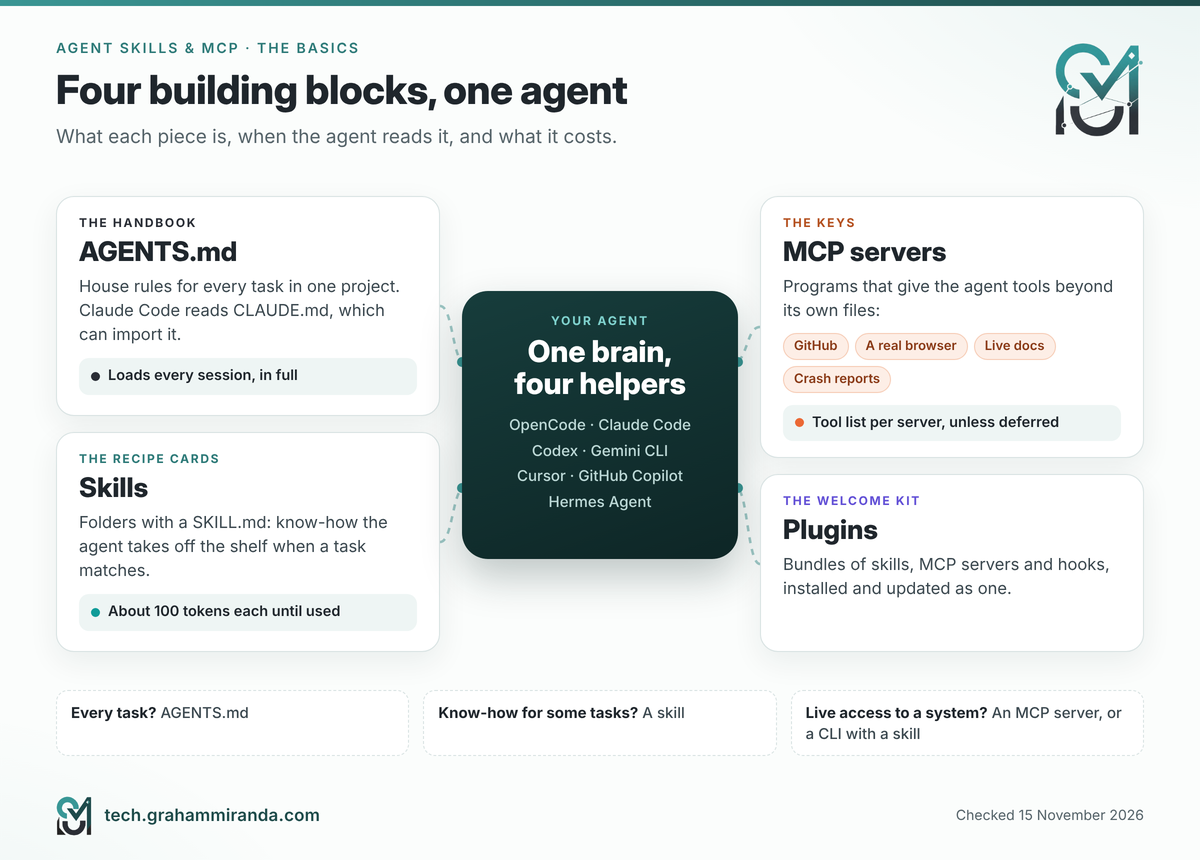
Table of Contents
- Part 1 — Agent Skills and MCP Servers in Plain English
- Part 2 — Skill, MCP Server or AGENTS.md? The Five-Question Test
- Part 3 — Where Every Agent Looks for Skills
- Part 4 — The
skillsCLI: npm for Agent Skills, Step by Step - Part 5 — “My Skill Pack Was Updated Two Days Ago. How Do I Know I Have It?”
- Part 6 — Five Real Problems From My Mac and Raspberry Pi, and How to Fix Them
- Part 7 — MCP Servers Without the Jargon
- Part 8 — Add an MCP Server in Six Agents: Copy-Paste Recipes
- Part 9 — Plugins: Skills and MCP Servers in One Box
- Part 10 — Write Your First Skill in Ten Minutes
- Part 11 — Staying Safe: Skills and Servers Are Software
- Part 12 — A Two-Minute Weekly Routine
- Part 13 — Which Setup Should You Choose? Five Scenarios
- Frequently Asked Questions
- The Bottom Line
Part 1 — Agent Skills and MCP Servers in Plain English
The new-hire picture
Imagine hiring someone brilliant. On day one you’d give them three things: a short handbook with the rules everyone follows, a binder of recipes for the jobs your team does in its own particular way, and a set of keys and badges so they can get into the systems they need. You’d also hand some people a welcome kit that bundles a few recipes and keys together.
AI agents need exactly the same, and each piece now has a standard name:
- The handbook is
AGENTS.md(Claude Code calls its versionCLAUDE.md). - The recipes are skills.
- The keys are MCP servers.
- The welcome kits are plugins, called extensions in some agents.
The rest of this guide is about the recipes and the keys, because that’s where most of the confusion lives.
What a skill is
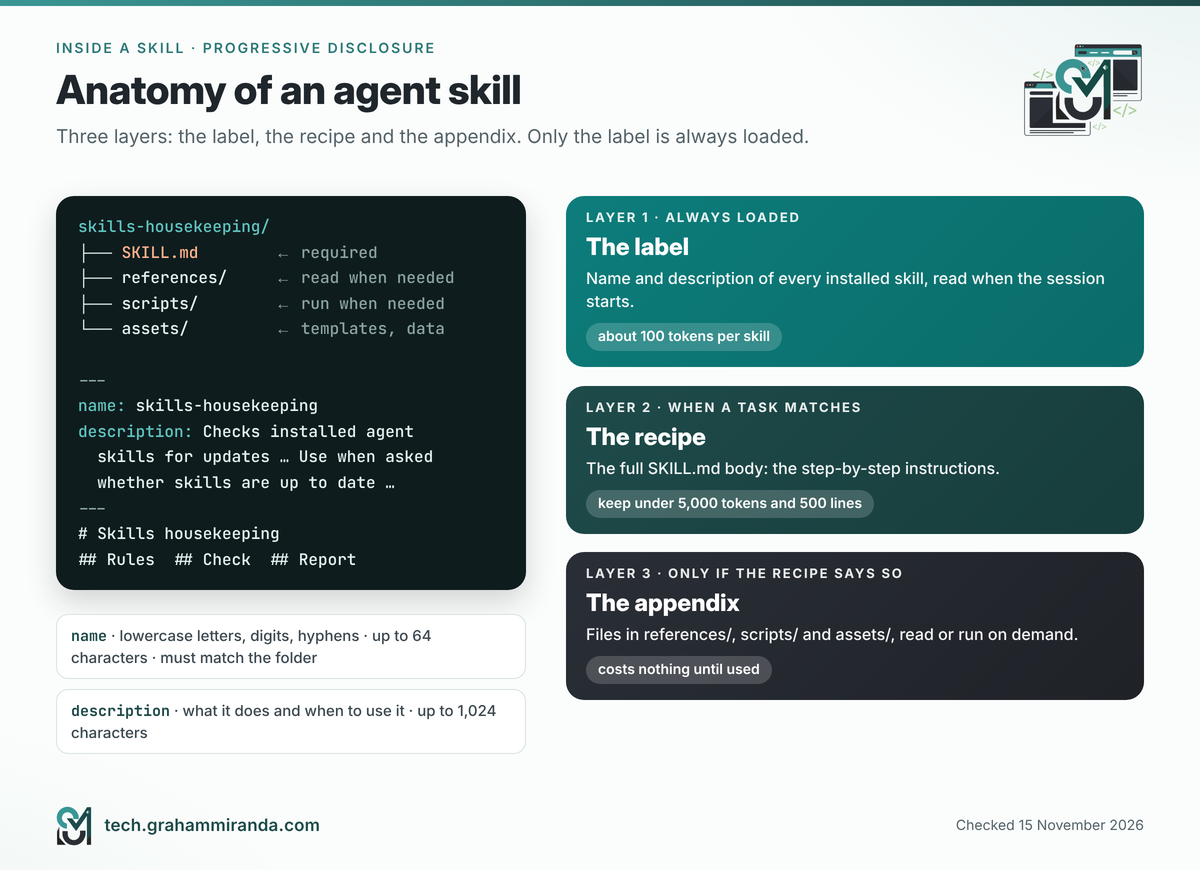
A skill is a folder. Inside it sits one required file, SKILL.md, and optionally anything else the job needs:
release-notes/
├── SKILL.md          ← required: name, description, instructions
├── references/       ← optional: longer documents, read only when needed
├── scripts/          ← optional: code the agent can run
└── assets/           ← optional: templates, images, data files
The SKILL.md file has a short header between two --- lines (that header is called front matter), followed by plain instructions:
---
name: release-notes
description: Writes App Store "What's New" notes from recent commits. Use when asked for release notes, a changelog or "what's new" text.
---

# Release notes

1. Read the commits since the last git tag.
2. Keep only changes a user would notice.
3. Write three to five short bullets in plain English, under 400 characters in total.
The open standard asks for two fields. The name may use only lowercase letters, numbers and hyphens, can be at most 64 characters long, and must match the folder’s name. The description can be up to 1,024 characters and should say what the skill does and when to use it, because the description is how the agent decides whether to open the skill at all.
Why you can install dozens of skills: the three-layer trick
Skills load in layers, which the standard calls progressive disclosure. Think of a bookshelf:
- The back covers. When a session starts, the agent reads only each skill’s name and description. The specification budgets about 100 tokens for this per skill. (A token is roughly a short word or part of one; it’s the unit models count their working memory in.)
- The chapter. When a task matches a description, the agent reads that skill’s full
SKILL.md. The standard recommends keeping it under 5,000 tokens and 500 lines. - The appendix. Reference files and scripts load only if the instructions point to them.
That’s why a hundred unused skills cost far less than one long rulebook. It isn’t free, though: descriptions add up, and agents cap them. Codex limits its initial skill list to 2% of the model’s working memory (8,000 characters if it can’t tell the size), and Claude Code cuts each skill’s listing text at 1,536 characters. Install what you’ll use.
What an MCP server is
MCP, the Model Context Protocol, is an open standard for connecting AI agents to tools and data. Anthropic introduced it in November 2024 and handed it to the Linux Foundation’s new Agentic AI Foundation in December 2025, alongside OpenAI’s AGENTS.md and Block’s goose.
An MCP server is a small program that says to your agent: “here are the tools I offer”. A GitHub server might offer create_issue and search_code; a browser server offers navigate and take_screenshot; a documentation server offers query_docs. Your agent is the MCP client: it shows the model the list, and when the model wants to use a tool, the agent checks your permissions, asks the server to run it, and passes the result back.
Servers come in two kinds:
- Local servers run on your own computer. The agent starts them with a command such as
npx @playwright/mcp@latestand talks to them through the program’s input and output (the technical name is stdio). - Remote servers run on the provider’s computers. You connect with a web address, such as
https://mcp.context7.com/mcp, and usually sign in through your browser or paste an API key. The technical name for the connection is Streamable HTTP.
Here’s the catch. Every tool comes with a name, a description and a list of parameters, written for the model to read. Unless your agent defers them, those descriptions travel with every request, and twenty servers with ten tools each make every answer slower, more expensive and less focused. Part 7 shows what each agent does about it.
AGENTS.md and plugins, briefly
AGENTS.md is a plain Markdown file in your project’s root folder that the agent reads at the start of every session: the project’s purpose, its commands, its non-negotiables. OpenCode, Codex, Cursor and GitHub Copilot read it directly. Claude Code reads CLAUDE.md instead, and its documentation suggests a CLAUDE.md that simply imports the other file with a line reading @AGENTS.md. Because it’s loaded every time, keep it short and move anything task-specific into skills.
Plugins bundle the other pieces. A Claude Code plugin can contain skills, subagents, hooks (scripts that run on events), and MCP and LSP servers. Codex, Cursor, GitHub Copilot CLI and Hermes Agent have plugins too, and Gemini CLI calls them extensions. Part 9 covers them.
A pocket glossary
| Word | What it means here |
|---|---|
| Agent (or harness) | The program you talk to: OpenCode, Claude Code, Codex and so on. It runs the model, reads files and calls tools |
| Model | The AI that does the thinking, such as GLM, Claude or GPT |
| Context window | The model’s working memory for one request. Everything you load competes for it |
| Token | The unit models count text in; roughly a short word or part of one |
| Skill | A folder with a SKILL.md file that teaches the agent one job |
| Front matter | The header at the top of SKILL.md, between two --- lines |
| MCP server | A program that offers the agent tools through the Model Context Protocol |
| Tool | One action an MCP server offers, such as create_issue |
| stdio / Streamable HTTP | How the agent talks to a local server and a remote server |
| OAuth | The “Sign in with…” flow in your browser that gives the agent a token without you pasting a password |
| Project scope / global scope | Installed for one project only, or for every project on your computer |
| Lock file | A receipt listing what you installed, where from, and a fingerprint of each skill |
| Symlink | A shortcut to a folder. The skills CLI keeps one real copy and links agents to it |
Part 2 — Skill, MCP Server or AGENTS.md? The Five-Question Test
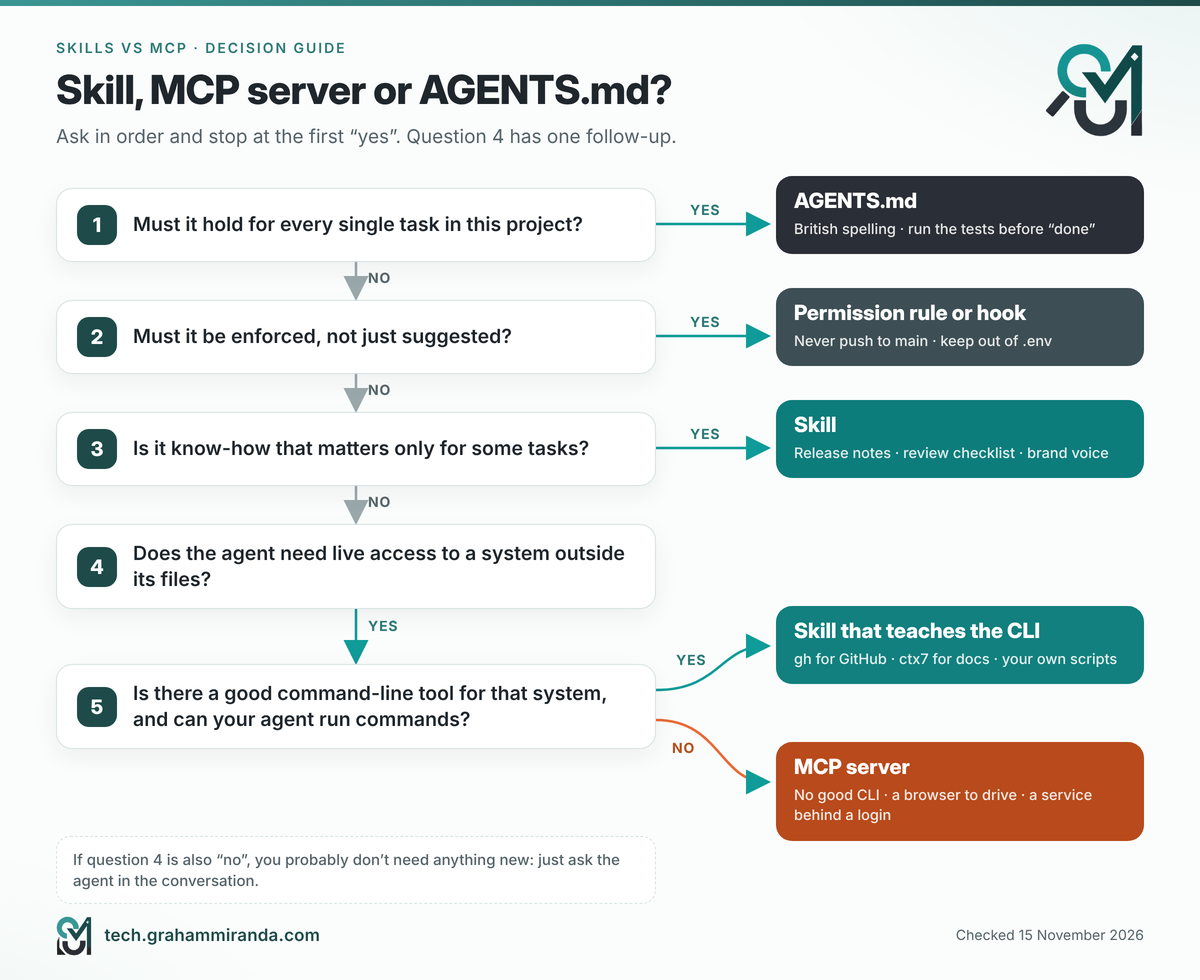
When you want an agent to do something better, ask these questions in order and stop at the first “yes”. Question 4 is the only one with a follow-up:
- Must it hold for every single task in this project? Put it in
AGENTS.md. “Use British spelling” and “run the tests before saying done” belong here. - Must it be enforced, not just suggested? Use a permission rule or a hook. Skills and
AGENTS.mdare instructions, and a model can ignore instructions. “Never push to main” needs adenyrule. - Is it know-how that matters only for some tasks? Write or install a skill. Release routines, review checklists, your brand voice and your test-first workflow are all skills.
- Does the agent need live access to a system outside its files? Your crash reports behind a login, a browser it can drive, a project-management app. If so, ask question 5 before you reach for a server.
- Is there already a good command-line tool for that system? If yes, a skill that teaches the agent that tool usually beats a server: the agent already knows how to run commands, a CLI costs nothing until it’s used, and its output can be filtered before it reaches the model. If there’s no good CLI, if your agent can’t run commands, or if the job is interactive (like driving a browser), add an MCP server.
Here’s the test applied to ten everyday wishes:
| You want the agent to… | Use | Why |
|---|---|---|
| Always use British spelling | AGENTS.md |
Applies to every task |
| Never push to the main branch | A permission rule | It must be enforced, not suggested |
| Write release notes the way you like them | A skill | Know-how, needed occasionally |
| Follow a strict test-first workflow | A skill (Superpowers has one) | A procedure for some tasks |
| Read and file GitHub issues | A skill that teaches gh, or GitHub’s MCP server |
gh is cheaper; the server suits agents that can’t run commands |
| Look up the current docs for a library | An MCP server (Context7) or its CLI with a skill (ctx7) |
Live data either way |
| Click through your web app and take screenshots | An MCP server (Playwright) | It needs a running browser the agent can drive |
| Check last night’s crashes | An MCP server (Sentry) | Live data behind a login |
| Build a PDF report from your template | A skill with a script and the template in assets/ |
A procedure plus a bundled tool |
Keep away from your .env files |
A permission rule | It must be enforced |
Skills and MCP servers aren’t rivals. Some of the best setups pair them: a skill explains when and how to use a server’s tools, and the server does the work. Codex even lets a skill declare the MCP servers it depends on, in an optional agents/openai.yaml file.
Part 3 — Where Every Agent Looks for Skills
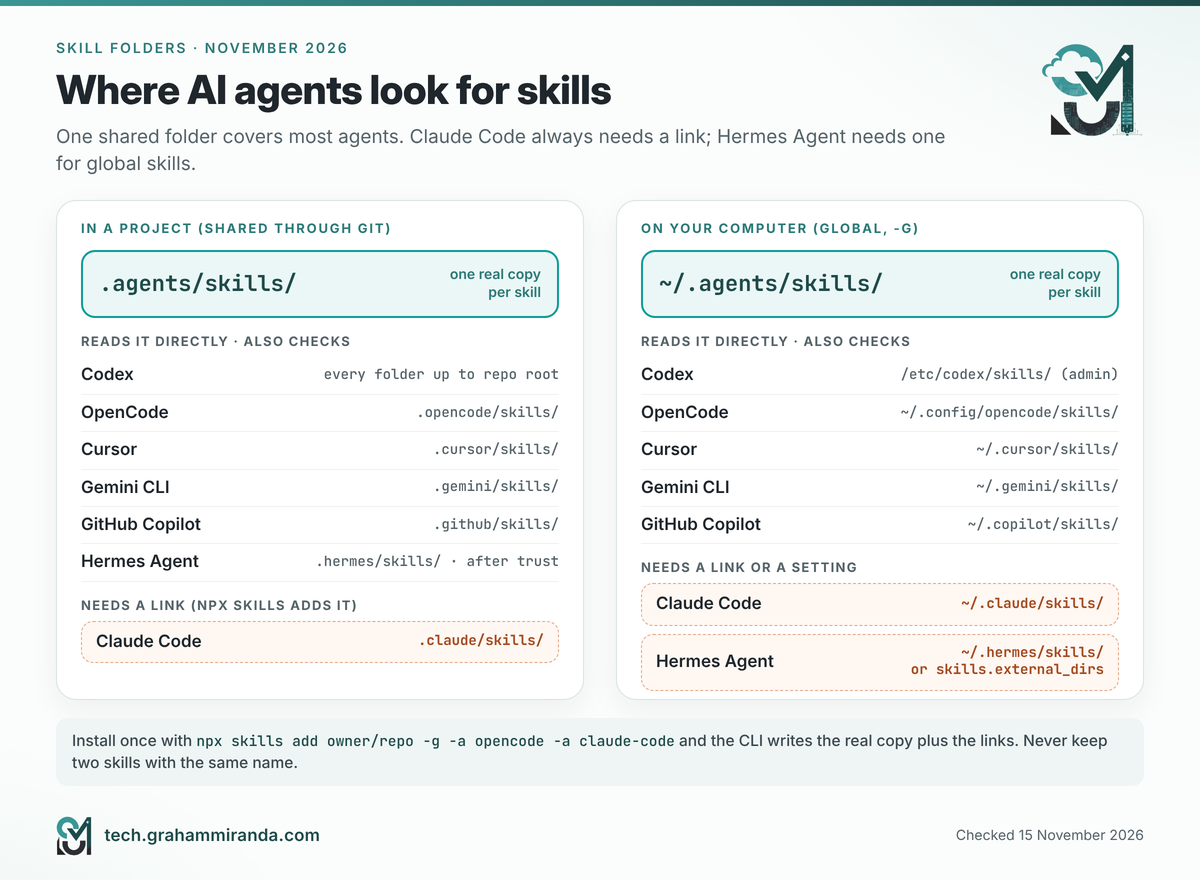
Every agent looks in two kinds of place. Project folders live inside your repository, so the skills travel with the code and your teammates get them too. Personal folders live in your home folder and apply to every project on your computer. Most tools call personal installs global.
In 2026 the agents converged on one shared location: .agents/skills in a project and ~/.agents/skills in your home folder. Put a skill there and most agents find it without any extra work.
| Agent | Project folders | Personal folders | Call a skill yourself | Worth knowing |
|---|---|---|---|---|
| OpenCode | .opencode/skills, .agents/skills, .claude/skills |
~/.config/opencode/skills, ~/.agents/skills, ~/.claude/skills |
Mention @skill-id in your prompt |
The ID is the folder’s name. Gate skills with the skill permission |
| Claude Code | .claude/skills |
~/.claude/skills |
/skill-name |
Doesn’t read .agents/skills. Plugin skills appear as /plugin-name:skill-name |
| Codex | .agents/skills, in every folder from where you start up to the repository root |
~/.agents/skills, plus /etc/codex/skills for administrators |
$skill-name, or /skills |
Ships with a built-in $skill-installer |
| Gemini CLI | .agents/skills, .gemini/skills |
~/.agents/skills, ~/.gemini/skills |
/skills list; the model asks your permission before activating one |
.agents/skills wins when two skills share a name |
| Cursor | .agents/skills, .cursor/skills (and reads .claude/skills and .codex/skills) |
~/.agents/skills, ~/.cursor/skills |
/skill-name |
A paths field limits a skill to matching files |
| GitHub Copilot | .github/skills, .agents/skills, .claude/skills |
~/.copilot/skills, ~/.agents/skills |
Loads skills when relevant | Works in Copilot CLI, the cloud agent and agent mode in VS Code and JetBrains |
| Hermes Agent | .hermes/skills, .agents/skills, after you run hermes skills trust |
~/.hermes/skills, plus any folders listed in skills.external_dirs |
/skill-name, and up to five in a row |
Scans every hub install for malicious content |
Paths from each agent’s documentation on 15 November 2026. Agents add locations regularly; check your agent’s skills page if something doesn’t show up.
Three details that save confusion
- Claude Code is the exception. It reads only
.claude/skillsand~/.claude/skills. The skills CLI handles this for you by creating a link from Claude Code’s folder to the shared copy. If you copy skills by hand, you’ll need to put them (or a symlink) in Claude Code’s folder yourself. - Hermes Agent keeps its own library. Its primary folder is
~/.hermes/skills. To make it read the shared folder too, add it in~/.hermes/config.yaml:
yaml
  skills:
    external_dirs:
      - ~/.agents/skills
Or install with the skills CLI and include -a hermes-agent. Pick one approach, not both, or you’ll have every skill twice.
– Duplicate names cause quiet surprises. Each agent has its own rule for which copy wins. OpenCode registers its folders in a fixed order and the last one wins, with your project’s .opencode/skills last of all. Claude Code does the opposite: a personal skill beats a project skill with the same name. Gemini CLI prefers workspace over user and .agents over .gemini, and Codex simply shows both. The fix is boring and reliable: don’t keep two skills with the same name.
OpenCode has two extras worth knowing. A single Markdown file at the top of a skills folder (such as skills/review.md) also counts as a skill, and a skills array in opencode.jsonc can add extra folders or even a web catalogue of skills. My OpenCode guide covers its skill permissions in more depth.
Part 4 — The skills CLI: npm for Agent Skills, Step by Step
You can install skills by copying folders around, and for one or two that’s fine. Past that, you want a package manager: something that knows where each agent looks, keeps one copy instead of five, remembers where every skill came from, and can tell you when there’s a newer version. That’s what skills does. It’s an open-source (MIT) command-line tool from Vercel Labs, you run it with npx skills, and its directory of public skills lives at skills.sh.
The facts that matter on 15 November 2026:
- Version 1.8.1, released on 11 November. It moves fast: 1.7.5 to 1.8.1 took nine days.
- It needs Node.js 22.20 or later.
- It supports 79 agents, including OpenCode, Claude Code, Codex, Cursor, Gemini CLI, GitHub Copilot and Hermes Agent.
- It installs from GitHub (
owner/repo), GitLab, Azure Repos, any Git address, a local folder, or a direct download link to aSKILL.mdor an archive.
Step 0 — Check Node.js, and always ask for the latest version
node --version # needs v22.20.0 or later
If that prints an older version or “command not found”, install the current LTS release from nodejs.org. On a Mac with Homebrew, brew install node works too. On a Raspberry Pi, the version in the operating system’s own package list is often too old, so use the installers linked from that same page.
Then make one habit automatic: type npx skills@latest rather than plain npx skills for anything that checks or updates. Plain npx can reuse a copy it downloaded weeks ago, and with this tool, which version you run changes what the commands do (Part 5 explains the biggest example).
Step 1 — Look before you install
npx skills@latest add vercel-labs/agent-skills --list
--list shows every skill in the repository with its description and installs nothing. Then open the repository in your browser and read the SKILL.md of anything you’re about to install, plus any scripts beside it. On skills.sh, each skill’s page also shows security audit results (Part 11).
Step 2 — Install a skill for the agents you use
# One skill, for OpenCode and Claude Code, in the current project
npx skills add vercel-labs/agent-skills --skill web-design-guidelines -a opencode -a claude-code

# The same skill for every project on this computer
npx skills add vercel-labs/agent-skills --skill web-design-guidelines -g -a opencode -a claude-code

# Pin a release tag or a full commit, so updates are deliberate
npx skills add owner/[email protected] --skill my-skill
Leave out --skill and -a and the CLI asks you interactively: which skills, which agents, and whether to link or copy. Here’s where everything lands:
| Scope | The one real copy | Links for agents with their own folder | The record of what you installed |
|---|---|---|---|
| Project (the default) | ./.agents/skills/<name> |
e.g. ./.claude/skills/<name> for Claude Code |
./skills-lock.json |
Global (-g) |
~/.agents/skills/<name> |
e.g. ~/.claude/skills/<name>, ~/.hermes/skills/<name> |
~/.agents/.skill-lock.json |
The CLI keeps one real copy in .agents/skills, which most agents read directly, and creates links (symlinks, essentially shortcuts) for agents that look somewhere else. One copy means one update. If your system doesn’t handle symlinks well, which can happen on Windows, add --copy to get independent copies instead.
Step 3 — See what’s installed
npx skills ls              # this project's skills
npx skills ls -g           # your global skills
npx skills ls -a opencode  # only what OpenCode gets
npx skills ls --json       # machine-readable, for scripts
For project skills, current versions also show a status: tracked (matches the lock file), modified (you or the agent edited it), untracked (no lock entry, such as a skill you wrote by hand) or missing (in the lock file but not on disk).
Step 4 — Find skills
npx skills find                    # interactive search
npx skills find seo                # search by keyword
npx skills find react --owner vercel   # only one organisation's repositories
Or browse skills.sh, which ranks skills by installs and groups them by topic. The most-installed skill there today is find-skills from Vercel’s own repository, which teaches your agent to search for skills itself. Install counts change daily, so treat the ranking as a hint, not a review.
Step 5 — Try a skill without installing it
npx skills use vercel-labs/agent-skills@web-design-guidelines
This prints a ready-made prompt for that skill, which you can pipe or paste into an agent on the same computer. Add --agent claude-code and the CLI starts Claude Code with the skill loaded. It’s a good way to test a skill before it becomes part of your setup.
Step 6 — Remove skills
npx skills remove web-design-guidelines            # from this project
npx skills rm --global web-design-guidelines       # from your global skills
npx skills remove --agent claude-code my-skill     # from one agent only
npx skills remove vercel-labs/agent-skills         # everything from that source
npx skills remove                                  # pick from a list
npx skills remove --all removes every skill recorded in the lock file and skips folders it didn’t install, such as skills you wrote yourself, so it won’t delete your own work.
Step 7 — Make your own
npx skills init my-skill creates my-skill/SKILL.md from a template. Part 10 walks through a complete example.
The whole tool on one card
| I want to… | Command |
|---|---|
| See what a repository offers | npx skills@latest add owner/repo --list |
| Install one skill into this project | npx skills add owner/repo --skill name |
| Install for every project | add -g |
| Choose the agents | add -a opencode -a claude-code (or --agent '*' for all) |
| Install without any questions | add -y |
| Pin a version | npx skills add owner/[email protected] --skill name |
| List installed skills | npx skills ls · npx skills ls -g |
| Search | npx skills find keyword |
| Check for updates (read-only) | npx skills@latest check · add -g or -p |
| Install updates | npx skills update · -g · -p · -y · or name the skills |
| Remove | npx skills remove name · add -g for global |
| Restore a project’s skills from its lock file | npx skills install |
| Start a new skill | npx skills init name |
Commands for skills 1.8.1. npx skills install (an alias of experimental_install) and the experimental_sync command for skills shipped inside npm packages are marked experimental and may change.
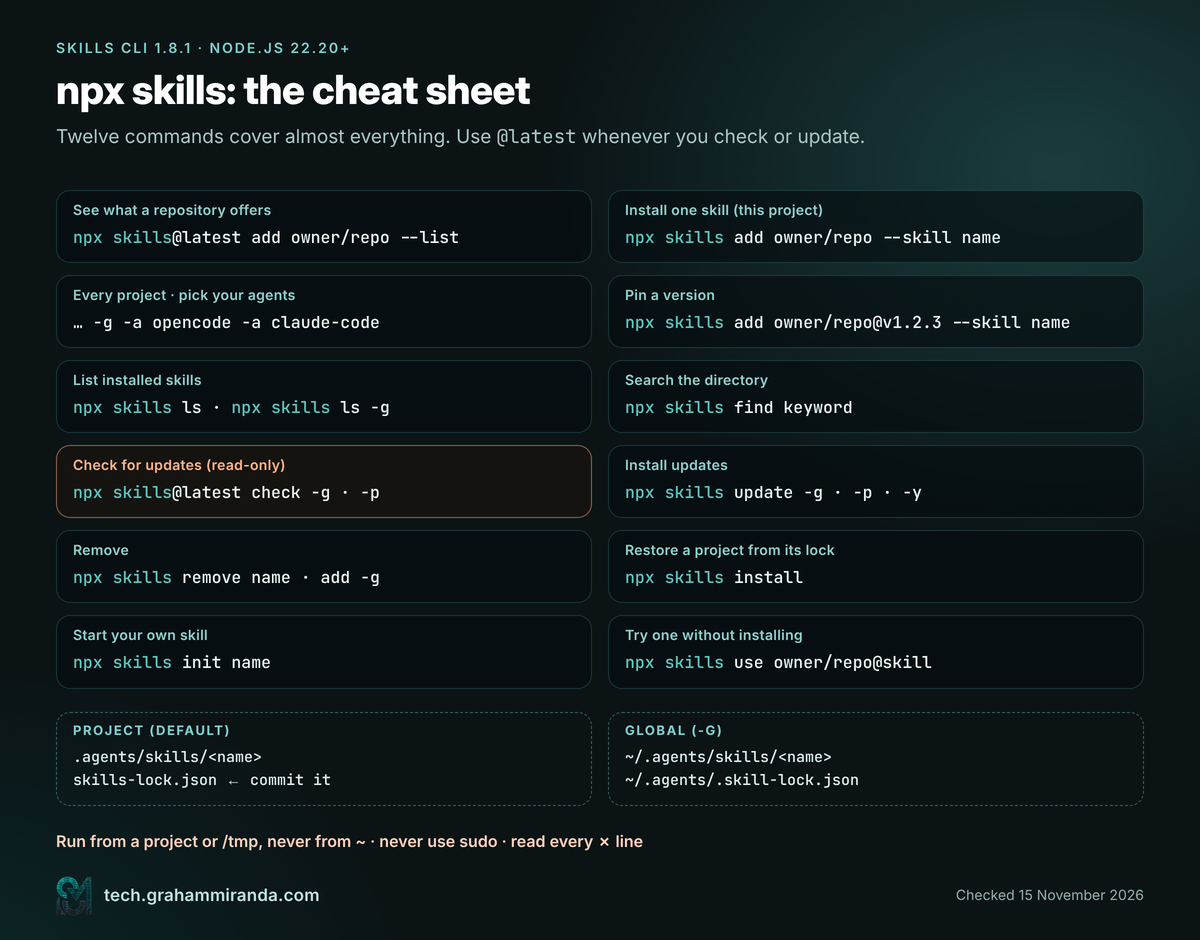
--list before you install, and @latest whenever you check or update.What’s a lock file, and should I commit it?
A lock file is a receipt. For every skill it records where it came from and a fingerprint of its folder (technically a hash: a short code that changes whenever any file in the folder changes). The CLI keeps two kinds:
skills-lock.jsonin a project. Commit it to Git. On another computer, or for a teammate,npx skills installrestores exactly the same skills, and--frozen-lockfile(the default in CI) refuses to continue if anything differs. That makes a project’s skills reproducible, likepackage-lock.jsondoes for code.~/.agents/.skill-lock.jsonfor your global skills. It belongs to your user account (or lives at$XDG_STATE_HOME/skills/.skill-lock.jsonif you’ve set that variable). Don’t edit it by hand, and note that every user on a computer has their own, which matters in Part 6.
Telemetry, briefly
The CLI sends anonymous usage data. According to its documentation, GitHub repository and skill names are included only when GitHub confirms the repository is public; other kinds of source may be named too. To switch it off, add export DISABLE_TELEMETRY=1 (or DO_NOT_TRACK=1) to your shell profile. That also switches off the security-audit lookups the CLI makes for public skills, so decide which you value more.
Other installers you’ll meet
The skills CLI isn’t the only way in. Several agents and tools have their own installers, and they all follow the same open standard:
| Tool | Example | Good to know |
|---|---|---|
GitHub CLI (gh skill, version 2.90 or later, in preview) |
gh skill install owner/repo skill-name --agent claude-code |
gh skill preview shows a skill before you install it; --pin locks a version |
| Hermes Agent | hermes skills install <identifier> |
Its hub includes skills.sh, and every install is security-scanned |
| Gemini CLI | gemini skills install <git-url> |
--scope workspace for one project; asks for consent unless you pass --consent |
| Codex | $skill-installer <name> |
A built-in system skill |
| Claude Code | /plugin install name@marketplace |
Plugins bundle skills with MCP servers and hooks (Part 9) |
One rule prevents most headaches: update a skill with the same tool you installed it with. Each installer keeps its own records, and none of them knows what the others did.
Part 5 — “My Skill Pack Was Updated Two Days Ago. How Do I Know I Have It?”
That was my exact question when Superpowers, the popular skill library by Jesse Vincent, announced an update. npx skills ls lists names, not versions, so it can’t tell you. Here’s how the CLI actually knows.
How the check works
When you install a skill, the CLI stores the fingerprint of its folder in the lock file. When you check, it asks the source (usually GitHub) for the fingerprint of the same folder today. Same fingerprint: up to date. Different: there’s an update. It doesn’t compare version numbers or dates, which is why it works even for skills that have neither.
cd /tmp                        # or a project folder, but never your home folder
npx skills@latest check -g     # your global skills

cd ~/code/my-app
npx skills@latest check -p     # this project's skills
A typical result in 1.8.1 looks like this:
↑ brainstorming has an update
↑ writing-plans has an update
2 skill(s) can be updated; run npx skills update to install
check also reports project skills whose files no longer match the lock file (has local changes), and it exits with an error code whenever anything is outdated or modified, so you can use it to stop a CI build that has drifted.
check changed in November, so run the latest version
Since version 1.7.5 (2 November 2026), check only reports. In earlier versions, from at least 1.5.18 up to 1.7.4, check was simply another name for update: it asked “Update scope?” and installed updates as it went. If you’ve used npx skills check before November and wondered why it was “updating” things, that’s why. Use npx skills@latest check and you’ll get the read-only behaviour.
Two more details that trip people up:
checkpicks one scope by itself. If the folder you’re in contains askills-lock.jsonfile, or a.agents/skillsfolder with a skill in it, it checks project skills; otherwise it checks global ones. Add-gor-pto say which you mean.- There’s no “update everything from one repository” option. Either update everything in a scope, or name the skills.
Then update
npx skills update                      # asks: project, global or both
npx skills update -g                   # all global skills
npx skills update -p                   # all project skills
npx skills update brainstorming writing-plans -g   # just these
npx skills update -y                   # no questions: project if you're in one, else global
Read the changes before you update anything important. Open the repository’s commit history on GitHub and look at what changed in the skill folders: an update is new instructions your agent will follow with your permissions.
If you installed it as a plugin, update it as a plugin
Many skill packs are now distributed as plugins, and Superpowers is a good example. Its README lists a different install route for almost every agent:
| Agent | Superpowers install, per its README | How it updates |
|---|---|---|
| Claude Code | /plugin install superpowers@claude-plugins-official |
Automatically, from Anthropic’s official marketplace |
| Codex CLI | /plugins, search for “superpowers”, Install Plugin |
Through the plugin manager |
| Cursor | /add-plugin superpowers in Agent chat |
Through the plugin manager |
| Gemini CLI | gemini extensions install https://github.com/obra/superpowers |
gemini extensions update superpowers |
| GitHub Copilot CLI | copilot plugin marketplace add obra/superpowers-marketplace, then copilot plugin install superpowers@superpowers-marketplace |
Through the plugin manager |
| Hermes Agent | hermes plugins install obra/superpowers --enable |
Through the plugin manager |
| OpenCode | Add "superpowers@git+https://github.com/obra/superpowers.git" to the plugin list in opencode.json, as its OpenCode install guide describes |
On restart; clear OpenCode’s package cache if a new version doesn’t appear, or add #v5.0.3-style tags to pin |
From the Superpowers README and its OpenCode install guide, checked 15 November 2026.
I installed Superpowers on my Mac with npx skills -g, so mine updates through the skills CLI. That’s fine. What isn’t fine is installing the same pack through two channels: you end up with two copies of every skill under identical names, and no way to tell which one the agent will pick.
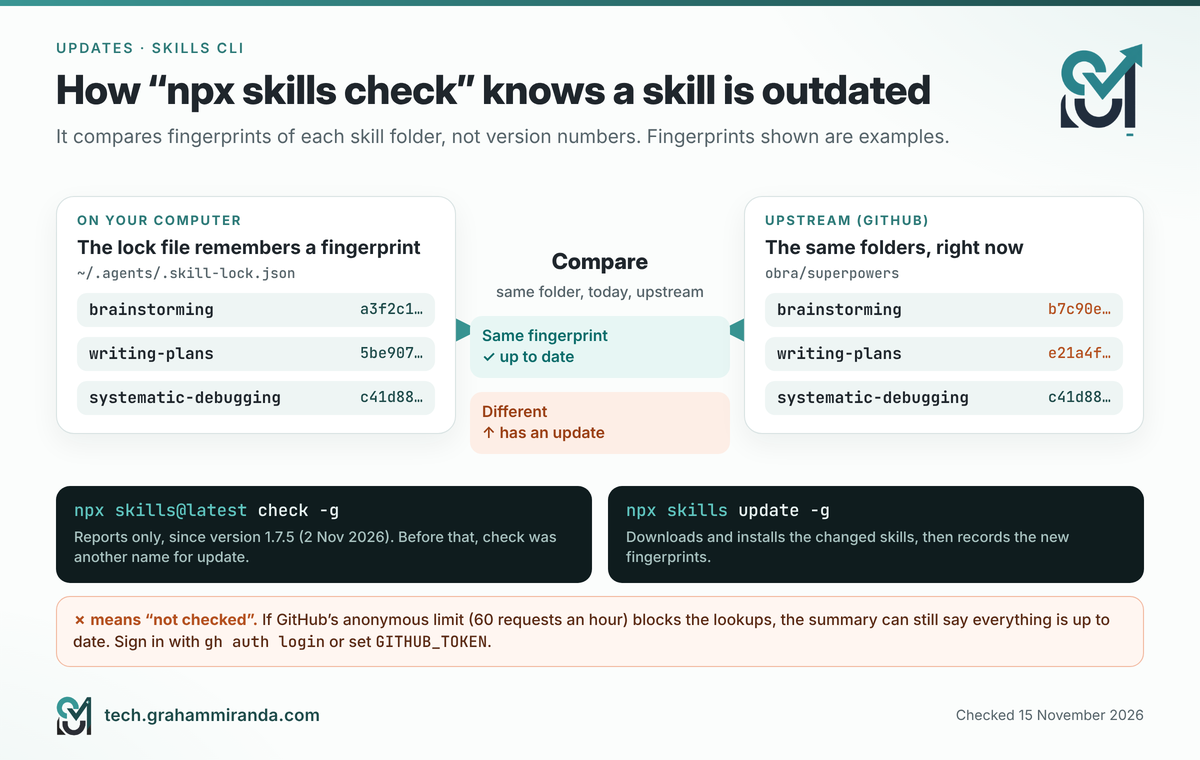
check compares fingerprints, not version numbers. Since 1.7.5 it only reports; update is the command that changes anything.Part 6 — Five Real Problems From My Mac and Raspberry Pi, and How to Fix Them
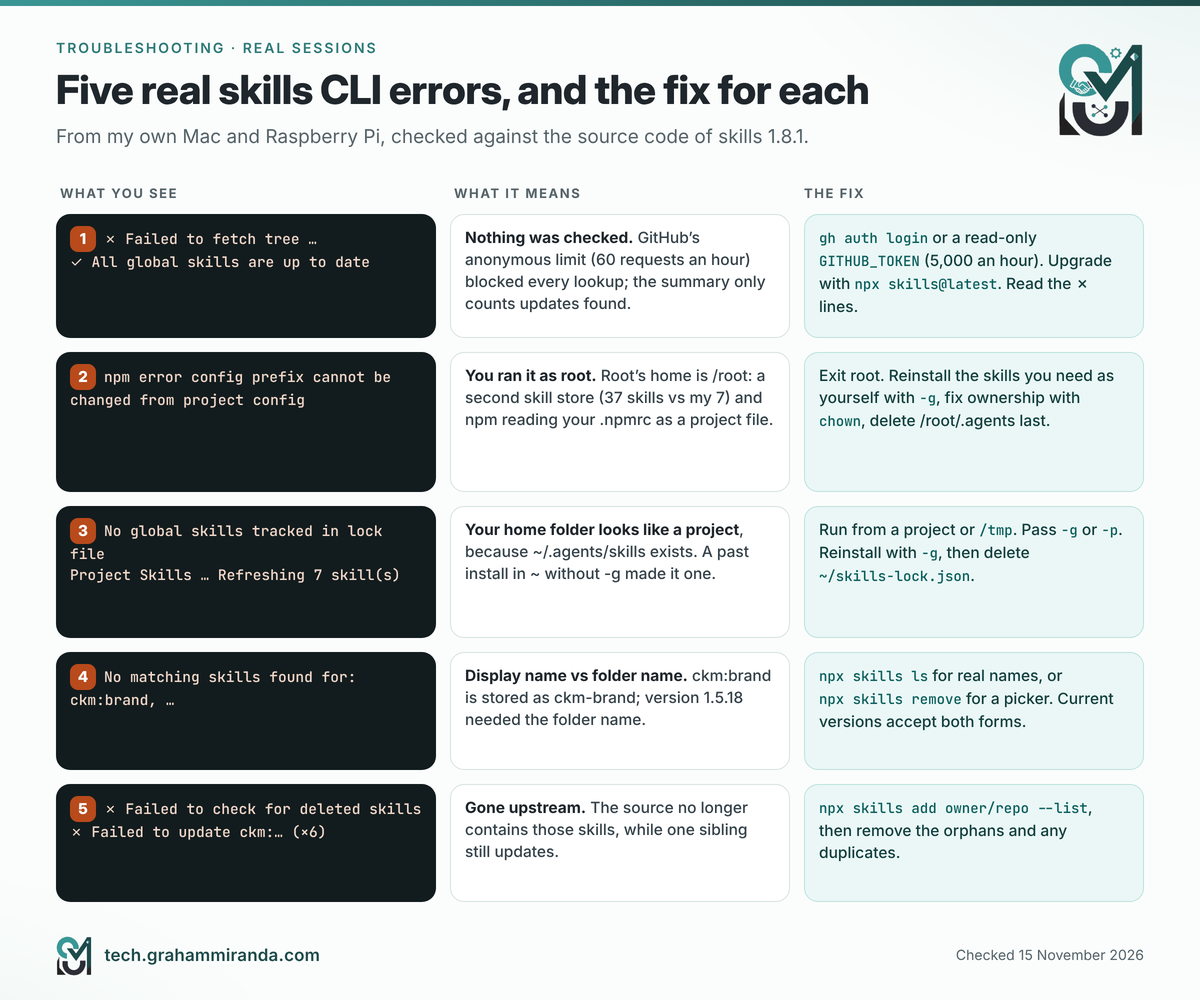
Everything in this part happened to me in the summer of 2026, on version 1.5 of the CLI. Each problem has since been checked against the source code of the current release, 1.8.1, so you’ll know which ones are fixed and which still bite. The terminal output is real; I’ve shortened it and removed machine names.
Problem 1: “All global skills are up to date”, when nothing was checked
On my Mac, npx skills check produced this:
graham@mac my-app % npx skills check
◇  Update scope
│  Both
Checking for skill updates…
Global Skills
Checking skills from source: anthropics/skills
│  GitHub API request limit reached; checking existing gh authentication…
  ✗ Failed to fetch tree for anthropics/skills
Checking skills from source: vercel-labs/skills
  ✗ Failed to fetch tree for vercel-labs/skills
…                                  (six more sources, every one ✗)
Checking skills from source: obra/superpowers
  ✗ Failed to fetch tree for obra/superpowers
✓ All global skills are up to date
What happened. To check a repository, the CLI asks GitHub’s API for the repository’s list of files. GitHub allows 60 anonymous requests an hour per internet address, and my allowance for that hour was already gone (the tool says so on the first line), so every lookup failed. The final line only counts the updates the tool found, and it had found none, so it printed a green tick. The old version also tried to borrow a GitHub CLI login behind the scenes (that’s the “checking existing gh authentication” line); since every request still failed, there was evidently no login to borrow.
Is it fixed? Partly. Version 1.8.1 tries harder before it gives up: anonymous first, then a token from your environment, then the GitHub CLI’s own login through gh api, and for update checks a plain Git download as a last resort. But the 1.8.1 source code shows that when a source still can’t be checked, the summary line still counts only the updates it found. A green tick under red crosses is still possible, so read the ✗ lines.
The fix. Give the CLI a login, which raises the limit to 5,000 requests an hour:
- Easiest: install the GitHub CLI and run
gh auth login. Current versions of the skills CLI askghto make the API call and never see your credentials. - Or use a token: create a fine-grained personal access token with read-only access to public repositories, then add it to your shell profile (
~/.zshrcon a Mac,~/.bashrcon a Raspberry Pi):
bash
   export GITHUB_TOKEN="github_pat_…"     # read-only, public repositories
Open a new terminal afterwards. Treat the token like a password: never paste it into a chat, a skill or a file you commit.
3. Upgrade and re-check: npx skills@latest check -g.
Problem 2: sudo gave me two skill stores and an npm error
On my Raspberry Pi I’d fallen into the habit of typing sudo su first. This is what it produced:
graham@pi:~ $ sudo su
root@pi:/home/graham# npx skills update
npm error config prefix cannot be changed from project config: /home/graham/.npmrc.
◇  Update scope
│  Both
Checking for skill updates…
Global Skills
…
Found 6 global update(s)
…
Project Skills
Updating for: Universal, Claude Code, Hermes Agent
Refreshing 7 skill(s)…
And a moment later, back as my normal user:
graham@pi:~ $ ls ~/.agents/skills | wc -l
7
graham@pi:~ $ sudo ls /root/.agents/skills | wc -l
37
What happened. sudo su turns you into root, and root has its own home folder, /root. Skills are stored per user, so root’s global skills live in /root/.agents/skills and mine in /home/graham/.agents/skills. Every global install I’d ever done as root had gone into root’s store: 37 skills there, 7 in mine. If your agents run as your normal user, which is the usual setup, everything in root’s store is invisible to them.
The npm error has the same cause. As root, npm’s personal settings file is /root/.npmrc, so the /home/graham/.npmrc sitting in the folder I was in gets read as a project settings file instead. npm’s own code refuses to let a project file change the prefix setting, and logs exactly that error. There’s a third risk you won’t see straight away: anything root writes inside your home folder ends up owned by root, and your normal user can’t update it later.
The fix.
- Leave root: type
exit. From now on, run the CLI and your agents as yourself. - Find out which user your agents use. Whichever home folder contains their settings is the one that matters:
bash
   ls -d ~/.claude ~/.config/opencode ~/.hermes 2>/dev/null
   sudo ls -d /root/.claude /root/.config/opencode /root/.hermes 2>/dev/null
- Reinstall root’s skills as yourself, from their original sources. Copying the files across would carry root’s ownership and stale records with it. Reinstalling writes a clean lock file. First list the sources root used:
bash
   sudo grep '"source"' /root/.agents/.skill-lock.json | sort -u
Then, from a project folder or /tmp, run npx skills add <owner/repo> -g -a <your agents> for each one you still want.
4. Give your own folders back to yourself, in case root wrote into them:
bash
   sudo chown -R "$(id -un)":"$(id -gn)" ~/.agents ~/.claude ~/.hermes ~/.config/opencode 2>/dev/null
- Only when everything works as you, delete root’s copy with
sudo rm -rf /root/.agents.
If you use sudo because global npm installs fail without it, fix that instead: point npm’s prefix at a folder you own (npm config set prefix ~/.npm-global, then add ~/.npm-global/bin to your PATH). That’s almost certainly what the prefix line in my own .npmrc was doing.
Problem 3: run from your home folder, and it becomes a “project”
Back as myself, in my home folder:
graham@pi:~ $ npx skills check
Need to install the following packages:
[email protected]
Ok to proceed? (y) y
…
Global Skills
No global skills tracked in lock file.
Install skills with npx skills add <package> -g
Project Skills
Updating for: Universal, Claude Code, Hermes Agent
Refreshing 7 skill(s)…
What happened. The CLI decides that a folder is a project if it contains a skills-lock.json file or a .agents/skills folder with a skill in it. Your home folder contains ~/.agents/skills, because that’s where global skills live, so from ~ the CLI sees a project. And if you ever ran npx skills add in your home folder without -g, you created a real project install there, with its own ~/skills-lock.json, whose skill folder is the very same folder the global install uses. That’s what had happened on my Pi: seven skills tracked as a “project” in my home folder, and nothing at all in my own global lock file.
“No global skills tracked in lock file” has three common causes: you never installed with -g, you installed with -g as a different user (root, via sudo), or the lock file was deleted. If you’ve read elsewhere that a generate-lock command rebuilds it, it doesn’t exist: there’s no such command in version 1.5 or 1.8.
The fix.
- Run the CLI from a project folder or
/tmp, never from~, and pass-gor-pso it can’t guess. - To untangle a home-folder “project”, reinstall the skills you want with
-gfrom another folder (they land in the same place, now recorded in your global lock file), then delete~/skills-lock.json. Don’t runnpx skills removefrom~for this: in your home folder, the project folder and the global folder are the same folder.
Problem 4: “No matching skills found” because of a colon
graham@pi:~ $ npx skills remove ckm:banner-design ckm:brand ckm:design \
  ckm:design-system ckm:slides ckm:ui-styling
◇  Found 7 unique installed skill(s)
■  No matching skills found for: ckm:banner-design, ckm:brand, ckm:design, ckm:design-system, ckm:slides, ckm:ui-styling
What happened. Those skills display as ckm:banner-design, but a colon is a risky character in a folder name, so the CLI saved them as ckm-banner-design: it lowercases the name and turns anything other than letters, digits, dots and underscores into a hyphen. Version 1.5.18 compared what I typed with the folder names exactly, so nothing matched.
Is it fixed? Yes. Current versions convert your input the same way before comparing, so ckm:brand and ckm-brand both work, and when nothing matches, 1.8.1 prints the names that are installed.
The fix. Run npx skills ls (or ls ~/.agents/skills) to see the real names, or run npx skills remove without arguments and pick from the list. Check the scope too: from a project folder, removing a skill that’s recorded in your global lock now tells you to add -g.
Problem 5: six skills fail, one from the same repository works
Refreshing 7 skill(s)…
✗ Failed to check for deleted skills from nextlevelbuilder/ui-ux-pro-max-skill
Updating ckm:banner-design…
  ✗ Failed to update ckm:banner-design
…                                  (five more ✗)
Updating ui-ux-pro-max…
  ✓ Updated ui-ux-pro-max
What happened. To update a skill, the CLI looks for it in its source repository again. Six of my seven skills from that repository couldn’t be found, while the seventh updated fine. When most skills from one source fail and one succeeds, the missing ones have usually been renamed, moved or removed upstream. That repository’s README today describes a single skill, ui-ux-pro-max, and mentions banners, brand identity and slides only as features of a paid tier, which fits the six having left the free repository.
The fix. See what the source offers now, then remove what’s gone:
npx skills add nextlevelbuilder/ui-ux-pro-max-skill --list
npx skills remove ckm-banner-design ckm-brand ckm-design ckm-design-system ckm-slides ckm-ui-styling
Current versions of the CLI notice skills that were deleted upstream and offer to clean them up during an update, and they remove missing skills from the lock file when you uninstall. While you’re there, look for duplicates: if you also have a plain brand skill next to ckm-brand, keep one. Two skills with near-identical descriptions confuse the agent’s choice and waste its listing budget.
Bonus: Claude Code doesn’t see a skill the CLI installed
- Check the link. Claude Code reads only its own folders, so
ls -la ~/.claude/skills(or.claude/skillsin the project) should show the skill, usually as a link into.agents/skills. Several 1.5 releases fixed bugs around Claude Code’s links (1.5.16 and 1.5.20), so if it’s missing, reinstall withnpx skills@latest add … -a claude-code. - Check the file starts correctly. The opening
---of the front matter must be the very first line ofSKILL.md, or Claude Code treats the whole file as plain text. - Reload. Claude Code picks up edited skills live, but a skills folder created after the session started needs
/reload-skills. Then/skillslists what’s loaded.
Part 7 — MCP Servers Without the Jargon
What happens when you connect a server
- You add the server to your agent’s settings: a command for a local server, a web address for a remote one.
- When a session starts, the agent launches the local server or connects to the remote one, and signs in if the server requires it.
- The server lists its tools, and the agent passes their descriptions to the model.
- When a task needs a tool, the model asks for it, your agent checks your permission rules (and may ask you), the server does the work, and the result goes back into the conversation.
Local or remote?
| Local server (stdio) | Remote server (Streamable HTTP) | |
|---|---|---|
| Runs | On your computer, started by the agent | On the provider’s computers |
| You add | A command, such as npx @playwright/mcp@latest |
An address, such as https://mcp.context7.com/mcp |
| Sign-in | Usually an API key in an environment variable | Usually OAuth in your browser, or a key in a header |
| Needs | Node.js, Python or Docker, depending on the server | An internet connection |
| Best for | Things on your machine: a browser, files, a local database | Cloud services: GitHub, Sentry, documentation, project tools |
| Watch out for | It runs with your user’s full permissions | Your data goes to that provider |
You may still see a third type, SSE, in older guides. Claude Code’s documentation marks it as deprecated; use the HTTP address when a server offers both.
A word on versions
The current MCP specification, released on 28 July 2026, is the biggest revision since the protocol launched: its core is now stateless, which lets remote servers run behind ordinary load balancers. You rarely need to care, because clients and servers agree on which revision to speak and older servers keep working. OpenCode is the one place you might see it: each server has a protocol setting (legacy by default, auto, or 2026-07-28), and connection pooling only works with the newest revision.
The context bill, and how to keep it small
Every tool a server offers arrives with a description written for the model. In OpenCode’s own words, “MCP tools consume model context, so add only the servers you need.” Two agents now soften the cost by default:
- Claude Code uses tool search. At the start of a session it loads only tool names and each server’s instructions, and pulls in a tool’s full definition when Claude actually looks for it.
- OpenCode uses Code Mode, which groups each server’s tools behind one entry instead of listing every tool on its own. It’s on unless you set
"codemode": falsefor a server.
Everywhere else, and on top of those defaults, these are your controls:
| Agent | Switch a server off | Hide tools you don’t want |
|---|---|---|
| OpenCode | "disabled": true, or /mcps for one session |
A deny rule on <server>_<tool> in permissions |
| Claude Code | claude mcp remove <name> (/mcp shows status) |
A deny permission rule on mcp__<server>__<tool>; ENABLE_TOOL_SEARCH decides how much loads up front |
| Codex | enabled = false |
enabled_tools and disabled_tools |
| Gemini CLI | gemini mcp disable <name> (add --session for one session) |
includeTools and excludeTools |
| Cursor | The server’s toggle under Customize | (Admins can set tool allowlists) |
| Hermes Agent | enabled: false |
tools.include and tools.exclude |
My rule: two to five servers you use every week beat twenty you might use one day. Remove the rest; you can add them back in a minute.
Four servers worth trying first
| Server | What it gives your agent | Type | Address or command | Sign-in |
|---|---|---|---|---|
| Context7 | Current, version-specific documentation for popular libraries and frameworks | Remote | https://mcp.context7.com/mcp |
None needed; a free API key raises the limits |
| GitHub (official) | Issues, pull requests, code search, Actions | Remote | https://api.githubcopilot.com/mcp/ |
OAuth where your agent supports it, or a personal access token |
| Playwright | A real browser the agent can open, click through and screenshot | Local | npx @playwright/mcp@latest |
None |
| Sentry | Your real errors and crashes | Remote | https://mcp.sentry.dev/mcp |
OAuth |
Where to find more:
- The official MCP Registry, maintained by the protocol’s contributors, lists published servers.
- Your tools’ own documentation. Most services now publish an official server; search their docs for “MCP”.
- Your agent’s catalogue. Hermes Agent has
hermes mcp catalog, and many Claude Code plugins bring their own servers.
Prefer servers published by the company that runs the service. A random server called “github-mcp-pro” deserves the same suspicion as a random browser extension.
The lighter option: a command-line tool plus a skill
Before you add a server, check whether a command-line tool does the job. Context7 itself offers both routes: the MCP server above, or a small CLI with a skill (npx ctx7 setup --opencode, which needs Node.js 22.13 or later). GitHub’s own gh tool plus a short skill covers most of what its server does.
A server makes sense when your agent can’t run commands (a desktop chat app, for instance), the service has no good CLI, or the job is interactive, like driving a browser. A CLI plus a skill makes sense when the tool already exists: it costs nothing until it’s used, and its output can be trimmed before it reaches the model. My OpenCode guide makes the same case for app development.
Part 8 — Add an MCP Server in Six Agents: Copy-Paste Recipes
Each recipe adds the same two servers: Context7 (remote) and Playwright (local). Swap in any other server the same way. Where an agent has both a command and a settings file, the command simply writes the file for you.
OpenCode
opencode mcp add context7 --url https://mcp.context7.com/mcp
opencode mcp add playwright -- npx @playwright/mcp@latest
opencode mcp list
Add --global to make a server available in every project. In opencode.jsonc the same setup looks like this:
{
  "$schema": "https://opencode.ai/config.json",
  "mcp": {
    "servers": {
      "context7": {
        "type": "remote",
        "url": "https://mcp.context7.com/mcp",
        "oauth": false
        // With a free API key, add:
        // "headers": { "Authorization": "Bearer {env:CONTEXT7_API_KEY}" }
      },
      "playwright": {
        "type": "local",
        "command": ["npx", "@playwright/mcp@latest"]
      }
    }
  }
}
- Secrets go in as
{env:NAME}; OpenCode doesn’t expand a plain$NAME. - Remote servers try OAuth automatically;
oauth: falseis for servers that use a key or none. Sign in withopencode mcp auth <name>, and over SSH, paste the callback URL from the failed browser page into the prompt. - Inside a session,
/mcpsconnects, disconnects or signs in to servers. - Each tool becomes a permission action named
<server>_<tool>, so{ "action": "playwright_*", "resource": "*", "effect": "ask" }makes every browser action ask first.
Claude Code
claude mcp add --transport http context7 https://mcp.context7.com/mcp
claude mcp add playwright -- npx @playwright/mcp@latest
claude mcp list
The -- separates Claude Code’s options from the server’s own command. Servers default to local scope (you, in this project). Add --scope user for all your projects, or --scope project to write a .mcp.json file you can commit for your team:
{
  "mcpServers": {
    "context7": {
      "type": "http",
      "url": "https://mcp.context7.com/mcp"
    },
    "playwright": {
      "command": "npx",
      "args": ["@playwright/mcp@latest"]
    }
  }
}
.mcp.jsonexpands${VAR}and${VAR:-default}, so keys stay in your environment, not in Git./mcpinside a session shows each server’s status and handles OAuth sign-in.- Claude Code asks before using servers from a project’s
.mcp.json, so a cloned repository can’t quietly add its own.
Codex
Codex keeps servers in ~/.codex/config.toml, or in .codex/config.toml inside a project you’ve marked as trusted:
[mcp_servers.context7]
url = "https://mcp.context7.com/mcp"

[mcp_servers.playwright]
command = "npx"
args = ["@playwright/mcp@latest"]
- Remote servers can also be added with
codex mcp add context7 --url https://mcp.context7.com/mcp, andcodex mcp login <name>runs an OAuth sign-in. - For a key,
bearer_token_env_var = "CONTEXT7_API_KEY"reads it from your environment. - Trim a server with
enabled_toolsanddisabled_tools;startup_timeout_sec(10 seconds by default) helps slow servers start.
Gemini CLI
gemini mcp add -t http context7 https://mcp.context7.com/mcp
gemini mcp add playwright npx @playwright/mcp@latest
gemini mcp list
gemini mcp add writes to the project’s settings by default; add -s user for every project. In settings.json:
{
  "mcpServers": {
    "context7": { "httpUrl": "https://mcp.context7.com/mcp" },
    "playwright": { "command": "npx", "args": ["@playwright/mcp@latest"] }
  }
}
httpUrlis for Streamable HTTP;urlmeans the older SSE type.- Leave
trustoff. Set totrue, it skips every confirmation for that server. - Gemini CLI strips variables that look like secrets (names containing TOKEN, SECRET, PASSWORD or KEY) from a server’s environment unless you list them in its
envblock. - OAuth needs a browser on the same machine. In an untrusted folder, local servers stay disconnected until you run
gemini trust.
Cursor
Cursor reads .cursor/mcp.json in a project and ~/.cursor/mcp.json for everything:
{
  "mcpServers": {
    "context7": { "url": "https://mcp.context7.com/mcp" },
    "playwright": {
      "type": "stdio",
      "command": "npx",
      "args": ["@playwright/mcp@latest"]
    }
  }
}
- Local servers need
"type": "stdio". - Secrets go in as
${env:NAME}. - Switch servers on and off with their toggles under Customize.
Hermes Agent
Hermes reads mcp_servers in ~/.hermes/config.yaml:
mcp_servers:
  context7:
    url: "https://mcp.context7.com/mcp"
  playwright:
    command: "npx"
    args: ["@playwright/mcp@latest"]
- Run
/reload-mcpafter editing, andhermes mcp test context7to see exactly what a server answered. - For OAuth services, add
auth: oauthto an HTTP entry. On a headless machine, Hermes offers paste-back, SSH port forwarding or a device sign-in flow. - Hermes passes local servers only the variables you list in
envplus a safe baseline, not your whole shell environment. - Tools appear as
mcp_<server>_<tool>; filter them withtools.includeortools.exclude.
Check it works, in any agent
Ask a question only the server can answer: “Use Context7 to look up how to define a route in the current version of Next.js, and tell me which tool you called.” Then ask for something visible: “Open example.com with Playwright and describe the page.” If the agent says it has no such tools, list the servers (opencode mcp list, claude mcp list, gemini mcp list, hermes mcp test) and look for a failed connection or a sign-in that never finished.
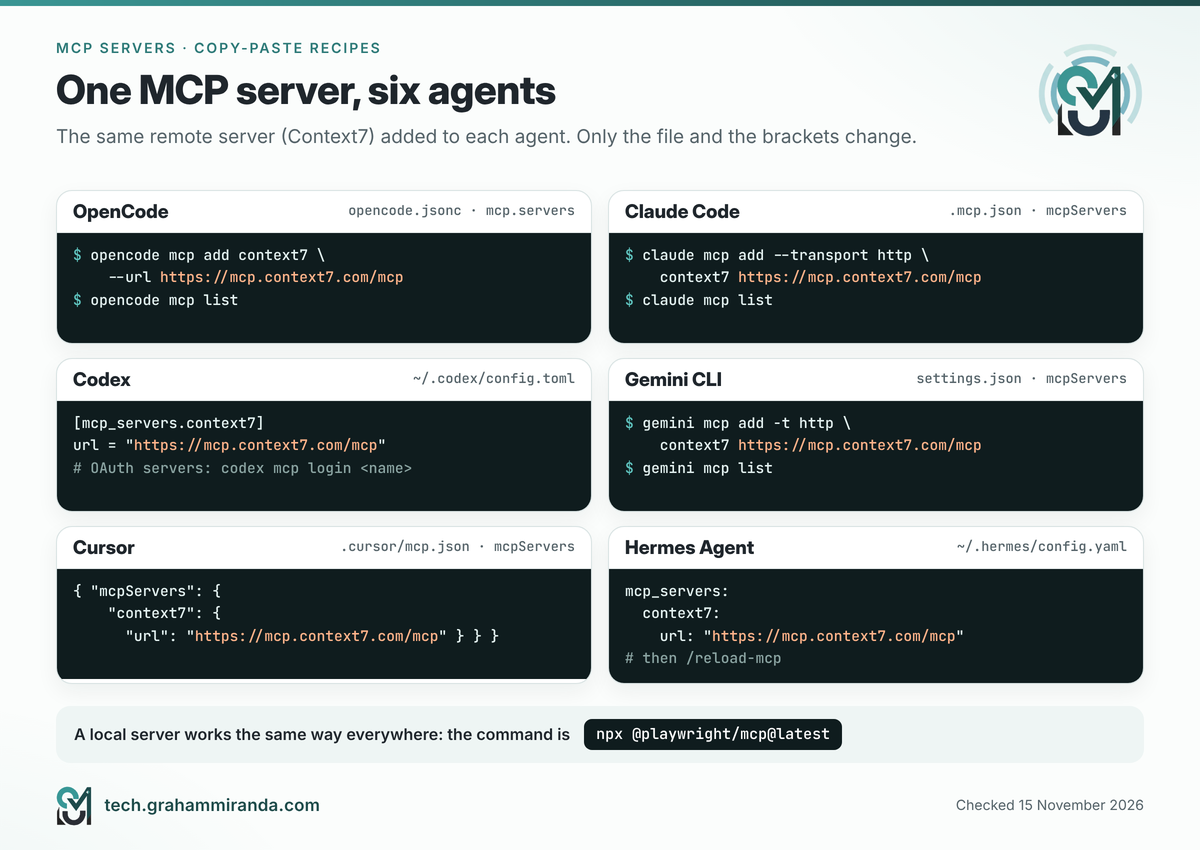
Part 9 — Plugins: Skills and MCP Servers in One Box
Installing ten skills and three servers one at a time gets old. Plugins bundle them, and most agents now have a plugin system of some kind.
Claude Code plugins
A Claude Code plugin can contain skills, subagents, hooks, MCP servers and language servers. Plugins come from marketplaces, which are simply catalogues hosted in a Git repository:
/plugin marketplace add anthropics/skills
/plugin install document-skills@anthropic-agent-skills
In a session, /plugin install first opens the plugin’s details so you can see exactly what it adds before you choose a scope: you (every project), this repository for everyone, or this repository just for you. From your shell, claude plugin install <name>@<marketplace> does the same without a session.
Three features worth knowing:
- Context cost is visible. For plugins in Anthropic’s official marketplace, the details pane estimates what the plugin adds to every message and what it adds when used.
claude plugin details <name>shows the per-session figure for anything installed. - Updates. Anthropic’s official marketplace updates plugins automatically; third-party marketplaces don’t, unless you switch it on.
claude plugin update <name>@<marketplace>updates one plugin by hand. - Unused plugins are flagged. The Installed tab groups plugins you haven’t used recently, which makes spring cleaning easy.
Plugins elsewhere
- Codex distributes reusable skills through plugins (
/pluginsin the CLI), and a plugin can also carry MCP server connections. - Gemini CLI calls them extensions:
gemini extensions install <git-url>andgemini extensions update <name>. - GitHub Copilot CLI (
copilot plugin install) and Hermes Agent (hermes plugins install) have plugin commands, and Cursor has/add-pluginin Agent chat. - OpenCode plugins are JavaScript or TypeScript packages listed in the
pluginsetting of its config, which can register skills and tools. Superpowers installs this way.
The two rules that keep a plugin setup sane
- One channel per pack. If a skill pack exists as a plugin and as plain skills, choose one. Two copies means duplicate names and an agent that picks whichever it sees first.
- Update where you installed. The skills CLI doesn’t know about plugins, and plugin managers don’t know about
~/.agents/skills.
Part 10 — Write Your First Skill in Ten Minutes
The best first skill solves a job you repeat. Here’s one built from Part 6: a skill that lets any agent check your skills for updates safely, without ever using sudo or trusting a green tick blindly.
Step 1 — Create the folder
mkdir -p ~/skills-drafts && cd ~/skills-drafts
npx skills init skills-housekeeping
That creates skills-housekeeping/SKILL.md from a template. Replace its contents with this:
---
name: skills-housekeeping
description: Checks installed agent skills for updates and problems with the npx skills CLI, and explains the results in plain English. Use when asked whether skills are up to date, to update skills, or when an installed skill seems to be missing.
metadata:
  author: graham-miranda
  version: "1.0"
---

# Skills housekeeping

## Rules
- Never run any command with sudo.
- Never run `npx skills update` or `npx skills remove` without asking first.
- Run commands from /tmp or a project folder, never from the home folder.

## Check
1. Run `cd /tmp && npx skills@latest check -g` for global skills.
2. If the current project has a skills-lock.json file, also run `npx skills@latest check -p` in the project folder.
3. Treat every line that starts with ✗ as "not checked", even if a later line says everything is up to date.

## Report
- List skills with updates, skills with local changes, and anything that couldn't be checked.
- If any check failed, suggest `gh auth login`, or a GITHUB_TOKEN with read-only access to public repositories.
- Ask before updating. Then run `npx skills update -g` (or `-p`) and report what changed.
Step 2 — Check it against the standard
- Name:
skills-housekeepinguses only lowercase letters and hyphens, is under 64 characters, and matches the folder’s name. All three are required. - Description: it says what the skill does and when to use it, and it contains the words people actually type (“up to date”, “update skills”, “missing”). The description is the only part the agent sees before deciding, so it does most of the work. The standard allows up to 1,024 characters; aim for one or two sentences.
- Length: well under the recommended 500 lines. When a skill grows, move detail into
references/and point to it from the instructions.
The Agent Skills project publishes a reference validator, skills-ref, which checks the front matter and naming rules: skills-ref validate ./skills-housekeeping.
Step 3 — Install it for every agent at once
The skills CLI installs from a local folder too:
npx skills add ./skills-housekeeping -g -a opencode -a claude-code -a codex
That puts the real copy in ~/.agents/skills/skills-housekeeping (read directly by OpenCode and Codex) and adds a link in ~/.claude/skills for Claude Code.
Step 4 — Test it
Ask in plain words: “Are my skills up to date?” A well-described skill gets picked up automatically. If it doesn’t, call it by name to rule out a loading problem: @skills-housekeeping in OpenCode, /skills-housekeeping in Claude Code, $skills-housekeeping in Codex. If it loads by name but never on its own, the description is the problem: add the phrases you actually use.
Step 5 — Share it
Push the folder to a GitHub repository, ideally inside a skills/ folder (skills/skills-housekeeping/SKILL.md). Anyone can then install it with npx skills add your-name/your-repo. The CLI finds skills in skills/ and in common agent folders, up to three levels deep.
Agent-specific extras, and when to avoid them
Several agents understand extra front matter fields. Claude Code has disable-model-invocation (only you can trigger the skill) and context: fork (run it in a subagent); Cursor has paths (only for matching files); OpenCode can hide a skill from the model with metadata set to opencode/autoinvoke: false. They’re useful, but the standard fields are what travels. Claude Code’s own documentation notes that outside Claude Code, in claude.ai uploads or the Skills API, only the standard fields are accepted and anything else is an error. For skills you share, stick to name, description, license, compatibility, metadata and the experimental allowed-tools.
Part 11 — Staying Safe: Skills and Servers Are Software
It’s easy to think of a skill as “just a Markdown file”. It’s not, really. It’s instructions your agent will follow with your permissions, often with scripts it will run on your machine. And a local MCP server is a program running as you.
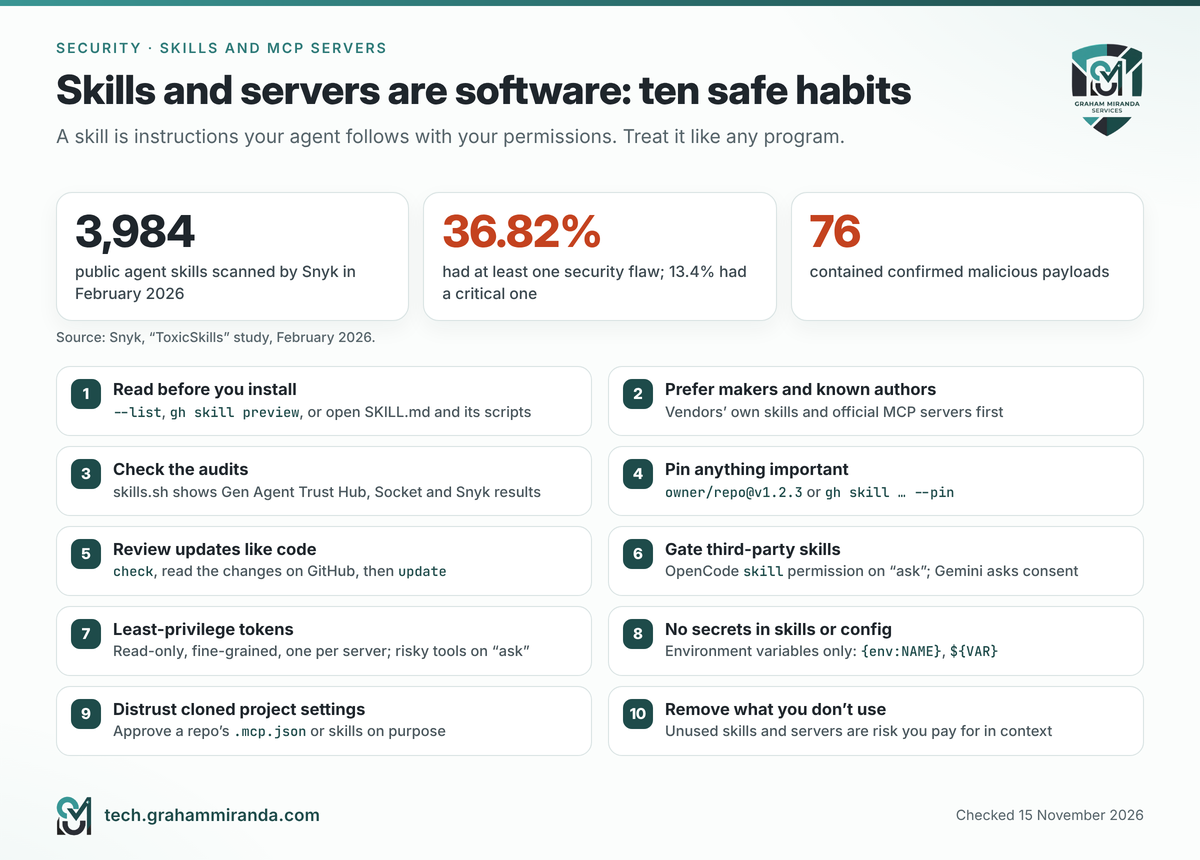
The numbers from this year are sobering. Snyk’s ToxicSkills study, published in February 2026, scanned 3,984 public agent skills: 36.82% had at least one security flaw, 13.4% had a critical one, and 76 contained confirmed malicious payloads. The trouble concentrated on ClawHub, the community marketplace for OpenClaw, where an earlier audit of 2,857 skills, also reported by Snyk, had found 341 malicious ones, about 12% of the registry at the time. By contrast, the 100 most popular skills on skills.sh triggered none of Snyk’s prompt-injection or malicious-code checks. Popularity isn’t proof, but it helps.
MCP has its own version of the risk. Claude Code’s documentation warns that servers which fetch outside content can expose you to prompt injection: a web page, issue comment or crash report containing text aimed at your agent rather than at you.
Ten habits that keep you safe
- Read before you install. Use
npx skills add owner/repo --list,gh skill preview, or simply open theSKILL.mdand its scripts on GitHub. - Prefer makers and known authors. Expo’s skills for Expo, Vercel’s for Next.js, a vendor’s official MCP server for its own service.
- Check the audits. Each skill on skills.sh shows results from three scanners: Gen Agent Trust Hub, Socket and Snyk. “Pending” means nobody has looked yet.
- Pin anything important.
npx skills add owner/[email protected], orgh skill install … --pin v1.2.3, so updates happen when you choose. - Review updates like code.
npx skills check, then read the changes on GitHub, thennpx skills update. - Gate third-party skills. In OpenCode, rules use the
skillaction and the last match wins:
jsonc
   "permissions": [
     { "action": "skill", "resource": "*", "effect": "ask" },
     { "action": "skill", "resource": "skills-housekeeping", "effect": "allow" },
     { "action": "playwright_*", "resource": "*", "effect": "ask" }
   ]
Hermes Agent scans every hub install, and --force can’t override a “dangerous” verdict. Gemini CLI asks your consent before activating a skill.
7. Give servers the least access that works. Read-only, fine-grained tokens; separate tokens per server; write and delete tools on “ask” or filtered out.
8. Keep secrets out of skills and committed config. Use environment variables ({env:NAME} in OpenCode, ${VAR} in Claude Code’s .mcp.json, ${env:NAME} in Cursor), never pasted keys.
9. Be careful with other people’s project settings. A cloned repository can bring its own .mcp.json or skills. Claude Code asks before using project servers, Gemini CLI keeps local servers disconnected in untrusted folders, and Hermes Agent loads project skills only after hermes skills trust. Don’t click through those prompts on autopilot.
10. Uninstall what you don’t use. Every unused skill and server is attack surface you’re paying for in context.
Part 12 — A Two-Minute Weekly Routine
Skills and servers drift. A small routine keeps them honest:
# Global skills, from a neutral folder
cd /tmp && npx skills@latest check -g

# Each project you're actively working on
cd ~/code/my-app && npx skills@latest check -p

# After reading what changed upstream:
npx skills update -g
Once a month, take five more minutes:
- Prune.
npx skills ls -gand remove what you haven’t used. In Claude Code, the plugin panel lists plugins you haven’t used recently. - List your servers.
opencode mcp list,claude mcp list,gemini mcp listorhermes mcp testfor each. Remove anything you’ve forgotten adding. - Rotate tokens you gave to servers, especially write-capable ones.
Two machines, one setup
I run agents on a Mac and on a Raspberry Pi, and three habits keep them in step:
- Same approach on both: your normal user, never
sudo, and the CLI run from a project folder or/tmp. - Project skills travel with Git. Commit
.agents/skillsandskills-lock.json; on the other machine,npx skills installrestores exactly the same versions. - Global skills come from a script. Keep your
npx skills add … -gcommands in a small shell file and run it on each machine. It doubles as documentation of what you rely on.
On a headless machine like a Pi, set GITHUB_TOKEN in ~/.bashrc so update checks don’t hit the anonymous limit. Browser sign-ins need care: OpenCode lets you paste the callback URL into its prompt, Hermes Agent offers paste-back, SSH port forwarding or a device flow, while Gemini CLI’s OAuth flow needs a browser on the same machine.
Part 13 — Which Setup Should You Choose? Five Scenarios
1. “I’ve just started with OpenCode.”
Install three skills at most and one MCP server. Context7 is a good first server, and a release or review skill that matches how you work is a good first skill. Keep third-party skills on ask in OpenCode’s permissions until you trust them. My OpenCode guide covers the rest of the setup.
2. “I use OpenCode and Claude Code side by side, maybe Hermes Agent too.”
Install skills globally with the CLI and name every agent: npx skills add owner/repo -g -a opencode -a claude-code -a hermes-agent. One copy, three agents. MCP servers don’t share a common config file, so add each one to each agent and keep the list somewhere you’ll find it. My comparison of OpenCode, Hermes Agent and OpenClaw explains where each agent shines, and my AI coding harness comparison covers 28 of them side by side.
3. “My team shares a repository.”
Use project scope: commit .agents/skills, skills-lock.json, and the MCP settings (opencode.jsonc, .mcp.json or .cursor/mcp.json) with no secrets in them. Each person keeps keys in their own environment. In CI, npx skills install --frozen-lockfile fails if anyone’s skills drift, and npx skills check -p fails when updates are waiting.
4. “My agents run on a Raspberry Pi or a server.”
One normal user, no sudo, ever. Set GITHUB_TOKEN, prefer remote servers that accept a token in a header (or offer a device sign-in), and run the weekly check from /tmp. Part 6 is your checklist.
5. “My code must not leave my machine.”
Use local MCP servers only, and skip remote documentation and code-search servers. Switch off the CLI’s telemetry (DISABLE_TELEMETRY=1), read every skill you install, and remember that the model itself may still be a cloud model: privacy depends on where the model runs too. My guide to running LLMs on a MacBook covers what the fully local route really costs.
Frequently Asked Questions
Agent skills are folders that teach an AI agent how to do a specific job. Each one contains a SKILL.md file with a name, a description and step-by-step instructions, plus optional scripts and reference files. The agent reads only the descriptions at the start of a session and loads a skill’s full instructions when a task matches. Skills follow an open standard, so most work in OpenCode, Claude Code, Codex, Cursor, Gemini CLI, GitHub Copilot and Hermes Agent alike.
An MCP server is a small program that gives an AI agent new tools through the Model Context Protocol, an open standard now hosted by the Linux Foundation’s Agentic AI Foundation. Local servers run on your computer and are started by the agent; remote servers run on a provider’s computers and are reached by a web address, usually with a browser sign-in. Examples include GitHub’s official server, Context7 for current documentation and Playwright for controlling a browser.
A skill gives the agent know-how: written instructions for how to do a job, loaded only when needed. An MCP server gives the agent abilities: tools that reach systems outside the terminal, such as GitHub, a browser or a crash tracker. Use a skill for procedures and conventions, an MCP server for live access to a system, and AGENTS.md for rules that apply to every task. If a good command-line tool exists, a skill that teaches it is often cheaper than a server.
Mostly, because all three follow the Agent Skills standard. The difference is where they look. Codex and OpenCode read the shared .agents/skills and ~/.agents/skills folders; OpenCode also reads .opencode/skills and Claude Code’s folders. Claude Code reads only .claude/skills and ~/.claude/skills. Some extra front matter fields, such as Claude Code’s context: fork, work in only one agent, so shared skills should stick to the standard fields.
Run npx skills add owner/repo --list to see the skills a repository offers, then npx skills add owner/repo --skill skill-name -a opencode -a claude-code to install one for the agents you use. Add -g to make it available in every project. You need Node.js 22.20 or later. Without flags, the CLI asks which skills and agents you want and whether to link or copy the files.
Project installs put the real copy in .agents/skills/<name> inside your project and record it in skills-lock.json. Global installs (-g) put it in ~/.agents/skills/<name> and record it in ~/.agents/.skill-lock.json. Agents that read .agents/skills use that copy directly; for agents with their own folder, such as Claude Code (.claude/skills) or Hermes Agent (~/.hermes/skills), the CLI creates a link to it.
Run npx skills@latest check -g for global skills, or npx skills@latest check -p inside a project. The CLI compares each skill folder’s fingerprint in your lock file with the same folder upstream and lists any skill that has an update, without installing anything. Since version 1.7.5 (2 November 2026), check only reports; npx skills update installs. Run it from a project folder or /tmp, not your home folder.
Because the summary only counts updates it found. If GitHub’s limit of 60 anonymous API requests an hour blocks every lookup, the CLI prints a ✗ line for each source and can still finish with “All global skills are up to date”. Sign in with gh auth login or set a read-only GITHUB_TOKEN to raise the limit to 5,000 requests an hour, upgrade with npx skills@latest, and always read the ✗ lines.
No. Skills are stored per user, and root has its own home folder, so sudo installs skills into /root/.agents/skills, where agents running as your normal user never see them. It can also leave root-owned files in your own folders and trigger npm errors such as “prefix cannot be changed from project config”. Run the CLI and your agents as your normal user.
Run opencode mcp add <name> --url <address> for a remote server, or opencode mcp add <name> -- <command> for a local one, then check it with opencode mcp list. Add --global to use it in every project. The same settings can live under mcp.servers in opencode.jsonc, with secrets written as {env:NAME}. Use opencode mcp auth <name> to sign in, and /mcps inside a session to connect or disconnect servers.
As few as you actually use, usually two to five. Each server’s tools come with descriptions the model has to read, which costs context and can make answers slower and less focused. Claude Code defers tool definitions until needed and OpenCode groups them by server, which helps, but unused servers still add risk and clutter. Remove anything you haven’t used in a month.
Only as safe as their source. A skill is instructions your agent follows with your permissions, often with scripts it runs. Snyk’s February 2026 study of 3,984 public skills found security flaws in 36.82% and confirmed malicious payloads in 76. Read a skill and its scripts before installing, prefer skills from the tool’s makers, check the audit results on skills.sh, pin versions, and keep third-party skills on “ask” in your agent’s permissions.
It’s the project lock file the skills CLI writes when you install skills into a project. It records where each skill came from and a fingerprint of its files. Commit it to Git: on another computer, npx skills install restores exactly the same skills, and --frozen-lockfile fails if anything differs. Global skills have a separate lock file at ~/.agents/.skill-lock.json, one per user account.
skills.sh is Vercel’s public directory of agent skills. It ranks skills by installs, groups them by topic, and shows security audit results from Gen Agent Trust Hub, Socket and Snyk for each one. You install skills from it with the npx skills add owner/repo command it shows. The same CLI’s npx skills find command searches the directory from your terminal.
The Bottom Line
Agent skills and MCP servers answer two different questions. Skills answer “how do we do this here?”: they’re cheap, portable recipe cards that load only when needed. MCP servers answer “can you reach that system?”: they’re powerful keys that cost context and deserve the same care as any software you install. AGENTS.md holds the few rules that apply to everything, and permissions enforce what must never happen.
If you take five things from this guide, take these:
- Put shared skills in
.agents/skillsand letnpx skillslink them into the agents that look elsewhere. - Run
npx skills@latest checkfrom a project folder or/tmp, read the ✗ lines, and update deliberately. - Sign in to GitHub (
gh auth login) on every machine that checks for updates. - Never use
sudowith skills or agents. - Start with three skills and one server, and add more only when a real task asks for them.
Skills and servers turn a clever generalist into a colleague who knows your way of working and can reach your tools. The trick is to give it exactly what it needs, and nothing it doesn’t.
Using skills or MCP servers I haven’t mentioned? I’d like to hear which ones earned a permanent place in your setup, and which error messages sent you searching. Corrections are welcome: this article gets updated when the tools change, which, judging by this year, will be often.
Disclosure: No company mentioned in this article sponsored, reviewed or approved it, and it contains no affiliate links. Products are named in the text only; the images use my own logos.
Last updated: 15 November 2026.