 English
 Deutsch
 Español
 Italiano
 Français
 Português do Brasil
 Tiếng Việt
 ไทย
 Bahasa Indonesia
 Русский
 العربية
 हिन्दी

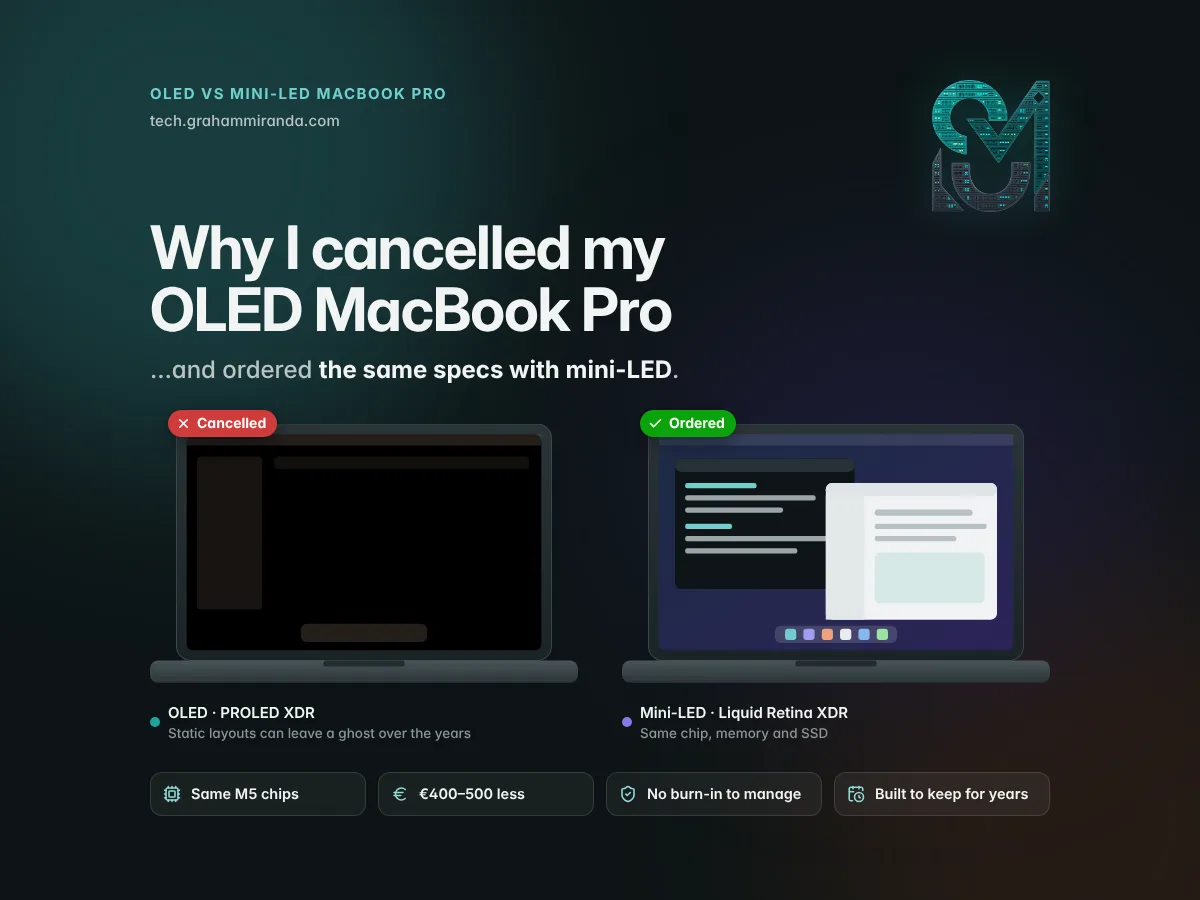
Last week I published a long explainer on Apple's first OLED Mac, the MacBook Pro with PROLED XDR Display: how its tandem OLED works, what Apple does against burn-in, how touch works on macOS and why the Apple Pencil doesn't. I had one on order, too. Since then I've settled the OLED vs mini-LED MacBook Pro question for myself, and the OLED lost.
I've cancelled that order. In its place I've ordered the same MacBook Pro with the same chip, the same memory and the same storage, but with the mini-LED screen Apple has used since 2021, the one it now calls the Liquid Retina XDR display.
Nothing was wrong with the OLED model. It hadn't even arrived: deliveries only start on 6 November. I changed my mind over one question I couldn't answer in its favour. Will this screen still look the way it does today after many years of my kind of work?
I want my next MacBook Pro to be a workstation I can use for a long time without thinking about its screen. My main Mac today is a 13-inch M1 MacBook Pro from 2020, still running the latest version of macOS six years after it came out, and I want the next one to last at least as long. An OLED panel is the one part of a modern MacBook that wears according to what you show on it. What I show on mine, the same bright, static layout for most of the day, is exactly the content OLED handles worst.
For the way I work, the mini-LED screen is as good as the OLED one. It's just as sharp and just as smooth, far brighter than I'll ever use at a desk, rated for the same battery life, and €400 to €500 cheaper. So here's the decision, written down: why I made it, the numbers behind it, what I gave up, the strongest arguments against me, and who I think should still buy the OLED model.
Independence note: No company sponsored, reviewed or approved this article, and it contains no affiliate links. I haven't used the OLED MacBook Pro. The comparison draws on Apple's specifications and technical paper, early reporting and long-term tests of other OLED panels, all credited where they appear.
TL;DR — The 60-Second Version
- The decision. I cancelled my MacBook Pro with PROLED XDR (tandem OLED) and ordered the MacBook Pro with Liquid Retina XDR (mini-LED) with the same chip, memory and SSD.
- Why. I'm buying a workstation for years, not a gadget for two. My screen spends hours a day showing the same bright, static layout: terminals and AI coding agents, an editor's sidebars, admin dashboards, the menu bar and the Dock. That's OLED's worst case.
- The maths. At 8 hours a day, 5 days a week, a laptop clocks 2,080 hours a year: over 12,000 hours in six years. The two best-known long-term tests saw visible burn-in on other OLED panels after 6,000+ hours of light-mode desk work and 10,000 hours of news at maximum brightness. Different panels and harsher conditions, but the direction is clear.
- Apple's defences are serious, with a two-layer tandem panel, per-pixel wear compensation, a burn-in-aware brightness ceiling and cooling that routes heat away from the screen. But Apple promises no lifetime, calls burn-in normal OLED behaviour on the iPhone, and AppleCare+ excludes normal wear and tear.
- Mini-LED doesn't burn in the way OLED does. Its pixels don't make light, so a static menu bar can't wear its outline into them. It isn't immortal, though: backlights can fail, and in RTINGS' three-year TV test, OLED TVs failed outright less often than LCDs.
- For my work, mini-LED matches OLED where it counts: same 254 ppi sharpness, 120 Hz, 1,000 nits sustained across the whole screen, P3 colour and identical battery ratings, from the same M5 Pro and M5 Max chips.
- What I gave up: touch, the Dynamic Island, true blacks without blooming, 2,000-nit peaks, Adobe RGB, 0.22–0.32 kg of weight, the new design and the 16 TB option.
- What I accept: some blooming around white text on black, plus the two weaknesses Notebookcheck found in the mini-LED panel: slower pixel response and PWM flicker.
- What I saved: €400 on the 14-inch or €500 on the 16-inch in Germany; $400 in the US.
- Who should still buy OLED: people whose work is the screen (HDR, photo, colour), people who replace their laptop every two or three years, frequent travellers, touch fans and mixed, everyday use.
- Cancelling in Germany: online until your order says "Versand wird vorbereitet"; after delivery, Apple takes standard hardware back within 14 days.
My OLED vs Mini-LED MacBook Pro Decision at a Glance
| MacBook Pro with PROLED XDR (cancelled) | MacBook Pro with Liquid Retina XDR (ordered) | |
|---|---|---|
| Panel | Tandem OLED: every pixel is its own light | Mini-LED-backlit LCD |
| Chip, memory, storage | M5 Pro or M5 Max, up to 128 GB, up to 16 TB | Same chips and memory, up to 8 TB |
| Sustained full-screen brightness | 1,000 nits | 1,000 nits |
| Peak brightness | 2,000 nits (HDR, and SDR outdoors) | 1,600 nits (HDR); SDR up to 1,000 nits outdoors |
| Contrast | 10,000,000:1, no blooming | 1,000,000:1, some blooming |
| Sharpness, refresh rate | 254 ppi, 10–120 Hz | 254 ppi, up to 120 Hz |
| Battery ratings | Same | Same |
| Burn-in from static layouts | Mitigated, not ruled out | Not the way OLED burns in |
| Touch, camera cut-out | Touch, Dynamic Island | No touch, notch |
| Weight, 14" / 16" (M5 Pro) | 1.38 / 1.82 kg | 1.60 / 2.14 kg |
| Price in Germany, 14" / 16" M5 Pro | €3,299 / €3,899 | €2,899 / €3,399 |
| For my work | A better screen than I need, with a risk I don't want | Everything I use, and nothing to manage |
Apple's technical specifications and press release (28 October 2026), 9to5Mac's model comparison and German prices from apfelpatient.de, checked 4 November 2026.
Table of Contents
- Part 1 — OLED vs Mini-LED MacBook Pro: Two Models, One Difference
- Part 2 — Why I Cancelled, in Short
- Part 3 — My Workstation Is OLED's Worst Case
- Part 4 — The Lifespan Maths: The Hours Add Up
- Part 5 — What Apple Does Against Burn-In, and Why It Didn't Settle It for Me
- Part 6 — How Each Screen Ages: OLED Wear vs Mini-LED Wear
- Part 7 — Why Mini-LED Is as Good as OLED for My Work
- Part 8 — What I Gave Up, and What I Accept
- Part 9 — The Money: Same Specs, €400–500 Less
- Part 10 — The Case Against My Decision
- Part 11 — Who Should Still Buy the OLED MacBook Pro
- Part 12 — How to Cancel or Return a MacBook Pro Order in Germany
- Part 13 — What Would Change My Mind
- Frequently Asked Questions
- The Bottom Line
Part 1 — OLED vs Mini-LED MacBook Pro: Two Models, One Difference
Since 28 October, Apple has sold two MacBook Pros side by side. The new MacBook Pro with PROLED XDR Display has a tandem OLED touchscreen, a Dynamic Island in place of the notch, a new hinge and a slimmer, lighter body; 9to5Mac's comparison calls it the first MacBook Pro redesign since 2021. The MacBook Pro with Liquid Retina XDR display is the design Apple introduced in 2021, with a mini-LED screen and a notch. In Apple's own naming, the choice is PROLED XDR vs Liquid Retina XDR.
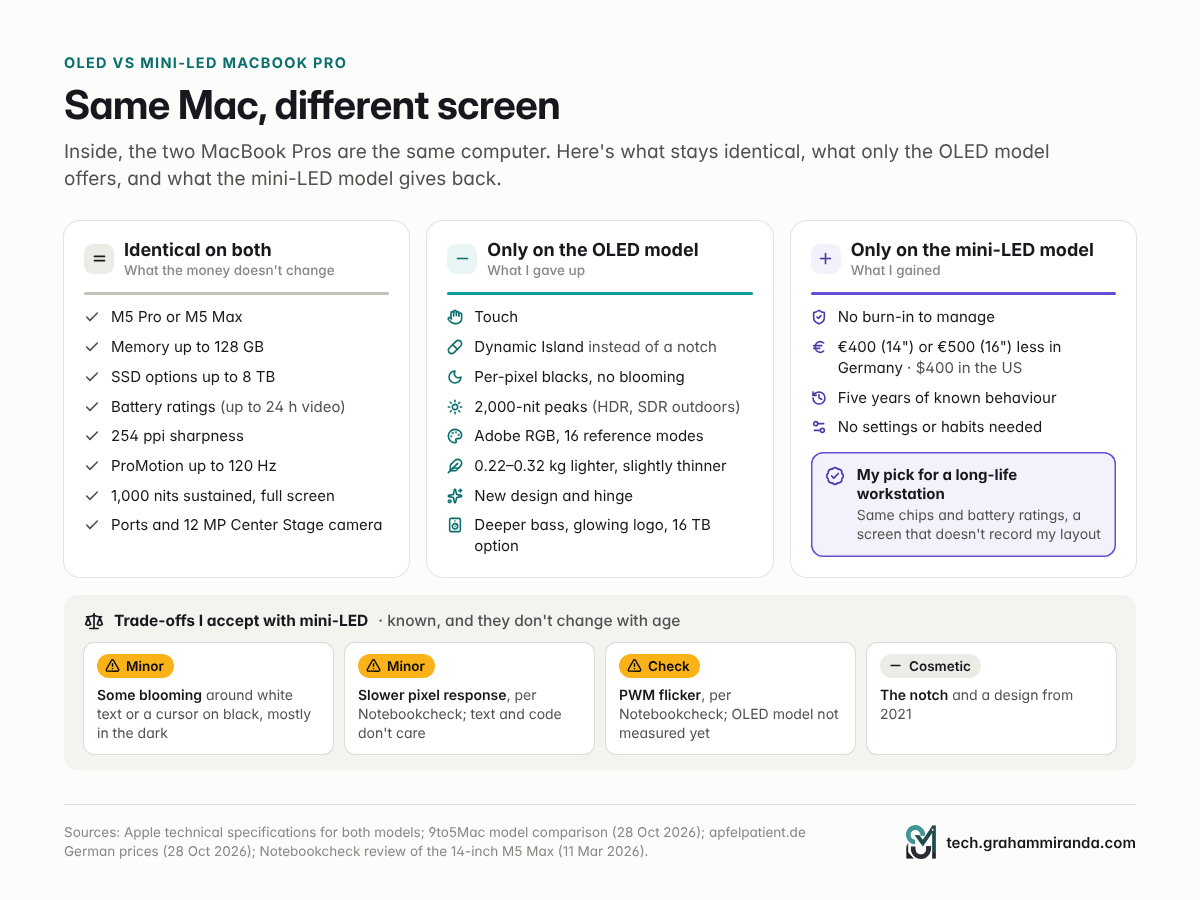
Inside, they're the same computer. Both come with the M5 Pro or M5 Max, the same memory options up to 128 GB, the same storage options (the OLED model alone adds 16 TB on the M5 Max), the same ports and the same battery ratings: up to 22 hours of video on a 14-inch M5 Pro and up to 24 hours on a 16-inch M5 Pro. The 14-inch mini-LED line also offers a cheaper model with the base M6 chip, which the OLED line doesn't.
That's what made this decision possible at all. If the OLED model had a faster chip, more memory or longer battery life, this would be a different article. It doesn't, so the choice comes down to the screen and the body around it, and that's a question about how I use my Mac rather than how fast it is.
What each one costs
| Configuration | Mini-LED (Germany) | OLED (Germany) | Difference | Mini-LED (US) | OLED (US) |
|---|---|---|---|---|---|
| 14-inch, M5 Pro, 24 GB, 1 TB | €2,899 | €3,299 | +€400 | $2,499 | $2,899 |
| 16-inch, M5 Pro, 24 GB, 1 TB | €3,399 | €3,899 | +€500 | $2,999 | $3,399 |
| 14-inch, M5 Max, 36 GB, 2 TB | €4,799 | €5,199 | +€400 | $4,099 | $4,499 |
| 16-inch, M5 Max, 36 GB, 2 TB | €5,099 | €5,599 | +€500 | $4,399 | $4,799 |
German prices include 19% VAT (apfelpatient.de, 28 October 2026, re-checked 4 November). US prices are before sales tax (Apple and 9to5Mac). Prices change; check Apple's configurator for your exact build.
Both lines already carry the increases Apple pushed through in June, which, as 9to5Mac's Michael Burkhardt points out, made the mini-LED MacBook Pro $300 dearer than before. I went through what that did to high-memory configurations in Don't Buy a MacBook Just to Run LLMs.
What I ordered
The configuration is identical on both orders: same chip, same memory, same SSD. The only thing I changed is the model, which means the screen and the body around it. (If you're still choosing memory, especially for local AI, my MacBook Pro M5 Pro 64 GB guide covers that decision, and it's the same on both models.)
Part 2 — Why I Cancelled, in Short
Four reasons, in order of weight.
1. I'm buying a workstation for the long haul. My M1 MacBook Pro came out in 2020. Six years later it runs macOS 27; EveryMac lists the 2020 M1 models as the oldest Macs it supports, missing only the most powerful on-device Apple Intelligence model. Apple's chips age gracefully, and the M5 Pro and M5 Max will be fast enough for my work for many years. The question is whether every other part of the laptop keeps up. On an OLED MacBook, the part most likely to show its age is the screen.
2. My screen is the worst case for OLED. Static, bright and on for hours: terminals, editors, dashboards, the menu bar and the Dock, every working day. Part 3 goes through it.
3. Apple mitigates burn-in, but it doesn't rule it out. Its technical paper describes the most thorough burn-in defences Apple has published for any product. It also publishes no lifetime figure and no burn-in warranty terms, it describes burn-in as normal OLED behaviour on the iPhone, and AppleCare+ excludes normal wear and tear. Part 5 has the details.
4. Mini-LED already does everything I need, for less. Same sharpness, same smoothness, more brightness than I'll use, same battery ratings, same chips, €400–500 cheaper. Part 7 goes line by line.
And a smaller fifth: this is Apple's first OLED Mac, its first touchscreen Mac and a new chassis with a new hinge. First generations are where the surprises live. The mini-LED design has been on sale for five years, and its strengths and weaknesses are well documented.
Part 3 — My Workstation Is OLED's Worst Case
Burn-in risk is the product of three things: how static the content is, how bright it is, and how long it stays. Any one of them on its own does little. All three together, every day, for years, is the scenario every OLED maker warns about, Apple included: its iPhone support document advises against leaving static images on screen at maximum brightness for long periods.
Here's what my screen shows on a normal working day:
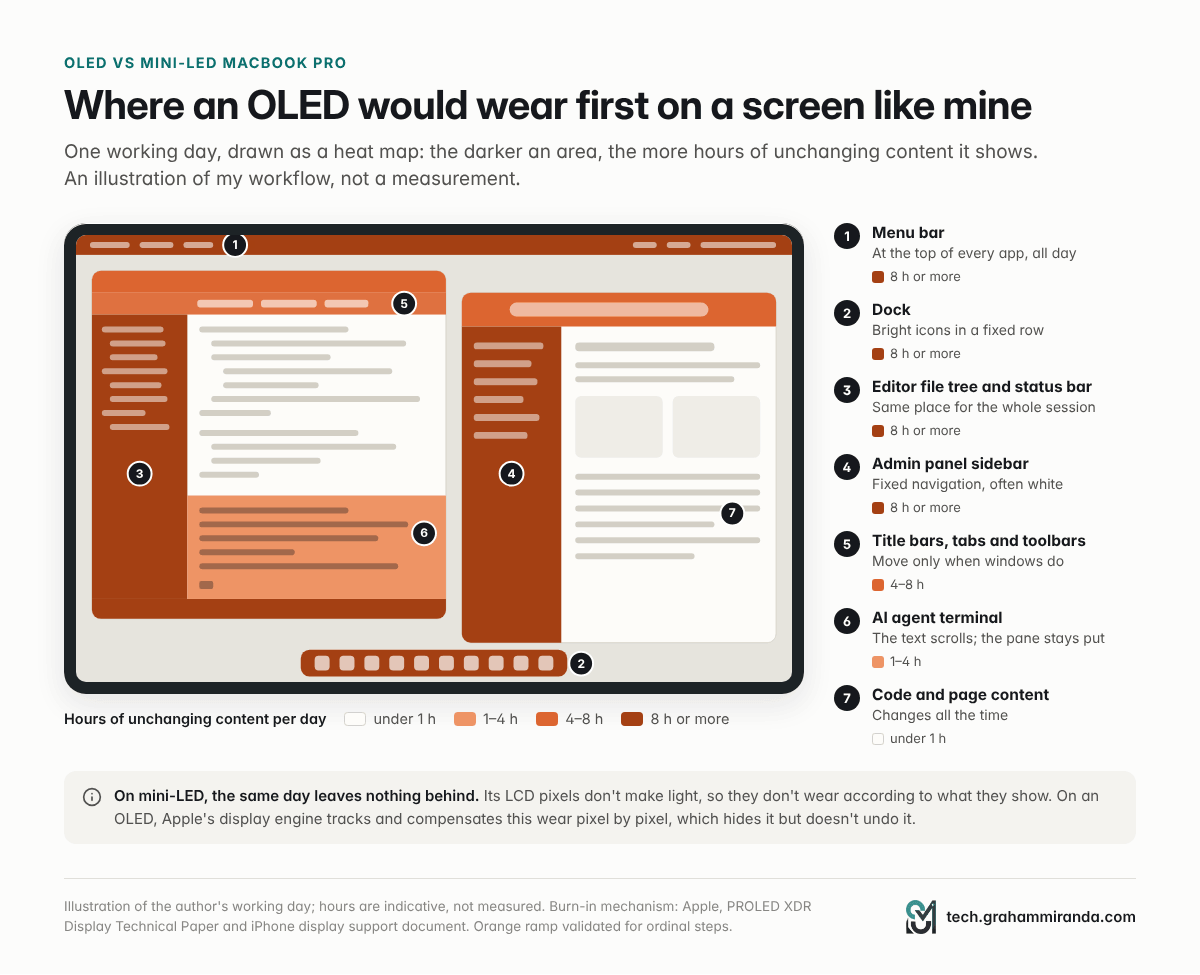
- AI coding agents in a terminal and an editor. I build software through AI agents rather than writing code by hand (I compared 28 of these tools in Every AI Coding Harness Compared, and told the story of building an app this way in How to Build an App From Scratch With AI). That means terminal windows and an editor with a file tree, tab bar and status bar in the same places for hours.
- Local LLMs. I run language models locally, which means long sessions with the same chat or model-server window open.
- The blog. Writing and editing long articles like this one in WordPress, with fixed toolbars around a white page.
- Running an IT services company. Hosting panels, SSH sessions to servers, monitoring views and an ERP, many of them admin interfaces with fixed navigation sidebars.
- macOS itself. The menu bar along the top and the Dock along the bottom, all day.
Look at that list from an OLED panel's point of view. The menu bar, the Dock, a terminal's frame, an editor's sidebar, an admin panel's navigation: they sit on the same pixels day after day, and the brightest of them, white sidebars and toolbars, sit there at full working brightness while the content area beside them keeps changing. Those fixed, bright strips are precisely where uneven wear would show first.
Couldn't I just change my habits?
Yes, and in the explainer I listed the settings that help against MacBook Pro burn-in: automatic brightness, an auto-hiding menu bar and Dock, a display that sleeps after a few minutes, dark mode, closing windows I'm not using. They work, and I'd recommend them to anyone who buys the OLED model.
But each is a small compromise in how I use my own computer, for the whole life of the computer. A menu bar that hides when I want to glance at it. A Dock I have to summon. Sidebars I'd shuffle around to spread the wear. A workstation should adapt to the way I work, not the other way round. With mini-LED, I don't have to think about any of it.
Part 4 — The Lifespan Maths: The Hours Add Up
Burn-in isn't measured in days or months. It's measured in hours of the same content on the same pixels. So here's the arithmetic for a laptop used as a workstation.
| Use pattern | Per year | After 3 years | After 6 years | After 8 years |
|---|---|---|---|---|
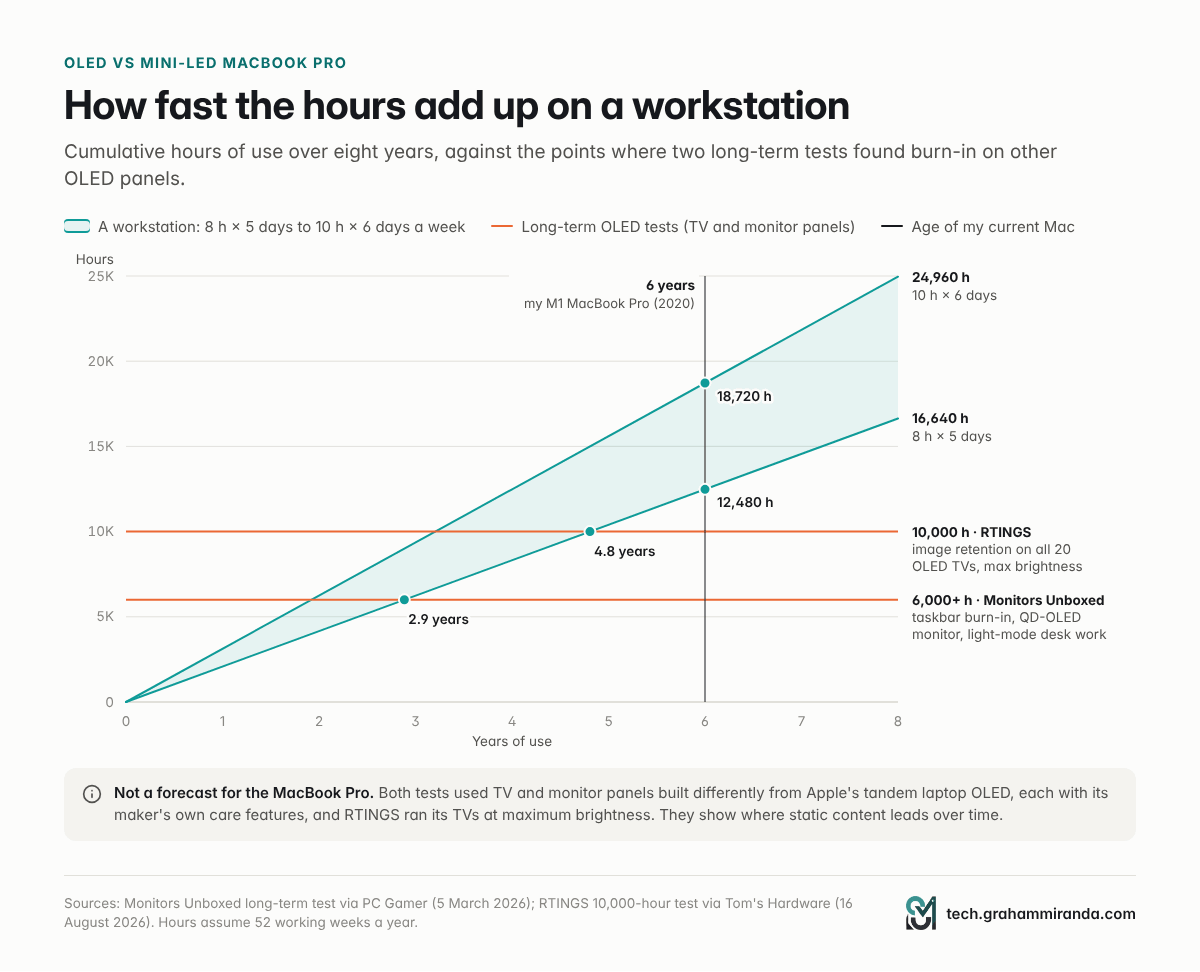
| 8 hours a day, 5 days a week | 2,080 h | 6,240 h | 12,480 h | 16,640 h |
| 10 hours a day, 6 days a week | 3,120 h | 9,360 h | 18,720 h | 24,960 h |
52 working weeks a year, no holidays deducted.
Now set those numbers against the two best-known long-term OLED tests:
- Monitors Unboxed used a QD-OLED monitor, MSI's MPG 321URX, as a main work screen for about 60 hours a week: mostly static apps in Windows' light mode, with few precautions. As PC Gamer reported in March, after 24 months and more than 6,000 hours it showed a faint line where two side-by-side windows met, burn-in along the taskbar and faint marks where individual taskbar icons sit. Noticeable against some backgrounds; not catastrophic.
- RTINGS ran 20 OLED TVs, from a 2017 model to 2023 models, through the equivalent of 10,000 hours of a news channel at each TV's maximum brightness. As Tom's Hardware reported in August, every one developed image retention, and the newest burned in about as much as the oldest. What had improved was brightness and efficiency, which give a panel more headroom.
At 8 hours a day, five days a week, a laptop passes 6,000 hours in under three years and 10,000 hours in under five. Six years of that is more than 12,000 hours; at 10 hours a day, six days a week, it's nearly 19,000.
What those tests do and don't tell me
They don't tell me when a PROLED XDR panel would show burn-in. They used different panels (TVs and a QD-OLED monitor, not Apple's tandem laptop OLED), each with its own maker's protection, and RTINGS ran everything at maximum brightness, which laptops rarely do and Apple's brightness ceiling is designed to discourage. Apple's tandem stack also lowers the stress on each emitter layer, and panel makers claim their tandem laptop OLEDs last about twice as long as single-layer ones.
What they do tell me is the direction. OLED wear is cumulative, it lands where content doesn't move, and the test closest to real desk work saw it build up over two years and 6,000 hours. Even if Apple's panel lasts two or three times as long, the life I want from this laptop is long enough to find out.
And if burn-in does come, it's likely to come late: years after Apple's one-year warranty has ended, when a replacement screen is paid out of pocket at a price Apple hasn't published for these models. The battery, the other part of a laptop that wears out, is treated differently: AppleCare+ replaces it once it falls below 80% of its original capacity, and Apple offers battery-only repairs on Mac laptops for up to ten years after it stops selling them. Screen wear has no equivalent promise.
Part 5 — What Apple Does Against Burn-In, and Why It Didn't Settle It for Me
Apple has clearly thought hard about this. Its PROLED XDR technical paper describes four defences, which I covered in detail in the explainer:
- Two layers share the load. Each pixel's light comes from two stacked emitter layers, so each runs at lower current, which Apple links to a longer panel lifespan.
- Every pixel's wear is tracked. The display engine in the M5 Pro and M5 Max monitors each pixel's usage and compensates pixel by pixel, and keeps applying its calibration as the panel ages.
- Brightness that knows the risk. The brightness ceiling depends on the surroundings, and automatic brightness weighs the panel's long-term burn-in risk alongside ambient light, power use and your past adjustments.
- Heat is kept off the panel. A redesigned cooling system routes warm air away from the display; Apple rates the brightness figures for temperatures below 25 °C.
That's more than most laptop makers publish. It's also, as iClarified noted in its summary of the paper this week, a set of mitigations rather than a promise that the panel can't burn in.
What Apple doesn't promise
- A lifetime. Apple gives no figure for how many hours of static content the panel can take before burn-in becomes visible.
- How the compensation works. Compensation keeps worn and unworn areas looking the same by driving them differently. It hides wear; it doesn't undo it, and the headroom it relies on isn't unlimited.
- Warranty language. Apple's Mac documents don't mention burn-in. On the iPhone, Apple's support document calls image persistence and burn-in characteristics of OLED and normal behaviour. AppleCare+ for Mac excludes normal wear and tear: the exclusion is in Apple's current EU product information for the plan and has been in its US terms for years. Apple hasn't said how it would treat burn-in on a Mac, but put those three facts together and I wouldn't count on a free screen if my menu bar showed up as a ghost in year four. In the EU you also have at least two years of statutory rights against the seller. None of this is legal advice.
Compare that with the OLED monitor market, where makers have competed on burn-in warranties since 2024: according to Tom's Hardware, MSI covers its QD-OLED monitors against burn-in for three years and ASUS for two. A clear, written burn-in warranty on the MacBook Pro would have changed my decision more than any spec sheet.
Part 6 — How Each Screen Ages: OLED Wear vs Mini-LED Wear
"Lifespan" means two different things for a screen, and it helps to separate them. Wear is the slow change in how a screen looks, caused by use. Failure is something breaking. OLED and mini-LED behave differently on both.
OLED: every pixel wears on its own
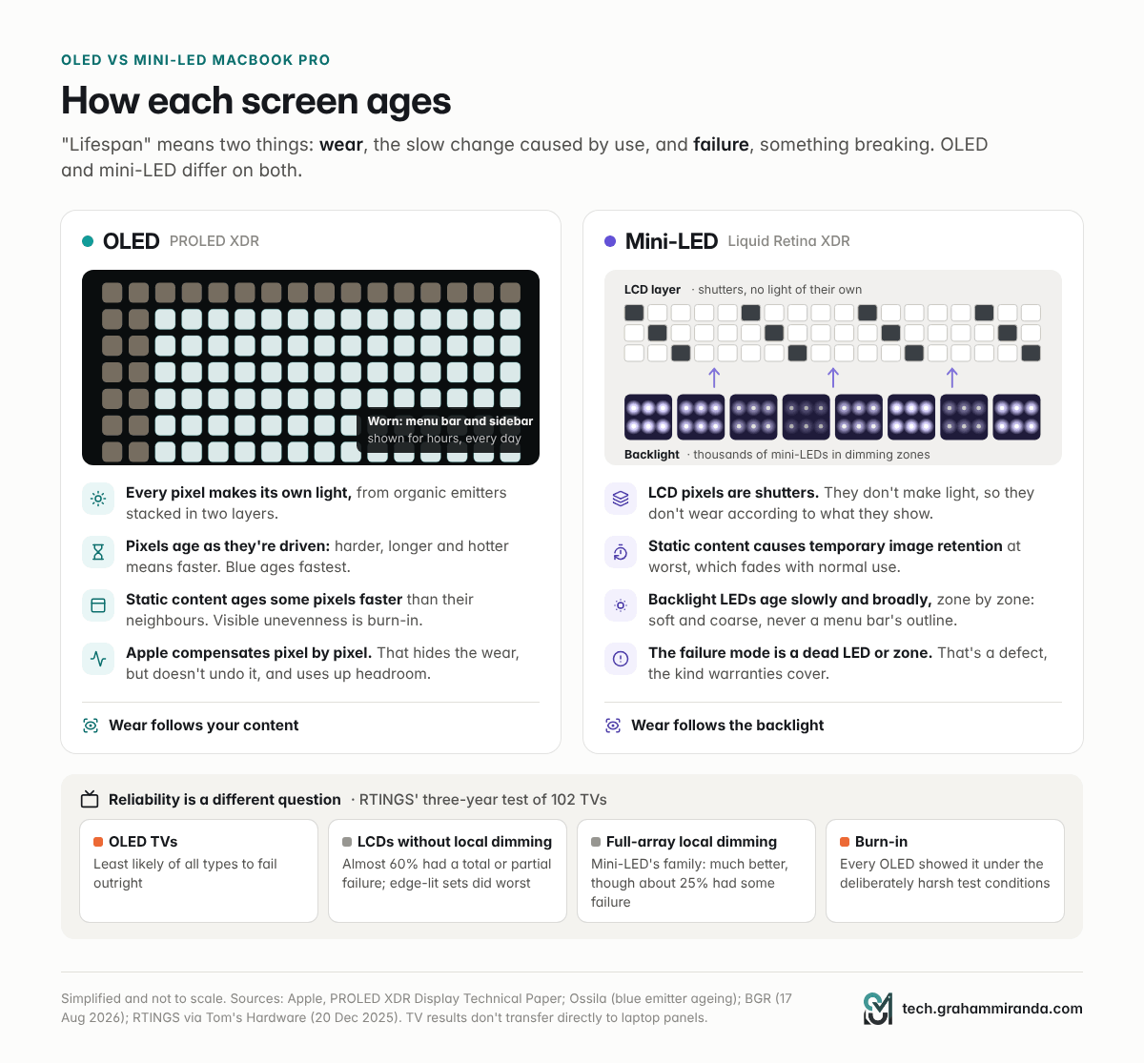
An OLED pixel is its own light source, made of organic emitter material that ages as it's driven: the harder and the longer, the faster. Blue emitters age fastest, according to Ossila, which supplies materials for OLED research; that's why burned-in areas often look slightly tinted. Because each pixel ages according to what it showed, a static element slowly wears its outline into the panel. That's burn-in, and it's why OLED lifespan is usually a question of uneven wear rather than of pixels failing.
Tandem stacks slow this down. LG Display said in 2024 that its tandem laptop OLEDs last twice as long as single-layer panels, and Samsung Display, reportedly the supplier of Apple's MacBook Pro panels, made a similar claim for its newest tandem laptop panels in July. They don't change the principle: wear still follows content.
Mini-LED: the light comes from behind
A mini-LED screen is an LCD. Its pixels don't make light at all; they're shutters in front of a backlight made of thousands of tiny LEDs grouped into dimming zones. The LCD layer doesn't wear according to what it shows, so a static menu bar can't burn its shape into it. The worst a static image usually does on an LCD is temporary image retention: some owners of the first Retina MacBook Pro saw it in 2012, and it was temporary. BGR's comparison puts it plainly: burning an image into mini-LED is almost impossible, though colours can still drift with age. Mini-LED burn-in, in the OLED sense, isn't really a thing.
The backlight does age. With local dimming, zones behind bright content work harder than zones behind dark content, so a backlight can age a little unevenly too. But each zone lights a large block of pixels, so any difference is soft and coarse, never the crisp outline of a menu bar, and the LEDs themselves are inorganic. What a backlight can do is fail: an LED or its driver can die and leave a dark zone. That's a defect, not wear, and defects are what warranties cover.
What the reliability data says, and why it isn't the whole story
The best public data on screen reliability, RTINGS' three-year test of 102 TVs, doesn't flatter LCD. As Tom's Hardware reported, 20 TVs failed outright and 24 partially, and OLEDs were the least likely to fail. Edge-lit LCDs did worst: almost 60% of the TVs without local dimming had a total or partial failure. Full-array local-dimming sets, the family mini-LED belongs to, did much better, though about a quarter still had some failure. And every OLED in the test showed burn-in, which RTINGS puts down to its deliberately harsh conditions rather than normal use.
So if "lifespan" means won't break, OLED TVs have the better record. If it means won't change because of how I use it, mini-LED wins. TVs aren't laptops, and their panels, backlights, heat and usage differ, so neither result transfers directly. But it sharpened my question. I'm not worried that my MacBook Pro's screen will die; warranties, consumer law and AppleCare+ exist for that. I'm worried about the slow, uncovered kind of change caused by the way I work, and mini-LED doesn't have that failure mode.
Five years of mini-LED MacBook Pros
Apple's mini-LED laptops have been on sale since October 2021, and the complaints I found in five years of coverage are about how they look, not how they age. There's blooming around bright objects on black, which early owners in MacRumors' 2021 round-up found minor, mostly visible at an angle and much less noticeable than on the 12.9-inch iPad Pro of the same year. And there are slow pixel response and PWM flicker, both listed as weaknesses in Notebookcheck's review of the 14-inch M5 Max model. I didn't find a pattern of reports of mini-LED MacBook Pro screens wearing out.
Part 7 — Why Mini-LED Is as Good as OLED for My Work
Here's the OLED vs mini-LED MacBook Pro comparison through the only lens that matters to me: what each difference does for the work I actually do.
| OLED (PROLED XDR) | Mini-LED (Liquid Retina XDR) | Does it matter for my work? | |
|---|---|---|---|
| Sharpness | 254 ppi | 254 ppi | Identical text |
| Refresh rate | 10–120 Hz ProMotion | Up to 120 Hz ProMotion | Same smooth scrolling |
| Full-screen brightness | 1,000 nits sustained, SDR and HDR | 1,000 nits sustained (HDR); SDR up to 1,000 nits outdoors | Both far brighter than I use at a desk |
| Battery ratings | Same | Same | Identical on paper |
| Colour | P3 + Adobe RGB, 16 reference modes | P3, 11 reference modes | My images go on the web, not to print |
| HDR peak | 2,000 nits | 1,600 nits | 1,600 is plenty to check HDR video |
| Black level | Per pixel, no blooming | Local dimming, some blooming | Minor: white text on black, mostly in the dark |
| Pixel response | Microseconds | Slow, per Notebookcheck | Irrelevant for text and code |
| Outdoor SDR | Up to 2,000 nits | Up to 1,000 nits | My MacBook Pro is a desk workstation |
| Touch, Dynamic Island | Yes | No | Not part of my workflow |
| Weight, 14" / 16" | 1.38 / 1.82 kg | 1.60 / 2.14 kg | It mostly stays on the desk |
| Burn-in from static layouts | Mitigated | Not the OLED kind | The deciding row |
Apple's technical specifications for both models; Notebookcheck's review of the 14-inch M5 Max (March 2026).
The numbers I use every day are the same
For text, code, terminals and admin panels, the things that decide comfort are sharpness, smoothness and a steady, even picture. Both panels are 254 pixels per inch, so text renders identically. Both run ProMotion up to 120 Hz. And neither gets anywhere near its limits indoors: both hold 1,000 nits across the full screen, and comfortable desk brightness is a small fraction of that.
The OLED panel can drop to 10 Hz for static content to save power, but Apple rates both models for the same battery life, so I'm not giving up hours away from the charger.
Blooming is the real visual difference
Mini-LED's weakness is that its dimming zones are far bigger than its pixels. Put white text on a black background in a dark room and a faint halo can appear around it; owners on the MacRumors forums have described a white cursor glowing slightly on a dark background. MacRumors' round-up of early owners found it minor on the MacBook Pro and mostly visible at an angle. It matters most for dark films and night-time video work.
For me it's a small cost. Dark-themed terminals and editors are exactly where blooming shows, so I'll see it now and then. But it appears only in some conditions, it doesn't get worse over time, and it's the price of a screen I'll never have to manage. If I spent my evenings grading HDR footage in a dark room, this alone would send me to OLED.
Colour, HDR and peaks: better than I need
The OLED panel's extras are real: Adobe RGB for print work, 2,000-nit HDR highlights, 2,000 nits for ordinary content outdoors, 16 reference modes including DICOM presets for medical imaging. They're aimed at photographers who print, colourists and people who work in the sun, and my work is none of those: my images go to the web, I don't grade HDR video, and my MacBook Pro works at a desk. The mini-LED's 1,600-nit HDR peak and P3 colour already exceed what my work asks of a screen.
Touch, the Dynamic Island and a lighter body: nice, not needed
Touch is the OLED model's other headline feature, and it's well done. But my work happens on a keyboard and trackpad, and I already own an iPad Air for the things touch is best at. The Dynamic Island is a nicer use of the camera cut-out than a notch, but it doesn't change my work. The weight saving is real, 0.22 kg on the 14-inch and 0.32 kg on the 16-inch, and it matters if you carry a laptop every day. A workstation mostly stays on the desk.
Part 8 — What I Gave Up, and What I Accept
I don't want to pretend this was free. Here's everything the mini-LED model doesn't have.
- Touch. The first Mac you can touch, with gestures, touch-tuned Apple apps and a hinge redesigned to keep the screen steady.
- The Dynamic Island, with Live Activities, calls, music and AirDrop in place of a notch.
- Per-pixel blacks. No blooming, no halos, ever.
- 2,000-nit peaks for HDR highlights, and for ordinary content outdoors.
- Adobe RGB and 16 reference modes, against P3 and 11 on the mini-LED.
- Weight and size. The 14-inch OLED model with M5 Pro weighs 1.38 kg, slightly less than my 13-inch M1 MacBook Pro at 1.4 kg, despite the bigger screen. The mini-LED equivalents weigh 1.60 kg (14-inch) and 2.14 kg (16-inch), against 1.82 kg for the 16-inch OLED. The OLED models are also slightly thinner.
- The redesign itself, plus the smaller extras: a redesigned woofer Apple says gives 50% deeper bass, new tweeters, camera stabilisation while you touch the screen, Genlock support, the glowing Apple logo and a 16 TB SSD option.
What I accept with mini-LED
- Some blooming, as described above.
- Slower pixel response. Notebookcheck lists it as a weakness. Text and code don't care; fast games and fast-moving video do, a little.
- PWM flicker. Notebookcheck measured constant PWM flicker on the mini-LED MacBook Pro. This isn't a clear win for OLED, though: nobody has measured the PROLED XDR panel yet, and Notebookcheck measured the 13-inch M4 iPad Pro's tandem OLED flickering at 240 Hz at minimum brightness. If you're PWM-sensitive, wait for measurements of both.
- The notch and a design that's five years old.
What I avoid
The first-generation unknowns. The OLED model's PWM behaviour hasn't been measured. Its sustained performance in a thinner chassis hasn't been tested; 9to5Mac's comparison notes that real-world testing will show whether the new design affects it. And the touch layer and hinge are new. None of these is a known problem. They're simply unknowns, and the mini-LED design has had five years to reveal its own.
Part 9 — The Money: Same Specs, €400–500 Less
In Germany the OLED premium is €400 on the 14-inch and €500 on the 16-inch, the same on M5 Pro and M5 Max; in the US it's a flat $400. As a share of the price, it hits hardest on the cheaper configurations: 13.8% on the 14-inch M5 Pro and 14.7% on the 16-inch M5 Pro, falling to 8.3% and 9.8% on the M5 Max models.
Money wasn't my main reason, and it's only fair to say so: spread over six years, €400–500 is roughly €67–83 a year. For a screen that made my work better and would last as long as the rest of the laptop, I'd pay it without thinking.
But that's the point. For my work, the OLED panel isn't better in any way I'd notice day to day, and it's the one component that could age faster than the rest. Paying more for a screen I'd have to manage, to get features I wouldn't use, is the opposite of what I want from a workstation.
Part 10 — The Case Against My Decision
Plenty of informed people think I'm wrong to worry. Here are the strongest arguments, and my answers.
"Burn-in is a solved problem." In July, 9to5Mac's Ben Lovejoy argued that burn-in on an OLED MacBook Pro is exceedingly unlikely: full-screen apps hide the menu bar and Dock, few people run a laptop at maximum brightness for hours, modern panels are tougher, and tandem stacks roughly halve the stress on each layer. Max Tech's Vadim Yuryev went further on X, telling people to stop saying OLED MacBook Pros will burn in, because tandem panels and per-pixel monitoring make it a thing of the past. My answer: for most people, they're probably right. But both arguments rely on usage that changes, and the exception they leave open, the same bright layout for hours every day, is my normal day.
"The iPad Pro has had tandem OLED since 2024 with no burn-in scandal." True. I found no major-outlet coverage of a burn-in problem with the tandem OLED iPad Pro, and that's genuinely reassuring about Apple's panels. My answer: an iPad spends its life in full-screen apps with little static furniture on screen, and two and a half years is less than half the life I want from this Mac.
"OLED is actually more reliable than LCD." In RTINGS' three-year TV test, OLED TVs failed outright less often than LCDs. My answer: that's about things breaking, and it's covered in Part 6. I'm not choosing mini-LED because I expect OLED to fail. I'm choosing it because it doesn't wear according to how I use it.
"Just use the settings." Auto-brightness, an auto-hiding menu bar and Dock, dark mode and a display that sleeps quickly remove most of the risk. My answer: agreed, and I'd tell any OLED buyer to use them. I'd rather not adapt my workflow to my screen for the next six years.
"Plug in an external monitor for the static stuff." Run the OLED laptop in clamshell mode at your desk and keep its own screen for travel and creative work. My answer: a good option for people who want OLED on the road. For me it means paying €400–500 for a laptop screen I'd then avoid using for my main work.
"You'll regret it when OLED is everywhere." Bloomberg's Mark Gurman has reported that the MacBook Air should go OLED in 2028, so mini-LED's days in Apple's laptops are probably numbered. My answer: probably true, and it's fine. By the time I replace this Mac, OLED laptops will be several generations further on, with years of owner reports behind them. That's when I'd rather buy one.
"Resale value will be worse." Possibly, since the OLED model is the newer design. But an OLED laptop with visible burn-in might resell worse still. Nobody knows yet, and I'm buying to use, not to resell.
Part 11 — Who Should Still Buy the OLED MacBook Pro
My decision fits my work. Plenty of people should make the opposite one.
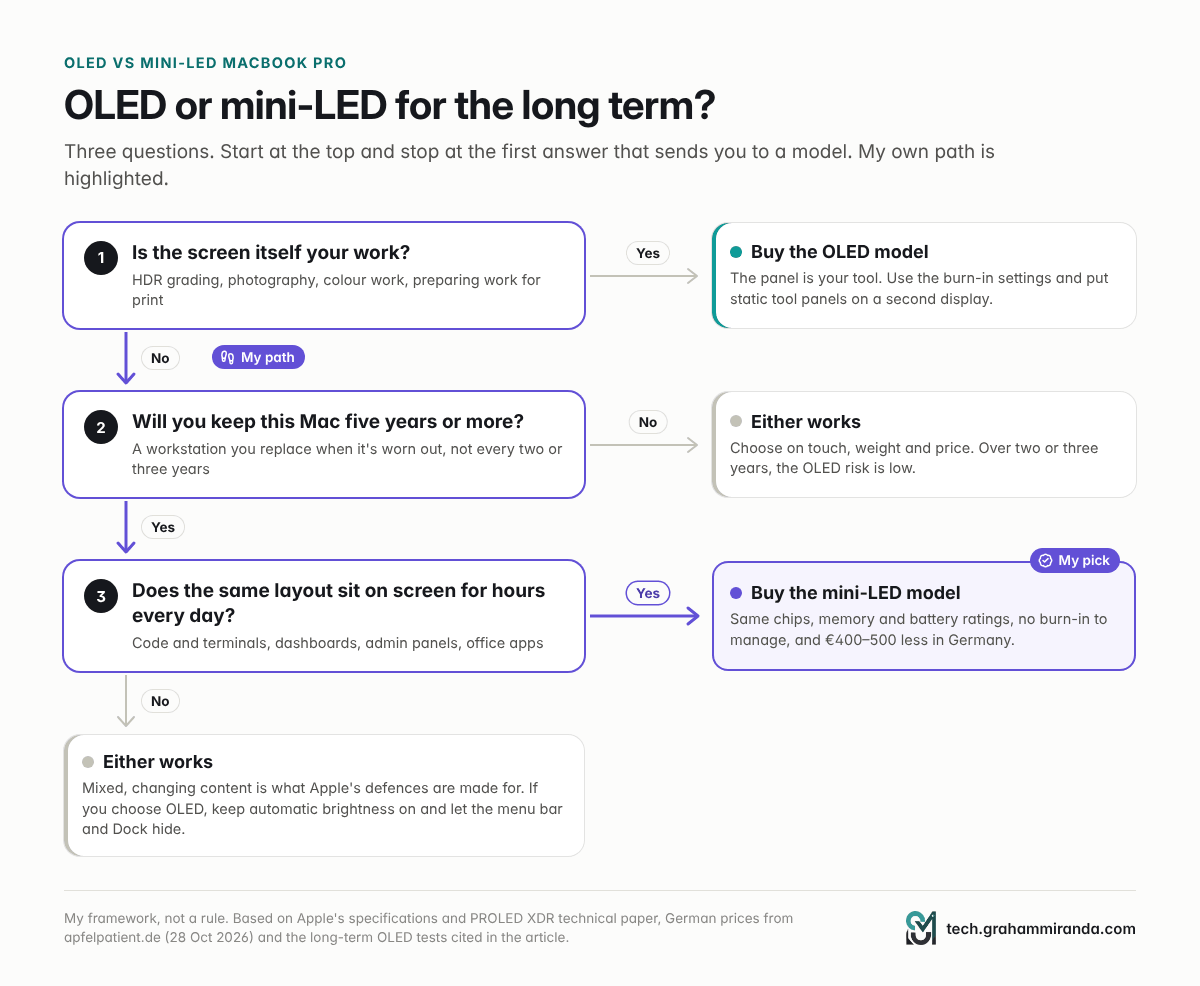
- People whose work is the screen. HDR video editors and colourists, photographers who print, designers who prepare work for print: 2,000-nit peaks, per-pixel contrast, Adobe RGB and 16 reference modes are real tools. Buy the OLED model, use the settings and put static tool panels on a second display.
- People who replace their laptop every two or three years. That's a fraction of the hours that worry me, and with Apple's protections and sensible settings, the risk within that window is low.
- Frequent travellers. 0.22–0.32 kg less weight and 2,000 nits outdoors are worth paying for if your laptop lives in a bag.
- Mixed, everyday use. Browsing, documents, video and calls, with automatic brightness on: the content keeps changing, and Apple's defences are made for exactly this.
- Touch fans and iPhone developers. Touch is useful for scrolling, presenting, music software and testing iOS apps in Xcode.
| Your situation | My pick | Why |
|---|---|---|
| Static layouts for hours, keeping it 5+ years | Mini-LED | No burn-in to manage, same performance, €400–500 less |
| HDR, colour or print work | OLED | The screen is your tool; manage the static parts |
| Replacing every 2–3 years | OLED, if you want its features | Burn-in unlikely within your ownership |
| Carry it every day | OLED | Lighter, brighter outdoors |
| Mixed everyday use | Either | Decide on touch, weight and price |
| Always-on dashboards, kiosks, monitoring | Mini-LED, or an external display | OLED's worst case, all day |
Part 12 — How to Cancel or Return a MacBook Pro Order in Germany
If you're having the same second thoughts, here's how it works in Apple's German Online Store, according to Apple's own help pages (checked on 4 November 2026).
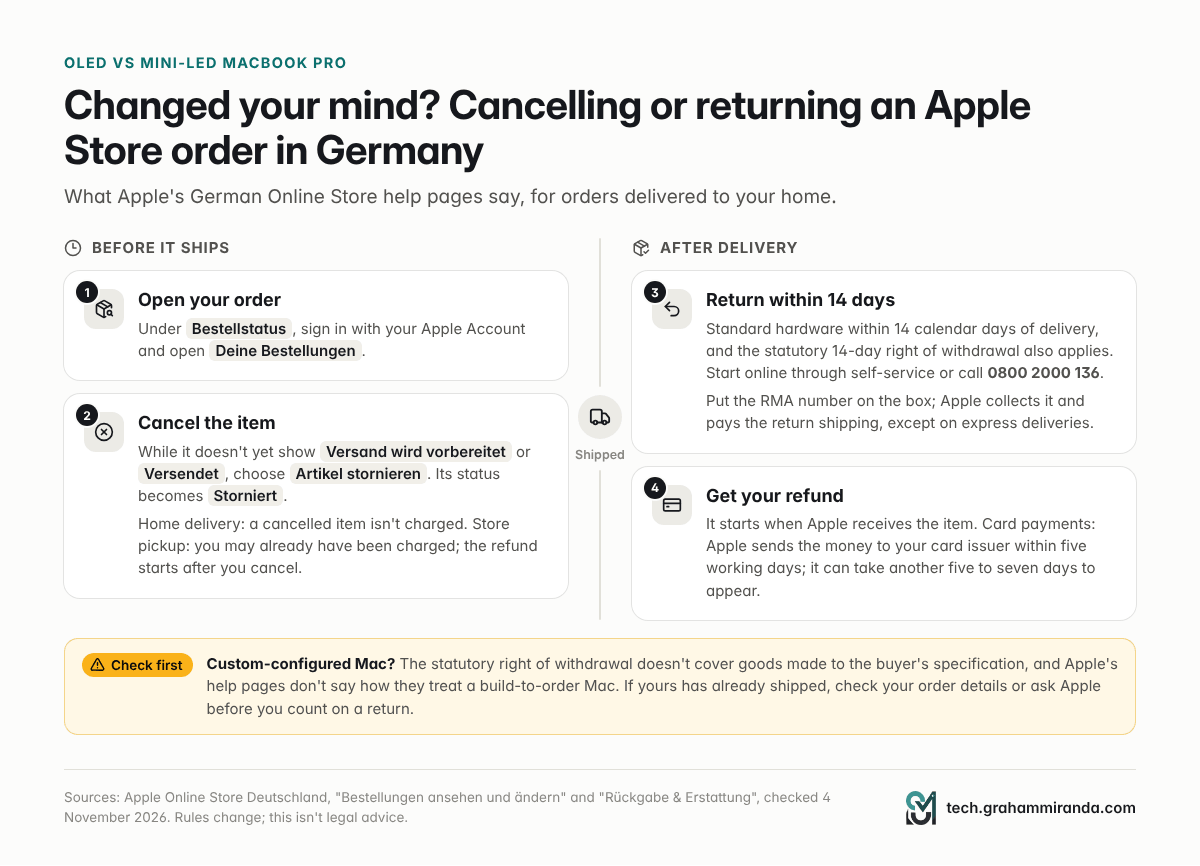
- Open your order. Sign in with your Apple Account under Bestellstatus, and open Deine Bestellungen.
- Cancel before it ships. As long as the item doesn't yet show Versand wird vorbereitet (preparing to ship) or Versendet (shipped), you may be able to select it and choose Artikel stornieren (cancel item). Its status changes to Storniert. For home delivery, a cancelled item isn't charged; for in-store pickup, you may already have been charged, and the refund starts after you cancel.
- Too late to cancel online? Accept the delivery and return it. Apple takes standard hardware back within 14 calendar days of delivery, and German law also gives you a 14-day right of withdrawal. Start the return through Apple's self-service site or by calling Apple on 0800 2000 136, put the RMA number you receive on the box, and Apple collects it. Apple pays the return shipping, except on express deliveries.
- Your refund. It starts when Apple receives the item. For credit cards, Apple sends the money to your card issuer within five working days, and it can take another five to seven days to appear.
- Custom configurations. The statutory right of withdrawal doesn't cover goods made to the buyer's specification, and Apple's help pages don't spell out how they treat a custom-configured Mac. If yours is a build-to-order model and it has already shipped, check your order details or ask Apple before you count on a return.
- Order the replacement. The mini-LED model is configured the same way on Apple's store. Check its delivery date before you cancel if you need a working Mac by a particular day.
Part 13 — What Would Change My Mind
I'm not anti-OLED. I'm anti-uncertainty on a machine I want to keep for years. These would change my answer:
- A burn-in warranty, or a published lifetime figure for the panel under static content.
- Two or three years of owner reports from people who use the OLED MacBook Pro the way I'd use mine: long days, fixed layouts, working brightness.
- An independent long-term test of a tandem laptop OLED under desk-work conditions, like Monitors Unboxed's but on Apple's panel.
- Measurements of PWM, sustained performance and real-world battery life from full reviews.
When my next replacement comes round, I expect at least the first two to exist, and OLED to be the obvious choice. This time, it wasn't.
Frequently Asked Questions
Is a mini-LED or OLED MacBook Pro better for long-term use?
For long-term use with a lot of static content, such as coding, admin work or spreadsheets for many hours a day, the mini-LED MacBook Pro is the safer choice: it has the same M5 Pro and M5 Max chips, memory options and battery ratings, and its LCD layer doesn't burn in the way OLED does. For display-critical work, mixed everyday use or a laptop you'll replace within two or three years, the OLED model's better screen is worth having.
Does the mini-LED MacBook Pro get burn-in?
Not the way OLED does. A mini-LED screen is an LCD, so its pixels don't emit light and don't wear according to what they show. Static content can cause temporary image retention that fades, and the LED backlight slowly loses brightness over many years, but a menu bar can't wear its outline into the panel. Backlight LEDs can fail, which is a defect covered by warranty, not wear.
How many hours does it take for an OLED to burn in?
There's no single figure, and Apple doesn't publish one for the PROLED XDR panel. In Monitors Unboxed's long-term test, a QD-OLED monitor used for static desk work in light mode showed slight burn-in after 24 months and more than 6,000 hours. In RTINGS' test, all 20 OLED TVs developed image retention after the equivalent of 10,000 hours of news at maximum brightness. Apple's tandem laptop panel is built differently and has its own protection, so those numbers aren't a forecast for it.
Is the OLED MacBook Pro worth €400–500 more than the mini-LED model?
It is if the screen is central to your work (HDR, photography, colour, print), if you carry your laptop every day, or if you want touch. It isn't if you mainly code, write or run admin and office software: the mini-LED model has the same chips, memory options, ports and battery ratings for €400 (14-inch) or €500 (16-inch) less in Germany, and $400 less in the US, with no burn-in to manage.
Do the OLED and mini-LED MacBook Pros have the same performance?
On paper, yes. Both use the M5 Pro or M5 Max with the same memory options up to 128 GB, and Apple rates them for the same battery life. The OLED model is thinner with a redesigned cooling system, and reviews haven't yet measured whether that changes sustained performance. The 14-inch mini-LED line also offers a base M6 model.
What do you lose with the mini-LED MacBook Pro?
Touch, the Dynamic Island, per-pixel blacks without blooming, 2,000-nit peak brightness, Adobe RGB and 16 reference modes, 0.22–0.32 kg of weight, the new design and hinge, deeper bass, the glowing Apple logo and the 16 TB SSD option. The mini-LED panel also has slower pixel response and PWM flicker, according to Notebookcheck.
Is the mini-LED MacBook Pro good for coding?
Yes. Coding is mostly static text and fixed panels for hours, which is the content OLED handles worst and mini-LED doesn't mind. Text is equally sharp at 254 ppi on both, and both run at up to 120 Hz. The one visual drawback is slight blooming around bright text on a dark theme in a dark room.
Does mini-LED blooming matter in dark mode?
A little. With white text or a white cursor on a black background, mini-LED can show a faint halo, most visible in a dark room and at an angle. Early MacBook Pro owners found it minor, and it doesn't get worse over time. If you grade HDR video or watch dark films at night, OLED's per-pixel blacks are clearly better.
Does AppleCare+ cover OLED burn-in on the MacBook Pro?
Apple hasn't said. AppleCare+ for Mac excludes normal wear and tear, both in Apple's current EU product information for the plan and in its US terms, and on the iPhone Apple describes burn-in as normal OLED behaviour. In the EU you also have at least two years of statutory rights against the seller for defects. If burn-in coverage matters to you, ask Apple in writing before you buy.
Can I cancel an Apple Store order in Germany after it ships?
Not online. You can cancel in Deine Bestellungen only until the item shows Versand wird vorbereitet or Versendet. After that, accept the delivery and return it within 14 days; Apple pays the return shipping except on express deliveries. Customer service is on 0800 2000 136.
How long do I have to return a MacBook Pro to Apple in Germany?
14 calendar days from delivery for standard hardware bought from Apple's German Online Store, and the statutory 14-day right of withdrawal also applies. The statutory right doesn't cover goods made to the buyer's specification, and Apple's help pages don't say how they treat custom-configured Macs, so check before you rely on it for a build-to-order model.
Will Apple stop selling the mini-LED MacBook Pro?
Apple hasn't said. For now it sells both families side by side, and its new base M6 MacBook Pro launched with mini-LED. Bloomberg has reported that OLED will spread to the MacBook Air in 2028, so mini-LED will probably fade out of Apple's laptops eventually. If it does, the service clock starts then: Apple keeps repairing a product for up to seven years after it stops selling it, and offers battery-only repairs on Mac laptops for up to ten.
The Bottom Line
The OLED MacBook Pro has the best screen Apple has ever put in a laptop, and for a lot of people it's the right MacBook Pro to buy. It wasn't the right one for me.
I want a workstation I can use for many years without thinking about it. My days are the same bright, static layout for hours: the one workload that turns OLED's greatest strength, pixels that make their own light, into its weakness. Apple's defences are thorough, but they're mitigations without a lifetime figure or a written promise, and the clock they slow down keeps running for as long as I keep the laptop.
The mini-LED model gives me the same chips, memory, storage, ports and battery ratings, a screen that's just as sharp, just as smooth and brighter than I'll ever need at a desk, and a panel that doesn't record my layout. I lose touch, the Dynamic Island, perfect blacks and a few hundred grams, and I keep €400–500.
For a machine I plan to keep as long as my M1, that's an easy trade. I'll look at OLED again when it's had a few more years, and a few more generations, to prove itself.
Did you order the OLED MacBook Pro, the mini-LED one, or neither? I'd like to hear how you decided, and in a few years, how your screen has held up. Corrections and counter-evidence are welcome; I'll update this article as full reviews and long-term reports come in.
Disclosure: This article contains no affiliate links and no sponsored content. No company mentioned in it reviewed it before publication.
Facts checked: 4 November 2026.