 English
  Deutsch
  Español
  Italiano
  Français
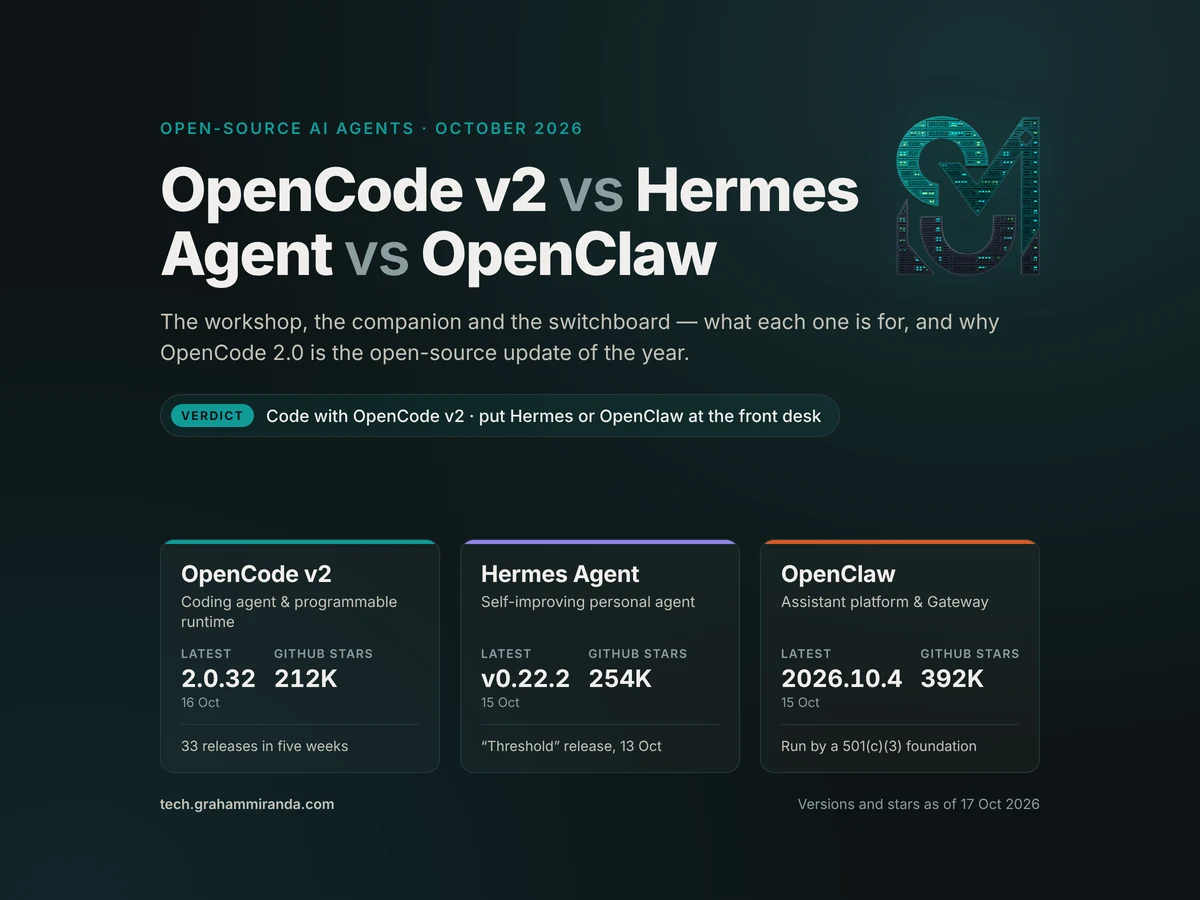
Three open-source AI agents dominate the conversation in late 2026 — OpenCode v2, Hermes and OpenClaw — and between them they have collected more than 850,000 GitHub stars.
OpenClaw, the lobster-themed assistant that started life as a hobby WhatsApp bridge and is now run by its own foundation, sits at roughly 392,000. Hermes Agent, Nous Research’s self-improving personal agent, has climbed past 250,000 — overtaking OpenCode somewhere over the summer. And OpenCode, the open-source coding agent from the team that built SST, is at about 212,000 and has just finished the most ambitious rebuild any of the three has attempted.
The question everyone asks about them is which one should I use? The honest answer is that it’s slightly the wrong question. These three tools overlap, borrow ideas from each other and even plug into each other — but they were built for different jobs. OpenCode is a workshop for code. Hermes is an agent that lives with you and learns. OpenClaw is the switchboard that puts an assistant into every chat app you own, for one person or a whole team.
So this article does three things. It explains the differences properly, without the feature-table theatre. It makes the case — loudly, because I think it deserves it — for why OpenCode 2.0, which officially became OpenCode’s main release line on 12 October, is the most important open-source agent update of the autumn. And it maps the enormous wave of new models that landed in the past ninety days, pulled straight from the models.dev database, onto each agent so you know what to actually run.
Everything here was checked against the official documentation, release notes, changelogs and the three projects’ own source repositories as of 17 October 2026. All three ship updates almost daily, so I have flagged the volatile numbers as I go.
TL;DR — The 60-Second Version
- They are not three versions of the same thing. OpenCode v2 is a coding agent that has become a programmable agent runtime. Hermes Agent is a personal agent built around memory and a learning loop. OpenClaw is a self-hosted assistant platform built around a Gateway that connects models, tools and 20-plus chat apps for one person or a team.
- OpenCode 2.0 is the update of the year. The 2.0.0 tag landed on 11 September; Anomaly’s launch post on 12 October made 2.x the main line; 2.0.32 shipped on 16 October — 33 releases in five weeks. One shared background service behind every interface, a rebuilt API, Code Mode switched on for every MCP server, background subagents and shell commands (press
Ctrl+B), 80-plus internal plugins with hot reload, a client package and an embeddable SDK, built-in git worktree tools, QR-code remote pairing, native Windows ARM64 and WinGet packages. - What v2 costs you: v1 plugins don’t load, the server API changed, v2 runs no language servers (so no LSP diagnostics), and session sharing has been retired. V1 is still patched — 1.19.3 shipped on 16 October — and
opencode upgrade --majormoves you across when you’re ready. - Hermes Agent v0.22.0, “The Threshold Release”, landed on 13 October and is its biggest yet: a guided first launch on a free trial model, app connectors for tools like Linear and Notion, one-click local models through llama.cpp, a Plugin Catalog of 600 reviewed plugins, password-manager logins for its browser, a “Bot Screen” you can take over, and live steering of subagents. Since v0.21.0, roughly 6,080 merged pull requests from about 2,520 contributors have gone into it.
- OpenClaw is the biggest and the most “infrastructure” of the three. It is now run by an independent 501(c)(3) foundation with maintainers from Microsoft, NVIDIA, OpenAI and Tencent, has no paid tier, and its October releases (2026.10.1 to 2026.10.4) are about reliability. It is the strongest choice for multi-channel, multi-user assistants — and the one with the heaviest security history. Sandboxing is still off by default.
- The model wave is real. Since early September, models.dev has added Gemini 4 Argon, Meta’s Muse Wonder and the open-weight Muse Spark Open (816B total, 42B active), Claude Haiku 5.5 at $0.10/$0.50 per million tokens, Mistral Large 4, Reflection’s open Beam 1.0, GPT-6.1 Sol, Claude Sonnet 5.5 and Opus 5.5, Xiaomi’s open MiMo-V2.6, Grok 4.7 and DeepSeek V4.1 Flash. A one-million-token context window is now normal, and output prices run from $0.28 to $50 per million tokens.
- My recommendation: write code with OpenCode v2. Run Hermes (if you want an agent that learns you) or OpenClaw (if you want shared, multi-channel infrastructure) as the always-on “front desk”. Then wire the front desk to OpenCode — Hermes ships a bundled OpenCode skill, and OpenClaw can drive OpenCode as an external harness over the Agent Client Protocol.
- What it costs: all three are MIT-licensed and free. The bill is model time. Routing a small, fast model rather than a mid-tier one to an always-on chat agent is the difference between about $3 and about $47 a month for the same workload — and frontier models cost far more (Part 10 shows the maths).
OpenCode v2 vs Hermes Agent vs OpenClaw at a Glance
| OpenCode v2 | Hermes Agent | OpenClaw | |
|---|---|---|---|
| What it is | Open-source AI coding agent, rebuilt as a programmable agent runtime | Self-improving personal agent with memory and a learning loop | Self-hosted assistant platform built around a Gateway |
| Built by | Anomaly (the team behind SST) | Nous Research | OpenClaw Foundation (independent 501(c)(3)); created by Peter Steinberger |
| Licence | MIT | MIT | MIT |
| How it makes money | Optional model services: Zen (pay as you go), Go ($10/month), Go Plus ($40/month), enterprise | Optional Nous Portal subscription and hosted Hermes Cloud | It doesn’t — no paid tier, hosted service or token; donor-funded |
| Latest release (17 Oct) | 2.0.32 (16 Oct); v1 still patched (1.19.3) | v0.22.2 (15 Oct); v0.22.0 “Threshold” on 13 Oct | 2026.10.4 (15 Oct); 2026.10.10-beta.1 in testing |
| GitHub stars | ~212K | ~254K | ~392K |
| Core runtime | TypeScript on Node | Python | TypeScript on Node (24.16+ or 26.1+) |
| Main interfaces | Terminal UI, opencode mini, Electron desktop, installable web app, IDE extensions, HTTP API, SDK | CLI and TUI, Hermes Desktop, messaging gateway, web dashboard, OpenAI-compatible API, ACP for editors | Browser Control UI, CLI, TUI, macOS menu-bar app, Windows Hub, iOS and Android nodes |
| Chat apps | Not its job — you pair a browser or phone to the service | 20+ (Telegram, Discord, Slack, WhatsApp, Signal, email, Teams, iMessage via BlueBubbles…) | 20+ (WhatsApp, Telegram, Discord, iMessage, Slack, Teams, Signal, Google Chat…) |
| Memory | Sessions, AGENTS.md and skills — no long-term model of you | Curated MEMORY.md and USER.md, session search, pluggable memory providers, self-written skills | One memory plugin slot, session search, provenance-tracked memories, Skill Workshop |
| Where code runs | Your machine, behind ordered permission rules; Code Mode runs JavaScript in a locked-down interpreter | Seven terminal backends: local, Docker, SSH, Singularity, Modal, Daytona, Vercel Sandbox | The host by default; optional sandboxes, device nodes and cloud workers |
| Default safety model | Allow/ask/deny rules (last match wins), hard-deny policies, snapshots before and after every step | Command approvals and DM pairing; the project says the operating system is the only real boundary | DM pairing by default; policy enforced in Gateway code; sandboxing opt-in |
| Best at | Building, refactoring and reviewing code | A long-running agent that learns you and lives in your chats | Shared, always-on assistant infrastructure for a household, team or company |
Versions, star counts and prices are a 17 October 2026 snapshot. All three projects release several times a week — check each project’s releases page before relying on a specific build.
Table of contents
- TL;DR — The 60-Second Version
- OpenCode v2 vs Hermes Agent vs OpenClaw at a Glance
- Part 1 — Three Agents, Three Jobs
- Part 2 — OpenCode 2.0: The Update of the Year
- Part 3 — Where OpenCode v2 Is Still Rough
- Part 4 — Hermes Agent: The Agent That Learns You
- Part 5 — OpenClaw: From Lobster Meme to Foundation
- Part 6 — Head to Head: 12 Differences That Actually Matter
- Part 7 — Why OpenCode v2 Is the One I’d Code With
- Part 8 — Better Together: Front Desk and Workshop
- Part 9 — The New Model Wave, According to models.dev
- Part 10 — What It Really Costs
- Part 11 — Security: The Part Nobody Wants to Read
- Part 12 — How to Install All Three, Step by Step
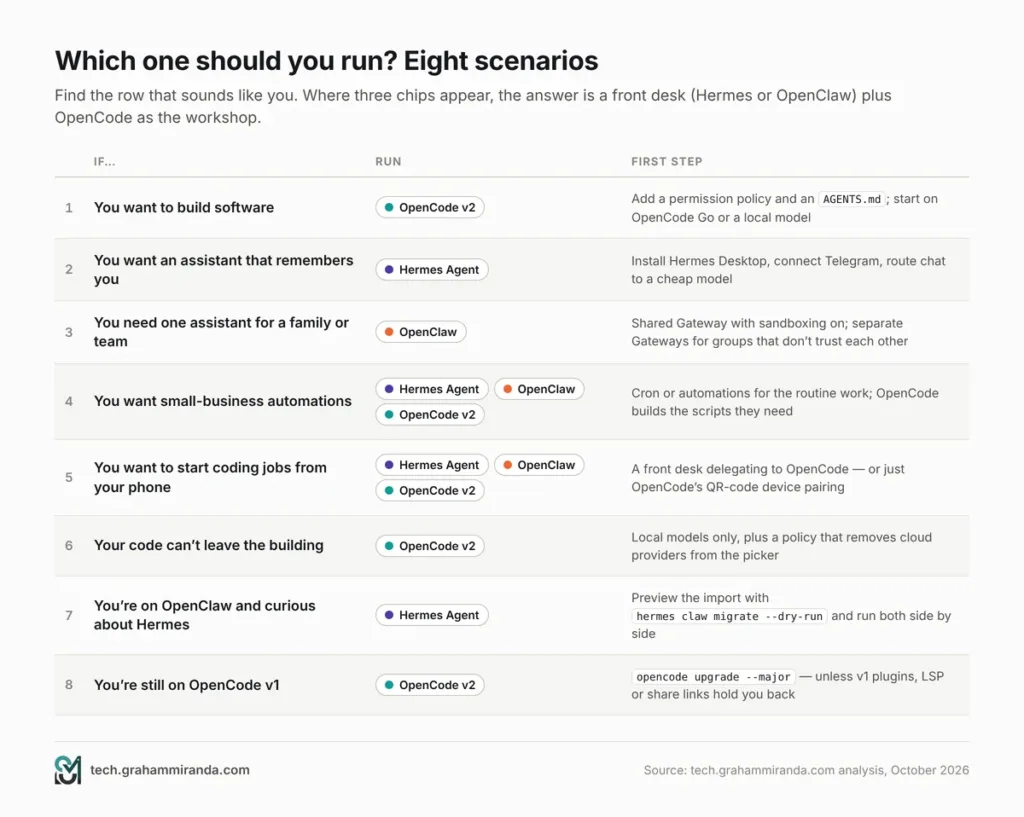
- Part 13 — Which One Should You Run? Eight Scenarios
- 1. “I just want to build software.”
- 2. “I want an assistant on my phone that actually remembers me.”
- 3. “I want one assistant for my family or my team, across WhatsApp, Slack and Teams.”
- 4. “I run a small business and want automations — daily reports, inbox triage, reminders.”
- 5. “I want to start coding jobs from my phone.”
- 6. “My code can’t leave the building.”
- 7. “I’m on OpenClaw and curious about Hermes.”
- 8. “I’m still on OpenCode v1.”
- Part 14 — What to Watch Next
- Frequently Asked Questions
- What is the difference between OpenCode, Hermes Agent and OpenClaw?
- Is OpenCode v2 better than Hermes Agent for coding?
- Is Hermes Agent better than OpenClaw?
- What is new in OpenCode 2.0?
- Should I upgrade from OpenCode v1 to v2?
- Can I use OpenCode together with Hermes Agent or OpenClaw?
- Are OpenCode, Hermes Agent and OpenClaw free?
- Which AI models work best with these agents in October 2026?
- Is OpenClaw safe to use?
- Can Hermes Agent run local models?
- What is models.dev?
- Does OpenCode v2 support LSP?
- Who makes OpenCode, Hermes Agent and OpenClaw?
- The Bottom Line
Part 1 — Three Agents, Three Jobs
Before any feature table, it helps to picture where each tool lives.
OpenCode is a workshop. You open it inside a project, describe what you want, and it does the loop a developer does: reads the code, makes a plan, edits files, runs commands, reads the output, fixes what broke, and keeps going until the job is done or it needs you. Its sessions are about a codebase, not about you. It tries to understand your repository — through AGENTS.md files, skills and the code itself — and it is deliberately good at the unglamorous parts of code work: permissions, undo, diffs, parallel branches.
Hermes Agent is a companion that learns. Nous Research built it around what it calls a closed learning loop. You talk to it from a terminal, a desktop app or a chat app on your phone; it keeps a small, curated memory of you and your environment in MEMORY.md and USER.md, searches its own past conversations, writes itself new skills after a hard task and refines them the next time. It schedules jobs, delegates to subagents and runs on anything from a laptop to a cheap VPS to a serverless sandbox that sleeps when idle. It can absolutely write code — it even runs real language servers — but its centre of gravity is you.
OpenClaw is a switchboard. At its heart is the Gateway, a local control plane that owns sessions, tools, credentials and connections to chat platforms. Channels bring the assistant into WhatsApp, Telegram, iMessage, Slack, Teams, Discord and more than a dozen others; companion apps and phone “nodes” add voice, camera, screen and device actions. The same Gateway runs a private assistant on one laptop or a shared deployment for a team — the project says configuration is the only difference. Its own architectural pitch is a trusted gateway, untrusted execution and policy enforced in code rather than requested in a prompt.
Show Image Three different starting points. Each project is reaching toward the others, but the defaults still tell you what each one was built for.
What they have in common
The overlap is real, and it is growing:
- All three are MIT-licensed and free to self-host.
- All three are model-agnostic. Hosted frontier models, open-weight models through cloud providers, and local models through Ollama, LM Studio, vLLM or llama.cpp all work.
- All three speak MCP, the Model Context Protocol, so the same tool servers plug into each.
- All three use the same skill format. OpenCode loads skills from its own folders and from
.claude/skillsand.agents/skills; Hermes is compatible with the agentskills.io standard; OpenClaw follows the AgentSkills spec. A well-written skill travels between them. - All three read
AGENTS.md-style instructions. OpenClaw and Hermes also share the idea of aSOUL.mdpersona file and aUSER.mdprofile — Hermes can even import an OpenClaw setup with one command. - All three now have some form of “code mode” — letting the model write a small script that calls several tools at once instead of one tool call per round trip.
Where they genuinely differ
The differences are about defaults and centre of gravity:
| Question | OpenCode v2 | Hermes Agent | OpenClaw |
|---|---|---|---|
| What is a “session” about? | A project and a task | A conversation with you (and your bots) | A conversation on a channel, for one or many people |
| What does it remember long term? | Your repository’s instructions and skills | You: preferences, environment, past conversations | Whatever its memory plugin stores, with recorded provenance |
| Who is it for? | A developer (or a team of them) | One person, possibly with a roster of bots | One person, a household, or a whole organisation |
| Where does it usually run? | On your dev machine (or a dev server you pair to) | Anywhere — laptop, $5 VPS, Docker, serverless sandboxes | A machine you control, often always on |
| Its instinct when unsure | Ask before acting (permission rules) | Ask for risky commands; learn from the outcome | Follow the policy the operator configured |
Keep that table in mind. Most “OpenClaw vs Hermes vs OpenCode” arguments online are really arguments about which of those rows matters to the person arguing.
Part 2 — OpenCode 2.0: The Update of the Year
I build with OpenCode, and every week of v2 releases has made the case for it stronger. Here is why it deserves the title.
Most successful open-source projects never dare to rewrite themselves. OpenCode did — and rather than spending a year apologising, the team shipped 33 releases in five weeks, made 2.x the main line, and kept the old line patched for anyone not ready to move.
The timeline
| When (2026) | What happened |
|---|---|
| July | OpenCode 2.0 opens as a public beta (a separate opencode2 binary at first) |
| 11 September | The 2.0.0 tag is cut |
| 12–30 September | 2.0.1 through 2.0.21 ship — often two releases a day |
| 11 October | v1.19.0 adds opencode upgrade --major and a /update command that can move you to OpenCode 2 — and stops installing updates automatically |
| 12 October | Anomaly publishes its OpenCode 2.0 launch post; the official changelog switches to the 2.x line; The New Stack and Product Hunt pick it up. 2.0.27 adds built-in worktree tools, an installable web app and safer remote pairing |
| 13 October | 2.0.28: per-project auto-accept, native Windows ARM64, WinGet packages |
| 14 October | 2.0.29: remote device pairing with a QR code, provider account management, automatic response continuation |
| 15 October | 2.0.30: docked diffs in the terminal UI, changed files by turn, instructions globs and URLs now load, the old session-sharing backend retired |
| 16 October | 2.0.32: copy the latest reply with /copy, headless auth login, an experimental voice-session API in the SDK. V1 gets 1.19.3 the same day |
Build numbers and dates come from the project’s tags and changelog. Treat them as a snapshot.
Show Image Thirty-three v2 releases in five weeks — while v1 kept receiving maintenance builds. Fast, but not reckless.
The seven big ideas in OpenCode 2.0
1. One service behind every screen
In 2.0, OpenCode’s server starts automatically as one background process on your machine, and everything else is a client of it: the full-screen terminal UI, the lighter opencode mini, the Electron desktop app, the web app, IDE extensions and your own scripts. Start a session in the terminal, carry on in the desktop app, approve a permission prompt from a browser tab — it is the same session everywhere.
The client/server split existed in v1, but Anomaly’s own post concedes it was something only power users touched. In 2.0 it is simply how OpenCode works, and you can see it:
bash
opencode service status   # is the shared service running, and where?
opencode service restart  # unstick it
2. An API rebuilt from scratch
Anomaly was refreshingly blunt about the old server API. Its verdict, in three words: “It was bad.” The new one was redesigned around how millions of daily users actually drive agents, and — crucially — OpenCode can call it on itself. The launch post’s examples include the agent creating a git worktree for a new task, renaming a session and moving it into that worktree, listing sessions and interrupting a stuck one.
That is the real shift in v2. OpenCode is no longer just a tool you use; it is a runtime other software can drive. Orca, the open-source cockpit for racing several agents in parallel git worktrees, is exactly the kind of tool that benefits. So are the unofficial SDKs already appearing for other languages.
3. Code Mode, on by default for MCP
This is the feature I would point a sceptic at first.
Every MCP server you add normally pours its tool definitions into the model’s context, and every tool call is a separate round trip. Add ten servers and you are paying — in tokens and in latency — before you’ve typed a word.
OpenCode 2.0’s answer is Code Mode. A minimal JavaScript interpreter in the new @opencode/codemode package turns MCP servers and OpenAPI endpoints into callable functions. Instead of calling tools one at a time, the model writes a short script that chains several calls in a single round trip — the launch post’s example files GitHub bugs straight into Linear. Every MCP server is opted into Code Mode by default. Anomaly’s claim is that you can wire up a thousand tools with very little context bloat and let the agent discover and compose them.
It is tightly boxed: the sandbox has no direct filesystem access, no imports, no timers and no direct fetch — it can only call tools in its catalog, and each of those calls still goes through your permission rules. The execute tool that runs it has its own permission, so you can switch it off entirely.
Fewer round trips means less waiting and fewer tokens. I would still call it promising rather than proven — nobody has published an independent benchmark of it yet — but the design is right.
4. Background subagents and background shell
The biggest bottleneck in agentic coding isn’t the model. It’s waiting.
In 2.0 the main agent can hand a job to a subagent that runs in the background — automatically or because you asked — and keep working. That subagent can use a different model: the launch post’s example is a review subagent on a separate model reading the main agent’s work. Long-running shell commands can run asynchronously too, with the agent notified when they finish. And if something is already running in the foreground, Ctrl+B pushes it to the background.
One caveat the docs are right to stress: concurrency is not isolation. Two agents editing the same files will still collide. Which is why the next feature matters.
5. Git worktrees, built in
Since 2.0.27, OpenCode has built-in worktree_create, worktree_list and worktree_remove tools. Ask it to start a risky change in its own worktree, and it creates an isolated checkout on its own branch and moves the session there. Removing a worktree needs normal edit approval, and a forced removal can discard uncommitted work — so read the prompt before you click.
Combine background subagents with worktrees and you have parallel, isolated work streams inside one OpenCode window, without reaching for another tool.
6. Plugins all the way down
Nearly every feature in 2.0 is itself built as an internal plugin — more than 80 of them. Anomaly’s reasoning is simple: if the team has to live on the Plugin API, the Plugin API stays well maintained. Terminal-UI plugins graduated from experimental to stable, running on the OpenTUI library. And everything hot-reloads, which leads to the most delightful trick in the release: ask OpenCode to write a plugin for itself mid-session, and it can use it straight away.
7. A client and an embeddable SDK
@opencode/client connects to the running service — it discovers the local one automatically, which makes scheduled scripts easy — and ships in plain JavaScript and Effect flavours. @opencode/sdk goes further: it is the same code that powers the CLI, packaged so you can embed the OpenCode runtime in your own server or in an environment like Cloudflare Durable Objects, with any OpenCode client able to connect to it. Anomaly says the SDK is still under development; treat it as early.
The three weeks since 2.0.15
In late September, v2 was at 2.0.15. Here is what has arrived since — a long list for three weeks:
- Remote device pairing (2.0.29). In Settings → Pairing, choose Pair device to enable remote access through OpenTunnel and get a QR code or a link. Steering a session from your phone is now a scan away.
- Provider account management (2.0.29). Switch, rename, remove or add accounts per provider from the connect dialog or Settings → Providers.
- Automatic response continuation (2.0.29). Replies that hit the output-token limit now continue instead of stopping mid-sentence.
- Per-project auto-accept (2.0.28). Trust one project more than another from Settings → Projects, or toggle it in a session with
mod+shift+a. - Native Windows ARM64 and WinGet packages (2.0.28). No more x64 emulation on ARM laptops.
- Release highlights in the terminal (2.0.28). After an update, the home screen shows what’s new once;
/highlightsbrings it back. - Installable web app and safer remote pairing (2.0.27). Install the web UI from Chrome or Edge; the first
opencode pair --remotenow warns you that it exposes your server and asks for confirmation. - Google Cloud credentials for Vertex and faster snapshots (2.0.26). Application Default Credentials work out of the box, and session snapshots cost less, recover from interruptions and use less disk.
- Docked diffs and “changed files by turn” (2.0.30).
/diffopens the diff viewer beside your session (pressfto go full screen), and the timeline can show which files each turn changed, with line counts. - Instructions that actually load (2.0.30). Local globs and remote URLs in the
instructionssetting now resolve and refresh — closing one of the gaps v2 launched with. - Quality-of-life fixes (2.0.32).
/copycopies the latest reply rather than the whole transcript,opencode auth loginno longer crashes on headless servers, and the SDK gained an experimental voice-session API for OpenAI’s realtime models and xAI’s Grok Voice.
What carried over from 2.0.0 — and still impresses
The launch-era features are all still there, and they are the reason I trust v2 with real work:
- Permissions that work like a firewall. One ordered list of
allow,askanddenyrules — the last match wins — so “ask before any shell command, allowgit status, denygit push” is three lines. Sensible defaults ask before touching anything outside the project and before reading.envfiles. - Policies that never ask, only forbid — for example, making every model provider except the approved ones disappear from the picker.
- Snapshots before and after every model step, with
/undo,/redoand revert-to-message. - Local models that simply appear. Ollama, LM Studio and vLLM are discovered automatically on their default ports.
- Model variants everywhere with
provider/model#variant, so a planning agent and a building agent can run the same model at different reasoning effort. - Skills that travel. OpenCode reads Claude Code’s and the cross-tool
.agentsskill folders directly. - Prompt-cache warming (off by default) and checkpoint-based compaction for long sessions.
How to upgrade
If you are on v1, update to the latest 1.x and run:
bash
opencode upgrade --major      # or type /update inside the terminal UI
opencode --version            # should report 2.0.x
opencode service status       # confirms the shared service is running
New installs can use the v2 installer directly (curl -fsSL https://opencode.ai/v2/install | bash) or a package manager — Part 12 has the full list. Back up ~/.config/opencode first; v1 and v2 share configuration folders.
Part 3 — Where OpenCode v2 Is Still Rough
I want people to use OpenCode v2. That’s exactly why this section exists. Overselling a tool is the fastest way to make someone quit it.
V1 plugins do not run. The plugin API was rewritten, and the migration guide is explicit that renaming the config key or moving the file isn’t enough — v1 plugin code has to be ported. Popular plugins are catching up, but check yours before you switch.
The server API is completely different. Anything built against v1’s HTTP endpoints needs porting, and new third-party SDKs increasingly target 2.x only.
There is no LSP in v2 — for now. This is the one I’d underline for anyone working in a typed codebase. V2 accepts your lsp configuration but, per the migration guide, doesn’t start language servers, expose LSP tools or produce LSP diagnostics. The recommended workaround is to let the agent run your linter, type checker or compiler instead — add an allow rule for npm run typecheck * (or your equivalent) so it can check its own work without asking. It’s worth knowing that Hermes Agent does run full language servers — pyright, gopls, rust-analyzer, typescript-language-server and about twenty more — and feeds their diagnostics back after every edit. On this one point, Hermes is ahead.
Session sharing is gone. V1 could publish a session as a public link. In 2.0.30 the team removed the retired sharing backend and the unavailable /share command. If you used share links to show clients what the agent did, export the transcript instead.
Release velocity cuts both ways. Thirty-three releases in five weeks means fast fixes and, inevitably, occasional regressions. Even packaging is still settling: WinGet packages were announced in 2.0.28, yet the project’s latest commits pause its automated WinGet submissions until the packages are accepted. If you are on Windows, check before relying on that route.
Nobody has measured the speed-ups yet. Code Mode and background work should cut tokens and waiting. As one careful independent write-up pointed out, there is no published benchmark showing v2 is faster or cheaper than v1 on the same task. Measure it on your own repository.
The shared service deserves respect. In January, a vulnerability in OpenCode’s v1 server (CVE-2026-22812, rated CVSS 8.8) allowed unauthenticated remote code execution on versions before 1.0.216. V2’s design is more careful — the service listens on localhost, opencode pair issues credentials, and remote exposure now asks for confirmation — but a background service that can run shell commands is still a background service that can run shell commands. Keep it on localhost, reach it over SSH or a private network such as Tailscale, and never expose the port to the internet.
My read: none of this should stop a new user, and most of it shouldn’t stop anyone. If you depend on v1 plugins, LSP diagnostics or share links, stay on 1.19.x a little longer. Everyone else should move now.
Part 4 — Hermes Agent: The Agent That Learns You
If OpenCode is the specialist, Hermes Agent is the ambitious generalist — and on GitHub, at least, the generalist is winning. Hermes went from about 165,000 stars in late May to 216,000 by mid-July (according to the community-run Hermes Atlas reports) and sits at roughly 254,000 today.
Who builds it
Hermes Agent comes from Nous Research, the open-source AI lab best known for its Hermes family of models. The agent is MIT-licensed, and the business sits around it: Nous Portal, a subscription that bundles access to more than 300 models plus a “Tool Gateway” for web search, image generation, text-to-speech, a cloud browser and optional cloud sandboxes; and Hermes Cloud, a hosted option. In July, TechCrunch reported that Nous was in talks to raise new funding at a valuation of around $1.5 billion; RuntimeWire reported a round of at least $75 million, led by Robot Ventures. Treat both as reported, not confirmed.
The learning loop
Nous calls Hermes self-improving, and the mechanics behind that are concrete:
- Curated memory. Two small files,
MEMORY.mdfor your environment and projects andUSER.mdfor you, are kept deliberately bounded and loaded every session. The agent nudges itself to save what matters. - Session search. Past conversations are indexed (SQLite full-text search) and summarised on demand, so “what did we decide about the backup script last month?” actually works.
- Self-written skills. After a complex task, Hermes can write a skill describing how it did it, then improve that skill the next time it uses it.
- Pluggable memory providers. Honcho’s “dialectic” user modelling, Mem0, Supermemory, Hindsight and others plug in from the plugin catalog when the built-in files aren’t enough.
The effect, in practice, is an agent that gets less generic the longer you use it. That is Hermes’s whole pitch, and no other tool in this comparison leans into it as hard.
Where it lives
- CLI and terminal UI —
hermesstarts a conversation; slash commands work the same in the terminal and in chat apps. - Hermes Desktop — a native app for macOS, Windows and Linux, now with Bot Mode on by default: a roster of named bots, each a separate profile with its own model, memory, skills and avatar, which can run routines and even talk to each other in group chats.
- The messaging gateway — one background process connects Hermes to Telegram, Discord, Slack, WhatsApp, Signal, SMS, email, Home Assistant, Matrix, Mattermost, Microsoft Teams, LINE, iMessage via BlueBubbles and more than a dozen others.
- An OpenAI-compatible API server, so front-ends such as Open WebUI or LibreChat can talk to it, and ACP support so it runs inside VS Code, Zed and JetBrains editors.
- Voice, including a hands-free “Hey Hermes” wake word on the desktop and live voice conversations in Discord voice channels.
It runs anywhere — which is the point
Hermes is designed not to be tied to your laptop. It supports seven terminal backends: local, Docker, SSH, Singularity, Modal, Daytona and Vercel Sandbox. With Daytona or Modal, the agent’s environment hibernates when idle and wakes on demand, so an always-available agent can cost very little between conversations. The project’s own suggestion is a $5 VPS, and it means it.
Automation and delegation
- Cron in plain language — “every weekday at 7am, summarise my inbox and post it to Telegram” — with delivery to any connected platform.
- Subagents through a
delegate_tasktool: isolated context, restricted toolsets, their own terminals, and up to ten running at once by default. execute_codelets the agent write a Python script that calls Hermes’s own tools over RPC, collapsing a multi-step job into one turn — Hermes’s equivalent of Code Mode.- Kanban boards, goals and mixture-of-agents for longer-running, multi-step work.
- Batch trajectory generation, a nod to its research roots: you can run the agent over thousands of prompts to produce training data.
It can code — properly
Don’t mistake “personal agent” for “can’t code”. Hermes runs real language servers and feeds their diagnostics back after every edit, snapshots your working directory before changes (with /rollback), supports git worktrees, and loads project context from AGENTS.md, CLAUDE.md, .cursorrules and its own .hermes.md. It also ships bundled skills for delegating coding work to OpenCode, Claude Code or Codex — more on that in Part 8.
v0.22.0, “The Threshold Release”
Hermes’s biggest release so far landed on 13 October (GitHub lists it as published on the 14th). The headline changes:
- A first launch that sets itself up — a fresh desktop install opens a guided setup chat running on a free trial model, so you don’t need an API key to start.
- Connectors that let Hermes act inside hosted apps such as Linear and Notion, with several named accounts per app.
- Local models in one click through llama.cpp, with recommendations based on your hardware.
- Stable release channels — tested SemVer releases are now the default for source installs, with an opt-in switch to the main branch.
- Signed desktop packages, a Microsoft Store listing, and a
hermes pmpackage manager for pinned tools and Python environments. - A Plugin Catalog of 600 reviewed plugins, each pinned to a reviewed commit.
- The newest models — Claude 5.5, GPT-6 and Gemini 4 Argon — with prior reasoning replayed by default.
- Password-manager logins for the browser agent via 1Password, Bitwarden or Hermes’s own vault, without exposing the password to the model.
- Bot Screen — watch a bot’s desktop and take over for logins, two-factor prompts or CAPTCHAs.
- Live subagent steering — see running subagents, their tasks and transcripts, and steer or stop them.
- A leaner codebase — the release notes say the source shrank by about a third with no change in behaviour.
The scale is hard to overstate: since v0.21.0, about 24,200 commits, 6,080 merged pull requests and 7,180 closed issues from roughly 2,520 contributors. Two patch releases followed within two days — v0.22.1 with Windows Store fixes and v0.22.2 with gateway reliability fixes.
Hermes’s honest security stance
What I respect most about Hermes is that its security policy doesn’t pretend. It describes Hermes as a single-tenant personal agent and states plainly: “The only security boundary against an adversarial LLM is the operating system.” In-process guards — command approval, pattern-based deny rules, DM pairing for chat platforms — are useful layers, but they are not walls.
The practical consequence is simple. If Hermes will read your email, browse the web or accept messages from a chat app, put its terminal on an isolated backend (Docker, a remote SSH box or a cloud sandbox) rather than your main machine, and give it only the credentials it needs.
Where Hermes is weaker
- One trust level per channel. Hermes’s own security policy says that everyone you authorise on a channel adapter is equally trusted, and suggests separate instances if you need separation. That is fine for one person; it is not a team permission model.
- Memory without lineage. OpenClaw’s maintainers point out, in their own comparison, that Hermes’s built-in memory entries don’t record which session they came from, so “forget that” has softer edges. Consider the source, but it is a fair design observation.
- A lot of moving parts. Python, Node, a bundled package manager and a fast release train — the README even documents antivirus false positives on Windows.
- The best experience nudges you toward a subscription. You never need Nous Portal, but it is clearly the smoothest path.
Part 5 — OpenClaw: From Lobster Meme to Foundation
No open-source agent has had a stranger, faster or more public year than OpenClaw.
A very short history
According to the project’s own lore page, it started life as Warelay, a WhatsApp gateway. It became Clawd, living in Clawdbot, in November 2025. In January 2026, after a polite trademark email from Anthropic, it “molted” into Moltbot on 27 January — and three days later, on 30 January, into OpenClaw. The rename itself was chaos: automated bots grabbed a social handle within seconds, and the creator, Peter Steinberger, accidentally renamed his own GitHub account in the panic.
Then it exploded. In February, Steinberger announced he was joining OpenAI, with the project moving to an independent foundation. That foundation was announced in July: an independent 501(c)(3) chaired by Path founder Dave Morin, with a first full-time team of ten led on the engineering side by chief architect Vincent Koc. Its core maintainers include engineers from NVIDIA and Microsoft (four each), OpenAI and Tencent (three each), and others from Atlassian, Xiaomi, Red Hat and Hugging Face. Microsoft launched Scout, an always-on personal agent built on OpenClaw, in June. Morin’s stated goal is for OpenClaw to be the “Switzerland of AI” — neutral ground for every model and lab.
The README is careful about the money: the foundation is funded by donors including Amazon, OpenAI, Red Hat and the University of Michigan, with infrastructure support from GitHub, NVIDIA, Vercel and others, and in its own words, “OpenAI is a donor, not an owner.” There is no paid tier, no hosted service and no token.
The scale
At about 392,000 stars and 82,500 forks, OpenClaw is the largest of the three by a wide margin — The New Stack reported in July that it ranked sixth among GitHub’s most-starred projects of all time, ahead of Linux and React. Morin has claimed around 4.5 million new self-hosted instances a week; I can’t verify that figure independently, but the GitHub numbers alone make the point.
Show Image Stars measure attention, not quality or usage. OpenCode’s audience is narrower by design — it only does code — which makes its numbers more impressive, not less.
How OpenClaw fits together
- The Gateway is the local control plane: sessions, tools, events, credentials and channel connections all live there.
- The Control UI (in your browser), the CLI and a TUI connect to the Gateway.
- Channels bring the assistant to chat apps. Telegram, WebChat, A2A and Reef ship in the core install; Discord, iMessage, Signal, Slack, Microsoft Teams, WhatsApp, Matrix, Google Chat, LINE and more than a dozen others install as official plugins.
- Companion apps and nodes add a macOS menu-bar app, a Windows Hub, and iOS and Android nodes with pairing, voice, camera, screen recording and location.
- Multi-agent routing gives separate agents isolated sessions per workspace or sender, and a shared Gateway lets several people work in the same session with their history and credit attached.
If you are new to it, my OpenClaw guide to Discord, Telegram and free models walks through the channel setup, and 10 practical ways to use OpenClaw has ideas for what to do with it once it’s running.
The architecture argument
OpenClaw’s docs make an explicit case that the right design for an agent you trust with credentials is a trusted Gateway with untrusted, movable execution: work can be pushed out to a sandbox, a device node or a disposable cloud worker that never holds the Gateway’s standing credentials, and tool policy is enforced in code rather than requested in a system prompt. Secrets can be referenced by handle so the model never sees the raw value, state is schema-versioned, and releases are signed by the foundation.
Two honest footnotes, both from the project itself: sandboxing is off by default, and plugin code runs in-process and unsandboxed. The strong isolation story is something you configure, not something you get by installing.
Vendors’ harnesses as plugins
The cleverest idea in OpenClaw is that it doesn’t insist on being the only agent loop. It treats other vendors’ harnesses as first-class runtimes: a Codex plugin drives OpenAI’s own Codex app-server loop, a Copilot plugin runs the GitHub Copilot SDK, and an Anthropic plugin drives the installed Claude Code executable. Through the Agent Client Protocol it can also run external coding harnesses — including OpenCode — inside chat-bound sessions. It is an MCP client and server, speaks the Linux Foundation’s A2A 1.0 protocol to other agents, and can expose an OpenAI-compatible API.
Skills, ClawHub and learning
ClawHub is OpenClaw’s registry for skills and plugins, with publishing, moderation and per-release trust verdicts drawn from VirusTotal, the project’s own ClawScan and static analysis. The docs are candid that a pending or stale scan can still allow installation with a warning, so openclaw skills verify is worth running before you trust anything new.
And OpenClaw now learns, too. Skill Workshop lets an agent save a procedure after hard multi-step work, fix a learned skill that misled it, and archive skills nobody has used for 30 days — with every change versioned and undoable. The old “OpenClaw doesn’t learn, Hermes does” line is out of date.
The October releases
- 2026.10.1 (10 October) added Claude Haiku 5.5 support, kept Code Mode state across cells and restarts, added Workboard navigation, let MCP Apps call their tools while their views stay open, extended cloud workers to enterprise repositories, and introduced sealed, immutable installation generations with recovery.
- 2026.10.4 (15 October) is a reliability release — fixes for work interrupted by sleep or clock changes, chats stuck after updates, and assorted messaging and sign-in issues — built from 55 pull requests by 49 contributors.
- A 2026.10.10 beta is already in testing.
The security history you need to know
OpenClaw’s rise was accompanied by a string of security incidents, and any honest comparison has to include them:
- CVE-2026-25253 (CVSS 8.8) — a one-click account takeover leading to remote code execution, caused by a default configuration and patched in January.
- CVE-2026-32922 (CVSS 9.9) — fixed in release 2026.3.11.
- The Moltbook leak — a backend misconfiguration at Moltbook, an agent social network built on OpenClaw, exposed around 1.5 million API keys and private agent messages.
- Malicious skills — by February, the OpenSourceMalware project had identified 386 malware-laden skills among just over 3,000 known ones.
To its credit, the project has responded structurally: DM channels pair unknown senders by default, the docs include a security guide and an exposure runbook, ClawHub scans every release, and the foundation publishes security advisories in the open. But the lesson stands: OpenClaw is powerful because it connects to everything, and that is exactly what makes a careless install dangerous.
Where OpenClaw is weaker
- Heavier to run. A pnpm workspace, Node 24.16+ or 26.1+, a Gateway daemon, channel plugins and a doctor for config migrations — it is infrastructure, and it feels like it.
- Tools run on the host by default. Read the sandboxing guide before connecting other people.
- Strict configuration policy. The project deliberately keeps no long-lived aliases for renamed config keys;
openclaw doctor --fixmigrates you, but you have to run it. - The attack surface is the product. Twenty-plus channels and a public skill registry are a feature and a risk at the same time.
Part 6 — Head to Head: 12 Differences That Actually Matter
Here is the comparison in one table, followed by what each row means in practice.
| # | Difference | OpenCode v2 | Hermes Agent | OpenClaw |
|---|---|---|---|---|
| 1 | Primary job | Write, refactor and review code | Be your long-running personal agent | Run assistants across channels, people and devices |
| 2 | Where you meet it | Terminal, desktop, web app, IDE; steer from a paired phone | Terminal, desktop, 20+ chat apps, voice | 20+ chat apps first; browser Control UI; native apps and phone nodes |
| 3 | Always-on behaviour | Background service; you schedule opencode run yourself | Built-in cron with delivery to any chat app | Gateway daemon with cron jobs and mail triggers |
| 4 | Long-term memory | None about you — project instructions and skills | Curated memory files, session search, user modelling | One pluggable memory slot with recorded provenance |
| 5 | Learning | You teach it (skills, AGENTS.md); it can write plugins for itself on request | Writes and improves its own skills | Skill Workshop learns, fixes and archives procedures |
| 6 | Parallel work | Background subagents, background shell, built-in worktrees | Up to 10 concurrent subagents, Kanban, bot group chats | Multi-agent routing, subagents, cloud workers |
| 7 | Scripting tools together | Code Mode (JavaScript, on by default for MCP) | execute_code (Python over RPC) | Code Mode (JavaScript via Node or QuickJS) |
| 8 | Safety defaults | Ordered allow/ask/deny rules, hard-deny policies, per-step snapshots | Command approvals, DM pairing; isolate the backend | DM pairing; policy in code; sandboxing opt-in |
| 9 | Coding aids | Snapshots and /undo, docked diffs, changed-files-by-turn; no LSP yet | Real language servers, checkpoints and /rollback, worktrees | Delegates to Codex, Claude Code, OpenCode and other harnesses |
| 10 | Models | 75+ providers via models.dev, auto-discovered local models, Zen/Go, ChatGPT and Copilot sign-in | Nous Portal’s 300+ models, OpenRouter, OpenCode Zen/Go, Copilot, local llama.cpp | Most major providers, subscription OAuth, self-hosted endpoints, a curated recommended list |
| 11 | Who pays the team | Anomaly, through optional model services and enterprise | Nous Research, venture-funded, through Portal and Cloud | A donor-funded foundation; nothing to buy |
| 12 | Release style | 33 v2 releases in five weeks; v1 still patched | Big named releases plus daily canaries; SemVer stable channels from v0.22 | Several releases a week; four release channels; public betas |
Show Image Same building blocks, different centres: OpenCode centres the session, Hermes centres the agent’s memory, OpenClaw centres the Gateway.
1. The job decides almost everything
If your sentence starts with “in this repository…”, you want OpenCode. If it starts with “remind me…”, “keep an eye on…” or “every morning…”, you want Hermes or OpenClaw. If it starts with “our team…”, lean OpenClaw. Most of the remaining rows follow from that.
2. Where you meet it
OpenCode lives where code lives: the terminal, the desktop app, the browser and your editor. Since 2.0.29 you can pair a phone with a QR code and steer a session remotely, but it is still a coding cockpit, not a chat contact. Hermes and OpenClaw are the opposite — they are designed to be messaged. Hermes adds voice and a wake word; OpenClaw adds device nodes that can use a phone’s camera, screen and location.
3. Always-on behaviour
All three can run in the background. Only two of them initiate. Hermes has natural-language cron that delivers results to any connected chat app; OpenClaw has scheduled jobs and mail triggers wired into its Gateway. OpenCode waits to be asked — though its new client package can discover the running service, which makes a scheduled opencode run from your own cron job trivial.
4. Memory
This is the sharpest philosophical split. OpenCode remembers your project: AGENTS.md, skills, session history. It doesn’t build a model of you, and for a coding tool that is arguably a feature. Hermes remembers you, deliberately and in bounded files you can read. OpenClaw makes memory a plugin slot — only one memory plugin is active at a time — and tracks where each memory came from, so deleting it means something.
5. Learning
Hermes made the self-writing skill loop its signature; OpenClaw’s Skill Workshop now does something very similar, with versioning and undo. OpenCode doesn’t learn on its own — but in 2.0 you can ask it to write a plugin or a skill for itself and use it immediately, which is a more explicit, reviewable kind of learning. For code, I prefer explicit.
6. Parallel work
OpenCode 2.0 closed most of the gap here: background subagents, background shell commands and built-in worktrees mean genuine parallel streams inside one window. Hermes runs up to ten subagents at once by default and adds Kanban boards and bot-to-bot group chats. OpenClaw routes work across multiple agents and can push execution to cloud workers.
7. Scripting tools together
All three now let the model write a little program instead of making one tool call per round trip. OpenCode and OpenClaw use JavaScript; Hermes uses Python. OpenCode’s twist is that Code Mode is on by default for every MCP server, which matters more the more tools you connect.
8. Safety defaults
OpenCode’s permission system is the most legible: you can read the rule list and know what will happen. Hermes is the most honest: it tells you the operating system is the only real wall and recommends isolated backends. OpenClaw has the most structural model — a Gateway that enforces policy in code — but leaves sandboxing for you to switch on. Part 11 goes deeper.
9. Coding aids
OpenCode’s per-step snapshots, docked diffs and changed-files timeline are the best review loop of the three. Hermes wins on language-server diagnostics, which OpenCode v2 currently lacks. OpenClaw’s approach is different again: rather than compete as a coding agent, it hosts the coding agents — Codex, Claude Code, Copilot and OpenCode among them.
10. Models
All three are genuinely model-agnostic. OpenCode’s provider catalogue is models.dev — the community-contributed open database the OpenCode team started — so new models tend to appear there first. Hermes’s smoothest path is Nous Portal; OpenClaw maintains a hand-curated “recommended models” list that its model pickers show first. Part 9 covers the models themselves.
11. Who pays the team
This matters more than it looks. OpenCode is funded by selling optional model access and enterprise features around a free agent. Hermes is the product of a venture-backed lab that sells subscriptions and hosting. OpenClaw is run by a foundation that sells nothing. None of these is automatically better — but each creates different incentives, and it is worth knowing which one you are relying on.
12. Release style
All three move fast. OpenCode ships small, frequent point releases. Hermes now does big, named releases on a SemVer stable channel, with daily canary builds for the brave. OpenClaw ships several releases a week across four release channels, with public betas in between. Pin versions on anything that matters.
Part 7 — Why OpenCode v2 Is the One I’d Code With
I build software with AI agents rather than by hand, and OpenCode is where that work happens — it’s the tool I used to build my own app, Stash. Hermes and OpenClaw can both write code. Here is why, for code, I still reach for OpenCode v2.
1. Specialists win at specialist work. The coding loop is plan, edit, test, read the diff, undo if needed, repeat. OpenCode v2 has polished every step of that loop: a plan agent that can’t edit files, ordered permission rules, snapshots before and after every model step, a docked diff viewer, a per-turn changed-files view and one-command undo. A generalist agent can do the same work. It doesn’t make the work this reviewable.
2. The safety net is designed for the way people actually use agents now. Most people driving coding agents in 2026 don’t read every line as it’s written. Per-step snapshots, worktrees and a “deny git push” rule are what make that style of working survivable. OpenCode treats them as core features rather than add-ons.
3. Code Mode and background work attack the real bottleneck. Waiting. Every round trip you avoid and every job you can push to the background with Ctrl+B is time back. On a busy MCP setup, Code Mode should also mean noticeably fewer tokens — I’d like to see independent measurements, but the design is sound.
4. It is a runtime, not just an app. The rebuilt API, the client package and the embeddable SDK mean OpenCode can sit inside your own tools: CI jobs, dashboards, parallel-agent cockpits like Orca, even a Cloudflare Durable Object. And because OpenCode can call its own API, the agent can organise its own work — creating a worktree, moving a session into it, interrupting something stuck.
5. Model freedom without the busywork. OpenCode reads its provider catalogue from models.dev, discovers Ollama, LM Studio and vLLM automatically, signs into ChatGPT and GitHub Copilot accounts, and offers its own Go plan — $10 a month for a 29-model lineup — when you just want something that works. Switching models is a menu choice, which in a year when the “best model” changes monthly is a form of insurance.
6. It plays nicely with the other two. Hermes ships a bundled skill for delegating work to OpenCode, and OpenClaw can run OpenCode as an external harness. Both can use OpenCode Zen and Go as model providers. Choosing OpenCode for code doesn’t lock you out of either.
7. The momentum is real. About 212,000 stars, more than 28,000 forks, roughly 950 contributors, and a homepage claim of more than 16 million monthly developers. Kilo, the open-source coding agent Anaconda acquired in July, had rebuilt its CLI and VS Code extension on top of OpenCode.
The fair counter-arguments
- No LSP diagnostics in v2 yet. Hermes has them. Make the agent run your type checker instead.
- It doesn’t know you. If you want an agent that remembers your preferences across every part of your life, that’s Hermes’s job.
- It doesn’t live in your chats. If you want to fire off a task from WhatsApp on the train, use Hermes or OpenClaw as the front desk — which is exactly where Part 8 goes next.
- If you only ever use Claude on a Pro or Max plan, Claude Code is still the smoother path. Anthropic has restricted those subscriptions to its own tool since January; OpenCode can use Claude through a paid API key instead.
Part 8 — Better Together: Front Desk and Workshop
The most useful way to think about these three tools is not as rivals but as roles. Put a front desk where you already are — your chat apps — and let it hand coding jobs to a workshop that is excellent at code.
Show Image The front desk talks to you; the workshop talks to your code. Neither needs to be good at the other’s job.
Pattern A — Hermes as the front desk, OpenCode as the workshop
Hermes ships a bundled skill, installed by default, for using OpenCode as an autonomous coding worker driven through Hermes’s terminal and process tools. The skill is written for feature work, refactors and pull-request review, long-running sessions with progress checks, and parallel tasks in isolated worktrees.
In practice that means you can message Hermes from Telegram with something like “Use OpenCode in ~/code/shop to add pagination to the orders API, run the tests, and send me a summary of the diff” — and Hermes will drive OpenCode on the machine where it runs.
Two practical notes:
- The skill’s prerequisites still list the v1 install command (
npm i -g opencode-ai@latest). If you have moved to OpenCode 2.0, install it with the v2 installer instead and check which binary Hermes actually sees withwhich -a opencode— the skill itself warns that shells can resolve different OpenCode binaries. - Give Hermes the same model access. Hermes has built-in
opencode-zenandopencode-goproviders, so one OpenCode Go subscription can serve both tools.
Pattern B — OpenClaw as the front desk, OpenCode through ACP
OpenClaw can run external coding harnesses through the Agent Client Protocol, and its harness list includes an opencode alias. Once the ACP backend is set up — OpenClaw’s “ACP agents — setup” page covers it — you can bind a conversation to an OpenCode session working in a specific repository:
text
/acp spawn opencode --bind here --cwd /workspace/shopFrom then on, that chat thread is the OpenCode session: messages go to OpenCode, replies come back to the channel, and the ACP runtime owns the session and its cancellation. OpenCode must be installed and authenticated on the Gateway host. For a team, this is the killer pattern — a Slack or Teams channel where anyone allowed can ask for a fix, while OpenCode’s own permission rules still decide what the agent may do.
Pattern C — One model bill for all three
All three tools accept the same kinds of model access, so you can centralise it:
- OpenCode Zen or Go work natively in OpenCode and as providers in Hermes and OpenClaw.
- A router such as OpenRouter gives all three one key and one bill; a local switcher such as CC Switch, if you already use one, keeps provider settings in one place.
- Local Ollama serves all three for anything private, at zero marginal cost.
Five rules for a two-agent setup
- The front desk proposes; you merge. Deny
git pushin OpenCode’s permission rules, and review pull requests yourself. - Run the workshop somewhere disposable — a dev box, a VPS or a container — not on the machine that holds your personal data.
- Separate credentials. The chat-facing agent shouldn’t hold your production keys, and the coding agent shouldn’t hold your email.
- Pair, don’t expose. Use DM pairing on the front desk, OpenCode’s pairing on the workshop, and SSH or a private network between machines.
- Keep the transcript. Ask for a diff summary in the chat every time, so there is a human-readable record of what changed.
Part 9 — The New Model Wave, According to models.dev
An agent is only as good as the model behind it, and the last ninety days have been extraordinary even by 2026 standards. (For the bigger picture of the year, see my State of AI 2026 round-up.)
The best single place to watch that churn is models.dev — a community-contributed, open-source database of model specifications, pricing and capabilities that the OpenCode team started and uses inside OpenCode itself. It is also why new models tend to appear in OpenCode’s picker so quickly: the catalogue is models.dev. Anyone can pull the whole thing as JSON:
bash
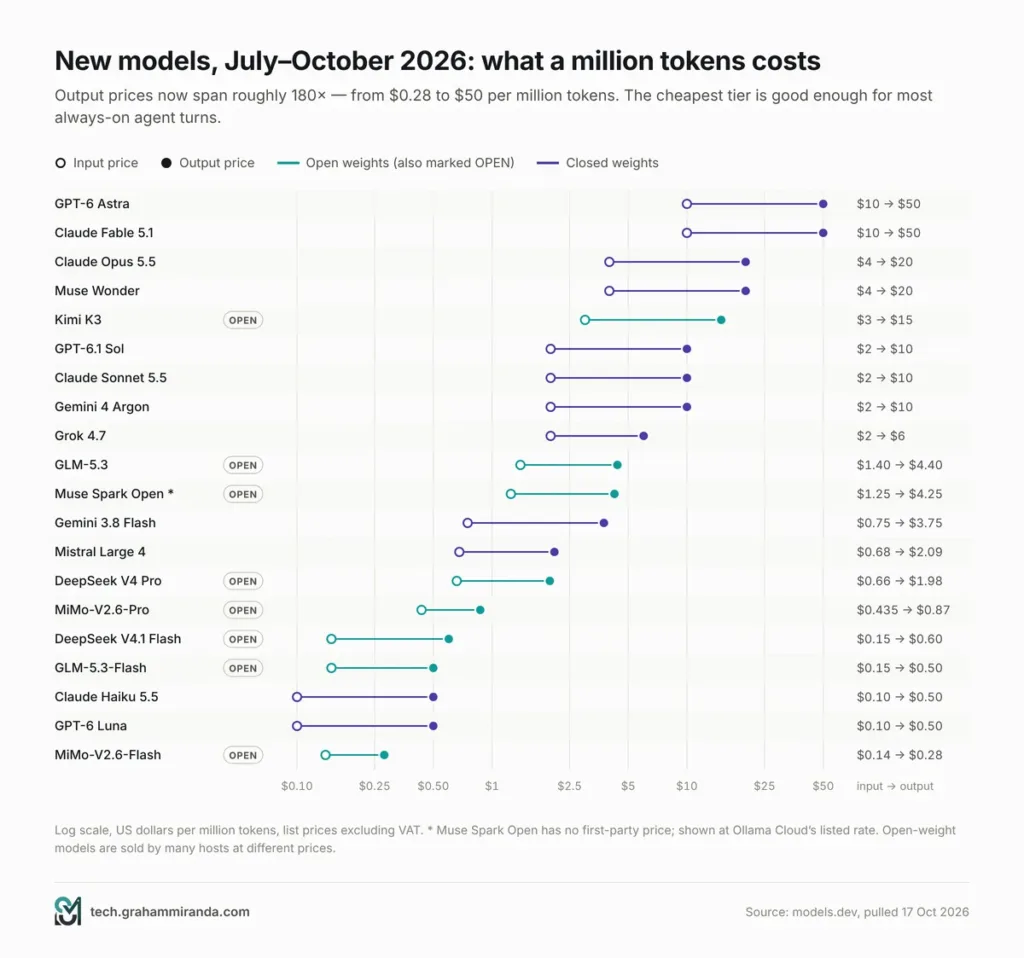
curl https://models.dev/api.jsonI pulled the full database on 17 October. It currently covers 232 providers and 8,986 model listings. Filtering to tool-calling text models listed by their own makers and released between 15 July and 16 October, and counting each model once, gives 40 new models in three months. Thirty-four of them have a context window of a million tokens or more. Thirteen have open weights.
Prices below are the list prices recorded on models.dev in US dollars per million tokens (input / output), excluding VAT. Open-weight models are sold by many hosts at different prices; where the maker doesn’t sell one directly, I name the host. All of this changes weekly — verify before you build a budget on it.
The frontier, closed-weight
| Model | Maker | Released (2026) | Context | Price (in / out) | Why it matters |
|---|---|---|---|---|---|
| Gemini 4 Argon | 13 Oct | 1M | $2 / $10 | Google’s new flagship for coding, maths and long-horizon agents; launched in the Gemini app and the Antigravity coding interface | |
| Muse Wonder | Meta | 12 Oct | 1M | $4 / $20 | Meta’s frontier multimodal reasoning model for personal agents, long-horizon coding and computer use |
| Claude Haiku 5.5 | Anthropic | 7 Oct | 1M | $0.10 / $0.50 | A fast, cheap Claude — ideal for chatty, always-on agent turns |
| Mistral Large 4 | Mistral | 6 Oct | 1M | $0.68 / $2.09 | Described on models.dev as a 1-trillion-parameter multimodal MoE |
| GPT-6.1 Sol | OpenAI | 29 Sep | 1.05M | $2 / $10 | Near-Astra performance for coding and computer use at a much lower price |
| Claude Sonnet 5.5 | Anthropic | 28 Sep | 1M | $2 / $10 | The everyday Claude for coding and agents |
| Claude Opus 5.5 | Anthropic | 22 Sep | 1M | $4 / $20 | Long-running agentic coding and knowledge work |
| GPT-6 Sol / GPT-6 Luna | OpenAI | 22 Sep | 1.05M | $2 / $10 · $0.10 / $0.50 | Sol for complex work; Luna for high-volume, focused tasks |
| Grok 4.7 | xAI | 21 Sep | 500K | $2 / $6 | xAI’s frontier model for long-running agents |
| GPT-6 Astra | OpenAI | 4 Sep | 1.05M | $10 / $50 | OpenAI’s most capable model |
| Gemini 3.8 Flash | 2 Sep | 1M | $0.75 / $3.75 | Google’s strongest Flash model, aimed at long-horizon software work | |
| Claude Fable 5.1 | Anthropic | 1 Sep | 1M | $10 / $50 | Anthropic’s top tier for demanding reasoning and long-horizon work |
The open-weight wave
| Model | Maker | Released (2026) | Size | Context | Price (in / out) | Why it matters |
|---|---|---|---|---|---|---|
| Muse Spark Open | Meta | 15 Oct | 816B total, 42B active | 1M | $1.25 / $4.25 (Ollama Cloud) | The open-weights version of Muse Spark that Mark Zuckerberg promised in September; already on a dozen hosts |
| Nemotron 3.5 Super VL | NVIDIA | 15 Oct | 120B total, 12B active | 1M | Free on NVIDIA’s catalogue | Vision-language reasoning for agents, open weights |
| Beam 1.0 | Reflection AI | 5 Oct | 501B total, 23B active | 1M | $1 / $3 (OpenRouter) | A new open MoE built for coding and agents; free for a limited time in OpenCode Go and Zen |
| MiMo-V2.6-Pro / Flash | Xiaomi | 22 Sep | — | 1M | $0.435 / $0.87 · $0.14 / $0.28 | Multimodal coding agents at rock-bottom prices |
| DeepSeek V4.1 Flash | DeepSeek | 10 Sep | — | 1M | $0.15 / $0.60 | A cheap, capable workhorse with a 393K output limit |
| Hy4 preview | Tencent | 28 Aug | — | 1M | $0.834 / $2.501 | Tencent’s next-generation agent model |
| GLM-5.3-Flash | Z.ai | 26 Aug | — | 1M | $0.15 / $0.50 | Natively multimodal and open — a superb everyday build model |
| GLM-5.3 | Z.ai | 14 Aug | — | 1M | $1.40 / $4.40 | Z.ai’s flagship for long-horizon coding |
| Qwen3.8 27B | Alibaba | 14 Aug | 27B dense | — | Run it locally | The local all-rounder for 32 GB-plus machines |
| DeepSeek V4 Pro | DeepSeek | 12 Aug | — | 1M | $0.66 / $1.98 | The bigger DeepSeek, still cheap |
| Kimi K3 | Moonshot AI | 16 Jul | — | 1M | $3 / $15 | Multimodal, with toggleable max-effort thinking |
“—” means models.dev doesn’t record that detail. Read each model’s licence before commercial use — “open weights” doesn’t always mean “do anything you like”.
Show Image Output prices span roughly 180× — from $0.28 to $50 per million tokens. Note the logarithmic axis: the cheap end is far cheaper than it looks.
Five things the data says
- A million tokens is now the default. Thirty-four of the forty new models offer a context window of at least one million tokens. Long context has stopped being a differentiator — what matters now is how well a model uses it, which is exactly what checkpoint compaction in OpenCode and session search in Hermes are for.
- The cheap tier got genuinely good. Claude Haiku 5.5 and GPT-6 Luna both cost $0.10 in and $0.50 out. DeepSeek V4.1 Flash, GLM-5.3-Flash and MiMo-V2.6-Flash sit in the same band. For an always-on agent that answers dozens of chat messages a day, that changes the economics completely (Part 10).
- Open weights are crowding the frontier. Muse Spark Open, Beam 1.0, Kimi K3 and GLM-5.3 are all open-weight, million-token, agent-tuned models. A year ago “open” meant “a generation behind”. It increasingly means “a few months behind, at a fraction of the price”.
- The price spread is enormous. Output tokens cost $0.28 per million at the bottom and $50 at the top. Using a flagship for every turn is the single most expensive habit in agentic AI.
- Free promotions are everywhere. OpenCode’s Zen and Go catalogues currently include time-limited free versions of Beam, LongCat 2.5 Preview, Nemotron 3.5 Super VL, MiMo-V2.6-Flash, DeepSeek V4.1 Flash and GLM-5.3-Flash. Great for experiments — check the terms before you send anything sensitive.
What each project’s maintainers are steering you toward
- OpenClaw keeps a hand-curated, ordered list of recommended models that its pickers show first. As of 16 October the top of that list reads: Claude Opus 5.5, GPT-6.1 Sol, Gemini 4 Argon, GPT-6 Astra, Claude Fable 5.1, Claude Sonnet 5.5, Claude Sonnet 5, Grok 4.7, DeepSeek V4.1 Flash and DeepSeek V4 Flash — with Muse Spark 1.3, Hy4, MiMo-V2.6-Pro, Qwen3.8 Max, GLM-5.3 and Kimi K3 further down.
- OpenCode Go ($10 a month, or $40 for Go Plus with higher limits) currently offers Kimi K3, Gemini 4 Argon, Kimi K2.7 Code, Step 5 Preview, MiniMax M3, Claude Haiku 5.5, GPT-6 Luna, Qwen3.7 Plus, GLM-5.3-Flash, MiMo-V2.6-Flash, DeepSeek V4.1 Flash and Muse Spark 1.3, plus free time-limited models — 29 in total.
- Hermes Agent v0.22 added the Claude 5.5, GPT-6 and Gemini 4 Argon generation, and Nous Portal fronts more than 300 models. One refreshingly honest detail from Nous’s own docs: its Hermes 4 chat models are not recommended for driving Hermes Agent, because they are tuned for conversation rather than rapid-fire tool calling.
My routing suggestions
These are my starting points, not benchmark results — test two candidates on your own work before committing.
| Role | Strong | Value | Private / local |
|---|---|---|---|
| OpenCode — planning and hard bugs | Claude Opus 5.5, GPT-6.1 Sol, Gemini 4 Argon | GLM-5.3, Kimi K3 | Frontier-class open models need server-grade hardware |
| OpenCode — everyday building | Claude Sonnet 5.5 | GLM-5.3-Flash, DeepSeek V4.1 Flash, MiMo-V2.6-Pro | Qwen3.8 27B |
| Hermes / OpenClaw — chatty, always-on turns | Claude Haiku 5.5 | GPT-6 Luna, DeepSeek V4.1 Flash, GLM-5.3-Flash | Nemotron 3.5 Lightning, Qwen3.8 27B |
| Hermes / OpenClaw — delegated heavy jobs | Claude Sonnet 5.5, GPT-6.1 Sol | GLM-5.3, DeepSeek V4 Pro | — |
If GLM ends up as your daily driver, the GLM Coding Plan through my affiliate link gets you 10% off. (Affiliate link — see the disclosure at the top.) OpenCode has a built-in provider for it under /connect, and Hermes ships a Z.ai provider too. Make sure the key type matches the provider — Coding Plan keys and standard API keys are not interchangeable.
For deeper dives on individual models, my Kimi K3 vs Fable 5.1 vs GLM-5.3 comparison and the GLM-5.3-Flash vs MiniMax M3 breakdown go further than I can here, and my MiniMax M3 vs Kimi K2.7 Code vs Nemotron 3 Ultra comparison looks at models through an OpenClaw and Hermes Agent lens.
Part 10 — What It Really Costs
All three tools are MIT-licensed and free. What you pay for is model time — and, if you want an always-on agent, somewhere to run it.
The optional subscriptions
| Option | Price | Works with | Notes |
|---|---|---|---|
| Local models via Ollama, LM Studio or llama.cpp | $0 | All three | Your hardware, your electricity; slower and weaker than frontier models |
| OpenCode Go | $10/month | OpenCode natively; Hermes and OpenClaw as a provider | 29 models with usage limits per five-hour window |
| OpenCode Go Plus | $40/month | Same | Higher limits |
| OpenCode Zen | Pay as you go | Same | Models the OpenCode team has benchmarked for agents |
| Nous Portal | Roughly $20–$200/month | Hermes (smoothest path) | 300+ models plus the Tool Gateway; $20, $100 and $200 tiers as reported by Composio in September |
| Hermes Cloud | Hosted, metered | Hermes | Composio’s September comparison reported instances from about $0.29 a day while running |
| OpenClaw | $0 | — | No paid tier, hosted service or token |
| A small VPS | Around $5/month | Any | Hermes’s README literally suggests a $5 VPS |
Prices are as listed or reported on 17 October 2026, exclude VAT, and change often. Verify before you subscribe.
If you would rather spend nothing on models while you experiment, my roundup of the best free APIs for OpenClaw is a good starting point — most of those endpoints work with Hermes and OpenCode too.
Why model routing matters more for Hermes and OpenClaw
A coding session is bursty: an hour of intense work, then nothing. An always-on chat agent is the opposite — dozens or hundreds of small turns a day, each carrying a large system prompt, memory files and tool definitions. That is where model choice quietly decides your bill.
Here is a simple model of one busy personal agent: 100 turns a day for 30 days, each sending 20,000 input tokens and receiving 1,000 output tokens, at the list prices above. “With caching” assumes 90% of input tokens are billed at the provider’s cache-read rate and ignores cache-write premiums.
| Model on every turn | Per month, no caching | Per month, with caching |
|---|---|---|
| Claude Haiku 5.5 or GPT-6 Luna | $7.50 | $2.64 |
| DeepSeek V4.1 Flash | $10.80 | $2.86 |
| GLM-5.3-Flash | $10.50 | $4.02 |
| Claude Sonnet 5.5 or GPT-6.1 Sol | $150.00 | $47.40 |
| Claude Opus 5.5 | $300.00 | $94.80 |
| GPT-6 Astra | $750.00 | $264.00 |
Show Image Same agent, same workload, same month. The model you route the chatty turns to is the biggest line on the bill.
The lesson: give the front desk a fast, cheap model for conversation and triage, and let it escalate — to a stronger model or to OpenCode — only when a task deserves it. Hermes supports fallback providers and a different model per bot; OpenClaw supports per-agent models and failover; OpenCode lets each agent and command run its own model.
Four realistic monthly budgets
| Budget | Setup | Roughly per month |
|---|---|---|
| Free | OpenCode v2 with local models; Hermes or OpenClaw on the same machine with local models | $0 (plus hardware you own) |
| Starter | OpenCode Go for coding and as the provider for your front desk | $10 |
| Everyday | OpenCode Go + a cheap API model for the always-on agent + a $5 VPS | $15–30 |
| Power | Go Plus or Nous Portal, frontier models by API for hard tasks, an always-on VPS | $50–150+ |
Part 11 — Security: The Part Nobody Wants to Read
All three of these tools can read untrusted content — web pages, emails, chat messages, files — and then act with your credentials on a real computer. That combination is the whole value of an agent, and it is also the whole risk. The headline threat is prompt injection: text that the agent reads which persuades it to do something you didn’t ask for.
Each project has a different answer to that, and you should know which one you are relying on.
| OpenCode v2 | Hermes Agent | OpenClaw | |
|---|---|---|---|
| Who can talk to it? | You, locally; paired browsers or phones with credentials | You, plus anyone you approve on each chat platform (DM pairing) | Paired senders on each channel; roles and scopes in shared Gateways |
| What runs commands? | Your user account, gated by permission rules | The configured terminal backend — your host unless you choose Docker, SSH or a cloud sandbox | The host for the main session unless you configure sandboxes, nodes or cloud workers |
| What stops a bad command? | Ordered allow/ask/deny rules and hard-deny policies | Approval prompts and deny rules — and, by its own account, ultimately only the operating system | Policy enforced in Gateway code, plus optional sandboxing |
| Undo | Snapshots before and after every step (files only) | Checkpoints and /rollback (files only) | Versioned state and guarded upgrades; learned skills can be undone |
| Known history | A January v1 server flaw (CVE-2026-22812) fixed in 1.0.216 | User-filed audit reports and third-party CVE records; check the project’s GitHub security tab | Several serious CVEs, the Moltbook leak and malicious ClawHub skills, mostly in early 2026 |
A checklist for each
OpenCode v2
- Keep the shared service on localhost. Reach it from elsewhere with
opencode pairover SSH or a private network like Tailscale — and read the confirmation before using--remote. - Start every project with shell commands on
ask, then allow the safe ones (git status *,git diff *, your test and lint commands) and denygit push *. - Leave the default prompt before reading
.envfiles switched on. - Use policies to make unapproved model providers disappear for client work.
- Commit before big tasks. Snapshots restore files; they can’t undo a dropped database table or a deployment.
Hermes Agent
- If Hermes reads email, browses or accepts chat messages, run its terminal on Docker, a remote SSH host or a cloud sandbox, not your main machine.
- Keep DM pairing and allowlists tight. Hermes’s policy is explicit that everyone you authorise on a channel is equally trusted — run separate instances for separate trust levels.
- Keep the dashboard and other local HTTP surfaces on loopback; the project treats exposing them as a break-glass decision.
- Review the skills it writes for itself now and then. Learned procedures are powerful — and they persist.
OpenClaw
- Read the security guide, the exposure runbook and the sandboxing guide before connecting anyone else or exposing the Gateway.
- Approve unknown senders deliberately with
openclaw pairing approve <channel> <code>. - Turn on sandboxing for anything beyond your own main session, and pin the plugins you allow.
- Run
openclaw skills verifybefore trusting a new skill from ClawHub, and remember that a pending scan can still allow installation with a warning. - One shared Gateway is for people who trust each other. Mutually untrusted groups need separate Gateways.
All three
- Never expose an agent’s port directly to the internet.
- Give each agent the least privilege it needs: separate API keys, no production credentials, no personal email on the coding box.
- Update regularly — every project in this article fixes security issues in point releases.
- If you run any of them on a Linux server, start with the basics in my Debian server hardening checklist.
Part 12 — How to Install All Three, Step by Step
You can run all three on one machine. I’d still suggest a dedicated box or VPS for anything that will be always on and reachable from your phone.
Step 0 — What you need
- Git, and a project in a Git repository for anything code-related.
- A modern terminal (Ghostty, WezTerm, Kitty, Alacritty, Windows Terminal).
- macOS, Linux or Windows. All three now support native Windows installs; WSL2 remains a good option for the Linux-first tools.
- At least one model: an API key, an OpenCode Go or Zen account, a Nous Portal login, a ChatGPT or GitHub Copilot subscription where supported — or Ollama for local models.
OpenCode v2
bash
# macOS, Linux, WSL — the official v2 installer
curl -fsSL https://opencode.ai/v2/install | bash

# or a package manager
npm install -g @opencode/cli
brew install anomalyco/tap/opencode-v2
winget install --id Anomaly.OpenCode -e    # Windows (check availability — see Part 3)

# then
opencode --version          # 2.0.x
opencode service status     # the shared background service
cd ~/code/your-project && opencode
Inside OpenCode, run /connect to add a provider and /models to choose a model — or just start Ollama, which v2 discovers automatically. The desktop app is at opencode.ai/download. Upgrading from v1 instead? opencode upgrade --major, after backing up ~/.config/opencode. Full docs: opencode.ai/v2/docs.
A sensible starting permission policy for opencode.jsonc in your project root:
jsonc
{
  "$schema": "https://opencode.ai/config.json",
  "permissions": [
    { "action": "shell", "resource": "*",                 "effect": "ask"   },
    { "action": "shell", "resource": "git status *",      "effect": "allow" },
    { "action": "shell", "resource": "git diff *",        "effect": "allow" },
    { "action": "shell", "resource": "npm test *",        "effect": "allow" },
    { "action": "shell", "resource": "npm run typecheck *", "effect": "allow" },
    { "action": "shell", "resource": "git push *",        "effect": "deny"  }
  ]
}
That typecheck rule is your stand-in for the missing LSP diagnostics — swap in your own toolchain’s commands.
Hermes Agent
bash
# macOS, Linux, WSL2
curl -fsSL https://hermes-agent.nousresearch.com/install.sh | bash
source ~/.bashrc            # or ~/.zshrc

hermes setup                # full setup wizard (or: hermes setup --portal for Nous Portal)
hermes model                # pick a provider and model
hermes                      # start chatting in the terminal
hermes gateway setup        # connect Telegram, Discord, Slack, WhatsApp…
hermes gateway start
hermes doctor               # diagnose problems
On Windows, run iex (irm https://hermes-agent.nousresearch.com/install.ps1) in PowerShell. Hermes Desktop downloads are on hermes-agent.nousresearch.com, and the documentation lives at hermes-agent.nousresearch.com/docs. Coming from OpenClaw? Preview the import first with hermes claw migrate --dry-run — it can bring across your SOUL.md, memories, user-created skills, command allowlist, messaging settings and selected API keys.
OpenClaw
bash
# macOS, Linux, WSL2
curl -fsSL https://openclaw.ai/install.sh | bash

# or, if you already manage Node.js (24.16+ or 26.1+; Node 26 recommended)
npm install -g openclaw@latest --allow-scripts=openclaw
openclaw onboard --install-daemon

# then
openclaw gateway status
openclaw dashboard          # opens the Control UI in your browser
On Windows, run iwr -useb https://openclaw.ai/install.ps1 | iex in PowerShell. Onboarding checks model access, creates the workspace and configures the Gateway; connect channels from the getting-started guide, and approve new senders with openclaw pairing approve <channel> <code>. Read the security guide before you invite anyone else in. For Telegram specifically, my OpenClaw Telegram thread-mode guide covers the setup step by step.
Wiring the front desk to the workshop
- Hermes → OpenCode: the bundled OpenCode skill is installed by default. Make sure the
opencodebinary Hermes sees is the v2 one (which -a opencode), and authenticate a provider in OpenCode (opencode auth login). Then simply ask Hermes to use OpenCode for a coding task. - OpenClaw → OpenCode: follow OpenClaw’s ACP agents setup page, make sure OpenCode is installed and authenticated on the Gateway host, then bind a conversation with
/acp spawn opencode --bind here --cwd /path/to/repo.
Part 13 — Which One Should You Run? Eight Scenarios
Show Image Eight situations, eight answers. Find the row that sounds like you.
1. “I just want to build software.”
OpenCode v2. Start with the permission policy in Part 12, an AGENTS.md for your project, and either OpenCode Go or a local model. Add Orca later if you want to race several models on the same task. New to building with agents? Start with my vibe coding guide.
2. “I want an assistant on my phone that actually remembers me.”
Hermes Agent. Install Hermes Desktop, connect Telegram (or your chat app of choice), and route everyday turns to a cheap model such as Claude Haiku 5.5, GPT-6 Luna or DeepSeek V4.1 Flash. Let it learn for a few weeks before you judge it — that is the point of it.
3. “I want one assistant for my family or my team, across WhatsApp, Slack and Teams.”
OpenClaw. A shared Gateway, channel plugins, roles and multi-user sessions are exactly what it is built for. Turn on sandboxing, and use separate Gateways for groups that don’t trust each other.
4. “I run a small business and want automations — daily reports, inbox triage, reminders.”
Hermes or OpenClaw for the always-on part, with OpenCode building any scripts or integrations they need. Hermes’s natural-language cron is the quickest start for one person; OpenClaw’s automation and roles scale better across a team. I went deeper on this pattern in AI for business growth with OpenClaw and OpenCode.
5. “I want to start coding jobs from my phone.”
A front desk plus OpenCode — Part 8’s pattern. Or, if you only need to check on and steer a session, OpenCode 2.0’s QR-code device pairing may be all you need.
6. “My code can’t leave the building.”
OpenCode v2 with local models, and an OpenCode policy that removes cloud providers from the picker for that project. If you also want a front desk, run Hermes or OpenClaw with local models only, on the same private network. My MacBook Pro M5 Pro 64 GB local AI guide covers which local models fit in which memory tier.
7. “I’m on OpenClaw and curious about Hermes.”
Run hermes claw migrate --dry-run and try it side by side. Keep OpenClaw if you rely on multi-user Gateways, device nodes or its policy model; try Hermes if what you want most is an agent that learns you.
8. “I’m still on OpenCode v1.”
Upgrade with opencode upgrade --major — unless you depend on v1 plugins, LSP diagnostics or session share links. In that case, stay on 1.19.x for a little longer; it is still being patched.
Part 14 — What to Watch Next
- OpenCode native apps. Anomaly says native apps built on the new pairing flow are in the works.
- LSP in OpenCode v2. The configuration is still accepted; whether language servers return is the biggest open question for typed codebases. No timeline has been announced.
- The v2 plugin ecosystem catching up, and the embeddable SDK maturing beyond its current early, in-development state.
- OpenCode v1’s retirement date. None has been announced; 1.19.x is still getting fixes.
- Hermes’s new cadence. v0.22 moved source installs to tested SemVer releases. Watch whether the huge rollup releases settle into a steadier rhythm — and whether Hermes Cloud and the reported funding round reshape the product.
- OpenClaw 2026.10.10 leaving beta, and whether the foundation’s councils on agent identity, profiles, evaluations and enterprise deployment produce shared standards the other projects adopt.
- Sandbox defaults. OpenClaw ships with sandboxing off; Hermes ships with host execution by default. The first project to make isolation the default without making setup painful will deserve a lot of credit.
- The models. Muse Spark Open’s licence and local quantisations, Gemini 4 Argon’s API rollout, and how quickly OpenCode Go, Nous Portal and OpenClaw’s recommended list absorb each new release.
- Prices. Every plan in this article has changed at least once this year. Re-check before you renew.
Frequently Asked Questions
What is the difference between OpenCode, Hermes Agent and OpenClaw?
OpenCode is an open-source AI coding agent: you run it in a code project and it plans, edits, runs commands and reviews changes. Hermes Agent, from Nous Research, is a self-improving personal agent with long-term memory, self-written skills, scheduled tasks and access from 20-plus chat apps. OpenClaw is a self-hosted assistant platform built around a Gateway that connects models, tools, devices and chat apps for one person or a whole team. All three are MIT-licensed and work with almost any model.
Is OpenCode v2 better than Hermes Agent for coding?
For most coding work, yes. OpenCode v2 has the better review loop — ordered permission rules, snapshots before and after every model step, docked diffs, built-in git worktrees, background subagents and Code Mode for MCP tools. Hermes is a capable coder too, and it currently has one clear advantage: it runs real language servers and feeds their diagnostics back after each edit, which OpenCode v2 does not yet do.
Is Hermes Agent better than OpenClaw?
It depends on the job. Hermes is the stronger choice for one person who wants an agent that learns their preferences and works from a laptop, a cheap VPS or a serverless sandbox. OpenClaw is the stronger choice for shared, multi-channel assistants for families, teams and companies, with roles, device nodes and policy enforced in its Gateway. Hermes can import an existing OpenClaw setup with hermes claw migrate.
What is new in OpenCode 2.0?
OpenCode 2.0 runs one shared background service behind its terminal UI, desktop app, web app and IDE extensions; rebuilds the server API from scratch; adds Code Mode, enabled by default for every MCP server; adds background subagents and background shell commands (Ctrl+B); implements most features as 80-plus hot-reloadable internal plugins; and ships a client package and an embeddable SDK. Recent 2.0.x releases added built-in git worktree tools, QR-code device pairing, native Windows ARM64 builds and docked diffs.
Should I upgrade from OpenCode v1 to v2?
Most people should. Update to the latest 1.x and run opencode upgrade --major, or type /update in the terminal UI, after backing up ~/.config/opencode. Wait if you depend on v1 plugins (they do not run in v2), on LSP diagnostics (v2 does not run language servers) or on session share links (retired in v2). V1 is still receiving maintenance releases.
Can I use OpenCode together with Hermes Agent or OpenClaw?
Yes. Hermes ships a bundled skill that drives OpenCode as an autonomous coding worker, and OpenClaw can run OpenCode as an external harness through the Agent Client Protocol with /acp spawn opencode. Both Hermes and OpenClaw can also use OpenCode Zen and OpenCode Go as model providers, so one subscription can serve all three.
Are OpenCode, Hermes Agent and OpenClaw free?
Yes — all three are MIT-licensed and free to self-host. You pay for model usage, unless you run local models. Optional paid services exist for two of them: OpenCode Go ($10 a month), Go Plus ($40) and Zen (pay as you go) for OpenCode, and Nous Portal and Hermes Cloud for Hermes. OpenClaw has no paid tier at all.
Which AI models work best with these agents in October 2026?
For hard coding and planning, Claude Opus 5.5, GPT-6.1 Sol and Gemini 4 Argon are the strongest picks — they top OpenClaw’s curated recommended list — with GLM-5.3 and Kimi K3 as strong open-weight options. For everyday building, GLM-5.3-Flash, DeepSeek V4.1 Flash, MiMo-V2.6-Pro and Claude Sonnet 5.5 are good value. For always-on chat agents, cheap fast models such as Claude Haiku 5.5, GPT-6 Luna and DeepSeek V4.1 Flash keep costs to a few dollars a month. Test two candidates on your own work before committing.
Is OpenClaw safe to use?
It can be, if you configure it carefully. OpenClaw had several serious security problems in early 2026, including high-severity CVEs and malicious skills on ClawHub, and it still ships with sandboxing switched off and tools running on the host for the main session. Read its security guide and exposure runbook, keep DM pairing on, enable sandboxing for anything beyond your own session, verify skills before installing them and never expose the Gateway to the internet.
Can Hermes Agent run local models?
Yes. Hermes v0.22.0 added one-click local models through llama.cpp with hardware-based recommendations, and Hermes also works with Ollama and other OpenAI-compatible local servers. For heavy tool use, choose a model tuned for agentic work and give it a large context window.
What is models.dev?
Models.dev is a community-contributed, open-source database of AI model specifications, pricing and capabilities, started by the OpenCode team and used inside OpenCode. It covers more than 230 providers and close to 9,000 model listings, and its full data is available as JSON at models.dev/api.json.
Does OpenCode v2 support LSP?
Not at the moment. OpenCode v2 accepts existing lsp configuration, but its migration guide says it does not run language servers, expose LSP tools or produce LSP diagnostics. The recommended workaround is to let the agent run your project’s linter, type checker or compiler — allow those commands in your permission rules so it can check its own work.
Who makes OpenCode, Hermes Agent and OpenClaw?
OpenCode is built by Anomaly, the team behind the SST framework. Hermes Agent is built by Nous Research, an open-source AI lab. OpenClaw was created by Peter Steinberger, who joined OpenAI in February 2026, and is now stewarded by the OpenClaw Foundation, an independent 501(c)(3) with maintainers from companies including Microsoft, NVIDIA, OpenAI and Tencent.
The Bottom Line
Comparing OpenCode, Hermes Agent and OpenClaw as if they were three versions of the same product misses what makes each of them good.
OpenClaw is infrastructure — the most connected, most governed and most ambitious of the three, with a security story that is strong once configured and a history that explains why you must configure it. Hermes Agent is the most personal — an agent that remembers you, writes its own skills and follows you from your terminal to your phone, with a refreshingly honest view of where its safety boundaries really are.
And OpenCode v2 is the update of the year. It took a hugely popular tool and rebuilt it properly: one service behind every screen, an API that agents can drive, Code Mode on by default, background work you can see and stop, worktrees built in, and a release pace that has turned rough edges into fixes in days rather than months. It has real gaps — no LSP yet, no share links, a plugin ecosystem still porting — but for writing software with AI, nothing open-source is better right now.
So don’t pick one. Code with OpenCode v2. Put Hermes or OpenClaw at the front desk. Route a cheap model to the chatty turns and a strong one to the hard problems. Then let the front desk hand the coding to the workshop.
Running any of these three already? I’d like to hear which models you route to which job, whether OpenCode 2.0 has been stable for you, and whether Hermes or OpenClaw has earned a permanent place on your phone. Corrections and counter-evidence are welcome — this article gets updated when the picture changes.
Disclosure: This article contains one affiliate link, to Z.ai’s GLM Coding Plan. Subscribing through it gets you 10% off and may earn me a commission at no extra cost to you. No other product in this article is sponsored, and none of the companies or foundations mentioned reviewed it before publication.
Last updated: 17 October 2026.