
 English
 Deutsch
 Español
 Italiano
 Français
 Português do Brasil
 Tiếng Việt
 ไทย
 Bahasa Indonesia
 Русский
 العربية
 हिन्दी

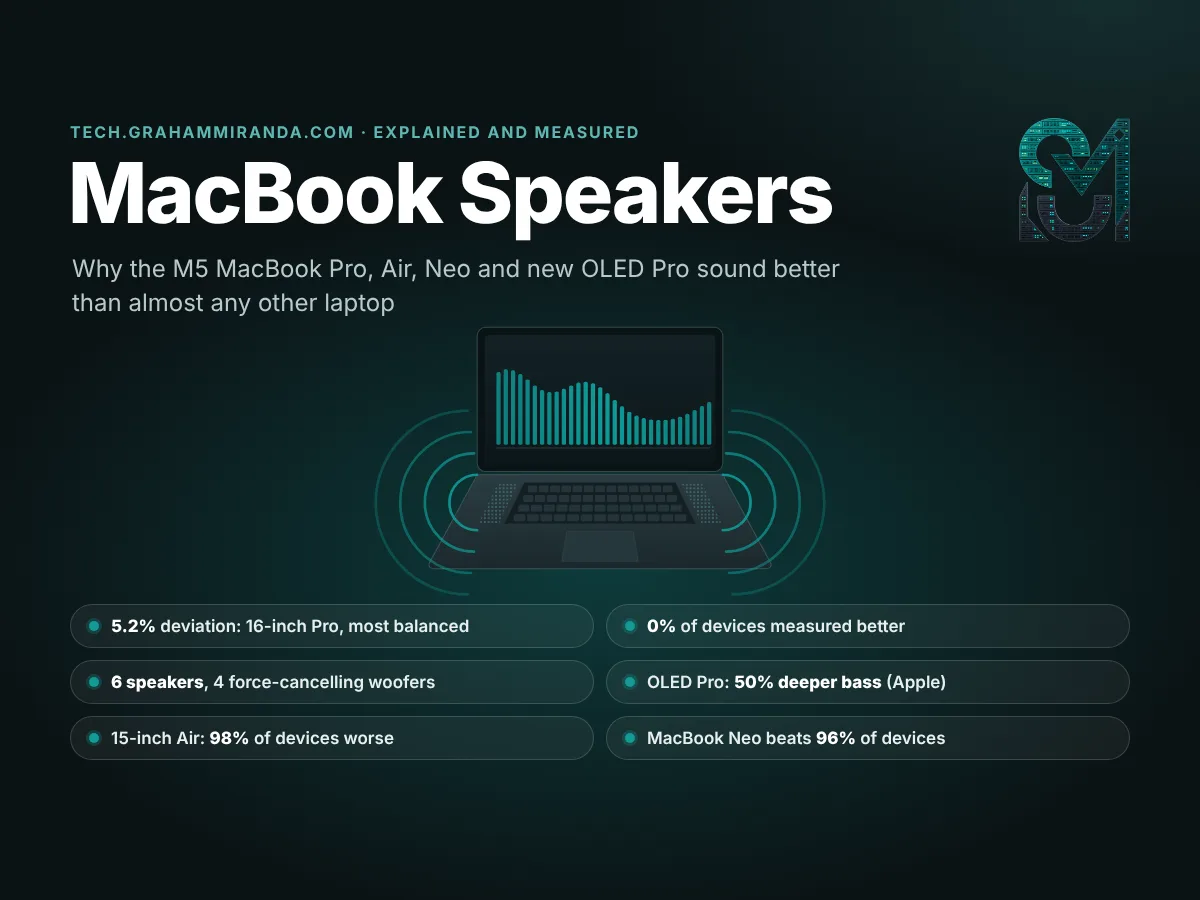
MacBook speakers have a reputation, and the numbers back it up. Notebookcheck has tested thousands of laptops and smartphones in about 20 years, and it puts every laptop’s speakers through the same test: pink noise at full volume, recorded and compared band by band. When it tested the 16-inch MacBook Pro with the M5 Pro this spring, the result went straight to the top of that database. Rounded to whole percentages, 0% of all the devices it had ever measured sounded more balanced, and 100% sounded worse.
It isn’t a one-off. In November, the 14-inch MacBook Pro with Apple’s new OLED screen landed in the same place. The 15-inch MacBook Air beat 98% of everything tested. Even the MacBook Neo, Apple’s cheapest laptop, with a phone chip and just two speakers, measured better than 96% of the database.
That’s the reputation in numbers, and Apple knows it. When it launched the OLED MacBook Pro on 28 October, it headed the audio section of its press release “The Best Audio System in a Laptop”.
For six years I’ve worked on a 13-inch M1 MacBook Pro with two speakers. My next Mac, a 16-inch MacBook Pro with the M5 Pro, has six. So before it arrives, I wanted to understand why MacBook speakers sound this good: not “Apple magic”, but the actual engineering. And I wanted to know whether the whole M5-era lineup deserves the reputation, from the €799 MacBook Neo to the new OLED MacBook Pro with what Apple calls 50 percent deeper bass.
The short answer is that three things work together: more and better drivers in a chassis designed around them, force-cancelling woofers that let small drivers move more air without shaking the laptop, and a lot of clever software. Smart amplifiers report each speaker’s voltage and current, a temperature model lets macOS drive the speakers right up to their physical limit, and signal processing shapes what reaches your ears. The long answer, with measurements for every current MacBook, the best Windows laptops for comparison and an honest list of what MacBook speakers still can’t do, is below.
Independence note: No company sponsored, reviewed or approved this article, and it contains no affiliate links. I haven’t measured these speakers myself. The measurements come from Notebookcheck, which tests every laptop’s speakers with the same method, and the specifications from Apple. Listening impressions from other reviewers are credited where they appear.
TL;DR — The 60-Second Version
- The reputation is measured, not just marketed. Notebookcheck measured the 16-inch MacBook Pro (M5 Pro) at 84.7 dB(A) with a 5.2% overall deviation from an even response. The average device in its database deviates by 23%, and the best result it has ever recorded is 4%. Rounded, 0% of all the devices it has tested did better.
- Every M5-era MacBook beats the average laptop by a wide margin. Overall deviation, best to worst: 16-inch Pro 5.2%, 14-inch OLED Pro 6.2%, 14-inch Pro (the M5/M6 design) 6.4%, 14-inch mini-LED Pro (M5 Max) 6.5%, 15-inch Air 7.7%, Neo 9.0%, 13-inch Air 11.7%.
- Three ingredients. Six drivers (two tweeters, four woofers) in the Pros and the 15-inch Air; force-cancelling woofers; and software: smart amplifiers, a temperature model of every speaker, and signal processing with EQ, psychoacoustic bass and compression.
- Force-cancelling woofers (2019) mount two woofers back to back so that their vibrations cancel. The bass goes deeper and stays cleaner without the aluminium case buzzing along.
- The new OLED MacBook Pro has an all-new woofer design that Apple says gives 50% deeper bass, new tweeters and the first tuning for closed-lid use. Apple doesn’t say what the 50% is measured against. Notebookcheck found the 14-inch’s bass closer to even than the mini-LED 14-inch’s (3.4% vs 4.5% from the median) and the speakers 2.5 dB louder.
- The 15-inch MacBook Air is the cheapest way to get six speakers: $1,499 / €1,699, measured within about 1.5 points of the 14-inch Pros.
- The 13-inch Air (four speakers) is good, not class-leading. 14% of the laptops in its class measured better, and Dell’s XPS 13 is close behind it.
- The Neo’s two side-firing speakers measure more evenly than the 13-inch Air’s four, yet reviewers say they lack the Air’s warmth and punch. Measurements don’t tell you everything.
- Windows has caught up in places. Asus’s ProArt P14 matched the 14-inch OLED Pro’s 6.2% and played louder, and Samsung’s Galaxy Book6 Ultra came within about two points of the 16-inch. No Windows laptop that Notebookcheck measured alongside the 2026 MacBook Pros was more balanced.
- Get more out of them: use a hard surface, keep the openings clear (on the Air they’re in the gap below the screen, on the Neo at the sides), set Dolby Atmos to Automatic in Music, and add an EQ app if you want to tune the sound.
- The limits: no real sub-bass, audible compression at full volume, not a reference for mixing, and no system-wide EQ in macOS.
MacBook Speakers at a Glance
| MacBook (November 2026) | Speakers | Max loudness | Overall deviation (lower is better) | Devices that measured worse | Price US / Germany |
|---|---|---|---|---|---|
| MacBook Pro 16″ (M5 Pro, mini-LED) | 6: 2 tweeters + 4 force-cancelling woofers | 84.7 dB(A) | 5.2% | 100% | $2,999 / €3,399 |
| MacBook Pro 14″ with PROLED XDR (M5 Pro) | 6: new woofers and tweeters, closed-lid tuning | 85.6 dB(A) | 6.2% | 99% | $2,899 / €3,299 |
| MacBook Pro 16″ with PROLED XDR (M5 Pro) | 6: new woofers and tweeters, closed-lid tuning | Not yet measured | — | — | $3,399 / €3,899 |
| MacBook Pro 14″ (M6)* | 6: 2 tweeters + 4 force-cancelling woofers | 84.8 dB(A)* | 6.4%* | 99%* | $1,999 / €2,299 |
| MacBook Pro 14″ (M5 Pro or M5 Max, mini-LED) | 6: 2 tweeters + 4 force-cancelling woofers | 83.1 dB(A) (M5 Max) | 6.5% | 99% | From $2,499 / €2,899 |
| MacBook Air 15″ (M5) | 6: 2 tweeters + 4 force-cancelling woofers | 84.8 dB(A) | 7.7% | 98% | $1,499 / €1,699 |
| MacBook Neo (A18 Pro) | 2 side-firing | 83.0 dB(A) | 9.0% | 96% | $699 / €799 |
| MacBook Air 13″ (M5) | 4 | 82.1 dB(A) | 11.7% | 89% | $1,299 / €1,399 |
*Measured on the 14-inch MacBook Pro with M5 (2025). The M6 model that replaced it on 27 October uses the same design. Measurements from Notebookcheck’s reviews (pink noise at maximum volume); “devices that measured worse” is Notebookcheck’s comparison with every device in its database, rounded. Speaker counts from Apple. Prices are base configurations, US before sales tax and Germany including VAT, checked 19 November 2026. Every model supports Spatial Audio with Dolby Atmos on its built-in speakers.
Table of Contents
- Part 1 — Why MacBook Speakers Sound So Good: The Short Answer
- Part 2 — Force-Cancelling Woofers, Explained
- Part 3 — The Secret Ingredient Is Software: Smart Amps, Speaker Protection and DSP
- Part 4 — Every M5-Era MacBook’s Speakers, Measured
- Part 5 — How to Read Speaker Measurements (and What They Miss)
- Part 6 — MacBook Pro Speakers: 14-Inch, 16-Inch and the New OLED Model
- Part 7 — MacBook Air Speakers: Four or Six?
- Part 8 — MacBook Neo Speakers: Two Drivers, Still Better Than Most
- Part 9 — MacBook Speakers vs Windows Laptops: Has the Competition Caught Up?
- Part 10 — Spatial Audio and Dolby Atmos on MacBook Speakers
- Part 11 — Beyond the Speakers: Microphones, the Headphone Jack and HDMI Audio
- Part 12 — How to Get the Best Sound From Your MacBook Speakers
- Part 13 — What MacBook Speakers Still Can’t Do
- Part 14 — Which MacBook Should You Buy for Sound?
- Frequently Asked Questions
- The Bottom Line
Part 1 — Why MacBook Speakers Sound So Good: The Short Answer
Laptop speakers start with a physics problem. Sound is moving air, and bass is a lot of moving air. To play a low note at a useful volume, a speaker has to push a large volume of air back and forth, and a loudspeaker does that with some mix of a big cone, a long stroke and a carefully designed enclosure behind the driver. A laptop that’s one and a half centimetres thick or less has room for very little of any of those. That’s why most laptops sound the way they do: voices come through clearly, but music sounds thin, and anything with a bass line loses its foundation.
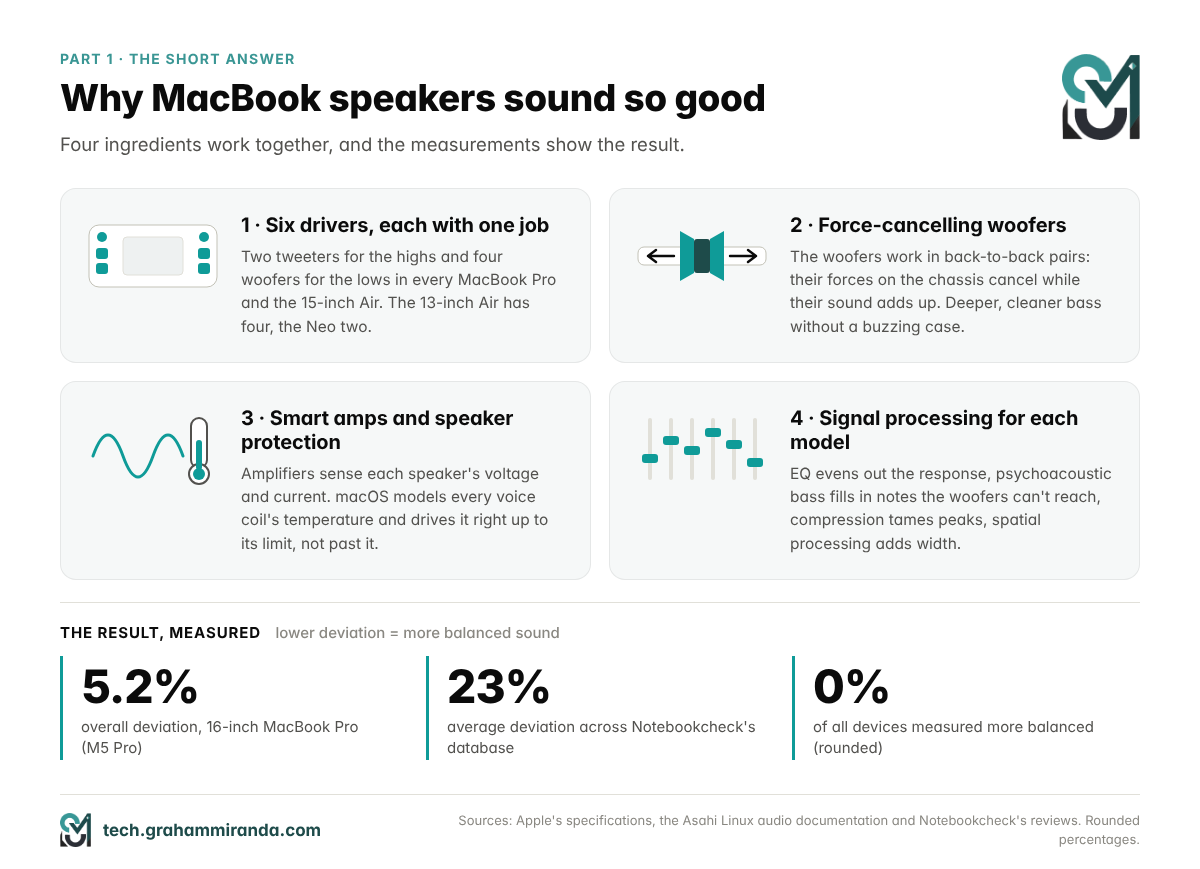
Apple’s answer has four parts, and each of them shows up in the measurements.
1. More drivers, each with one job. The MacBook Pros and the 15-inch MacBook Air have six speakers: two tweeters for the high frequencies and four woofers for the low and mid frequencies. Splitting the work lets each driver be optimised for its range, instead of one small driver trying to do everything. The 13-inch MacBook Air has four speakers, and the MacBook Neo has two.
2. Force-cancelling woofers. The four woofers work in pairs, mounted back to back, so the force of one cancels the force of the other. Each pair can move more air without shaking the aluminium chassis, which would otherwise buzz and smear the sound. Part 2 explains how it works.
3. Smart amplifiers and speaker protection. Small speakers sound best when they’re driven hard, right up to the edge of what they can survive. MacBooks use amplifiers that measure the voltage and current at each speaker, and macOS runs a model of each speaker’s temperature, so it can push them much further than a cautious fixed limit would allow. Part 3 tells the story of what happens without that protection.
4. Signal processing, tuned for each model. Before the sound reaches the amplifiers, macOS reshapes it: equalisation to even out the drivers’ natural response, psychoacoustic tricks that make you hear bass the woofers can’t fully reproduce, compression to keep peaks in check, and spatial processing for width.
There’s a fifth ingredient that’s harder to put a number on: Apple controls all of it. It designs the chassis, picks the drivers, writes the amplifier control software and tunes macOS’s audio processing for each MacBook. The Asahi Linux developers, who had to rebuild that chain from scratch to make the speakers work under Linux, ended up shipping a separate tuning profile for every Mac model they support. That tells you how much of a MacBook’s sound is decided in software, one machine at a time.
What “good” means in this article
Throughout this article, good speakers means two measurable things: loud enough to fill a room without falling apart, and balanced, so that bass, mids and highs come out at similar levels. Balance is what makes voices sound natural and keeps music from sounding thin or harsh. The measurements come from Notebookcheck, which tests every laptop with the same method, and Part 5 explains how to read them. Where other reviewers describe what they heard, I credit them by name.
Part 2 — Force-Cancelling Woofers, Explained
The problem: every speaker pushes back
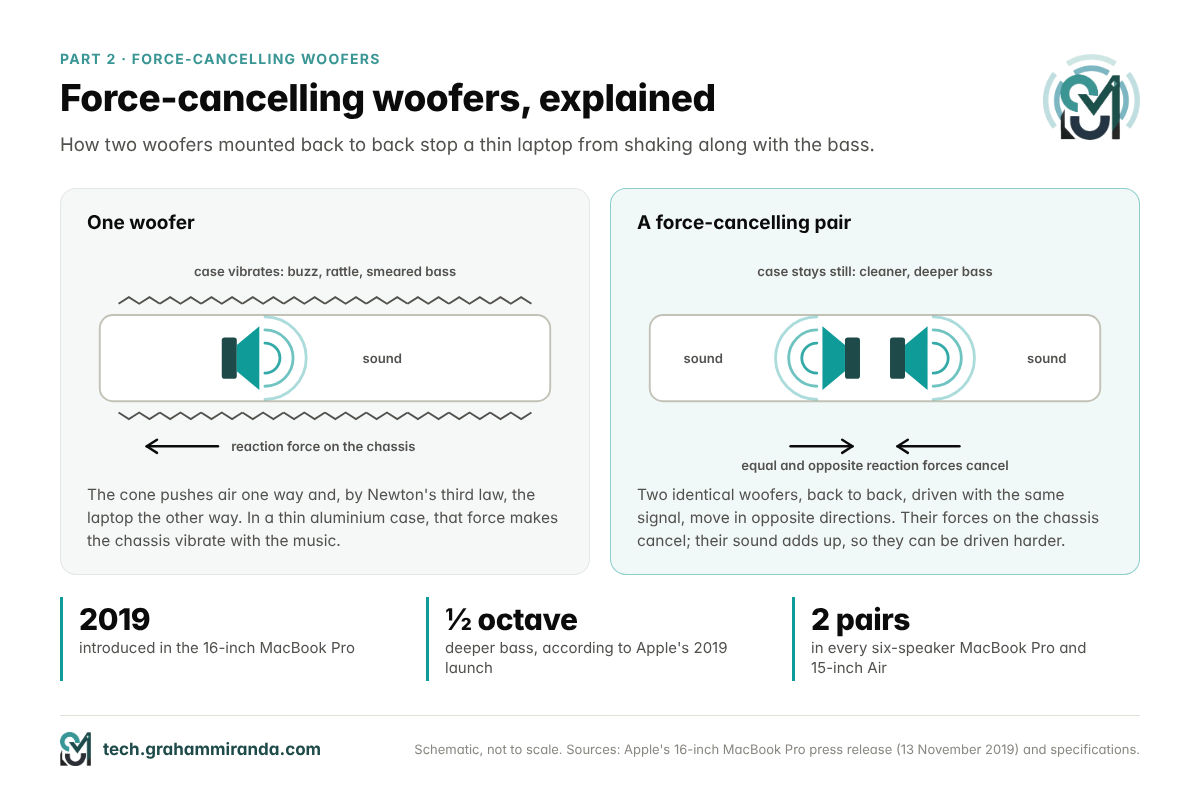
A speaker is a motor. An electrical signal moves a coil inside a magnetic field, the coil moves a cone, and the cone pushes air. Newton’s third law says that every push comes with an equal push in the opposite direction, so as the cone moves forward, the speaker’s frame is pushed backward. In a hi-fi cabinet that weighs several kilos, nobody notices. In a laptop shell made of thin aluminium, that reaction force makes the whole case vibrate along with the music.
Some of that vibration turns into buzzing and rattling you can hear. Some of it smears the bass. And all of it limits how hard a woofer can be driven before the laptop starts to sound like a cheap radio.
Apple’s fix: two woofers, back to back
Apple’s answer arrived with the 16-inch MacBook Pro in November 2019. Its press release introduced Apple-patented force-cancelling woofers, which pair drivers working against each other to cut the vibrations that distort sound, and said the bass could go half an octave deeper as a result.
The idea is simple. Mount two identical woofers facing in opposite directions and drive them with the same signal, so that when one moves left, the other moves right. Their reaction forces on the chassis point in opposite directions and cancel out, while the sound they produce adds up. The laptop stays still, and the woofers can move further and more cleanly than a single driver could in the same space.
What “half an octave deeper” means
An octave is a doubling of frequency: 100 Hz is one octave above 50 Hz. Half an octave is a factor of about 1.41, the square root of two. So if a speaker system’s bass faded out at around 140 Hz, extending it by half an octave would take it down to about 100 Hz. Those figures are an illustration, not Apple’s measurements, but they show why half an octave matters so much in a laptop. It can be the difference between hearing the top of a bass line and hearing the bass line itself.
From one MacBook to the whole lineup
The 2019 16-inch was only the start. When Apple redesigned the MacBook Pro in October 2021 around the M1 Pro and M1 Max, both the new 14-inch and the 16-inch got six speakers: two larger tweeters and four force-cancelling woofers. Apple’s product page promised notes up to half an octave deeper and up to 80 percent more bass, along with Spatial Audio. In June 2023, the first 15-inch MacBook Air brought the same layout to the Air: two tweeters and two sets of force-cancelling woofers.
Then, in October 2026, came the first real redesign of the system. The MacBook Pro with PROLED XDR Display keeps six speakers, but Apple has redesigned both the woofers and the tweeters, and claims 50 percent deeper bass as a result. Part 6 looks at whether that shows up in the measurements.
A short history of MacBook speakers
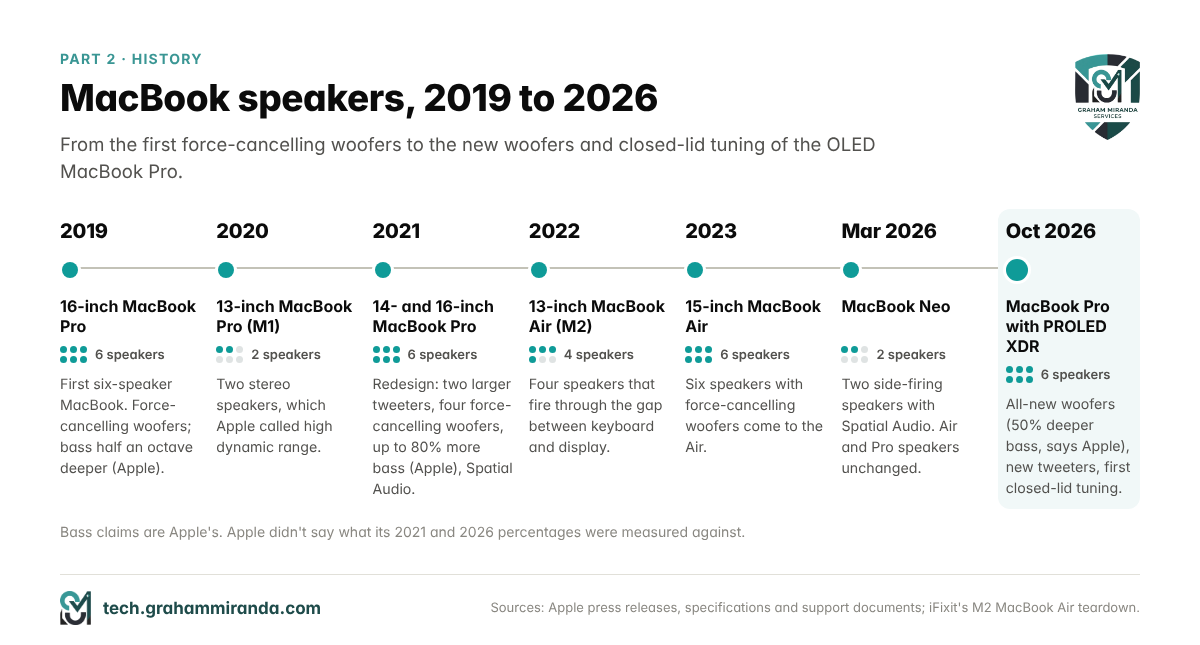
| Year | MacBook | What changed |
|---|---|---|
| 2019 | 16-inch MacBook Pro (Intel) | The first six-speaker MacBook; Apple-patented force-cancelling woofers; bass half an octave deeper, according to Apple |
| 2020 | 13-inch MacBook Pro (M1) | Two stereo speakers, which Apple called high dynamic range |
| 2021 | 14- and 16-inch MacBook Pro (M1 Pro, M1 Max) | Redesign: two larger tweeters and four force-cancelling woofers in both sizes; up to 80% more bass, according to Apple; Spatial Audio; a headphone jack that drives high-impedance headphones |
| 2022 | 13-inch MacBook Air (M2) | Four speakers (two tweeters, two woofers) that fire through the gap between the keyboard and the display |
| 2023 | 15-inch MacBook Air (M2) | Six speakers with force-cancelling woofers come to the Air |
| 2026, March | MacBook Neo; MacBook Air (M5); MacBook Pro (M5 Pro, M5 Max) | The Neo gets two side-firing speakers with Spatial Audio; the Air and Pro speaker systems stay the same |
| 2026, October | 14-inch MacBook Pro (M6); MacBook Pro with PROLED XDR | The M6 model is unchanged; PROLED XDR brings all-new woofers (50% deeper bass, according to Apple), new tweeters and the first closed-lid tuning |
Apple press releases, specifications and support documents; iFixit’s teardown for the M2 MacBook Air’s speaker placement.
Part 3 — The Secret Ingredient Is Software: Smart Amps, Speaker Protection and DSP
Force-cancelling woofers explain why MacBooks play deeper bass than most laptops. They don’t fully explain why MacBooks get so loud without distorting, or why such small drivers sound as full as they do. The rest of the answer is software, and the clearest account of it doesn’t come from Apple. It comes from the people who had to reverse-engineer it.
Small speakers are fragile, so macOS watches them
The Asahi Linux project, which builds Linux for Apple silicon Macs, describes the problem plainly in its documentation. The small speaker drivers in laptops, TVs and Bluetooth speakers are fragile, and yet they only sound their best when they’re driven hard. Play them too loud for too long and the voice coil overheats. Play them cautiously and they sound small.
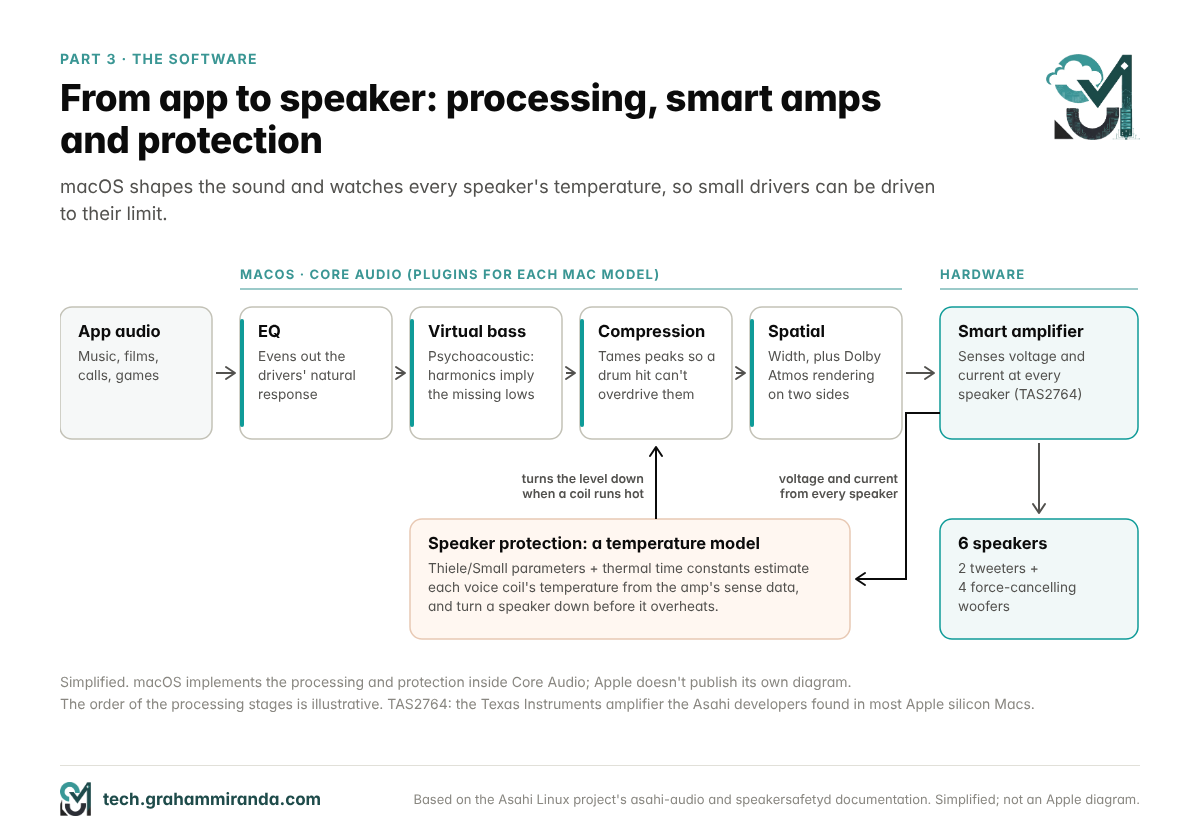
Apple’s solution is a feedback loop. According to the Asahi developers, most of the Apple silicon Macs they’ve worked on use Texas Instruments’ TAS2764 amplifier, which reports the voltage and current across each speaker’s voice coil. Combine those two signals with a model of the speaker, built from its electrical and mechanical characteristics (engineers call them Thiele/Small parameters) and the measured heating and cooling behaviour of the coil and magnet, and software can estimate how hot each coil is at any moment. When the estimate gets close to the limit, the software turns that speaker down until it cools.
The result is speakers that are driven, as the Asahi documentation puts it, “as hard as they physically can be” without permanent damage. Apple implements this inside Core Audio, the Mac’s audio system, as plugins written for each Mac model.
The day a Linux developer blew his MacBook’s tweeters
What happens without that protection was demonstrated, expensively, in September 2022. Hector Martin, who was leading the Asahi Linux project at the time, was testing speaker output on an M2 MacBook Air running Linux, with none of macOS’s safeguards in place. A 40-second sine sweep and a deliberately loud test track were enough to destroy both tweeters, as he told VICE’s Motherboard. He suspected heat: in his words, “the tweeter melted itself and seized up”.
Martin explained the difference to Motherboard: on macOS, the operating system controls the amplifier and limits it using an estimate of the speakers’ temperature. On Linux at the time, nothing stopped the amplifier from going louder than the speakers could handle. Asahi Linux kept the speakers switched off until it had written its own version of that protection, a program called speakersafetyd. Its Linux driver was written to mute and lock every speaker unless that program is running.
Then comes the signal processing
Protection lets the speakers play loud. Digital signal processing, or DSP, decides what they play. The Asahi team’s audio documentation is blunt about why it’s needed: speakers this small can’t reproduce much bass on their own, and processing is how modern devices make up for it. It lists what macOS does as “psychoacoustic bass enhancement, dynamic range compression, and spatialisation tricks”.
Each of those has a specific job:
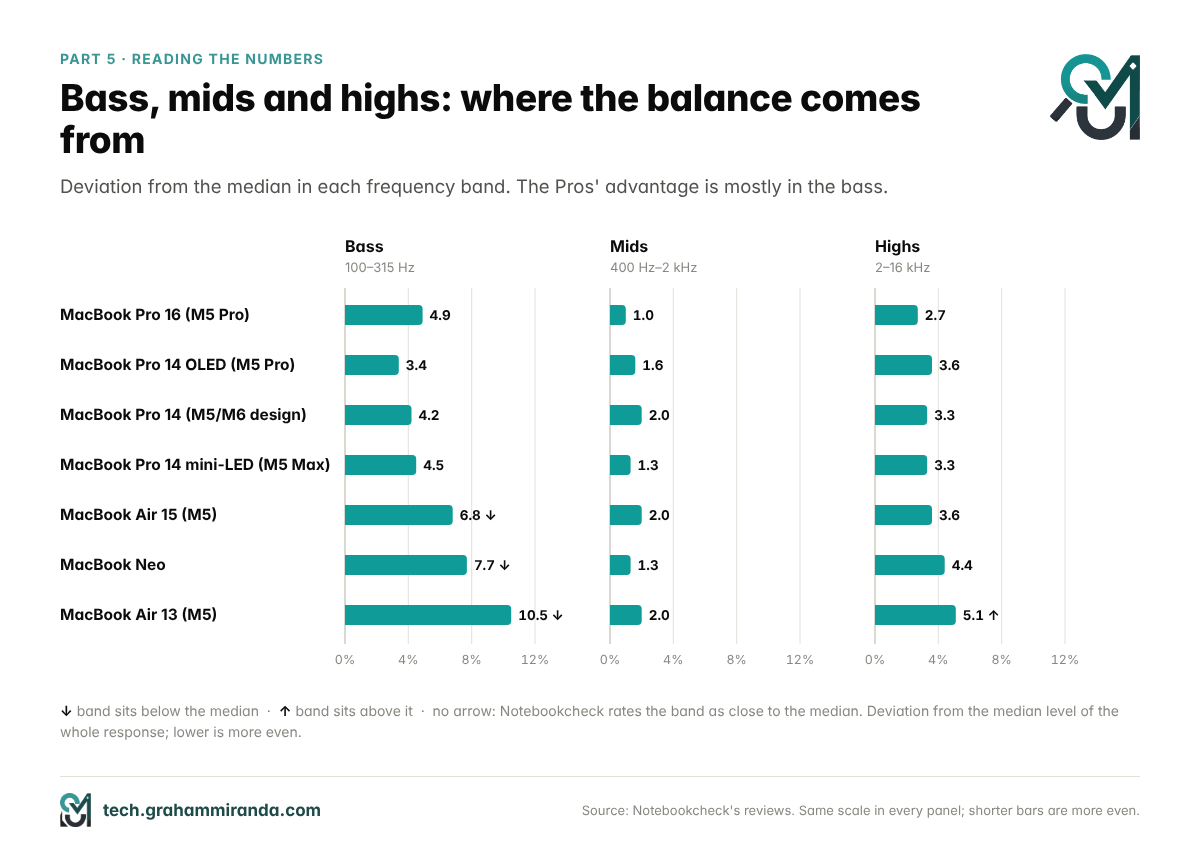
- Equalisation (EQ) boosts and cuts frequency ranges to even out the drivers’ natural response, which is anything but even. It’s the main reason a MacBook’s measured response is so balanced.
- Psychoacoustic bass exploits a quirk of hearing called the missing fundamental. A low note isn’t a single frequency; it comes with a series of harmonics above it. Play the harmonics and the brain fills in the note underneath, even if the speaker can barely produce it. So the processing emphasises the harmonics of bass notes the woofers can’t fully reach, and you hear bass that isn’t entirely there.
- Dynamic range compression turns loud peaks down and quiet passages up, so a single drum hit can’t push the speakers past their limits and soft passages stay audible. At full volume you can hear it working: loud music gets denser rather than louder.
- Spatialisation processes the stereo signal so the sound seems wider than the laptop, and renders Dolby Atmos mixes over the built-in speakers (Part 10).
The Asahi developers aren’t uncritical fans of Apple’s tuning. Their documentation criticises parts of macOS’s processing, and their own aims for an even response with as little added colour as possible. But the bigger lesson works in Apple’s favour: a MacBook’s sound is a system, and the hardware on its own would sound far less impressive without it.
What this means when you listen
- They get loud without crackling, because the protection and compression stop the drivers from being overdriven.
- Some of the bass you hear is perceptual. That’s not a cheat; it’s how small speakers that sound good get there. It’s also why big bass boosts from an EQ app can backfire: extra bass means extra work for the drivers, and the protection may turn the overall level down.
- A few steps below maximum usually sounds cleaner than maximum, because compression and protection do most of their work at the top of the volume range.
Part 4 — Every M5-Era MacBook’s Speakers, Measured
Apple’s laptop lineup changed a lot in 2026. In March came the MacBook Neo, the MacBook Air with M5, and the 14- and 16-inch MacBook Pro with M5 Pro and M5 Max. On 27 October, the entry-level 14-inch MacBook Pro moved to the M6 chip. And on 28 October, Apple added the MacBook Pro with PROLED XDR Display, an OLED model with new speakers that sells alongside the mini-LED Pros.
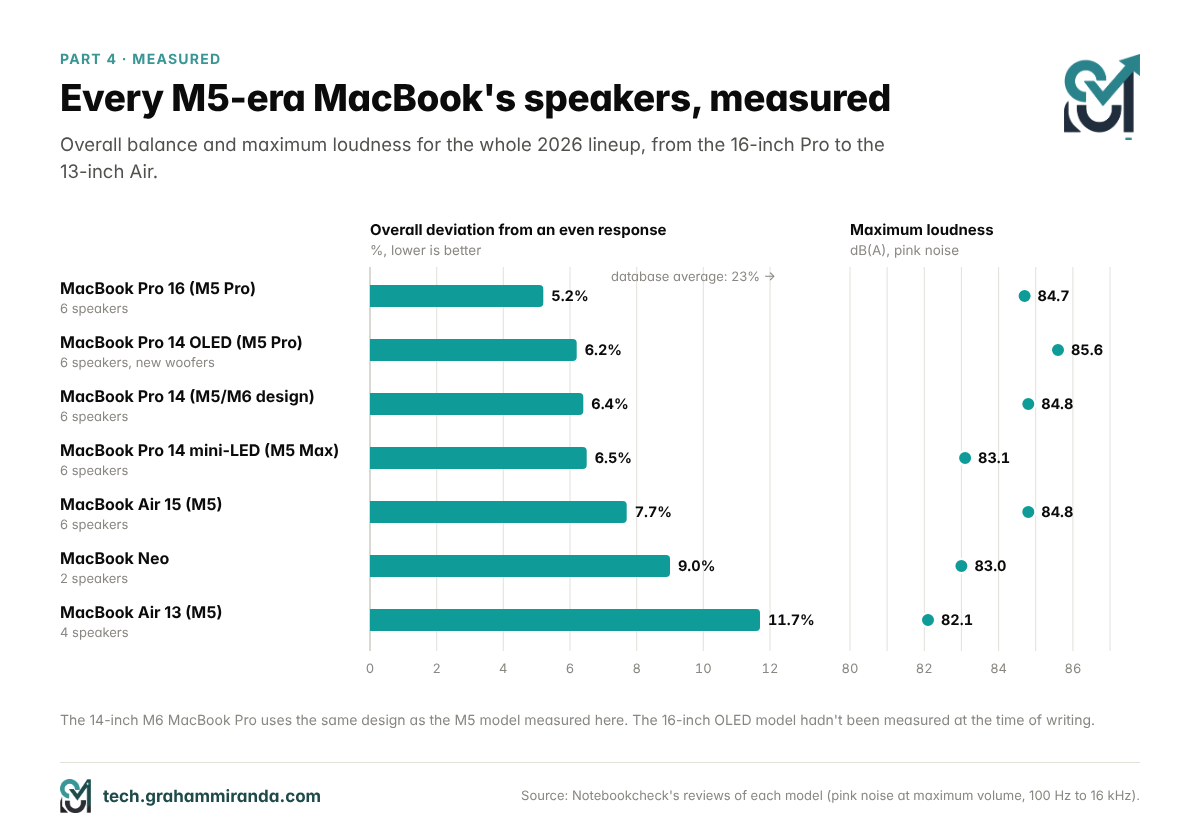
Here’s how all of them measure, with the three frequency bands that make up the overall figure:
| MacBook | Speakers | Loudness | Bass (100–315 Hz) | Mids (400 Hz–2 kHz) | Highs (2–16 kHz) | Overall | Better in class / of all devices |
|---|---|---|---|---|---|---|---|
| MacBook Pro 16″ (M5 Pro) | 6 | 84.7 dB(A) | 4.9% | 1.0% | 2.7% | 5.2% | 1% / 0% |
| MacBook Pro 14″ with PROLED XDR (M5 Pro) | 6 | 85.6 dB(A) | 3.4% | 1.6% | 3.6% | 6.2% | 3% / 0% |
| MacBook Pro 14″ (M5; same design as the M6 model) | 6 | 84.8 dB(A) | 4.2% | 2.0% | 3.3% | 6.4% | 4% / 1% |
| MacBook Pro 14″ mini-LED (M5 Max) | 6 | 83.1 dB(A) | 4.5% | 1.3% | 3.3% | 6.5% | 4% / 1% |
| MacBook Air 15″ (M5) | 6 | 84.8 dB(A) | 6.8% below | 2.0% | 3.6% | 7.7% | 2% / 2% |
| MacBook Neo | 2 | 83.0 dB(A) | 7.7% below | 1.3% | 4.4% | 9.0% | 4% / 3% |
| MacBook Air 13″ (M5) | 4 | 82.1 dB(A) | 10.5% below | 2.0% | 5.1% above | 11.7% | 14% / 9% |
Notebookcheck’s reviews, pink noise at maximum volume. Each band figure is how far that band sits from the median level of the whole response; lower is more even. “Below” and “above” mark bands that sit clearly under or over the median. The last column is the share of devices in Notebookcheck’s database, in the same class and overall, that measured better, rounded.
Reading the ranking
- The 16-inch is the benchmark. Its mids are almost perfectly even at 1.0%, and its overall figure is the best of any current MacBook. Notebookcheck rates its audio at 97%.
- The three 14-inch figures sit within 0.3 points of each other, from 6.2% to 6.5%. That’s too close to read much into the order. Where the OLED model does stand out is in loudness and bass, which Part 6 covers.
- The 15-inch Air is the quiet star. It sits within about 1.5 points of the 14-inch Pros and beats 98% of all the devices Notebookcheck has tested.
- The Neo beats the 13-inch Air on this measure, which doesn’t mean it sounds better. Part 5 explains why.
- The 13-inch Air is the weakest current MacBook, and it still measures better than 89% of everything in the database.
To put those numbers in perspective: across Notebookcheck’s whole database, the best result is a 4% deviation, the average is 23% and the worst is 136%. Every current MacBook measures better than nearly nine in ten of the devices Notebookcheck has tested, and the Pros better than 99 in 100.
Part 5 — How to Read Speaker Measurements (and What They Miss)
How Notebookcheck measures
Notebookcheck plays pink noise through each laptop at maximum volume. Pink noise is a test signal with equal energy in every octave, which sounds like a steady rush of water. It records what comes out and reports four kinds of numbers:
- Maximum loudness, in dB(A).
- Deviation from the median in three bands: bass (100–315 Hz), mids (400 Hz–2 kHz) and highs (2–16 kHz), plus the whole range from 100 Hz to 16 kHz. Each figure says how far, on average, that band sits from the median level of the whole response. A band 10% below the median sounds weak next to the rest; one 10% above sounds exaggerated. Lower numbers mean a more even, more natural sound.
- Linearity, meaning how smoothly the response changes from one frequency to the next. Peaks and dips make a speaker sound boxy or harsh even when the band averages look fine.
- A comparison with every other device Notebookcheck has measured, in the same class and overall, expressed as the share that measured better, similar or worse.
Loudness, decibels and what you can actually hear
Decibels are logarithmic. Every 3 dB is roughly a doubling of acoustic power, and about 10 dB sounds roughly twice as loud. Differences of one or two decibels are hard to notice outside a side-by-side comparison. The “(A)” means the measurement is A-weighted, which reduces the contribution of low frequencies the way our ears do at moderate volumes. That keeps a bass-heavy laptop from getting extra credit for loudness, but it also means loudness figures say nothing about bass.
Loudest isn’t best, either. HP’s OmniBook 5 14 reached 92.7 dB(A) in Notebookcheck’s test, the highest figure in this article, but its bass sat 19.3% below the median. Notebookcheck’s own verdict for that kind of result is “nearly no bass”.
What the numbers miss
- Anything below 100 Hz. The bass band starts at 100 Hz, so how deep a speaker reaches, which is exactly what claims like “half an octave deeper” and “50% deeper bass” are about, isn’t measured directly.
- Everyday volume. The test runs at maximum volume, where protection and compression are most active. At the volume you actually listen at, the tuning can sound different.
- Width, distortion and Spatial Audio. The test doesn’t measure stereo separation, how the speakers handle Dolby Atmos, or how clean they stay on real music with hard transients.
- Taste. Warmth, punch and the character of a tuning are real, but they don’t fit into a single percentage.
A case study: MacBook Neo vs 13-inch MacBook Air
On paper, the Neo’s two speakers are better balanced than the 13-inch Air’s four: 9.0% overall deviation against 11.7%. The bands show why. The Air’s highs sit 5.1% above the median, which makes it measure brighter, and its bass sits 10.5% below. The Neo’s bass is 7.7% below and its highs are 4.4% from the median.
Listening reviews reach a different verdict. Notebookcheck’s own reviewer found that the Neo’s speakers lack a bit of punch next to the Air, and Expert Reviews called them a little shrill, without the Air’s warmth and body. Both can be true at once. The likeliest explanation lies in what the measurement can’t see: bass below 100 Hz, punch on real music and the character of each tuning.
The lesson is to use measurements to separate good speakers from bad ones, then use listening, your own or a reviewer’s, to choose between the good ones.
Part 6 — MacBook Pro Speakers: 14-Inch, 16-Inch and the New OLED Model
The 16-inch: still the benchmark
The 16-inch MacBook Pro with M5 Pro is the best-measured laptop speaker system I could find. It plays at 84.7 dB(A), its overall deviation is 5.2%, and its mids are almost perfectly even. Notebookcheck rated its audio at 97% and noted that while the competition has caught up and most expensive multimedia laptops now offer good sound, Apple remains a step ahead.
For a sense of how far MacBook Pro speakers have come, the 13-inch M1 MacBook Pro I’ve used for six years measured 77.5 dB(A) with a 12.9% deviation in Notebookcheck’s 2020 review. The 16-inch is 7.2 dB louder, and its deviation is less than half as large. I compared the two in detail in MacBook Pro M1 vs M5 Pro.
The 14-inch: nearly as good, in a lighter body
The 14-inch measures almost as well. The M5 model from October 2025 reached 84.8 dB(A) with a 6.4% deviation, and the 14-inch with M5 Max came in at 83.1 dB(A) and 6.5%. Notebookcheck still listed excellent speakers among the 14-inch M5 Max’s strengths, in a review that otherwise criticised how hard that chip throttles in the smaller body.
Interestingly, the 16-inch’s lead over the 14-inch in Notebookcheck’s data doesn’t come from the bass band, where all the Pros sit within a point or so of each other. It comes mostly from flatter mids: 1.0% on the 16-inch against 1.3% to 2.0% on the 14-inch models. The bigger chassis should also give the 16-inch’s woofers more room to work with, but that would show up mostly below 100 Hz, where the measurement doesn’t reach.
The cheapest way into the MacBook Pro’s speakers is now the 14-inch MacBook Pro with M6, from $1,999 or €2,299. Apple hasn’t changed the design of the entry-level 14-inch since 2021, as Tom’s Hardware notes in its M6 review, and Apple’s specifications list the same high-fidelity six-speaker system with force-cancelling woofers. So the M5 model’s measurements are the best guide until someone measures the M6.
The OLED MacBook Pro: what Apple claims
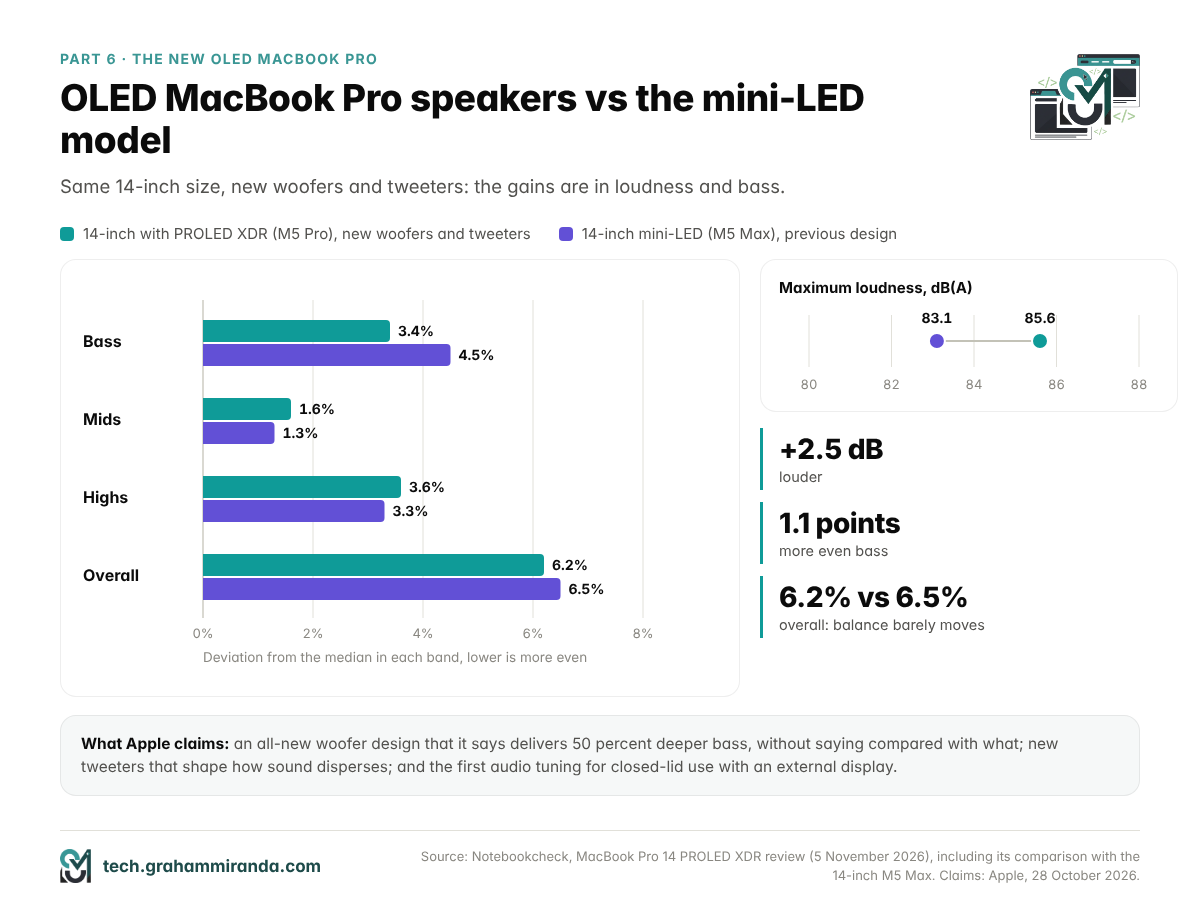
The MacBook Pro with PROLED XDR Display is the first MacBook Pro since the 2021 redesign with new speaker drivers. Apple’s press release credits redesigned woofers with 50 percent deeper bass and says new tweeters spread the sound more clearly. It’s also the first MacBook Pro with its own audio tuning for closed-lid use, when it’s connected to an external display.
A MacRumors round-up published after the first deliveries adds a physical clue. It reports larger speakers under the bottom cover, next to a photo comparing the internals of the 16-inch mini-LED and OLED models. Bigger drivers can move more air, which is the most direct route to deeper bass in a thin laptop.
What Apple doesn’t say is what the 50 percent is measured against, or how, as The Mac Observer and iThinkDifferent both pointed out. Read as frequency, it could mean anything from just over half an octave to a full octave, depending on how you calculate it. Read as output, 50% more acoustic power would be less than 2 dB. Either way, it’s a claim you can’t check without Apple’s reference, so the measurements are more useful.
What Notebookcheck measured
Notebookcheck’s review of the 14-inch OLED model with M5 Pro compares it directly with the 14-inch mini-LED model with M5 Max:
| 14″ with PROLED XDR (M5 Pro) | 14″ mini-LED (M5 Max) | Difference | |
|---|---|---|---|
| Max loudness | 85.6 dB(A) | 83.1 dB(A) | 2.5 dB louder |
| Bass (100–315 Hz) | 3.4% | 4.5% | 1.1 points more even |
| Mids (400 Hz–2 kHz) | 1.6% | 1.3% | 0.3 points less even |
| Highs (2–16 kHz) | 3.6% | 3.3% | 0.3 points less even |
| Overall | 6.2% | 6.5% | 0.3 points more even |
| Better than (all devices) | 99% | 99% | — |
Notebookcheck, MacBook Pro 14 PROLED XDR review, 5 November 2026. The chip doesn’t affect the speakers; both models in this table have six-speaker systems, but the OLED model’s woofers and tweeters are new.
So the OLED model is louder, and its bass sits closer to the rest of the response, while the overall balance barely moves. That’s consistent with a change aimed at the low end rather than at everything. Notebookcheck’s reviewer said its analysis showed improved bass and called the system “one of the best sound systems on the market”.
What it sounds like
Andrew E. Freedman of Tom’s Hardware reviewed the 16-inch OLED model with M5 Max and came away calling its six speakers “the best laptop speakers I’ve ever heard”. The improvement he heard was in the low end, with deep drums and bass filling his apartment. The rest of the range, he wrote, doesn’t sound dramatically better than the existing Pros, which fits Notebookcheck’s numbers well.
Closed-lid tuning, and why it matters
Plenty of people use a MacBook Pro shut on a desk, connected to an external display. On every other MacBook Pro, closing the lid puts the screen over the speaker grilles beside the keyboard, and the sound is tuned for the lid being open. The OLED model is the first to get tuning for the closed position. Tom’s Hardware tested it through a Thunderbolt dock and found it surprisingly good, if slightly muffled until the lid was opened again.
Is better sound worth the OLED premium?
On its own, no. The OLED model costs €400 more for the 14-inch and €500 more for the 16-inch in Germany, and $400 more in the US. If your MacBook Pro already has six speakers, new woofers alone are a thin reason to spend €3,299 or more. And as Production Expert pointed out, audio professionals will still mix on monitors or headphones.
The speakers are a bonus that comes with a screen decision. I made mine in Why I Cancelled My OLED MacBook Pro, and everything else about the OLED model is in The OLED MacBook Pro Is Here. The one exception: if you work lid-closed at a desk and don’t want external speakers, the OLED model is the only MacBook Pro tuned for exactly that.
Part 7 — MacBook Air Speakers: Four or Six?
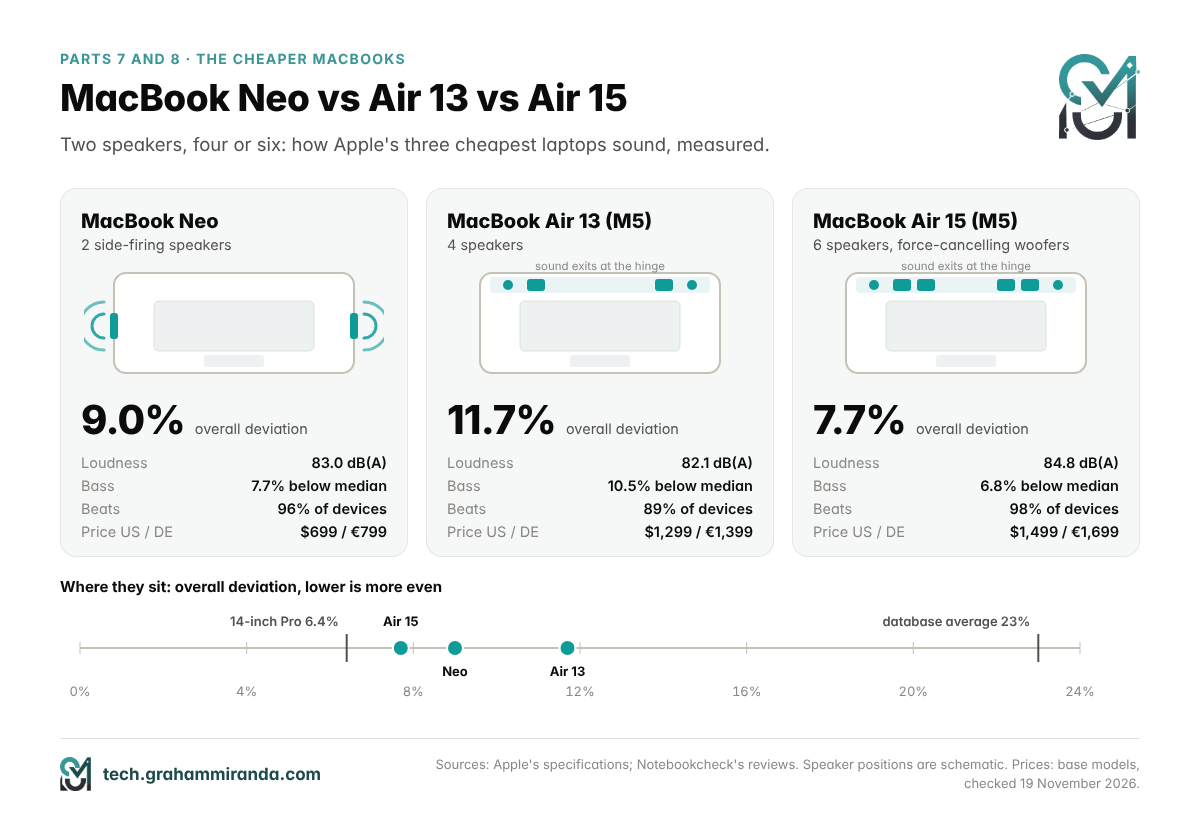
13-inch: four speakers hidden in the hinge
The 13-inch MacBook Air has a four-speaker sound system. When Apple introduced the design with the M2 Air in 2022, it described the four as two tweeters and two woofers, and iFixit’s teardown showed where they went: there are no grilles beside the keyboard any more, and the sound comes out of the gap between the case and the display.
Notebookcheck measured the M5 model at 82.1 dB(A) with an 11.7% overall deviation. Its bass sits 10.5% below the median and its highs 5.1% above, so it measures a little bright and light in the low end. The review still found the sound quality good, adding that owners will “rarely miss external speakers”.
In context, though, the 13-inch Air is one of the better small laptops rather than in a league of its own. In its class, 14% of laptops measured better, and the Windows ultraportables Notebookcheck put next to it weren’t far behind: Dell’s XPS 13 9350 at 13.0% and Microsoft’s Surface Laptop 7 at 12.1%. MSI’s Prestige 13 AI Plus, at 18.2%, shows what a more ordinary thin laptop sounds like.
15-inch: six speakers with force-cancelling woofers
The 15-inch MacBook Air is a different story. Since the first 15-inch model in 2023, it has had six speakers: two tweeters and two sets of force-cancelling woofers, the same layout as the Pros. The M5 model measured 84.8 dB(A) with a 7.7% deviation, which beats 98% of all devices Notebookcheck has tested. The review called the sound system excellent once again and a bit better than the 13-inch’s.
The M4 model measured 85.8 dB(A) and 8.0%, so the M5 Air’s speakers are essentially unchanged. The Windows laptops in the same comparison all trailed it: Lenovo’s ThinkPad X9-15 Aura Edition at 9.5%, and Microsoft’s Surface Laptop 15 and Samsung’s Galaxy Book4 Edge 16 at around 11.5%.
The value pick for sound
If good speakers are high on your list and a MacBook Pro isn’t in your budget, the 15-inch Air is the one to look at. It’s the cheapest MacBook with six speakers and force-cancelling woofers, at $1,499 or €1,699 against $1,999 or €2,299 for the cheapest MacBook Pro. Its overall deviation is 7.7% against the 14-inch Pro’s 6.4%. The main difference is the bass, which sits 6.8% below the median on the Air and within 4.2% to 4.9% of it on the mini-LED Pros.
Part 8 — MacBook Neo Speakers: Two Drivers, Still Better Than Most
The MacBook Neo launched in March as Apple’s cheapest laptop ever, with an A18 Pro chip from the iPhone 16 Pro and a starting price of $599. Apple’s June price rises took it to $699, or €799 in Germany. Apple describes its audio as dual side-firing speakers with Spatial Audio and Dolby Atmos support, plus two microphones.
Notebookcheck was impressed. Its reviewer noted that the two speaker modules inside the chassis are very large, and measured 83.0 dB(A) with a 9.0% overall deviation and very even mids (1.3%). That’s better than 96% of all the devices in the database. The review found the speakers lacked a bit of punch compared with the MacBook Air, but still rated the sound very good.
The comparison with similarly priced Windows laptops is where the Neo shines. Microsoft’s Surface Laptop 13 measured 11.1%, with bass 15.5% below the median. HP’s OmniBook 5 14 was the loudest laptop in this article at 92.7 dB(A), but at 12.8%, with bass 19.3% below the median. Lenovo’s IdeaPad Slim 3 14 measured 24.3%, with bass almost 30% below.
Other reviewers agree on the basics and differ on the details. KitGuru praised the clarity it gets from a pair of side-firing drivers, while Expert Reviews found them a little shrill next to the Air. BGR noted that they aren’t the same speakers as in the Air or Pro, and that you can hear the difference.
One practical point: because the speakers fire out of the sides, the Neo sounds best with clear space on both sides. Pushed against a wall or sunk into a sofa cushion, it loses much of what makes it good.
Part 9 — MacBook Speakers vs Windows Laptops: Has the Competition Caught Up?
Notebookcheck’s own answer, in its 16-inch MacBook Pro review, is: partly. The competition has caught up, and most expensive multimedia laptops now have good sound systems, but Apple is still a step ahead. The comparison laptops Notebookcheck measured alongside each MacBook this year show where that step is.
| Laptop | Class | Loudness | Bass | Overall deviation |
|---|---|---|---|---|
| MacBook Pro 16″ (M5 Pro) | 16-inch | 84.7 dB(A) | 4.9% | 5.2% |
| Samsung Galaxy Book6 Ultra | 16-inch | 85.6 dB(A) | 5.9% below | 7.3% |
| Asus ProArt P16 (RTX 5090) | 16-inch | 80.8 dB(A) | 3.3% | 8.3% |
| Lenovo ThinkPad T1g Gen 8 | 16-inch | 85.6 dB(A) | 9.3% below | 8.7% |
| Lenovo Yoga Pro 9i 16 (RTX 5070) | 16-inch | 81.4 dB(A) | 5.5% below | 9.7% |
| MacBook Pro 14″ with PROLED XDR (M5 Pro) | 14-inch | 85.6 dB(A) | 3.4% | 6.2% |
| Asus ProArt P14 (H7407) | 14-inch | 87.5 dB(A) | 4.9% | 6.2% |
| MacBook Pro 14″ mini-LED (M5 Max) | 14-inch | 83.1 dB(A) | 4.5% | 6.5% |
| Dell XPS 14 (Core Ultra X7 358H) | 14-inch | 87.0 dB(A) | 7.6% below | 7.3% |
| HP OmniBook Ultra 14 | 14-inch | 85.3 dB(A) | 10.0% below | 7.3% |
| HP ZBook Ultra G1a 14 | 14-inch | 88.7 dB(A) | 11.8% below | 10.4% |
| MacBook Air 15″ (M5) | Thin and light | 84.8 dB(A) | 6.8% below | 7.7% |
| Lenovo ThinkPad X9-15 Aura Edition | Thin and light | 87.5 dB(A) | 12.5% below | 9.5% |
| Microsoft Surface Laptop 15 (Snapdragon X Elite) | Thin and light | 81.0 dB(A) | 11.7% below | 11.4% |
| Samsung Galaxy Book4 Edge 16 | Thin and light | 81.8 dB(A) | 10.6% below | 11.5% |
| MacBook Air 13″ (M5) | Thin and light | 82.1 dB(A) | 10.5% below | 11.7% |
| Microsoft Surface Laptop 7 13.8 | Thin and light | 81.8 dB(A) | 12.7% below | 12.1% |
| Dell XPS 13 9350 | Thin and light | 82.6 dB(A) | 8.5% below | 13.0% |
| MSI Prestige 13 AI Plus Evo | Thin and light | 84.5 dB(A) | 19.4% below | 18.2% |
| MacBook Neo | Budget | 83.0 dB(A) | 7.7% below | 9.0% |
| Microsoft Surface Laptop 13 | Budget | 83.5 dB(A) | 15.5% below | 11.1% |
| HP OmniBook 5 14 | Budget | 92.7 dB(A) | 19.3% below | 12.8% |
| Lenovo IdeaPad Slim 3 14 | Budget | 82.6 dB(A) | 29.7% below | 24.3% |
Notebookcheck’s speaker measurements, taken from the comparison sections of its 2026 MacBook reviews. These are the laptops Notebookcheck chose to compare with each MacBook, not a survey of the whole market. Bass figures without “below” sit close to the median.
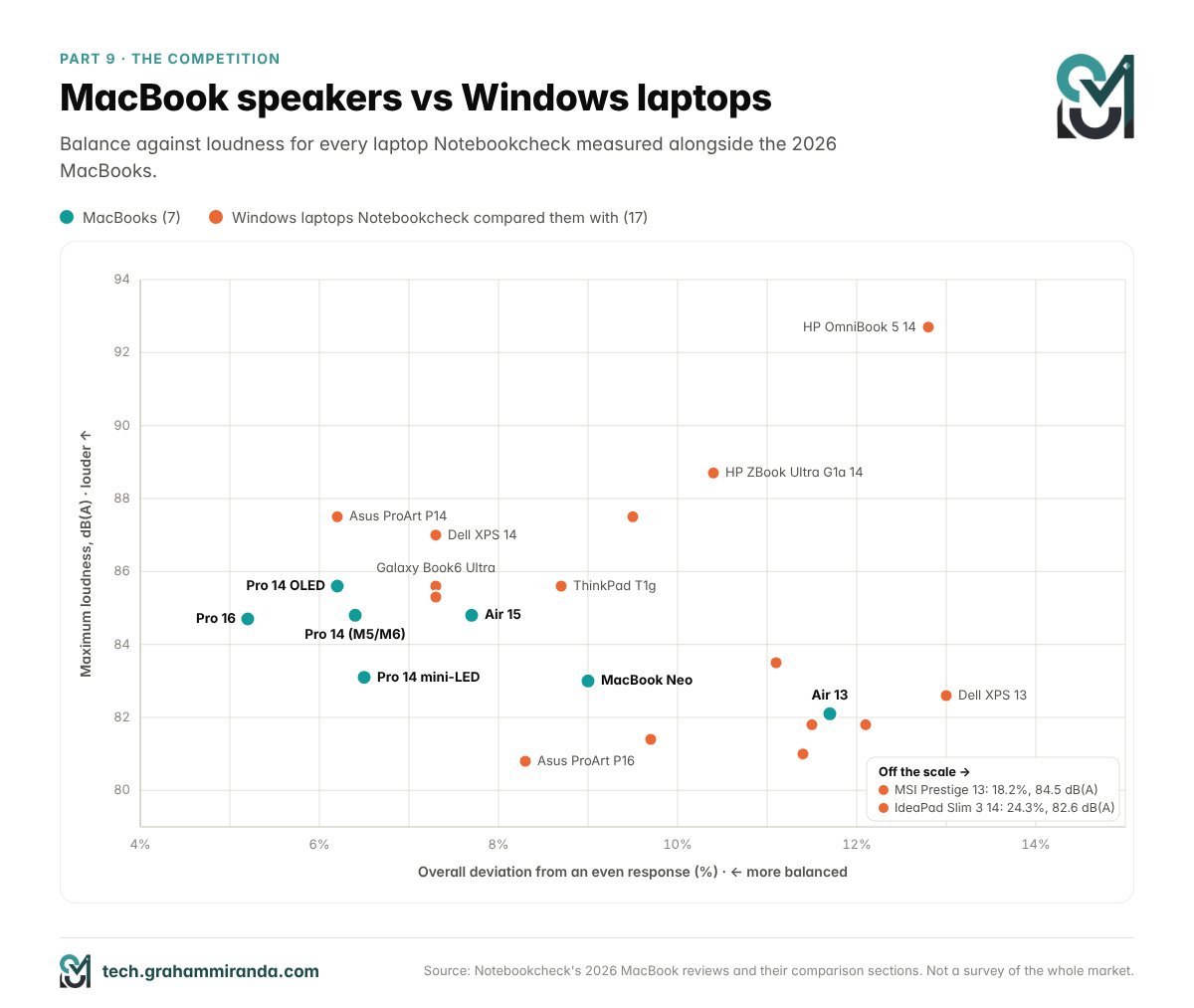
What stands out
- Windows laptops are often louder. HP’s ZBook Ultra (88.7 dB(A)), Asus’s ProArt P14 (87.5), Dell’s XPS 14 (87.0) and HP’s OmniBook 5 (92.7) all play louder than any MacBook.
- MacBooks are more balanced, mostly because of the bass. The MacBook Pros’ bass sits within 3.4% to 4.9% of the median. Most Windows laptops in these comparisons show reduced bass, from 5.5% to almost 30% below it. That’s the force-cancelling woofers and the processing from Parts 2 and 3, showing up in the data.
- There are real exceptions. Asus’s ProArt P14 exactly matches the 14-inch OLED Pro’s 6.2% and plays 1.9 dB louder. Asus’s ProArt P16 has even bass (3.3%) but is quieter and less even overall. Samsung’s Galaxy Book6 Ultra, at 7.3%, is the closest 16-inch rival.
- Among thin and light laptops, the gap is small. The 13-inch Air sits right among the Surface and XPS models. Only the 15-inch Air pulls clearly ahead in that group.
So the MacBook Pros are still the best-measured laptop speakers you can buy, but the lead is narrower than it was a few years ago, and below the Pro and the 15-inch Air, Apple’s advantage is modest.
Part 10 — Spatial Audio and Dolby Atmos on MacBook Speakers
Every current MacBook, from the Neo to the 16-inch Pro, supports Spatial Audio when playing music or video in Dolby Atmos on its built-in speakers, according to Apple’s specifications. With supported AirPods, AirPods Pro or AirPods Max, you also get dynamic head tracking, which keeps the sound anchored to the screen when you turn your head.
On built-in speakers, Spatial Audio is processing, not magic. It takes a multichannel or object-based mix and renders it through the stereo speakers so the sound seems wider and taller than the laptop. It can’t put a speaker behind you, and it works best when you sit centred in front of the screen.
Setting it up in Apple Music
- In the Music app, choose Music → Settings → Playback.
- Set Dolby Atmos to Automatic. Apple says that with Automatic, supported songs play in Dolby Atmos on the built-in speakers of MacBook Pro and MacBook Air models from 2018 on.
- Under the lossless audio options, choose the streaming quality you want: High Quality, Lossless or High Resolution Lossless.
- While a song plays, the Dolby button in the playback controls turns Spatial Audio on or off for it.
That last point matters more than it sounds. A Dolby Atmos mix is a different mix from the stereo master, not just a processed version of it, and some songs sound better one way than the other. If a track sounds hollow or the vocals seem pushed back, switch Spatial Audio off and compare.
Video in Dolby Atmos gets the same treatment, according to Apple’s specifications. If you connect a MacBook Pro to an AV receiver over HDMI, the Music app’s Prefer HDMI Passthrough setting sends Dolby audio to the receiver instead of the built-in speakers.
Part 11 — Beyond the Speakers: Microphones, the Headphone Jack and HDMI Audio
Microphones
The MacBook Air and MacBook Pro have a three-microphone array with directional beamforming, which focuses on your voice and suppresses sound from other directions. Apple’s specifications for the M5 Air add Voice Isolation and Wide Spectrum modes for calls: one filters out background noise, the other deliberately keeps it, for music lessons or a room full of people. When Apple redesigned the MacBook Pro in 2021, it claimed the new microphones had a 60% lower noise floor, and it calls the current Pro microphones studio-quality. The MacBook Neo has two microphones with directional beamforming instead of three.
A headphone jack that drives real headphones
Since 2021 for the MacBook Pro and 2022 for the MacBook Air, the 3.5 mm headphone jack has supported high-impedance headphones. Apple’s support document explains that the jack detects the impedance of whatever you plug in and adapts its output. For headphones under 150 ohms it provides up to 1.25 volts RMS; for headphones from 150 ohms to 1 kilohm it delivers 3 volts RMS. The built-in digital-to-analogue converter supports sample rates up to 96 kHz.
In practice, that means many studio headphones that would sound quiet on a phone can run straight from a MacBook Pro or Air without an external amplifier. Apple doesn’t list high-impedance support for the MacBook Neo.
HDMI audio
The MacBook Pro’s HDMI port supports multichannel audio output, so a MacBook Pro connected to a TV or AV receiver can send surround sound to it.
Part 12 — How to Get the Best Sound From Your MacBook Speakers
MacBook speakers sound good out of the box, but a few habits make a noticeable difference.
- Know where the sound comes out. On a MacBook Pro, the speaker grilles sit on either side of the keyboard. On a MacBook Air, the sound comes out of the gap between the keyboard and the display. On the Neo, it comes out of the sides. Keep hands, blankets and sleeves away from those openings.
- Use a hard, flat surface. A desk reflects sound towards you and helps the bass; a duvet or a cushion absorbs it.
- Sit in front of it. Stereo and Spatial Audio both depend on being roughly centred.
- Feed it good audio. In Music, set Lossless and Dolby Atmos (Automatic) under Music → Settings → Playback. A low-bitrate stream will sound like a low-bitrate stream on any speaker.
- Use the Dolby button. Compare Dolby Atmos and stereo on songs you know, and keep whichever sounds better.
- Add EQ if you want to tune the sound. The Music app has its own equaliser (Window → Equalizer), but it only affects Music. macOS has no built-in system-wide EQ, so for everything else you need an app such as Rogue Amoeba’s SoundSource (paid) or eqMac (which has a free version). Go easy on bass boosts: on small speakers they eat into the headroom that the protection system manages, and the result can be quieter overall.
- Stay a few steps below maximum. At full volume, compression is working hardest, and music gets denser rather than louder.
- Think about the lid. If you work lid-closed with an external display, the OLED MacBook Pro is the only model Apple advertises as tuned for that position. On other models, external speakers or headphones will sound better.
- If they crackle or drop out: check System Settings → Sound → Output to make sure the built-in speakers are selected and the balance is centred, update macOS, and restart the Mac’s audio service. In Terminal, run:
sudo killall coreaudiod
macOS restarts the audio service automatically within a few seconds. If crackling persists at moderate volume after that, contact Apple, because it may be a hardware fault.
- Clean gently. Use a soft, dry brush on the speaker openings. Never use liquids, sprays or sharp objects.
Part 13 — What MacBook Speakers Still Can’t Do
MacBook speakers are the best you can get in a laptop, but they’re still laptop speakers. These are the limits worth knowing.
- No real sub-bass. Physics hasn’t gone away. The woofers can’t move enough air to reproduce the deepest notes, and much of the bass you hear is the processing persuading your brain to fill it in. For films with a lot of low-frequency rumble, or music built on deep bass, headphones or external speakers will do far better.
- Compression at full volume. At maximum volume, protection and compression decide what you hear. Loud music sounds dense and slightly flattened rather than bigger.
- Apple drives them hard. That’s part of why they sound so good, and it comes with a small risk. Hector Martin told Motherboard in 2022 that he believed his destructive test track could also damage M1 MacBooks running macOS, and that he had seen speakers die under macOS too. Treat full-volume test tones and deliberately extreme tracks with caution.
- They’re not a mixing reference. Even the 16-inch’s speakers rely on processing that colours the sound. They’re fine for quick checks, but for mixing and mastering, use good headphones or studio monitors.
- Closed-lid sound on most models. Apple advertises closed-lid tuning only for the OLED MacBook Pro.
- The cheaper models are good, not exceptional. The 13-inch Air and the Neo measure well, but they don’t separate themselves from the best Windows ultraportables the way the Pros do.
- No system-wide EQ. You can’t adjust Apple’s tuning in macOS itself; you need a third-party app.
- The competition is closer than it was. As Part 9 showed, a few Windows laptops now match the 14-inch Pros on balance, and many play louder.
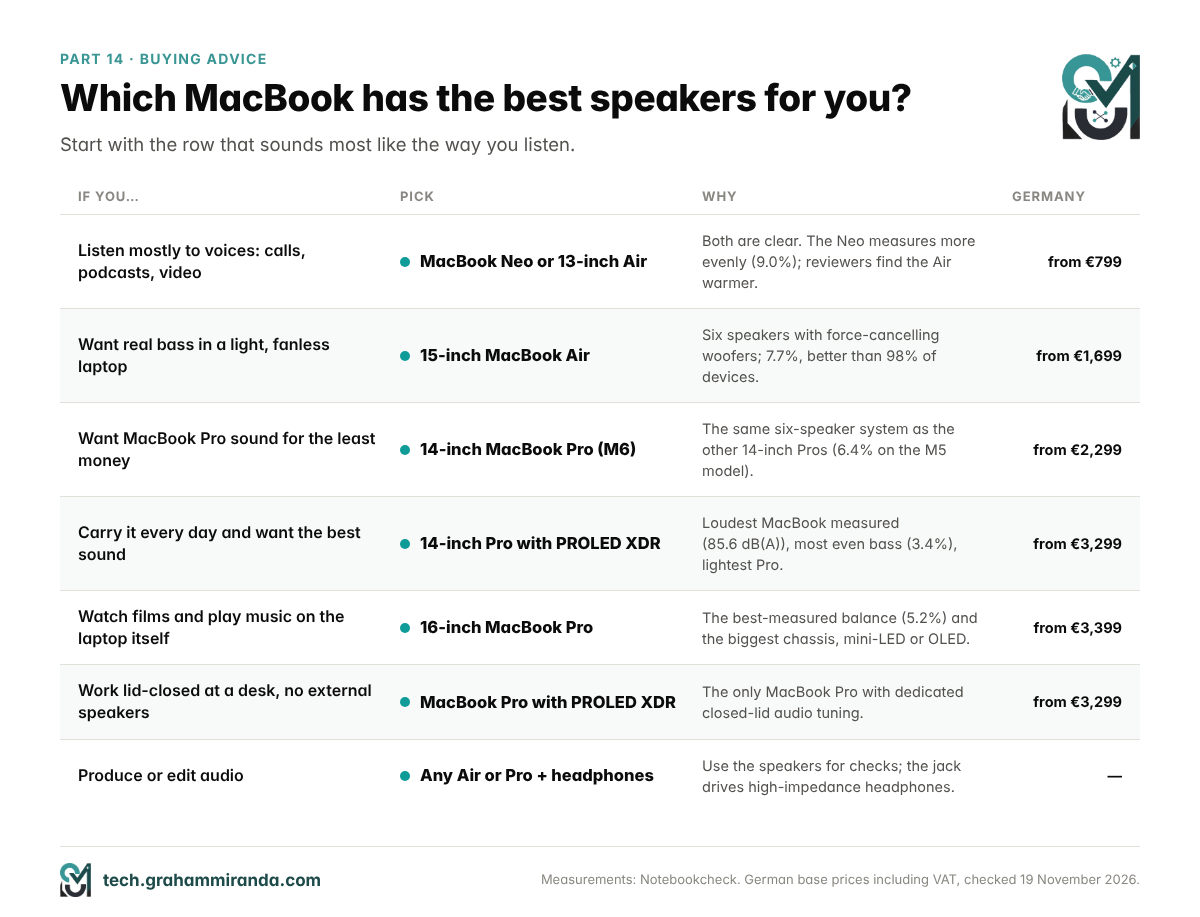
Part 14 — Which MacBook Should You Buy for Sound?
| If you mostly… | Pick | Why |
|---|---|---|
| Listen to voices: calls, podcasts, video | MacBook Neo or 13-inch MacBook Air | Both are clear. The Neo measures more evenly; reviewers find the Air warmer |
| Want real bass in a light, quiet laptop | 15-inch MacBook Air | Six speakers with force-cancelling woofers, 7.7%, from €1,699 |
| Want Pro sound for the least money | 14-inch MacBook Pro (M6) | The same six-speaker system as the other 14-inch Pros, from €2,299 |
| Carry your laptop daily and want the best sound | 14-inch MacBook Pro with PROLED XDR | The loudest MacBook measured (85.6 dB(A)), the most even bass (3.4%) and the lightest MacBook Pro |
| Watch films and listen to music on the laptop itself | 16-inch MacBook Pro (mini-LED or OLED) | The best-measured balance (5.2%) and the biggest chassis for the woofers |
| Work lid-closed at a desk without external speakers | MacBook Pro with PROLED XDR | The only MacBook Pro with closed-lid tuning |
| Produce or edit audio | Any MacBook Air or Pro, plus good headphones | The speakers are for checks; the headphone jack drives high-impedance headphones |
Frequently Asked Questions
Three things work together. The MacBook Pros and the 15-inch MacBook Air have six speakers, two tweeters and four woofers, and the woofers are force-cancelling pairs that cancel each other’s vibration so they can move more air without shaking the case. Smart amplifiers and a temperature model let macOS drive the small drivers as hard as they can safely go. And signal processing, including EQ, psychoacoustic bass and compression, shapes the sound for each model.
By measurement, the 16-inch MacBook Pro. Notebookcheck measured the M5 Pro model at 84.7 dB(A) with a 5.2% overall deviation, the most balanced result of any current MacBook. The 14-inch MacBook Pro with PROLED XDR is the loudest MacBook measured, at 85.6 dB(A), and has the most even bass. Among the cheaper models, the 15-inch MacBook Air comes closest to the Pros.
Yes, especially compared with the 13-inch Air. The Pros measure between 5.2% and 6.5% overall deviation, against 11.7% for the 13-inch Air, which has four speakers instead of six. The 15-inch Air narrows the gap a lot: it has six speakers with force-cancelling woofers and measured 7.7%, with weaker bass than the Pros as the main difference.
Apple says its new woofer design delivers 50 percent deeper bass, but it doesn’t say what that’s compared with or how it was measured. Notebookcheck measured the 14-inch OLED model’s bass closer to the median than the mini-LED 14-inch’s (3.4% against 4.5%) and found it 2.5 dB louder. Tom’s Hardware heard a clear improvement in the low end, with the rest of the range similar to earlier Pros.
The 13-inch MacBook Air has a four-speaker sound system. The 15-inch has six speakers: two tweeters and two sets of force-cancelling woofers. Both support Spatial Audio with Dolby Atmos on the built-in speakers. On the 13-inch, the sound comes out of the gap between the keyboard and the display rather than through grilles beside the keyboard.
Yes, especially for the price. Notebookcheck measured the Neo’s two side-firing speakers at 83 dB(A) with a 9.0% overall deviation, better than 96% of all the devices it has tested and better than the similarly priced Windows laptops in its comparison. Reviewers say they lack some of the MacBook Air’s punch and warmth.
They’re pairs of woofers mounted back to back and driven with the same signal, so they move in opposite directions. The forces they exert on the laptop cancel out while their sound adds up. That stops the aluminium case from vibrating along with the bass, so the woofers can be driven harder with less distortion. Apple introduced them in the 16-inch MacBook Pro in 2019.
The MacBook Pros are the most balanced laptop speakers in Notebookcheck’s 2026 comparisons, and no Windows laptop in them was more balanced, although Asus’s ProArt P14 matched the 14-inch OLED Pro and played louder. Many Windows laptops get louder than MacBooks, but most have noticeably weaker bass. Among thin and light 13-inch laptops, the gap is small.
Yes. Every current MacBook, including the Neo, supports Spatial Audio when playing music or video in Dolby Atmos on its built-in speakers. In the Music app, set Dolby Atmos to Automatic under Music → Settings → Playback. With supported AirPods, you also get dynamic head tracking.
macOS is designed to prevent it: it monitors each speaker through the amplifier, models its temperature and turns it down before it overheats. The risk is real without that protection. In 2022, an Asahi Linux developer destroyed the tweeters of an M2 MacBook Air while testing under Linux, and he said he believed some extreme content could damage M1 models even under macOS. Be careful with full-volume test tones.
Because closing the lid puts the screen over the speaker openings, and most MacBooks are tuned for use with the lid open. The MacBook Pro with PROLED XDR is the first MacBook Pro with dedicated audio tuning for closed-lid use with an external display, and even there, Tom’s Hardware found the sound slightly muffled. For lid-closed desk setups, external speakers or headphones work best.
Put the MacBook on a hard surface, keep the speaker openings clear and sit in front of it. In the Music app, turn on Lossless and set Dolby Atmos to Automatic, then compare songs with Spatial Audio on and off. For system-wide EQ, use an app such as SoundSource or eqMac, and keep the volume a few steps below maximum, where compression is less active.
Not reliably. Even the 16-inch MacBook Pro’s speakers rely on processing that colours the sound, and they can’t reproduce deep bass. They’re useful for checking how a mix translates to laptop speakers, but for mixing and mastering you need studio monitors or good headphones, which the MacBook Pro’s high-impedance headphone jack can drive directly.
The Bottom Line
MacBook speakers deserve their reputation, and in 2026 the measurements prove it. The 16-inch MacBook Pro is the best-measured laptop speaker system I could find, the 14-inch Pros are close behind, and even Apple’s cheapest laptop beats 96% of the devices Notebookcheck has ever tested. The secret isn’t a single trick. It’s six drivers where most laptops have two or four, woofers that cancel each other’s vibration, amplifiers that watch every speaker’s temperature, and processing tuned for each model. Take away the protection and the speakers can destroy themselves, as the Asahi Linux developers found out the hard way. Take away the processing and they sound thin.
The lineup isn’t uniform, though. The 15-inch MacBook Air is the best value for sound, the 13-inch Air and the Neo are good without being exceptional, and the new OLED MacBook Pro improves the bass without changing the overall picture. The competition is also closer than Apple’s marketing suggests. Still, if you want a laptop that you can actually listen to music on, nothing else gets as consistently close as a MacBook Pro.
For me, going from two speakers to six is one of the upgrades I’m most curious about. I’ll find out soon how much of it I can hear for myself.
Have you compared MacBook speakers with a Windows laptop or an older Mac? I’d like to hear which one surprised you. Corrections and counter-evidence are welcome, and I’ll update this article when new measurements appear, starting with the 16-inch OLED model and the M6 MacBook Pro.
Disclosure: This article contains no affiliate links and no sponsored content. No company mentioned in it reviewed it before publication.
Facts checked: 19 November 2026.
