 Italiano
  English
  Deutsch
  Español
  Français
Every AI Coding Harness Compared (October 2026): OpenCode v2, Hermes Agent, Claude Code, Codex and 24 More
The AI coding harness you pick, and the model you run inside it, can triple your bill without changing your results. On Artificial Analysis’s Coding Agent Index — the most detailed public benchmark of harnesses and models together — Codex running GPT-6.1 Sol and Claude Code running Sonnet 5.5 earn exactly the same score, and one costs three times as much per task as the other. Push Claude Code to maximum effort and it scores higher still, at about fourteen times Codex’s price.
That is the quiet fact behind every “which coding agent should I use?” argument in 2026. The model gets the headlines. The harness — the loop, the tools, the permissions, the memory and the interface wrapped around the model — decides how many tokens you burn, how long you wait, what the agent is allowed to touch and whether you can switch models next month when the leaderboard flips again.
And the harnesses have multiplied. Anthropic’s Claude Code ships a release almost every day. OpenAI’s Codex has become a desktop app, a cloud service and an open-source Rust CLI. OpenCode rebuilt itself from scratch and shipped version 2.1 on 20 October. Nous Research’s Hermes Agent learns your habits and hands coding jobs to other harnesses. DeepSeek, Alibaba, Moonshot, Mistral and Z.ai all now publish their own agents. Google switched off Gemini CLI for consumers and replaced it. Roo Code shut down. Continue was absorbed by Cursor, which SpaceX agreed the same month to buy for $60 billion.
So this article compares all of them. Twenty-eight harnesses in total, from the giants to the minimalists, with the newest independent benchmarks, prices pulled from the vendors’ own pages, release data pulled straight from the npm and PyPI registries, and a security section built from the CVEs this year actually produced.
Everything here was checked against official documentation, changelogs, package registries, GitHub repositories and the two public benchmarks that best compare harnesses, as of 22 October 2026. These tools change weekly, so I’ve flagged the volatile numbers as I go.
Informativa: This article contains one affiliate link, to Z.ai’s GLM Coding Plan. If you subscribe through it you get 10% off, and I may earn a commission at no extra cost to you. None of the companies, labs or foundations mentioned sponsored, reviewed or approved this article.
TL;DR — La versione in 60 secondi
- The harness and its settings change the bill more than the score. On Artificial Analysis’s Coding Agent Index, Codex running GPT-6.1 Sol scores 63 per $1.04, 15.5 minutes and 3.2 million tokens per task. Claude Code running Sonnet 5.5 matches that 63 at its “xhigh” effort setting for $3.33 a task — and at maximum effort scores 68 per $14.19, 1.5 hours and 27.7 million tokens.
- At the frontier, the harness adds little to raw pass rates. On Terminal-Bench 4.0, Claude Opus 5.5 resolves 64.8% of tasks inside Claude Code and 65.2% inside mini-SWE-agent, a harness with a single bash tool. The biggest gain from a lab’s own harness is xAI’s Grok Build, which lifts Grok 4.7 by 8.8 points.
- Best results: Claude Code. Best value: Codex. Best open, any-model harness: OpenCode v2 (2.1.2, released 21 October). Best agent that learns you: Hermes Agent (v0.22.4). Best minimal harness: Pi 1.0.
- 2026 thinned the field as fast as it grew it. Gemini CLI stopped serving consumers on 18 June and became Antigravity CLI. Roo Code shut down on 15 May. Continue was folded into Cursor. Aider hasn’t published a release since 12 February. Kilo Code was bought by Anaconda.
- Every open-model lab now ships its own harness. DeepSeek Harness collected about 252,000 GitHub stars in ten weeks. Qwen Code, Kimi Code, Mistral Vibe 3.0 and Z.ai’s ZCode round out the set.
- Subscriptions are the hidden lock-in. Claude Pro and Max only cover Anthropic’s own apps, plus a monthly credit for programmatic use. A ChatGPT login works in OpenCode, Pi and others. Copilot starts free. Cursor rebuilt its plans around Grok in mid-October, from $8 a month.
- Security has one lesson. Almost every serious coding-agent CVE of 2026 followed the same pattern: untrusted text tricked an agent into writing a file that other tooling trusted. Codex and Cursor sandbox shell commands by default. Claude Code’s sandbox is opt-in, Antigravity CLI asks before every command, OpenCode v2 relies on permission rules, and Pi has no permission system at all.
- Standards made switching cheap. MCP for tools, ACP for editors (44 agents in its registry), AGENTS.md for instructions and Agent Skills for know-how now work across most harnesses. So don’t marry one.
- My recommendation: uso two harnesses. Pick OpenCode v2 for every model you might ever want to run, and pair it with Claude Code for the hardest work or Codex for the best value. Put Hermes Agent in your chat apps if you want an agent that remembers you.
AI Coding Harnesses at a Glance
| Harness | Produttore | Licenza | Latest (2026) | Models | Cheapest way in | Ideale per |
|---|---|---|---|---|---|---|
| Claude Code | Antropico | Esclusivo | 2.1.308 · 22 Oct | Claude; gateways | Claude Pro $20/mo or API key | Top scores, deepest feature set |
| Codex | OpenAI | Apache-2.0 (CLI) | 0.163.0 · 15 Oct | OpenAI first; any via config | ChatGPT Free (limited), Plus $20 | Best results per dollar |
| OpenCode v2 | Anomaly | MIT | 2.1.2 · 21 Oct | Any (75+ providers), local | Gratuito | One agent for every model |
| Hermes Agent | Nous Research | MIT | 0.22.4 · 21 Oct | Any, local | Gratuito | An agent that learns you |
| Antigravity CLI | Not stated | Shipping since May | Gemini first | Free tier | Gemini users after Gemini CLI | |
| Copilot CLI | GitHub | Esclusivo | 1.0.102 · 21 Oct | Copilot catalogue; BYOK and local | Copilot Free | Teams already on GitHub |
| Cursor CLI | Cursor (SpaceX) | Esclusivo | 2026.10.19 | Cursor catalogue, Grok | Cursor Free | Cursor users, CI scripts |
| Pi | Earendil | MIT | 1.4.0 · 21 Oct | Any, local | Gratuito | A minimal harness to build on |
| DeepSeek Harness | DeepSeek | MIT | 0.2.1-rc.2 · 17 Oct | DeepSeek; any via config | Free + DeepSeek API | Plug-in everything, cheap models |
| Qwen Code | Alibaba | Apache-2.0 | 0.26.0 · 21 Oct | Any, local | Gratuito | Qwen and open models |
| Kimi Code | Moonshot AI | MIT | 2.3.0 · 21 Oct | Kimi first | Kimi Plus $19 or API key | Kimi K3 users |
| Mistral Vibe | Mistral AI | Apache-2.0 | 3.0.1 · 20 Oct | Mistral | Mistral API key | European teams on Mistral |
| Cline | Cline Bot Inc. | Apache-2.0 | CLI 3.0.73 · 17 Oct | Any, local | Gratuito | VS Code and JetBrains users |
| Kilo Code | Kilo (Anaconda) | MIT | 7.8.15 · 19 Oct | Any (500+ models), local | Gratuito | IDE users who want OpenCode inside |
| goose | AAIF (Linux Foundation) | Apache-2.0 | 1.55.0 | Any, local | Gratuito | A foundation-run, MCP-first agent |
| Factory Droid | Factory | Esclusivo | 0.247.0 · 22 Oct | Frontier + open-weight; BYOK and local | Pro $20/mo | Long-running missions for teams |
Twelve more — Grok Build, Devin, Amp, Warp, Junie, Kiro, Crush, Letta Code, OpenHands, cecli (the active Aider fork), ZCode and MiniMax Code — are covered in Parts 4 to 8, along with a long tail of newcomers. Versions are a 22 October 2026 snapshot taken from the npm and PyPI registries, GitHub tags and the ACP registry (Cursor CLI’s version comes from the latter).
Indice dei contenuti
- Every AI Coding Harness Compared (October 2026): OpenCode v2, Hermes Agent, Claude Code, Codex and 24 More
- TL;DR — La versione in 60 secondi
- AI Coding Harnesses at a Glance
- Part 1 — What an AI Coding Harness Is, and the Seven Families
- Part 2 — The Harness Effect: What the Benchmarks Actually Show
- Part 3 — 2026, the Year the Harness Became the Product
- Part 4 — The Frontier-Lab Harnesses: Claude Code, Codex, Antigravity CLI and Grok Build
- Part 5 — OpenCode v2 and the Open-Source, Any-Model Harnesses
- OpenCode v2 — the open harness for every model
- Pi — the minimalist other agents are built on
- Cline — the VS Code favourite, now everywhere
- Kilo Code — OpenCode inside your IDE, now owned by Anaconda
- goose — the foundation-run agent
- Crush — Charm’s terminal-native agent
- OpenHands — from agent app to agent SDK
- Aider and cecli — the pioneer and its fork
- Gone in 2026: Roo Code and Continue
- Part 6 — Hermes Agent and the Agents That Learn
- Part 7 — The Open-Model Lab Harnesses: DeepSeek, Qwen, Kimi, Mistral and Z.ai
- Part 8 — Editor CLIs and Agent Platforms: Copilot, Cursor, Junie, Kiro, Devin, Factory, Amp and Warp
- GitHub Copilot CLI — the agent your company may already pay for
- Cursor CLI — the editor’s agent, now owned by SpaceX
- JetBrains Junie CLI — the IDE vendor goes model-agnostic
- Kiro — AWS’s spec-first agent
- Devin — Windsurf’s successor, Cognition’s platform
- Factory Droid — missions for teams
- Amp — “agents beyond code”, billed at cost
- Warp — the terminal that open-sourced itself
- The long tail: Auggie and 30-odd more
- Part 9 — The Big Comparison Tables
- Part 10 — By the Numbers: Stars, Downloads and Release Pace
- Part 11 — What It Costs, and the Subscription Wars
- Part 12 — Security: What 2026 Taught Us
- Part 13 — The Standards That Make Switching Cheap: MCP, ACP, AGENTS.md and Skills
- Part 14 — How to Install the Main Harnesses, Step by Step
- Part 15 — Which One Should You Use? Twelve Situations
- Part 16 — Five Setups That Work
- Part 17 — What to Watch Next
- Domande frequenti
- What is an AI coding harness?
- What is the best AI coding harness in 2026?
- Is Claude Code better than Codex?
- Is OpenCode better than Claude Code?
- Can I use my Claude Pro or Max subscription in OpenCode or other harnesses?
- Can I use my ChatGPT subscription in other coding agents?
- What happened to Gemini CLI?
- What happened to Roo Code, Continue and Aider?
- Which coding harness is best for local models?
- Which AI coding agents are free?
- Does the harness matter more than the model?
- Is Hermes Agent a coding agent?
- What is DeepSeek Harness?
- Which AI coding agent is the most secure by default?
- What is ACP, the Agent Client Protocol?
- Can I use more than one coding harness on the same project?
- In sintesi
Part 1 — What an AI Coding Harness Is, and the Seven Families
A large language model on its own can only produce text. Everything that turns that text into a working pull request is the harness.
Strip any coding agent down and you find the same six parts:
- The loop. Read the task, plan, call a tool, read the result, decide what to do next, repeat until done. How a harness runs this loop — how often it re-plans, when it stops, how it recovers from errors — is most of what separates a good agent from an expensive one.
- The tools. Reading and editing files, running shell commands, searching code and the web, and anything you add through the Model Context Protocol (MCP). Pi ships four tools. Claude Code ships more than a dozen, plus whatever you connect.
- Context management. What goes into the model’s window on each turn, what gets summarised (“compacted”) when it fills up, what stays cached so you don’t pay for it twice, and what persists between sessions as memory.
- Permissions and isolation. What the agent may do without asking, what it must ask about, and what the operating system physically stops it from doing.
- The interface. A terminal UI, a desktop app, an editor panel, a chat app on your phone, or a cloud service that opens a pull request while you sleep.
- Extension points. Subagents, hooks, plugins, skills and instruction files such as
AGENTS.md— the places where you teach a harness how your team works.
A useful mental model, borrowed from Phil Winder’s harness comparison: the model is the engine, the harness is one agent built around it, a framework coordinates several agents along a path you design, and a platform runs all of it for an organisation. In 2026 there is a fifth layer too — the cockpit, a tool such as Orca or Herdr that runs several harnesses in parallel and lets you review what each one did.
The seven families
Twenty-eight harnesses is too many to compare as one list, so this article groups them by where they come from — because a harness’s origin predicts its defaults better than any feature table.
Mostra immagine Most tools sit firmly in one family and borrow ideas from the others. MCP, ACP, AGENTS.md and Agent Skills are the shared plumbing.
- Frontier-lab harnesses — Claude Code, Codex, Antigravity CLI and Grok Build. Built by the companies that train the strongest models, tuned for those models first, and usually bundled with a subscription.
- Open-model lab harnesses — DeepSeek Harness, Qwen Code, Kimi Code, Mistral Vibe, Z.ai’s ZCode, MiniMax Code and Tencent’s CodeBuddy Code. Agents from labs that publish open weights, designed to make their own models look good and cost little.
- Open-source, any-model harnesses — OpenCode v2, Pi, Cline, Kilo Code, goose, Crush, OpenHands and cecli, the active fork of Aider. Community-driven, bring your own key or your own local model, no subscription required.
- Agents that learn — Hermes Agent, Letta Code and, as a host for other harnesses, OpenClaw. Long-running agents with real memory that happen to write code well.
- Editor and platform CLIs — Copilot CLI, Cursor CLI, Junie CLI, Kiro CLI, Devin CLI and Augment’s Auggie. The terminal agent from the IDE or code host you already pay for.
- Agent platforms — Factory Droid, Amp, Warp with its Oz cloud agents, Devin Cloud, Codex cloud and Copilot’s cloud agent. Commercial products with hosted runners, long-running “missions” and team billing.
- Cockpits — Orca, Herdr, Conductor, Vibe Kanban and cmux. Not harnesses themselves, but the place many people now run them from. I compared the two biggest in Orca vs Herdr.
The boundaries blur. Codex is a frontier-lab harness e a cloud platform. OpenClaw is a personal agent that can drive Claude Code, Codex and OpenCode as plug-ins. Kilo Code is an IDE extension rebuilt on OpenCode. But the family a tool was born into still tells you who it was built for — and who pays for it.
Part 2 — The Harness Effect: What the Benchmarks Actually Show
“The harness matters as much as the model” became the cliché of 2026. It is half true, and the half that’s true is the expensive half.
The benchmark built to compare harnesses
Most coding benchmarks test models inside one fixed harness, so they can’t tell you anything about Claude Code versus Codex. Artificial Analysis changed that in May with its Coding Agent Index, which runs combinations of harness and model through the same tasks and records cost, time and tokens alongside the score. Version 1.5 averages three benchmarks: DeepSWE v1.1 (113 software-engineering tasks), Terminal-Bench 4.0 (66 hard terminal tasks) and SWE-Atlas-QnA (124 questions about real codebases).
Its public comparison pages currently cover three harnesses — Claude Code, Codex and OpenCode — and here is what they show:
| Harness + model (effort) | Index | Terminal-Bench 4.0 | Cost per task | Time per task | Tokens per task |
|---|---|---|---|---|---|
| Claude Code + Sonnet 5.5 (max) | 68 | 66% | $14.19 | 1.5 h | 27.7M |
| Claude Code + Opus 5.5 (max) | 66 | 63% | $13.04 | 1.1 h | 15.6M |
| Codex + GPT-6.1 Sol (xhigh) | 63 | 55% | $1.04 | 15.5 min | 3.2M |
| Claude Code + Sonnet 5.5 (xhigh) | 63 | 58% | $3.33 | 27.0 min | 7.1M |
| Codex + GPT-6 Astra (max) | 62 | 56% | $7.47 | 29.4 min | 3.3M |
| Claude Code + Fable 5.1 (max) | 62 | 58% | $12.39 | 34.8 min | 5.7M |
| Codex + GPT-6.1 Sol (medium) | 61 | 52% | $0.70 | 10.9 min | 2.3M |
| Claude Code + Sonnet 5.5 (high) | 55 | 42% | $1.24 | 12.3 min | 2.7M |
| Codice aperto + GLM-5.3 | 54 | 40% | $4.37 | 48.1 min | 14.3M |
| Codex + DeepSeek V4 Flash 0731 (max) | 39 | 11% | $0.08 | 18.3 min | 15.4M |
| Claude Code + Haiku 5.5 (low) | 28 | 6% | $0.14 | 11.6 min | 2.4M |
Source: Artificial Analysis Coding Agent Index v1.5 comparison pages, read 22 October 2026. Cost is pay-per-token API cost per task, not subscription pricing. Selected rows; 28 combinations in total.
Mostra immagine Every dot is one harness-and-model combination on the same suite. The top-right corner is Claude Code; the efficient frontier on the left is mostly Codex.
Three things jump out.
Claude Code owns the top of the chart. Nothing on these pages beats Sonnet 5.5 or Opus 5.5 at maximum effort inside Claude Code; the next-best figure I found from the same index, cited by Morph, is Cognition’s Devin Fusion CLI at 61.7. If the only thing you care about is the hardest task getting done, this is still the harness to beat.
Codex owns the value frontier. GPT-6.1 Sol in Codex lands five points lower for less than a tenth of the cost, in about a sixth of the time. Even at medium effort it scores 61 for 70 cents. And because Codex lets you plug in other providers, Artificial Analysis also ran DeepSeek V4 models through it — DeepSeek V4 Flash averaged eight cents per task, albeit with an index score of 39.
OpenCode plus an open-weight model reaches about 80% of the top score. GLM-5.3 in OpenCode scores 54 — between Claude Code’s Sonnet 5.5 at medium and high effort — with a 97% cache-hit rate and no subscription at all.
Mostra immagine The same three benchmarks, three very different amounts of work. Claude Code at maximum effort takes 266 turns per task; Codex takes 40.
The turns tell the story. At maximum effort, Claude Code takes about 266 turns per task: it reads more, checks more and spawns more subagents. Codex takes 40. Neither is wrong — Claude Code’s thoroughness buys the top score — but it means effort settings now matter as much as which harness you pick. Claude Code with Sonnet 5.5 at alto effort costs $1.24 a task and scores 55. At xalto it costs $3.33 and scores 63 — matching Codex’s best for about three times the price.
Same model, two harnesses
The cleanest test of a harness is to hold the model constant. Terminal-Bench 4.0 lets us do that, roughly, by comparing each lab’s own agent on the public board at tbench.ai with Vals AI’s runs of the same models in mini-SWE-agent — a deliberately minimal harness that gives the model a single bash tool and nothing else.
| Modello | Lab’s own harness | Own-harness score | mini-SWE-agent | Gap |
|---|---|---|---|---|
| Claude Opus 5.5 | Claude Code (max) | 64.8% | 65.2% | −0.4 |
| Claude Sonnet 5.5 | Claude Code (max) | 61.8% | 64.1% | −2.3 |
| GPT-6 Astra | Codex (max) | 58.2% | 59.6% | −1.4 |
| GPT-6.1 Sol | Codex (max) | 58.2% | 55.1% | +3.2 |
| Claude Fable 5.1 | Claude Code (max) | 57.9% | 58.1% | −0.2 |
| Claude Opus 5 | Claude Code (xhigh) | 53.9% | 53.5% | +0.4 |
| GPT-6 Sol | Codex (max) | 49.4% | 44.4% | +5.0 |
| GLM-5.3 | Claude Code (max) | 41.8% | 38.9% | +2.9 |
| Grok 4.7 | Grok Build (xhigh) | 37.6% | 28.8% | +8.8 |
| GPT-5.6 Sol | Codex (max) | 37.3% | 37.9% | −0.6 |
Own-harness scores: tbench.ai public board (five trials per task), as reported by Morph and CodingFleet after their 6 October checks. mini-SWE-agent scores: Vals AI, updated 19 October 2026. Different runners and effort settings, so treat gaps under about three points as noise.
Mostra immagine Seven of ten pairs land within three points. A bash-only harness keeps up with Claude Code when the model is Opus 5.5.
This is the half of the cliché that isn’t true — at least not any more. For the strongest models, a 100-line harness gets nearly the same pass rate as a lab’s flagship agent. The models have absorbed most of what harnesses used to add: planning, retrying, checking their own work.
The harness still matters for raw scores in two cases. Weaker or less agentic models benefit more: Grok Build lifts Grok 4.7 by almost nine points, and Codex lifts GPT-6 Sol by five. And older comparisons show bigger swings because older models needed more help. On the previous Terminal-Bench 2.0, Winder.AI cites Letta Code beating Claude Code by 59.1% to 41.6% with the same Claude model, a gap Winder attributes to Letta’s memory design.
What this means for choosing
- Pick the model for the ceiling. If a task is beyond a model, no harness will rescue it.
- Pick the harness for everything else. Cost per task, time per task, how much it asks you, what it is allowed to touch, which models you can swap in next month, and whether it works in your editor, your terminal or your phone. That’s where the 14× differences live.
- Read vendors’ own numbers with care. Anthropic’s launch table puts Sonnet 5.5 at 70.6% on Terminal-Bench 4.0 in its own setup; independent runs put it nearer 62–66%. Benchmarks themselves keep moving, too: Artificial Analysis revised its index in August so that agents no longer get credit for “reward hacking” — getting a task marked as solved without really solving it.
Part 3 — 2026, the Year the Harness Became the Product
If 2025 was the year coding agents became useful, 2026 was the year they became businesses — with all the acquisitions, shutdowns, pricing fights and rewrites that implies.
Mostra immagine Twenty-five moments in ten months. Dates are announcement or release dates.
Six forces explain almost everything on that timeline.
1. Consolidation. SpaceX agreed on 16 June to buy Cursor for $60 billion in stock, days after its own stock-market debut and months after merging with xAI; Bloomberg Law has since reported the deal as completed. Cursor itself absorbed Continue, the open-source assistant, in an acqui-hire the same month. Anaconda bought Kilo Code in July. Earendil — the Vienna company co-founded by Flask creator Armin Ronacher — took over the Pi harness in April. Cognition renamed Windsurf to Devin Desktop and removed its old Cascade agent entirely.
2. Shutdowns and handovers. Roo Code, once one of the most popular VS Code agents, shut down on 15 May and archived its repository, pointing users to a community fork called ZooCode and to Cline. Google stopped serving Gemini CLI to free and consumer users on 18 June and moved them to the new Antigravity CLI. Qwen Code’s free OAuth tier ended on 15 April after demand, in the team’s words, “far exceeded” expectations. Aider, the original terminal pair programmer, hasn’t published a release since 12 February.
3. Every open-model lab now ships a harness. Moonshot replaced its Python Kimi CLI with a TypeScript Kimi Code. DeepSeek launched DeepSeek Harness alongside V4-Pro on 13 August. Mistral rebuilt Vibe around a Rust terminal UI for version 3.0. Z.ai markets its ZCode IDE as the official harness for GLM. MiniMax and Tencent have agents in the ACP registry. Labs have learned that a model is judged by the agent it runs in — so they ship their own.
4. The subscription wars. On 9 January, Anthropic tightened its checks so that Claude Pro and Max logins stopped working in third-party harnesses such as OpenCode. It later wrote that rule into its terms, then softened it in May with a monthly credit for programmatic and Agent SDK use. OpenAI went the other way and let developers sign in with ChatGPT in tools like OpenCode and Pi. Cursor, now part of SpaceX, rebuilt its pricing around a Grok and X bundle in mid-October.
5. Standards won. Block handed goose to the Linux Foundation’s Agentic AI Foundation in April, where it joins MCP and AGENTS.md. The Agent Client Protocol (ACP), which lets any agent run inside editors such as Zed and JetBrains IDEs, published a v2 draft in July; its registry now lists 44 agents.
6. The great rewrites. OpenCode rebuilt itself as a shared background service for 2.0. Cline rebuilt its CLI on a new SDK for 3.0. Pi reached 1.0 and finally accepted MCP. Hermes Agent shipped its biggest release, v0.22 “The Threshold Release”. goose has had a 2.0 beta with a new architecture out since April.
The result is a market that looks crowded but has actually sorted itself into clear camps. The rest of this article goes through them one by one.
Part 4 — The Frontier-Lab Harnesses: Claude Code, Codex, Antigravity CLI and Grok Build
These are the harnesses built by the companies that train the strongest models. They are the most polished, the most heavily used and — with one important exception — the most tightly tied to a subscription.
Claude Code — the benchmark leader, and the most complete harness
What it is: Anthropic’s agentic coding tool. It started as a terminal CLI and now runs in the terminal, VS Code, JetBrains IDEs, a desktop app for macOS, Windows and Windows on ARM (Linux in beta), the web at claude.ai/code, the Claude mobile apps and Slack. Every surface runs the same engine, so your CLAUDE.md, settings and MCP servers follow you.
Release pace: relentless. Version 2.1.308 shipped on 22 October, and the npm registry shows 27 stable releases in the previous 30 days — more than any other big-lab harness.
What it does that others don’t — or don’t yet:
- The deepest extension model in the field. Skills, hooks (with dozens of events), plugins from marketplaces, MCP, custom subagents, agent teams that message each other, and dynamic workflows in which Claude writes a script that orchestrates many subagents and can be re-run.
- Background and parallel work. Subagents now run in the background by default in the desktop app and VS Code, and git worktrees isolate parallel sessions with
claude --worktree. - Work that follows you. Remote Control continues a local session from your phone or browser,
--teleportpulls a cloud session into your terminal, and “Channels” push Telegram, Discord or webhook events into a running session. - Scheduled tasks. Cloud scheduled tasks (formerly “routines”) run even when your computer is off and can trigger on GitHub events; desktop scheduled tasks run locally.
- Memory. Si legge
CLAUDE.md— or your existingAGENTS.md— and builds an automatic memory of what it learns about a project. - Safety tooling. Fine-grained permission rules and modes, an auto mode whose classifier decides what’s safe to run without asking, checkpointing with rewind, and an OS-level sandbox for shell commands on macOS, Linux and WSL2.
Recent releases have been about running all of that at scale: fork subagents by default in headless mode, “idle compaction” that summarises long conversations before the one-hour prompt cache expires, a new /effort ultracode level, hooks that can block an action if the hook itself fails, and an OpenTelemetry event for every tool call a rule, sandbox or hook stopped.
Modelli: Claude Opus 5.5, Sonnet 5.5, Haiku 5.5 and Fable 5.1, through Anthropic’s API, Amazon Bedrock, Google Cloud’s Agent Platform (formerly Vertex AI), Microsoft Foundry or your own LLM gateway. Officially it’s a Claude harness. In practice several labs — Z.ai, MiniMax and Moonshot among them — publish Anthropic-compatible endpoints, and both benchmark boards above include Claude Code running non-Claude models such as GLM-5.3, Qwen3.8 Max and Step 5. A local profile switcher such as CC Switch makes swapping those endpoints painless.
Prezzi: included in Claude Pro ($20 a month, or $17 a month billed annually), Max ($100 a month for 5× Pro usage, $200 for 20×), Squadra seats ($20–$25 Standard, $100–$125 Premium) and Impresa ($20 a seat plus usage at API rates). All plans share one usage pool between chat and Claude Code, with limits on a rolling five-hour window plus a weekly cap. Since 15 June, Pro and Max also include a monthly Agent SDK credit ($20, $100 or $200) for programmatic use — claude -p, GitHub Actions and third-party apps built on the Agent SDK.
Where it’s weaker:
- It’s the heaviest harness to run. At maximum effort it uses about 27.7 million tokens and 266 turns per task on Artificial Analysis’s suite. Lower effort cuts the bill sharply, but you have to choose to.
- The sandbox is off by default. You turn it on with
/sandbox. On native Windows, shell commands run unsandboxed. - It’s proprietary. The public GitHub repository (about 153,000 stars) holds plugins, examples and the issue tracker, not the source.
- Your Claude subscription only works in Anthropic’s apps. Third-party harnesses need an API key or the Agent SDK credit.
Verdict: if you want the highest scores and already pay for Claude, Claude Code is the reference harness every other tool is measured against.
Codex — the value leader, and genuinely open source
What it is: OpenAI’s coding agent, in four forms that share sessions and configuration: an open-source CLI written in Rust (Apache-2.0, about 128,000 GitHub stars), an IDE extension, il Codex app for macOS (launched 2 February) and Windows (4 March), and Codex cloud, which runs tasks remotely and reviews pull requests. The ChatGPT iOS app can start cloud tasks too.
Latest: CLI 0.163.0 (15 October), which made mid-response steering the default — you can redirect the agent while it’s still writing — and fixed several corporate-proxy problems.
What stands out:
- A sandbox that’s on by default. Codex agents can edit only their working folder or branch and must ask before elevated actions such as network access. Among the big-lab harnesses, only Codex ships with OS-level isolation switched on; Cursor’s default mode does something similar inside its own products.
- Efficiency. It uses a fraction of the turns and tokens of Claude Code for a similar result (Part 2).
- A full extension model. Subagents (built-in “worker” and “explorer” agents plus custom ones defined in TOML), a long-running goal mode, hooks, a plugin marketplace with more than 20 official plugins such as Slack, Figma, Notion and Sentry, skills, and MCP as both client and server. OpenAI’s
AGENTS.mdinstruction format, now stewarded by the Agentic AI Foundation, started here and is used in tens of thousands of repositories. - Parallel work in the app. Built-in worktrees, threads per agent, diff review with comments, and automations that run on a schedule and drop results in a review queue.
- Model freedom, quietly. OpenAI models come first, but
--ossruns local models through Ollama, LM Studio or MLX, and custom providers work through the config file. Artificial Analysis benchmarked DeepSeek V4 inside Codex for exactly that reason.
Modelli: GPT-6.1 Sol, GPT-6 Astra (the most capable), GPT-6 Sol and the cheap GPT-6 Luna. GPT-5.5 retired from Codex for ChatGPT sign-ins on 14 October.
Prezzi: included with ChatGPT. Inoltre ($20) gets an estimated 15–160 GPT-6.1 Sol messages, or 5–45 GPT-6 Astra messages, per five-hour window. Pro starts at $100, with $200 and $500 tiers and no five-hour limit at present; the $500 tier adds an “Ultrafast” mode. Business is $20 a user a month billed annually. Gratuito e Vai ($8) users get limited access, and API-key users get the CLI, SDK and IDE extension at API rates — but not cloud features such as GitHub code review.
The policy difference that matters: OpenAI lets you sign in with ChatGPT in other harnesses. This summer, OpenAI’s Thibault Sottiaux said OpenCode and Pi alone accounted for about 10% of Codex traffic. If you’d rather use OpenCode’s interface with your ChatGPT plan, you can.
Where it’s weaker: an OpenAI-first experience; usage limits published as wide estimates rather than fixed numbers; and, like every harness, it learned this year that repository instruction files can’t be trusted blindly (Part 12).
Verdict: the best results per dollar of any harness, the safest defaults of the frontier-lab harnesses, and open source to boot.
Antigravity CLI, and what happened to Gemini CLI
Gemini CLI was 2025’s free-tier darling: Apache-2.0, a thousand free requests a day, and the agent that launched the Agent Client Protocol with Zed. In 2026 Google changed course.
Su 19 May Google announced that its terminal experience was moving to the new Antigravity CLI, and on 18 June Gemini CLI stopped serving free users, Google AI Pro and Ultra subscribers and individual Gemini Code Assist users. Enterprise customers on Gemini Code Assist Standard or Enterprise, Google Cloud users and anyone with a paid Gemini API key kept access. Google says Gemini CLI “remains available to the community” as an Apache-2.0 repository and will keep getting model, bug and security updates for enterprise customers — and it does: 0.65.0 shipped on 20 October, with nightly builds of 0.67 already out.
Antigravity CLI is a different program. The binary is called agy, it’s written in Go, and it shares its architecture with the Antigravity 2.0 desktop app, including asynchronous background workflows. It keeps Agent Skills, hooks and subagents; Gemini CLI extensions become “plugins” (agy plugin import gemini converts them); GEMINI.md e AGENTS.md work unchanged; workspace skills move to .agents/skills; and MCP servers move to a standalone mcp_config.json. Google itself calls it “partial parity”. The announcement doesn’t say whether Antigravity CLI is open source, and its licence isn’t stated.
Its permission model is more cautious than Gemini CLI’s was. By default (request-review) it pauses before running commands, writing files or calling anything external that you haven’t pre-approved. A proceed-in-sandbox mode runs terminal commands automatically inside an isolated container with no access to your files, strict lets only read-only tools run freely, and --dangerously-skip-permissions does what the name says. You sign in with a Google account or a Google Cloud project.
Antigravity runs Gemini models first — Google launched its new flagship, Gemini 4 Argon, in the Gemini app and the Antigravity coding interface on 13 October. There’s a free tier for individuals, with Google AI subscriptions raising the limits.
Verdict: if you used Gemini CLI for free, install agy and run the plugin import. If you want the open-source Gemini CLI codebase, it’s still there — but for consumer accounts, the action has moved.
Grok Build — xAI’s parallel CLI, now bundled with Cursor
xAI’s coding agent entered early beta in mid-May for SuperGrok subscribers ($30 a month). It works in three stages — plan, search, build — and can run up to eight agents in parallel. xAI has since merged into SpaceX, which also now owns Cursor, and Cursor’s new plans bundle Grok Build alongside Grok Chat and other xAI features.
On benchmarks it is the clearest example of a harness helping a model: on Terminal-Bench 4.0, Grok 4.7 scores 37.6% in Grok Build against 28.8% in a bash-only harness. That still puts it about 27 points behind Claude Code with Opus 5.5. It’s available to ACP editors through the registry.
Verdict: worth a look if you already pay for SuperGrok or the new Cursor plans; not yet a reason to switch on its own.
Part 5 — OpenCode v2 and the Open-Source, Any-Model Harnesses
This is the family I’d point most people to first, because it’s the one that never locks you in. If you’re looking for Claude Code alternatives, start here: each of these harnesses runs almost any model — frontier APIs, cheap open-weight models, or something running on your own Mac — and none of them requires a subscription.
OpenCode v2 — the open harness for every model
I build with OpenCode — it’s the tool I used to make my own app, Stash — so take this section with that bias in mind. I went deep on version 2.0 on 17 October in OpenCode v2 vs Hermes Agent vs OpenClaw; here is the short version, plus what has changed since.
What it is: the open-source coding agent from Anomaly, the team behind SST. MIT-licensed, about 220,000 GitHub stars, and, with version 2, rebuilt as one background service that every interface connects to: a terminal UI, a lighter opencode mini, an Electron desktop app, an installable web app, IDE extensions and your own scripts. Start a session in the terminal, approve a permission prompt from your phone, finish in the desktop app.
What makes it stand out:
- Any model, really. Its provider catalogue è models.dev, the open model database the OpenCode team started, so new models appear quickly; more than 75 providers are supported. Ollama, LM Studio and vLLM are discovered automatically on their default ports. ChatGPT and GitHub Copilot logins work. Claude works through an API key — Anthropic stopped Claude subscription logins working in third-party harnesses in January.
- Code Mode, on by default for every MCP server. The model writes a short JavaScript program that chains tool calls in a locked-down interpreter instead of making one round trip per call, which keeps large MCP setups from flooding the context.
- Background subagents and shell commands. Stampa
Ctrl+Bto push a running task to the background; give a review subagent a different model from the main agent. - Built-in git worktrees, per-step file snapshots with
/annullae/ripeti, docked diffs and a “changed files by turn” view. - Permissions that read like a firewall: an ordered list of allow, ask and deny rules where the last match wins, plus hard-deny policies.
- A runtime, not just an app. A rebuilt HTTP API, a client package and an embeddable SDK mean other tools can drive it — Orca, OpenClaw and Hermes all do.
What’s new since 2.0. Version 2.1.0 (20 October) added persistent terminals on Windows x64 and ARM64, restored session archiving, let you edit permission rules from the UI, and added experimental to-do lists and Gemini Live voice. It also renamed some internal fields, so plugins built on early 2.0 builds may need updating. 2.1.2 (21 October) handles free-model limits gracefully — showing when the limit resets and offering to switch models — and adds OPENCODE_DISABLE_FREE_MODELS for teams that don’t want zero-cost models in the picker.
Benchmarks: on Artificial Analysis’s index, OpenCode with GLM-5.3 scores 54 at $4.37 a task with a 97% cache-hit rate — the only open-harness result on those comparison pages, and a strong one.
Where it’s still rough: v2 still doesn’t run language servers, so there are no LSP diagnostics; the migration guide’s advice is to let the agent run your type checker instead. V1 plugins don’t load. In v2, access to folders outside the project is allowed by default, and it only reads AGENTS.md, non CLAUDE.md. V1 (1.19.3) is still patched if you need to wait.
Prezzi: free. OpenCode Vai ($10 a month) and Go Plus ($40) bundle access to a curated set of models; Zen is pay-as-you-go.
Verdict: the best default harness for anyone who wants to choose — and keep choosing — their own models.
Pi — the minimalist other agents are built on
What it is: a “minimal, extensible agent harness” started by Mario Zechner (of libGDX fame) and taken over in April by Earendil, the Vienna public-benefit company co-founded by Flask creator Armin Ronacher. MIT-licensed, about 117,000 stars, and version 1.4.0 as of 21 October.
The philosophy: Pi ships four tools — leggere, scrivere, modifica e bash — and a system prompt plus tool definitions that come in under 1,000 tokens. There are no built-in subagents, plan mode, to-do lists or permission prompts. You add what you want through TypeScript extensions or community packages, and you can replace the system prompt entirely with a SYSTEM.md.
Why it matters more than its size suggests: OpenClaw is built on Pi’s components, and enough other tools pull in Pi’s packages that it’s downloaded about 2.7 million times a week. Pi finally accepted MCP in late September and made it a headline feature of Pi 1.0 on 1 October — on its own terms: MCP tools run through a sandboxed “Codemode” scripting tool so their schemas don’t fill the context window. A fork, oh-my-pi, packages a batteries-included setup for people who want Pi’s core without assembling it themselves.
Where it’s weaker: by design, almost everything. There’s no permission system — Pi runs with your account’s rights and doesn’t ask before each tool call — so its own documentation recommends running it in a container. Earendil has also said some future value-add features will be source-available and some enterprise features proprietary, though Pi itself stays MIT.
Verdict: the harness to choose if you want to understand and own every line of your agent. Run it in a container.
Cline — the VS Code favourite, now everywhere
What it is: one of the original open-source coding agents for VS Code, now also a JetBrains plugin, un CLI rebuilt on a new SDK for version 3.0, a Node SDK (@cline/sdk) for building your own agents, and a web-based Kanban board for running several agents. Apache-2.0 and about 68,000 stars.
Punti di forza: any model, including local ones; a clear plan/act split, where plan mode now hard-blocks file-editing shell commands; subagents that run tool calls concurrently; “agent teams”; ACP support; and a cline history --json command for scripting. ClinePass, a subscription that covers model usage, is now available to every CLI user.
Watch out for: the --yolo flag, which the help text itself says to use only in sandboxed environments.
Verdict: the most established open-source agent for your editor.
Kilo Code — OpenCode inside your IDE, now owned by Anaconda
What it is: an open-source coding agent for VS Code and JetBrains with a CLI and a browser-based Cloud Agent. It began as a fork of Roo Code, but Kilo has since rebuilt its CLI and VS Code extension on top of OpenCode — its own FAQ calls Kilo CLI “a fork of OpenCode”. MIT-licensed, about 28,000 stars, CLI 7.8.15 (19 October).
The news: Anaconda acquired Kilo in July. At the time, Kilo said more than three million developers were routing close to ten trillion tokens a month through it, across 500-plus models from more than 60 providers. Anaconda’s pitch is governance: model-neutral AI coding that enterprises can control.
Verdict: if you like OpenCode’s engine but want it inside VS Code or JetBrains, with an enterprise owner behind it, this is the one.
goose — the foundation-run agent
What it is: the open-source agent Block released in 2025 and donated in April to the Agentic AI Foundation (AAIF) at the Linux Foundation, where it sits alongside MCP and AGENTS.md. Apache-2.0, about 55,500 stars, with a native desktop app for macOS, Linux and Windows, a CLI and an embeddable API.
Punti di forza: MCP-first extensibility (goose was one of MCP’s earliest adopters), shareable “recipes” that package a workflow, any model including local ones through Ollama, and neutral governance. A goose 2.0 beta with a new architecture has been available since April; the current stable line is 1.55.
Verdict: a good pick for organisations that want an agent governed by a foundation rather than a company.
Crush — Charm’s terminal-native agent
What it is: the coding agent from Charm, the company behind much of the modern terminal-UI ecosystem in Go. About 28,000 stars, version 0.98.1. It’s licensed under FSL-1.1-MIT — source-available now, converting to MIT after two years — rather than a standard open-source licence.
Punti di forza: it uses language servers for code context (something OpenCode v2 currently lacks), supports MCP over stdio, HTTP and SSE, lets you switch models mid-session while keeping context, and runs on an unusual range of platforms, from Windows and macOS to Android and the BSDs.
Verdict: a beautiful, fast terminal agent for people who care how their tools feel. Check the licence if you plan to build a product on it.
OpenHands — from agent app to agent SDK
What it is: the project that started life as OpenDevin. MIT-licensed at its core (the repository also carries separately licensed components), about 91,500 stars, and increasingly a platform for building agents: the OpenHands Software Agent SDK (1.57.0 on 21 October) is downloaded close to a million times a week from PyPI. The local GUI now runs as agent-canvas, and each conversation can get its own Docker sandbox. OpenHands Cloud and Enterprise run it for you.
The catch: the standalone OpenHands CLI hasn’t had a release since 1.16.0 on 8 May. The energy is in the SDK and the GUI.
Verdict: choose it if you want to build your own agent product, or want per-conversation Docker isolation out of the box.
Aider and cecli — the pioneer and its fork
Aider practically invented the terminal pair programmer: git commits for every change, a repository map, architect/editor mode and benchmarks that the whole field used. It still has about 50,000 stars and an Apache-2.0 licence. But its last PyPI release, 0.86.2, came out on 12 February 2026, around 500 pull requests are open, and a January GitHub issue asking about the project’s future got no maintainer reply.
The energy has moved to cecli (formerly “Aider CE”), a community fork that adds an agent mode, subagents and MCP support. It shipped 1.9.0 on 17 October, with 1.10 release candidates already following.
Verdict: if you love Aider’s workflow, use cecli. If you want a modern agent, use one of the harnesses above.
Gone in 2026: Roo Code and Continue
- Roo Code shut down on 15 May 2026 and archived its repository. Its README points users to ZooCode, a community fork, and to Cline, where Roo began. Kilo, itself born from Roo, has also been courting its users.
- Continue, the open-source assistant for VS Code and JetBrains, was acqui-hired by Cursor in June. Users had until 15 July to export their data. Its final 2.0.0 release removed telemetry, and the code remains available under Apache-2.0 for anyone to fork.
Part 6 — Hermes Agent and the Agents That Learn
Most coding harnesses forget you the moment a session ends; at best they remember your project through an AGENTS.md file. A small family of agents is built the other way round — around long-term memory — and happens to be very good at code.
Hermes Agent — the agent that learns you, and codes properly
What it is: Nous Research’s self-improving agent. MIT-licensed, about 254,000 GitHub stars — more than OpenCode — and one of the three subjects of my OpenCode v2 vs Hermes Agent vs OpenClaw comparison. You talk to it from a terminal, the Hermes Desktop app, more than 20 messaging platforms or your editor. It keeps a small, curated memory of you (USER.md) and your environment (MEMORY.md), searches its own past conversations, writes itself new skills after hard tasks and refines them the next time.
Why it belongs in a coding-harness comparison:
- Real language servers. Hermes runs pyright, gopls, rust-analyzer, the TypeScript language server and about twenty more, and feeds their diagnostics back after every edit — something OpenCode v2 currently doesn’t do.
- Coding safety nets: checkpoints with
/rollback, git worktree support, and project context fromAGENTS.md,CLAUDE.md,.cursorrulesor its own.hermes.md. - Parallel and scripted work: up to ten subagents at once by default, plus
execute_code, which lets the model write a Python script that calls Hermes’s own tools in one turn. - It delegates to other harnesses. Hermes ships bundled skills for handing coding jobs to OpenCode, Claude Code or Codex, so you can message it from your phone — “use OpenCode to add pagination to the orders API and send me the diff” — and it drives the specialist for you.
- It runs anywhere: built-in terminal backends for your laptop, Docker, SSH, Modal, Daytona and Vercel Sandbox, with more available as plugins. Some sleep when idle and cost almost nothing.
- It speaks ACP, so it also works as an agent inside VS Code, Zed and JetBrains editors.
What’s new: v0.22.0, “The Threshold Release” (13 October), was its biggest release yet: a first launch that sets itself up on a free trial model, connectors for apps such as Linear and Notion, one-click local models through llama.cpp, signed desktop packages and a Microsoft Store listing, a catalogue of about 600 reviewed plugins, support for the Claude 5.5, GPT-6 and Gemini 4 families, password-manager logins for its browser agent, a “Bot Screen” you can take over and live steering of subagents. Patch releases followed fast; v0.22.4 (21 October) added catalogue entries for bubblewrap and Apptainer sandboxes and an importer that can now bring in a Cursor setup.
Where it’s weaker: it’s the most moving parts of anything here, its smoothest path runs through Nous’s paid Portal, and its own security policy is blunt: “The only security boundary against an adversarial LLM is the operating system.” Put its terminal on an isolated backend before you let it read email or the web.
Verdict: not the agent I’d point at a repository first — but the best front desk for one. I use it alongside OpenCode rather than instead of it.
Letta Code — memory as the product
What it is: a coding agent from Letta, the company behind MemGPT. Apache-2.0, version 0.34.20, and one of the fastest-moving projects in this article: 32 stable releases in 30 days.
What’s different: sessions belong to persistent agents that rewrite their own context over time. /init has the agent study your codebase and form memories; /remember makes it reflect and learn; /sleeptime lets it “dream” between sessions; and MemFS tracks its memory in git, optionally synced to your own GitHub repository. It learns reusable skills from finished tasks, searches across all its past messages, runs subagents in the background, keeps schedules and heartbeats, and can be reached through Slack, Telegram or Discord. It works with most models.
Evidence: Letta said in December 2025 that Letta Code was the top model-agnostic open-source harness on Terminal-Bench, and Winder.AI cites it beating Claude Code on Terminal-Bench 2.0 with the same Claude model. I couldn’t find a Terminal-Bench 4.0 or Coding Agent Index entry for it.
Verdict: the most interesting alternative to Hermes for developers who want memory to be the centre of their coding agent, not an add-on.
OpenClaw — not a coding harness, but the biggest host for them
OpenClaw, the self-hosted assistant platform with about 392,000 stars, doesn’t try to beat Claude Code at code. Instead it hosts coding harnesses: plugins drive OpenAI’s Codex app-server loop, the GitHub Copilot SDK and the installed Claude Code executable, and through ACP it can bind a chat thread to an OpenCode session with /acp spawn opencode. Its own agent core is built on Pi. Anthropic has said that tools built on its Agent SDK, OpenClaw among them, can draw on a Claude plan’s monthly programmatic credit. My OpenClaw guide covers the setup.
Part 7 — The Open-Model Lab Harnesses: DeepSeek, Qwen, Kimi, Mistral and Z.ai
A year ago, open-weight labs shipped models and let the community find harnesses for them. In 2026 they learned what Anthropic and OpenAI already knew: a model is judged by the agent it runs in. So they all built one.
DeepSeek Harness — “everything is a plugin”
What it is: DeepSeek’s open-source agent, released as v0.1 on 13 August alongside DeepSeek V4-Pro. MIT-licensed, invoked as dsh, and built on the Cordis plugin framework, where literally everything — models, tools, skills, sessions, sandboxes, file systems, the agent loop itself, orchestration and the user interface — is a swappable plugin.
How you use it: npx @deepseek-ai/dsh web starts a local web UI on your own machine; there’s also a headless command, a Python SDK and desktop apps for macOS and Windows. It inspects repositories, edits files, runs shell commands, searches the web, keeps plans, invokes skills, delegates to subagents and enforces approval policies. Modes range from a full coding agent to a minimal one, plus a “creator” mode for building your own agent profiles. Subagents and agent teams are still experimental plugins.
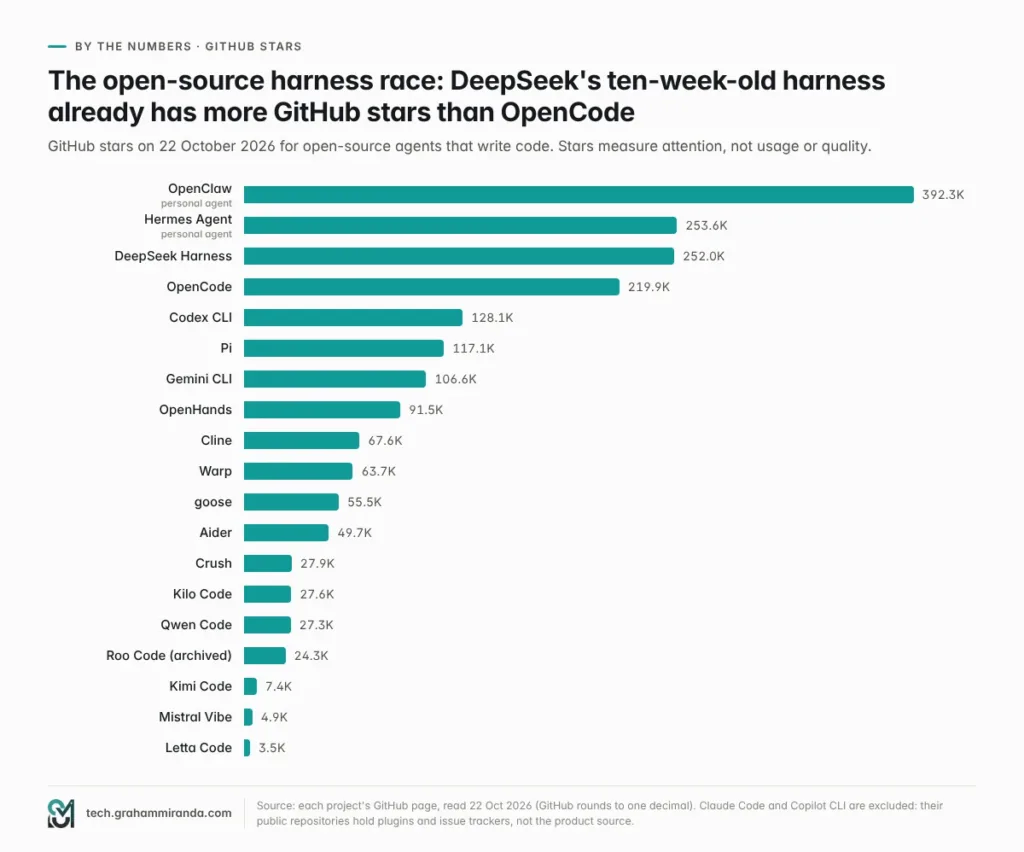
The numbers: a proposito di 252,000 GitHub stars in ten weeks — more than OpenCode — and roughly 300,000 npm downloads a week. It is also still pre-release: the latest build is 0.2.1-rc.2 (17 October), every build published to npm since launch has been an alpha or a release candidate, and the repository warns in capital letters that there will be compatibility-breaking changes.
Modelli: DeepSeek V4 Pro and Flash by default, with per-session reasoning effort; Anthropic, OpenAI and custom compatible endpoints, including local ones, can be configured.
Verdict: the most ambitious architecture in this article and the natural home for DeepSeek’s own, very cheap models — but treat it as a preview. If you’re in the EU, think carefully before sending client code to DeepSeek’s own API, which processes data in China; an EU-hosted provider or local weights avoid that.
Qwen Code — the Gemini CLI descendant that kept growing
What it is: Alibaba’s open-source agent, which began life adapted from Gemini CLI and has long since gone its own way. Apache-2.0, about 27,000 stars, version 0.26.0 (21 October).
Punti di forza: genuinely model-agnostic — OpenAI, Anthropic, Gemini and Qwen APIs, other providers, and local models through Ollama or vLLM, switchable at runtime. Auto-memory, auto-generated skills, subagents and agent teams, MCP, a headless mode for CI, an experimental qwen serve daemon, IDE support for VS Code, Zed and JetBrains, a desktop app, SDKs for TypeScript, Python and Java, and chat bots for Telegram, DingTalk, WeChat and Feishu. Its “Agent Arena” runs several models on the same task so you can compare them.
The catch: the free tier that made it famous is gone. Qwen’s free OAuth access ended on 15 April 2026; the team said demand had become too expensive for a small team to sustain. You now bring your own key, run local models or pay for Alibaba Cloud’s coding plan.
Verdict: one of the most feature-complete open-source harnesses available, and an excellent home for Qwen and other open models.
Kimi Code — Moonshot’s rewrite
What it is: the successor to Moonshot AI’s original Python Kimi CLI, which is now archived. Kimi Code is written in TypeScript, ships as a single binary or an npm package, is MIT-licensed and reached version 2.3.0 on 21 October.
Punti di forza: fast start-up, a terminal UI designed for long sessions, video input so the agent can watch a screen recording of a bug, conversational MCP setup with /mcp-config, a plugin marketplace that shows trust levels up front, isolated codificatore, explore e plan subagents, lifecycle hooks that can gate risky tool calls, and editor integration through ACP (kimi acp). It works with Kimi models by default and can be pointed at OpenAI-, Anthropic- or Google-style APIs instead, including self-hosted endpoints.
Prezzi: the agent is free; Kimi K3 usage comes through a Kimi membership (Plus $19, Pro $39, Max $99, Ultra $199 a month as of mid-October) or a Moonshot API key.
Verdict: the natural home for Kimi K3, and a well-made harness in its own right.
Mistral Vibe 3.0 — Europe’s harness gets a rewrite
What it is: Mistral’s open-source coding agent, Apache-2.0. Version 3.0 shipped on 19 October and is a clean break: the legacy Python interface is gone and vibe always starts a new Rust terminal UI; every session runs on a single “Unified Harness”; plan mode was removed; and a companion desktop app can import projects and sessions from other coding agents during onboarding. It now needs Python 3.14 or newer. 3.0.1 followed a day later.
Punti di forza: subagents (a task tool plus a read-only explore agent), skills in the Agent Skills format, MCP over stdio and HTTP with OAuth, ACP for editors, /branch to fork a conversation into a new session, and an admin switch to disable MCP across an organisation.
Modelli: Mistral’s own, such as Mistral Medium 3.5.
Verdict: the obvious choice for European teams standardising on Mistral, and worth watching now that the Rust rewrite is done. If you relied on plan mode, test before upgrading.
ZCode and the GLM Coding Plan — Z.ai’s two-track strategy
Z.ai sells its own desktop IDE, ZCode (version 3.2.2 was current in July; macOS and Windows, with Linux in beta), which it markets as the official harness for GLM, with multi-agent workflows and remote control from WeChat, Feishu or Telegram. But Z.ai’s smarter move is the Piano di codifica GLM, which works in more than 20 harnesses, including Claude Code, Codex, OpenCode and Cursor, and a GLM Coding Plan agent is listed in the ACP registry.
GLM-5.3 is the strongest open-weight model on both benchmark boards in Part 2: 41.8% on Terminal-Bench 4.0 inside Claude Code e 54 on the Coding Agent Index inside OpenCode. The plan costs $18 (Lite), $80 (Pro) or $168 (Max) a month as of mid-October, less on annual billing — and the GLM Coding Plan through my affiliate link takes another 10% off. (Affiliate link — see the disclosure at the top.) For more on the models themselves, see my Kimi K3 vs Fable 5.1 vs GLM-5.3 comparison e GLM-5.3-Flash contro MiniMax M3 in OpenCode.
MiniMax Code and CodeBuddy Code
Two more labs have agents in the ACP registry. Codice MiniMax is new and early (version 0.2.7); MiniMax’s “M Plan” coding subscriptions, billed annually from $220 a year, also work in Claude Code, Codex, Cursor and OpenCode. Tencent Cloud’s CodeBuddy Code is anything but early: version 2.172.1, 20 stable releases in the past 30 days and around 130,000 npm downloads a week, though under a custom licence rather than a standard open-source one.
Part 8 — Editor CLIs and Agent Platforms: Copilot, Cursor, Junie, Kiro, Devin, Factory, Amp and Warp
The last two families come from companies whose main product is something else — an editor, a code host, a terminal or a platform — and whose terminal agents are designed to keep you inside it.
GitHub Copilot CLI — the agent your company may already pay for
What it is: GitHub’s terminal agent, generally available since late February and now at 1.0.102 (21 October), with 14 stable releases in the past month and more than a million npm downloads a week.
What it does well:
- Specialised agents and a second opinion. Built-in agents for exploring a codebase and running tasks, plus Rubber Duck (generally available since June), a reviewer agent that critiques the main agent’s plans, designs, code and tests before it carries on. You can call it yourself with
/rubber-duck. - Autopilot (experimental) keeps working until a task is done; prompt scheduling (
/every 30m run the frontend tests, also experimental) repeats a prompt or skill on an interval. - Language-server support for go-to-definition and diagnostics — you install the servers yourself — and MCP, with GitHub’s own MCP server built in.
- Your own models, too. Since April the CLI supports bring your own key and local models, and since 7 October
/modelloautomatically lists models from a running Ollama instance next to Copilot’s cloud models. GitHub notes that picking a local model doesn’t by itself switch off telemetry or cloud features; offline mode is a separate opt-in. - Voice input processed locally, a redesigned terminal UI with accessible colour modes, and ACP support for editors.
- A desktop home. Il GitHub Copilot app, launched in technical preview at Microsoft Build in June, runs each agent session in its own git worktree, tracks pull requests through CI to merge, and sits alongside Copilot’s cloud agent, which can run on a schedule or on GitHub events.
- Enterprise plumbing: organisation owners can switch the CLI off, and admins get usage metrics for terminal sessions.
Prezzi: since 1 June, Copilot bills agent work in AI credits worth one cent each. Gratuito includes limited agent use in the CLI; Pro is $10 a month with 1,500 credits, Pro+ $39 with 7,000, and the new Max $100 with 20,000. Code completions stay unlimited. Models come from a multi-vendor catalogue — OpenAI, Anthropic, Google, xAI and others.
Verdict: if your company already pays for Copilot, start here; Rubber Duck alone is a good idea other harnesses should copy.
Cursor CLI — the editor’s agent, now owned by SpaceX
What it is: Cursor’s agent in the terminal (curl https://cursor.com/install -fsS | bash), with a headless mode for scripts, a GitHub Actions integration, a shell mode with safety checks and MCP. Its model menu mixes Cursor’s own Composer 2.5 with frontier models — Grok 4.7, Claude Opus 5.5, Claude Fable 5.1, GPT-5.6 Sol and Gemini 3.1 Pro among them — and Cursor’s cloud agents take on longer jobs.
What changed in 2026: almost everything around it. SpaceX agreed in June to buy Cursor for $60 billion in stock, after merging with xAI; Bloomberg Law has since reported the deal as completed. Cursor absorbed Continue the same month, and unveiled Origin, an agent-native rival to GitHub for code hosting. Then, in mid-October, its public pricing page was rebuilt around a Grok and X bundle.
The new pricing — as captured from Cursor’s page on 19 October by the tracker PricingSaaS, which cites no announcement from Cursor — runs Gratuito, Plus at $8 (a shared Cursor and Grok usage pool, with Grok models only), Premium at $30 (four times Plus usage, cloud agents, automations, Bugbot code reviews and third-party models at API list price), Super at $100 e Ultra at $200, with Teams from $30 a seat. The old $20 Pro tier is gone from the page. Check the live page before you buy; the tracker itself flags some inconsistencies.
Safety: Cursor’s recommended default, Auto-review, runs allowlisted commands immediately, sandboxes other shell commands where it can on macOS and Linux, and sends the rest to a classifier. It also had two of 2026’s notable agent CVEs, both fixed: CVE-2026-26268, in which a prompt injection could plant a git hook, and CVE-2026-48124, in which workspace-defined Claude hooks ran without approval.
Verdict: a strong agent inside a company whose direction is now tied to xAI’s models. If you want frontier non-Grok models, you’ll pay for them at API rates on the new plans.
JetBrains Junie CLI — the IDE vendor goes model-agnostic
JetBrains turned its in-IDE agent into a standalone, LLM-agnostic Junie CLI in March. It runs in the terminal, inside any IDE, in CI and on GitHub or GitLab; works with OpenAI, Anthropic, Google and Grok models; supports bring your own key to avoid platform fees; imports settings from Claude Code and Codex in one click; and supports guidelines, custom agents, skills, commands and MCP. It’s available through JetBrains AI licences (AI Pro from $10 a month for individuals) and is listed in the ACP registry.
Verdict: the natural pick for teams that live in IntelliJ, PyCharm or WebStorm and want one agent across IDE and terminal.
Kiro — AWS’s spec-first agent
AWS’s Kiro pairs an IDE with a Kiro CLI around “spec-driven” development: the agent writes requirements, a design and a task list before it writes code. It’s credit-based — Gratuito (50 credits), Pro $20 (1,000), Pro+ $40, Pro Max $100 and Power $200 (10,000), with add-on credits at $0.04 — and each model burns credits at a different multiplier: in September’s figures, Claude Opus 5.5 cost 2× the baseline and GPT-5.6 Sol 4.4×. It works in ACP-compatible editors, but its terms restrict using the subscription through some unrelated third-party harnesses.
Verdict: good for teams that want structure before code, especially on AWS. Watch the multipliers.
Devin — Windsurf’s successor, Cognition’s platform
Cognition completed its Windsurf makeover this year: the editor is now Devin Desktop, its old Cascade agent was removed in favour of Devin Local, and the same agent runs in the terminal as Devin CLI and remotely in Devin Cloud. Its headline feature is Fusion, which pairs a lead model with a “sidekick” — Cognition’s own notes suggest GPT-6 Astra as lead with its in-house SWE-2 model alongside. Devin Desktop can also host other agents over ACP, run agents on remote machines over SSH, and — notably — let eligible ChatGPT Plus and Pro subscribers bill GPT usage to their ChatGPT plan. Plans run from Gratuito a Pro ($20) and Max ($200), with team plans above. Morph’s leaderboard, citing Artificial Analysis, puts Devin’s Fusion CLI at 61.7 on the Coding Agent Index, within a couple of points of Codex’s best.
Verdict: a serious platform for teams that want local, terminal and cloud agents from one vendor.
Factory Droid — missions for teams
Factory’s Droid (CLI 0.247.0, released on 22 October; 32 stable releases in 30 days) is the most enterprise-shaped agent here: a desktop Factory App, the Droid CLI and SDK, managed cloud machines (“Droid Computers”), long-running Missions tracked in Mission Control, Automations, code review and an AutoWiki. It routes between frontier and open-weight models, allows BYOK up to an allowance, and falls back to an open-weight “Droid Core” pool when your standard usage runs out. Plans: Pro $20, Inoltre $100, Max $200, and a Teams plan at $60 a month plus $40 a seat. There’s no free plan. Factory reportedly raised $200 million at a $5 billion valuation in September.
Verdict: built for engineering organisations that want agents working through a backlog, not individuals looking for a cheap CLI.
Amp — “agents beyond code”, billed at cost
Amp, which began life inside Sourcegraph, ships continuously — 223 timestamped builds to npm in the past 30 days. It started with an ad-supported free tier in 2025, which has since been paused, and now offers a Hobby plan at $0 (bring your own key or link another subscription, such as ChatGPT), Megawatt at $20 and Gigawatt at $200 a month, plus pay-as-you-go credits with no markup on provider prices for individuals. “Orbs” — Amp’s hosted execution environments, billed by the minute — let agents run without your laptop. In an OpenAI customer story on 14 October, Amp’s chief executive, Quinn Slack, said OpenAI models account for most of Amp’s tokens. Subagents and an “oracle” for hard problems are part of the agent; ACP support comes through a wrapper.
Verdict: a polished commercial agent with honest pricing; good if you want someone else to run the infrastructure.
Warp — the terminal that open-sourced itself
Warp open-sourced its client on 28 April — the UI framework under MIT, the rest under AGPL-3.0 — with OpenAI as founding sponsor of the open-source project. It has about 64,000 stars, a built-in agent, and room for the CLI agents you already use, such as Claude Code, Codex and Gemini CLI. Its Oz platform runs cloud agents that triage issues, write specs, implement changes and review pull requests — publicly, on Warp’s own codebase. Warp says nearly a million developers use it. In August its plans started at Costruire, $20 a month ($18 billed annually) with 1,500 credits, up to Max at $200.
Verdict: the best terminal to host other harnesses, with a capable agent of its own.
The long tail: Auggie and 30-odd more
Augment’s Auggie CLI — built around its codebase “context engine” — is still developed daily, with nightly pre-releases, though its last stable release (0.36.0) dates from 21 August, and Augment cut its pricing to fewer plans in late August. Beyond it, the ACP registry lists agents from IBM (Bob), Snowflake (Cortex Code), Poolside, Qoder, LangChain (DeepAgents) and more than a dozen independents. If an agent you’ve never heard of shows up in your editor’s agent picker, that’s why.
Part 9 — The Big Comparison Tables
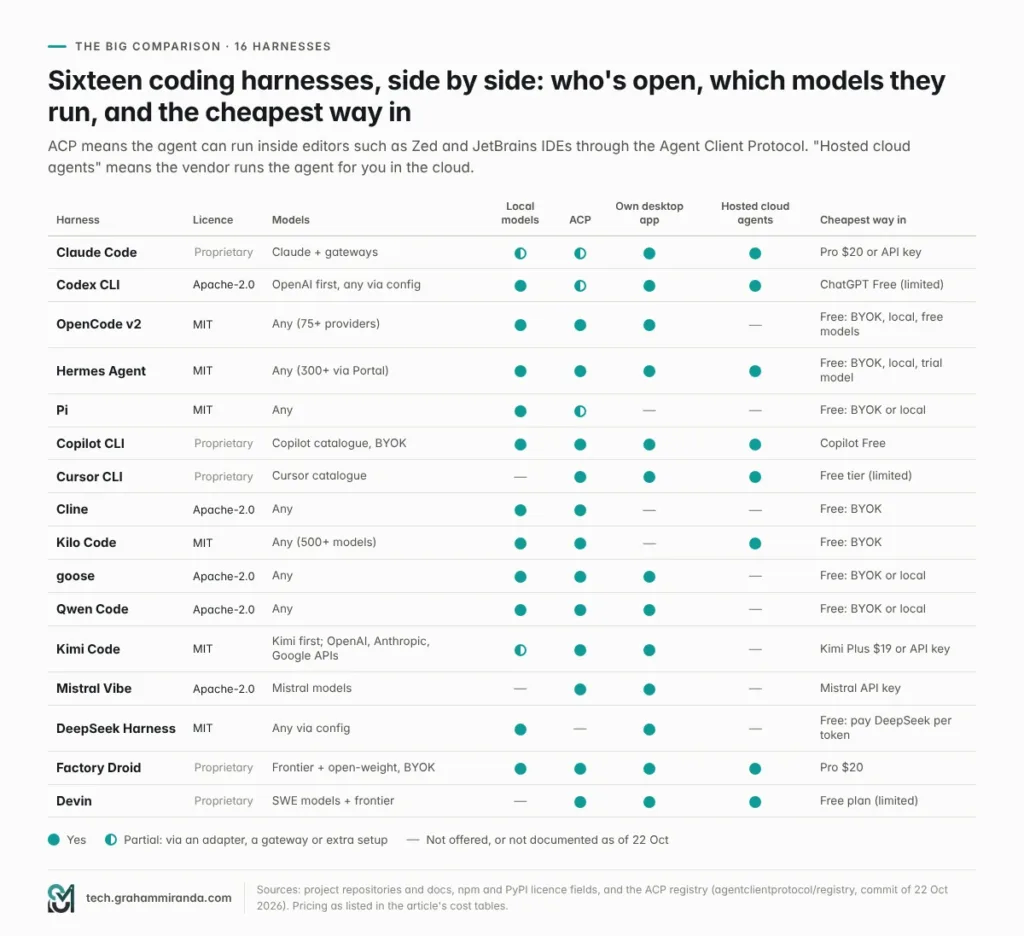
Mostra immagine Eleven of the sixteen are MIT- or Apache-licensed, and most of those run any model. All five proprietary harnesses come with hosted cloud agents and paid plans.
Who wins each category
| Categoria | Winner | Runner-up | Perché |
|---|---|---|---|
| Raw results | Claude Code | Codex | Top Coding Agent Index score (68) and top Terminal-Bench 4.0 board entry (64.8% with Opus 5.5) |
| Results per dollar | Codex | OpenCode + an open model | 63 on the index for $1.04 a task; GLM-5.3 in OpenCode scores 54 with no subscription |
| Model choice | OpenCode v2 | Kilo Code | 75+ providers via models.dev; Kilo routes to 500+ models |
| Local models | OpenCode v2 | Hermes Agent | Automatic discovery of Ollama, LM Studio and vLLM; Hermes adds one-click llama.cpp |
| Safe defaults | Codex | Cursore | OS sandbox on out of the box; Cursor’s default mode sandboxes shell commands where it can |
| Extensibility | Claude Code | Pi | Skills, hooks, plugins, agent teams and scripted workflows; Pi lets you rewrite the whole thing |
| Memoria | Hermes Agent | Letta Code | Curated user and environment memory, session search and self-written skills |
| Editor integration | Cline | Kilo Code | First-class VS Code and JetBrains extensions; Junie for teams that are all-in on JetBrains |
| Teams and governance | Copilot CLI | Factory Droid | Org policies and usage metrics inside GitHub; Factory adds missions and enterprise controls |
| Agents in the cloud | Codex | Claude Code | Codex cloud plus app automations; Claude Code’s web sessions and cloud scheduled tasks |
| Release pace | Letta Code, Factory Droid | Claude Code | 32, 32 and 27 stable releases in 30 days |
| Neutral governance | goose | OpenClaw (as a host) | goose is run by the Linux Foundation’s Agentic AI Foundation; OpenClaw by an independent non-profit foundation |
| Free start | OpenCode v2 | Copilot CLI | Free models built in; Copilot’s Free plan includes the CLI |
The rest of the field in one table
| Harness | Family | Licenza | Latest | One-line verdict |
|---|---|---|---|---|
| Grok Build | Frontier lab | Not stated | 1.0.67 (ACP registry) | Biggest harness boost on TB 4.0; bundled with SuperGrok and Cursor’s new plans |
| Devin (Desktop, CLI, Cloud) | Piattaforma | Esclusivo | Desktop 3.10.67 | Windsurf’s successor; Fusion pairs two models |
| Amp | Piattaforma | Esclusivo | Continuous builds | No-markup pricing, hosted “orbs” |
| Warp | Piattaforma | AGPL-3.0 / MIT | — | The best terminal to host other harnesses |
| Junie CLI | Editor CLI | Esclusivo | ACP 3659.7.0 | Model-agnostic JetBrains agent with BYOK |
| Kiro | Editor CLI | Esclusivo | — | Spec-first, credit-based |
| Crush | Open source | FSL-1.1-MIT | 0.98.1 | Beautiful TUI with language servers |
| Letta Code | Learns | Apache-2.0 | 0.34.20 | Memory-first, git-tracked context |
| OpenHands | Open source | MIT | SDK 1.57.0 | Now mostly an SDK and a GUI |
| cecli (Aider fork) | Open source | Apache-2.0 | 1.9.0 | Where Aider’s development went |
| ZCode | Open-model lab | Not stated | 3.2.2 (July) | Z.ai’s GLM IDE; the GLM plan also works elsewhere |
| Codice MiniMax | Open-model lab | Not stated | 0.2.7 (ACP registry) | Early; MiniMax’s M Plan works in other harnesses |
| CodeBuddy Code | Open-model lab | Personalizzato | 2.172.1 | Tencent Cloud’s fast-moving agent |
| Auggie | Editor CLI | Personalizzato | 0.36.0 (stable) | Context engine; daily pre-releases |
| Gemini CLI | Frontier lab | Apache-2.0 | 0.65.0 | Enterprise and paid-API-key users only since 18 June |
Part 10 — By the Numbers: Stars, Downloads and Release Pace
Popularity isn’t quality, but it does tell you where the community, the plug-ins and the answers on Stack Overflow will be.
Mostra immagine DeepSeek Harness went from zero to about 252,000 stars in ten weeks. Claude Code and Copilot CLI are left out because their public repositories don’t contain the product’s source.
Weekly downloads
Package downloads are an even noisier signal than stars — they include CI runs, automatic updates and tools pulled in as dependencies — but they show where people actually install things.
| Package | Harness | Weekly downloads | Caveat |
|---|---|---|---|
@openai/codex (npm) | Codex CLI | 13.2M | Platform-specific builds are published as versions of the same package, which likely inflates the count |
@anthropic-ai/claude-code (npm) | Claude Code | 6.4M | npm install is deprecated; native-installer installs aren’t counted |
@earendil-works/pi-coding-agent (npm) | Pi | 2.7M | Includes use as a dependency inside other agents |
openclaw (npm) | OpenClaw | 2.1M | |
opencode-ai / @opencode/cli (npm) | OpenCode v1 / v2 | 2.1M / 0.27M | V2 has its own package, created in September |
@github/copilot (npm) | Copilot CLI | 1.1M | |
openhands-sdk (PyPI) | OpenHands | 0.97M | The SDK, not the CLI |
mistral-vibe (PyPI) | Mistral Vibe | 0.37M | |
@deepseek-ai/dsh (npm) | DeepSeek Harness | 0.30M | |
@google/gemini-cli (npm) | Gemini CLI | 0.23M | Enterprise and API-key users only since June |
@tencent-ai/codebuddy-code (npm) | CodeBuddy Code | 0.13M | |
aider-chat (PyPI) | Aider | 68K | |
@moonshot-ai/kimi-code (npm) | Kimi Code | 52K | |
@qwen-code/qwen-code (npm) | Qwen Code | 45K | |
cline (npm) | Cline CLI | 43K | VS Code installs are counted separately by Microsoft |
@letta-ai/letta-code (npm) | Letta Code | 41K |
Source: api.npmjs.org and pypistats.org, last-week figures pulled on 22 October 2026.
Two numbers in that table are worth a second look. Pi’s 2.7 million weekly downloads are inflated by other software using it as an engine — itself the clearest sign that “minimal harness” has become infrastructure. And the SDKs behind the big harnesses are now downloaded as much as the harnesses themselves: Anthropic’s Claude Agent SDK was downloaded about 7.3 million times in the week to 22 October and the Agent Client Protocol SDK about 4.3 million — people are building their own agents on these foundations.
Who is still shipping
Mostra immagine A rough health check. Pre-releases are excluded, so DeepSeek Harness, Auggie and goose’s 2.0 beta look quieter than they are.
Fast isn’t automatically good — 27 Claude Code releases in a month means change you have to keep up with — but zero is a signal too. Aider hasn’t shipped since February, and the standalone OpenHands CLI not since May.
Part 11 — What It Costs, and the Subscription Wars
The open-source harnesses are free. Everything else — and the models behind all of them — costs money, and in 2026 come you pay became as important as how much.
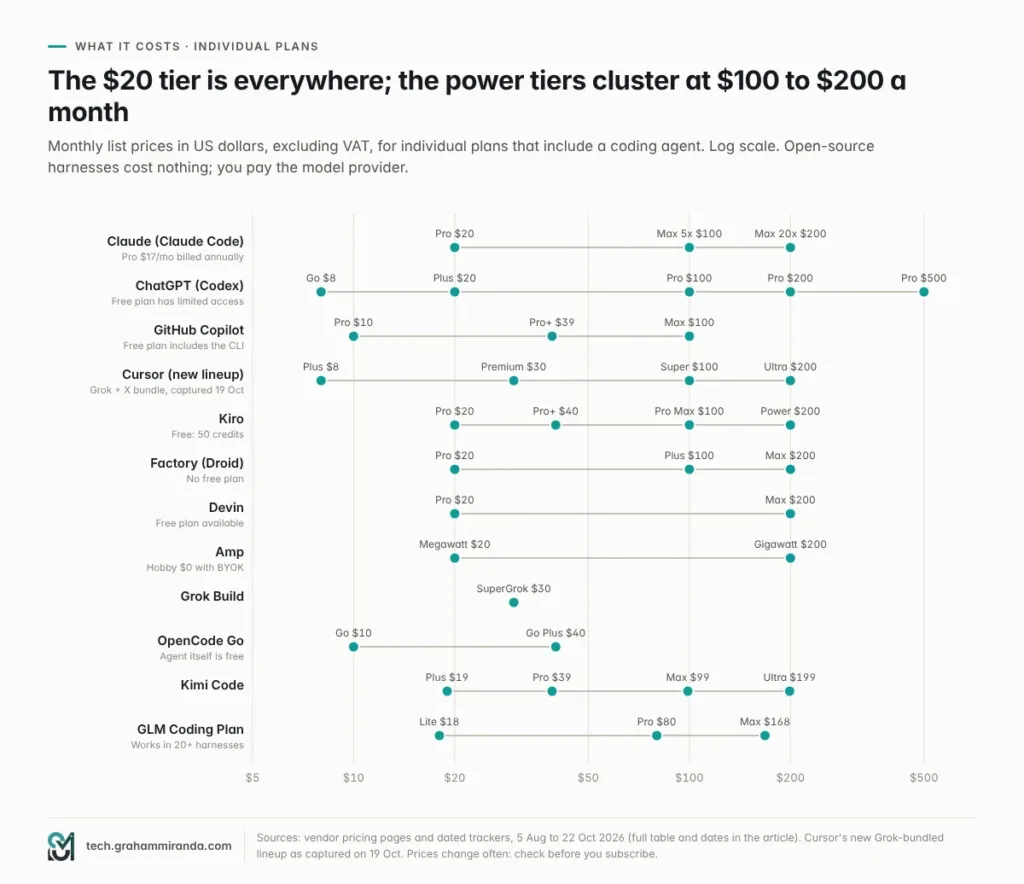
Mostra immagine The $20 tier is almost universal. The serious tiers cluster at $100 to $200.
The plans, side by side
| Plan family | Tiers (USD a month) | What you get for coding | As of |
|---|---|---|---|
| Claude | Pro $20 ($17 annual) · Max 5× $100 · Max 20× $200 · Team $20–$125 a seat | Claude Code everywhere; shared five-hour and weekly limits; Agent SDK credit $20–$200 | 22 Oct, claude.com; Morph, 5 Oct |
| ChatGPT | Free · Go $8 · Plus $20 · Pro $100 / $200 / $500 · Business $20–$25 | Codex app, CLI, IDE and cloud; Pro has no five-hour cap at present | 22 Oct, OpenAI |
| GitHub Copilot | Free · Pro $10 · Pro+ $39 · Max $100 | Copilot CLI and cloud agent, billed in AI credits (1,500 / 7,000 / 20,000) | June switch; Morph, 5 Oct |
| Cursore | Free · Plus $8 · Premium $30 · Super $100 · Ultra $200 · Teams from $30 | Grok-bundled; frontier non-Grok models at API price from Premium | PricingSaaS capture, 19 Oct |
| Kiro | Free · Pro $20 · Pro+ $40 · Pro Max $100 · Power $200 | 50 to 10,000 credits; models burn credits at different rates | Morph, 30 Sep |
| Factory | Pro $20 · Plus $100 · Max $200 · Teams $60 + $40/seat | Droid CLI, app and cloud machines; BYOK allowance | Third-party listings |
| Devin | Free · Pro $20 · Max $200 · Teams from $80 | Devin Desktop, CLI and Cloud | Firecrawl, 3 Aug; AiCybr, 5 Aug |
| Amp | Hobby $0 · Megawatt $20 · Gigawatt $200 · pay as you go | No markup on model prices for individuals | Amp pricing as tracked 17 Sep |
| Warp | Build $20 · Max $200 | 1,500 to 18,000 credits | AiCybr, 5 Aug |
| Grok Build | SuperGrok $30 | Grok Build CLI and Grok models | May launch coverage |
| Codice aperto | Agent free · Go $10 · Go Plus $40 · Zen pay as you go | Curated open and frontier models for OpenCode (and as a provider elsewhere) | OpenCode, 17 Oct |
| Nous Portal (Hermes) | Reported $20 / $100 / $200 | 300+ models and Nous’s tool gateway | Composio, September |
All prices in US dollars excluding VAT. In Germany and most of the EU, expect VAT on top for personal accounts; some vendors bill in euros at their own rates. Prices change constantly: check before you buy.
Coding plans for open-weight models
| Piano | Price (USD a month) | Models | Works in |
|---|---|---|---|
| Piano di codifica GLM (Z.ai) | Lite $18 · Pro $80 · Max $168 (less on annual billing) | GLM-5.3, GLM-5.3-Flash | 20+ tools including Claude Code, Codex, OpenCode, Cursor and ZCode |
| Kimi membership (Moonshot) | Plus $19 · Pro $39 · Max $99 · Ultra $199 | Kimi K3 | Kimi Code desktop, CLI and IDE plug-ins |
| MiniMax M Plan | From $220 a year (about $18 a month) | MiniMax M3.1 Flash Preview | Claude Code, Codex, Cursor, OpenCode |
| Alibaba Cloud Coding Plan | Pro $50 (Lite closed in March) | Qwen 3.7 and others | Qwen Code, which points users to it; check Alibaba’s docs for others |
| DeepSeek | No plan; pay per token | DeepSeek V4 family | Any harness with a custom endpoint |
Sources: Morph’s coding-plan comparison (prices checked 15 October 2026) and vendors’ pages.
If you go the GLM route, the GLM Coding Plan through my affiliate link gives you 10% off. (Affiliate link — see the disclosure at the top.) Make sure the key type matches the provider you configure: Coding Plan keys and standard API keys aren’t interchangeable.
Subscriptions vs paying per token
The Coding Agent Index’s per-task costs make the trade-off concrete. A hundred agent tasks a month at Codex’s GPT-6.1 Sol price would cost about $104 in API fees; at Claude Code’s maximum-effort Sonnet 5.5 price, about $1,419. That gap is exactly why $100 and $200 subscriptions exist — and why the labs guard them.
The subscription wars
The most consequential harness news of 2026 wasn’t a feature. It was who’s allowed to use which subscription where.
- Anthropic closed the door, then opened a window. Su 9 January it tightened checks so that Claude Pro and Max logins stopped working in third-party harnesses such as OpenCode; Anthropic’s Thariq Shihipar said they had “tightened our safeguards against spoofing the Claude Code harness.” Its consumer terms were then updated to match. On 13 May it announced a monthly Agent SDK credit — $20 for Pro, $100 for Max 5×, $200 for Max 20× — that covers
claude -p, GitHub Actions and third-party tools built on its Agent SDK, from 15 June. Interactive Claude Code use still counts against normal limits. Credits don’t roll over. - OpenAI went the other way. “Sign in with ChatGPT” works in OpenCode, Pi and other harnesses, and OpenAI’s Codex for Open Source programme lists several of them. Devin Desktop and Amp let you link a ChatGPT plan too. None of this is contractual — but in 2026 it made a ChatGPT plan the most portable subscription in AI coding.
- Google narrowed Gemini CLI. Consumer and Google AI plan users moved to Antigravity CLI on 18 June; only enterprise customers and paid API keys keep Gemini CLI.
- Cursor tied itself to xAI. The new plans share one usage pool between Cursor and Grok products, and charge API list price for frontier non-Grok models.
- Kiro restricts use of its subscription through some unrelated third-party harnesses.
The practical rule: if you want to switch harnesses freely, pay for models through an API key, a router, a ChatGPT plan or an open-model coding plan — not through a subscription that only works in one vendor’s app.
Part 12 — Security: What 2026 Taught Us
Coding agents read untrusted text — issues, READMEs, web pages, pull-request comments — and then act with your credentials. In 2026 that combination produced a steady stream of CVEs, and almost all of them followed one pattern.
Mostra immagine Most serious flaws this year weren’t exotic model attacks. They were trusted files written by an agent that read something it shouldn’t have trusted.
The pattern, with real examples
A 2026 review of nine CVE records covering coding assistants and a popular MCP server, by the security firm Stingrai, found the same root cause in all of them: a file in the working directory is treated as trusted configuration, prompt injection gets the agent to write that file, and ordinary tooling — a git hook, a restart, a CI step — executes it later.
| Harness | CVE | What happened | Fixed in |
|---|---|---|---|
| Claude Code | CVE-2026-25725 | The sandbox didn’t protect .claude/settings.json if it didn’t exist at start-up, so injected hooks ran on restart | 2.1.2 (February) |
| Claude Code | CVE-2026-39861 | A sandboxed process could plant a symlink an unsandboxed process followed | 2.1.64 (April) |
| Claude Code | CVE-2026-55607 | Worktree path handling allowed overwriting shell start-up files | 2.1.163 (July) |
| Cursore | CVE-2026-26268 | Prompt injection could write git hooks that ran outside the sandbox | 2.5 |
| Cursore | CVE-2026-48124 | Workspace-defined Claude hooks ran without approval | 3.0.0 |
| Gemini CLI | CVE-2026-12537 | In headless CI, workspaces were trusted automatically and --yolo ignored the tool allow-list | 0.39.1 |
| OpenCode (v1) | CVE-2026-22812 | Unauthenticated remote code execution via the local server | 1.0.216 (January) |
At Black Hat USA in August, Novee Security showed that a single GitHub issue, opened by an account with no privileges, could run code on the CI runners of Anthropic’s and Google’s own agent repositories and hijack the next agent run on OpenAI’s — each time using the vendor’s default configuration. Claude Code got a CVE fixed in 2.1.163; Gemini CLI was patched in 0.39.1; and OpenAI split the two Codex passes that shared a checkout into separate jobs and now tells users to treat repository instruction files as untrusted input.
How each harness isolates commands out of the box
- Codex: an OS-level sandbox on by default; network access needs approval.
- Cursor: the default Auto-review mode sandboxes shell commands where it can, on macOS and Linux.
- Claude Code: an OS-level sandbox for shell commands, spento until you run
/sandbox; not available on native Windows. - Antigravity CLI: asks before running commands by default, with an optional mode that runs them in an isolated container.
- OpenCode v2: ordered allow/ask/deny rules and hard-deny policies, no OS sandbox, and folders outside the project allowed by default.
- Hermes Agent: runs on the host unless you choose an isolated backend such as Docker, SSH, Modal or Daytona.
- Pi: no permission system at all; run it in a container.
- Cline, Kimi Code and Copilot CLI: approval prompts by default, plus flags that switch them off (
--yoloin Cline and Kimi Code).
Six habits that would have blunted most of 2026’s flaws
- Update weekly. Every fix above shipped in a point release — and the stream hasn’t stopped: Claude Code 2.1.309, published late on 22 October, fixed nine sandbox, permission and isolation gaps in a single release.
- Treat repository instruction files as untrusted —
AGENTS.md,CLAUDE.mdand any agent settings committed to a repo. - Turn the sandbox on, or run the whole agent in a container or virtual machine.
- Never use yolo or auto-approve modes outside a disposable environment.
- Keep production keys out of the agent’s environment. Separate API keys per agent, no deploy credentials.
- Lock down CI workflows that outsiders can trigger, especially anything that runs an agent on issue or pull-request content.
If you run agents on a Linux server, start with my Debian server hardening checklist.
Part 13 — The Standards That Make Switching Cheap: MCP, ACP, AGENTS.md and Skills
The most reassuring trend of 2026 is that harnesses are becoming interchangeable. Four standards did most of the work:
- MCP (Model Context Protocol) for tools. Every actively developed harness in this article supports it — even Pi, which held out until September — although the original Aider still doesn’t; the specification itself keeps moving — the newest Devin Desktop release adds support for the 28 July 2026 revision. MCP now sits under the Linux Foundation’s Agentic AI Foundation, alongside AGENTS.md and goose.
- ACP (Agent Client Protocol) for editors. Started by Zed with Gemini CLI, it lets any agent run inside any ACP-capable editor, such as Zed or JetBrains IDEs, or inside hosts such as Devin Desktop and OpenClaw. The official registry lists 44 agents — Claude Code, Codex, Pi and Amp through adapters, and OpenCode, Copilot CLI, Cursor, Gemini CLI, Cline, Kilo, goose, Kimi, Qwen Code, Mistral Vibe, Junie, Devin, Factory Droid, Grok Build and many more directly. A v2 draft published in July reworks how messages, diffs and permission requests flow, and the TypeScript SDK reached 2.0.0 on 19 October.
- AGENTS.md for instructions. Claude Code reads it in place of
CLAUDE.md, OpenCode v2 reads onlyAGENTS.md, and Pi, Antigravity CLI, Hermes and most others pick it up too. - Agent Skills (
SKILL.mdfolders) for know-how. Claude Code, Codex, OpenCode, Hermes, Pi, Antigravity CLI and Mistral Vibe all load them, and several read each other’s folders — OpenCode loads.claude/skillse.agents/skillsdirectly.
What to do with that: put your project rules in AGENTS.md, your reusable procedures in .agents/skills, and your tools behind MCP. Then switching harnesses — or running two side by side — is an afternoon’s work rather than a migration project.
Part 14 — How to Install the Main Harnesses, Step by Step
Every command below was checked against the project’s own documentation or its package in the npm or PyPI registry between 22 and 25 October 2026. Pick one or two; you don’t need them all.
Fase 0 — Cosa ti serve prima di tutto
- Git, and your project in a Git repository. Every harness works best when it can see a clean diff — and when you can undo its work. Download Git from git-scm.com.
- A modern terminal: Ghostty, WezTerm, Kitty, iTerm2, Warp or Windows Terminal.
- Node.js 22 or newer for the npm-based installs (Pi and Kimi Code need 22.19 or newer). Get it from nodejs.org. Claude Code, OpenCode, Hermes Agent and Antigravity CLI have their own one-line installers.
- At least one model: a subscription (Claude, ChatGPT, Copilot), an API key, an open-model coding plan, or a local model through Ollama.
Claude Code
bash
# macOS, Linux, WSL
curl -fsSL https://claude.ai/install.sh | bash
# Windows PowerShell:  irm https://claude.ai/install.ps1 | iex
# or: brew install --cask claude-code   |   winget install Anthropic.ClaudeCode

cd ~/code/your-project
claude            # sign in with your Claude account, or approve an ANTHROPIC_API_KEY
Then run /sandbox inside the session to switch on the shell sandbox (macOS, Linux and WSL2), or set sandbox.enabled a vero in ~/.claude/settings.json so it’s on in every session. The native installer updates itself; Homebrew and WinGet installs don’t. Docs: code.claude.com/docs.
Codex
bash
npm install -g @openai/codex
cd ~/code/your-project
codex             # sign in with ChatGPT, or use an OpenAI API key
codex --oss       # optional: run a local model through Ollama or LM Studio
The Codex desktop app for macOS and Windows shares the CLI’s sessions and settings; see OpenAI’s announcement e il open-source repository. Plans and limits are on OpenAI’s Codex pricing page.
OpenCode v2
bash
# macOS, Linux, WSL
curl -fsSL https://opencode.ai/v2/install | bash
# or: npm install -g @opencode/cli

cd ~/code/your-project
opencode
Inside OpenCode, run /connetti to add a provider — an API key, a ChatGPT or GitHub Copilot login, OpenCode Go or Zen — and /modelli to choose one. If Ollama, LM Studio or vLLM is running on its default port, OpenCode finds it automatically. Coming from v1? Back up ~/.config/opencode, then run opencode upgrade --major. Docs: opencode.ai/v2/docs.
A sensible starting permission policy for opencode.jsonc in your project root — ask before any shell command, allow the safe ones, never push:
jsonc
{
  "$schema": "https://opencode.ai/config.json",
  "permissions": [
    { "action": "shell", "resource": "*",                   "effect": "ask"   },
    { "action": "shell", "resource": "git status *",        "effect": "allow" },
    { "action": "shell", "resource": "git diff *",          "effect": "allow" },
    { "action": "shell", "resource": "npm test *",          "effect": "allow" },
    { "action": "shell", "resource": "npm run typecheck *", "effect": "allow" },
    { "action": "shell", "resource": "git push *",          "effect": "deny"  }
  ]
}
The typecheck rule is your stand-in for the LSP diagnostics v2 doesn’t produce yet — swap in your own toolchain’s commands.
Hermes Agent
bash
# macOS, Linux, WSL2
curl -fsSL https://hermes-agent.nousresearch.com/install.sh | bash
source ~/.bashrc          # or ~/.zshrc

hermes setup              # guided setup
hermes model              # choose a provider and model
hermes                    # start chatting in the terminal
hermes gateway setup      # optional: connect Telegram, Discord, Slack, WhatsApp…
On Windows, run iex (irm https://hermes-agent.nousresearch.com/install.ps1) in PowerShell, or install Hermes Desktop. To hand coding jobs to OpenCode, make sure the codice aperto command Hermes sees is the v2 one (which -a opencode). Docs: hermes-agent.nousresearch.com/docs.
Antigravity CLI (Google’s successor to Gemini CLI)
bash
# macOS, Linux
curl -fsSL https://antigravity.google/cli/install.sh | bash
# Windows PowerShell:  irm https://antigravity.google/cli/install.ps1 | iex

agy                         # sign in with a Google account or a Google Cloud project
agy plugin import gemini    # optional: convert your Gemini CLI extensions
Google’s migration guide covers moving skills to .agents/skills and MCP servers to mcp_config.json. If you have a paid Gemini API key or a Gemini Code Assist Standard or Enterprise licence, the original Gemini CLI still works: npm install -g @google/gemini-cli, allora gemini.
GitHub Copilot CLI
bash
npm install -g @github/copilot
cd ~/code/your-project
copilot             # follow the prompt to sign in with your GitHub account
You need a Copilot plan; the Free plan includes limited CLI use. Use /modello to pick a model — including local Ollama models — and /rubber-duck to ask the reviewer agent for a second opinion. Repository: github.com/github/copilot-cli.
Pi
bash
npm install -g @earendil-works/pi-coding-agent      # Node.js 22.19 or newer
cd ~/code/your-project
pi
Pi has no permission system, so run it in a container or a disposable VM. Point it at a provider with an API key or a supported subscription, add extensions and packages as you need them, and read the Pi repository for the extension API.
Qwen Code, Kimi Code and Mistral Vibe
bash
# Qwen Code — then run /auth to choose a provider and add a key
npm install -g @qwen-code/qwen-code
qwen

# Kimi Code — sign in with Kimi Code or a Moonshot API key (Node.js 22.19+)
npm install -g @moonshot-ai/kimi-code
kimi

# Mistral Vibe 3 — needs Python 3.14 or newer
curl -LsSf https://mistral.ai/vibe/install.sh | bash
# or: uv tool install mistral-vibe
vibe
Repositories: Qwen Code, Kimi Code, Mistral Vibe.
Cline, Kilo, DeepSeek Harness, Factory Droid and Cursor CLI
bash
npm install -g cline                 # then: cline
npm install -g @kilocode/cli         # then: kilo
npx @deepseek-ai/dsh web             # DeepSeek Harness web UI on http://127.0.0.1:3080
npm install -g @factory/cli          # then: droid  (needs a Factory plan)
curl https://cursor.com/install -fsS | bash    # Cursor CLI
For the editor extensions, search for Cline o Kilo Code in the VS Code or JetBrains marketplace. goose has desktop and CLI downloads on goose-docs.ai.
Make your setup portable
Whichever harnesses you choose, three files make switching between them painless:
AGENTS.mdin the repository root, with your build, test and lint commands, coding conventions and the things the agent must never do. Claude Code, Codex, OpenCode, Hermes, Pi, Antigravity CLI and most others read it..agents/skills/<name>/SKILL.mdfor repeatable procedures — “release a new version”, “add a database migration”. OpenCode, Antigravity CLI and others read this folder directly.- Your MCP servers documented in one place. Each harness keeps its own MCP config file, but the server commands and URLs are identical everywhere.
A minimal AGENTS.md to start from:
markdown
# AGENTS.md

## Commands
- Install: `npm ci`
- Test: `npm test`
- Type check: `npm run typecheck`
- Lint: `npm run lint`

## Rules
- Run the type check and tests before you say a task is done.
- Never commit secrets, and never run `git push`.
- Ask before adding a new dependency.
Part 15 — Which One Should You Use? Twelve Situations
Mostra immagine Find the row that sounds like you. Most people end up with two: one main harness and one for cheap or private work.
| If… | Inizia con | Perché |
|---|---|---|
| You want the top scores and already pay for Claude | Claude Code | Best Coding Agent Index and Terminal-Bench 4.0 results; Max plans include it |
| You want the best results per dollar | Codex | Five index points behind at about a fourteenth of the cost per task |
| You want one agent for every model, local included | OpenCode v2 | 75+ providers, auto-detected local models, free and MIT |
| You want an agent that learns you and lives in your chats | Hermes Agent | Memory, self-written skills, 20+ messaging apps; hand coding to OpenCode |
| You want the smallest harness you can rewrite | Pi | Four tools, a sub-1,000-token prompt, extensions for everything else |
| Your company already pays for GitHub Copilot | Copilot CLI | Included from the Free plan; org policies and cloud agent built in |
| You live in VS Code or JetBrains | Cline or Kilo Code | Open source, any model; Junie if your team is all-in on JetBrains |
| You want cheap open-weight models | OpenCode + a coding plan | GLM or MiniMax plans from about $18; DeepSeek by the token |
| Your code can’t leave the building | OpenCode v2 or goose, local models | Point them at Ollama or llama.cpp; block cloud providers by policy |
| You want agents working while you sleep | Codex cloud, Claude Code, Factory or Devin | Hosted runners, schedules and pull requests waiting in the morning |
| You want to start for free | OpenCode, Copilot Free or Antigravity CLI | Free models, a free plan, or Google’s free tier |
| You were on Aider, Roo Code or Continue | cecli, ZooCode or Kilo, Cline | The active forks and the closest successors |
A few of those deserve a sentence more.
“Best results per dollar” isn’t the same as “cheapest”. Codex’s advantage comes from doing the same work in far fewer turns and tokens. If you already pay for ChatGPT Plus, Codex costs you nothing extra until you hit its limits — and you can use the same ChatGPT login inside OpenCode if you prefer OpenCode’s interface.
“Cheap open-weight models” means a harness that doesn’t care whose model it runs. OpenCode, Kilo, Cline and Qwen Code run open-weight models natively, and Claude Code can through Anthropic-compatible endpoints. Z.ai’s GLM Coding Plan works in more than 20 tools and MiniMax’s M Plan in Claude Code, Codex, Cursor and OpenCode; Kimi’s membership is built around Moonshot’s own Kimi Code. GLM-5.3 in OpenCode scored 54 on the Coding Agent Index — around 80% of the top score.
“Can’t leave the building” is about hardware as much as software. A capable local coding model needs a lot of memory; my MacBook Pro M5 Pro 64 GB local AI guide covers what fits where. New to building with agents at all? Start with my vibe coding guide.
Part 16 — Five Setups That Work
The best advice in this article fits in one line: use two harnesses — one for the hardest work, one open harness for everything else. Here’s what that looks like at five budgets.
| Setup | Harnesses | Models | Roughly per month | Ideale per |
|---|---|---|---|---|
| Gratuito | OpenCode v2, plus Copilot Free or Antigravity CLI for a second opinion | OpenCode’s free models, local models through Ollama | $0 (plus hardware you own) | Learning, side projects, trying harnesses out |
| Valore | Codex, plus OpenCode v2 signed in with the same ChatGPT plan | GPT-6.1 Sol; add GLM-5.3 through the GLM Coding Plan Lite | $20–38 | Most solo developers |
| Power | Claude Code for the hardest work, OpenCode v2 for everything else, Hermes Agent as a front desk | Claude Opus 5.5 and Sonnet 5.5; OpenCode Go for open models | About $210 (Max 20× + Go) | People who code with agents all day |
| Private | OpenCode v2 or goose, Hermes Agent for chat | Local models through Ollama or llama.cpp only | $0 (plus serious hardware) | Client code that can’t leave your network |
| Squadra | Copilot CLI and the Copilot app, or Claude Code on Team plans; Factory or Devin for backlog work | Whatever the contract includes | Per seat | Companies with existing GitHub or Anthropic contracts |
Monthly figures use the list prices in Part 11: ChatGPT Plus $20, GLM Coding Plan Lite $18, Claude Max 20× $200, OpenCode Go $10. Excludes VAT.
Free. OpenCode’s zero-cost models are time-limited promotions with usage limits — version 2.1.2 added clear messages for when you hit them — so treat them as a way to start, not a plan. A local model removes the limits but not the hardware question.
Value. This is the setup I’d recommend to most people reading this. A ChatGPT Plus plan covers Codex across the CLI, app and cloud, and the same login works in OpenCode, so you can use whichever interface you like. Add the GLM Coding Plan when you want a strong open-weight model for long sessions — the affiliate link takes 10% off. (Affiliate link — see the disclosure at the top.)
Power. Claude Code on Max is still the strongest single harness, but Anthropic’s subscription won’t follow you into other tools, so pair it with an open harness for anything you want to run on other models. Hermes Agent sits in your chat apps, remembers your projects and hands coding jobs to Claude Code or OpenCode. I wrote up the front-desk-and-workshop pattern in OpenCode v2 vs Hermes Agent vs OpenClaw.
Private. Use OpenCode v2’s policies to make cloud providers disappear from the model picker for client projects, and keep the agent’s machine off the internet if the contract demands it. Expect slower and weaker results than frontier models.
Team. Start with the harness your company already pays for — usually Copilot — because governance, billing and single sign-on matter more at scale than a few benchmark points. Add a platform such as Factory or Devin when you want agents to work through a backlog unattended.
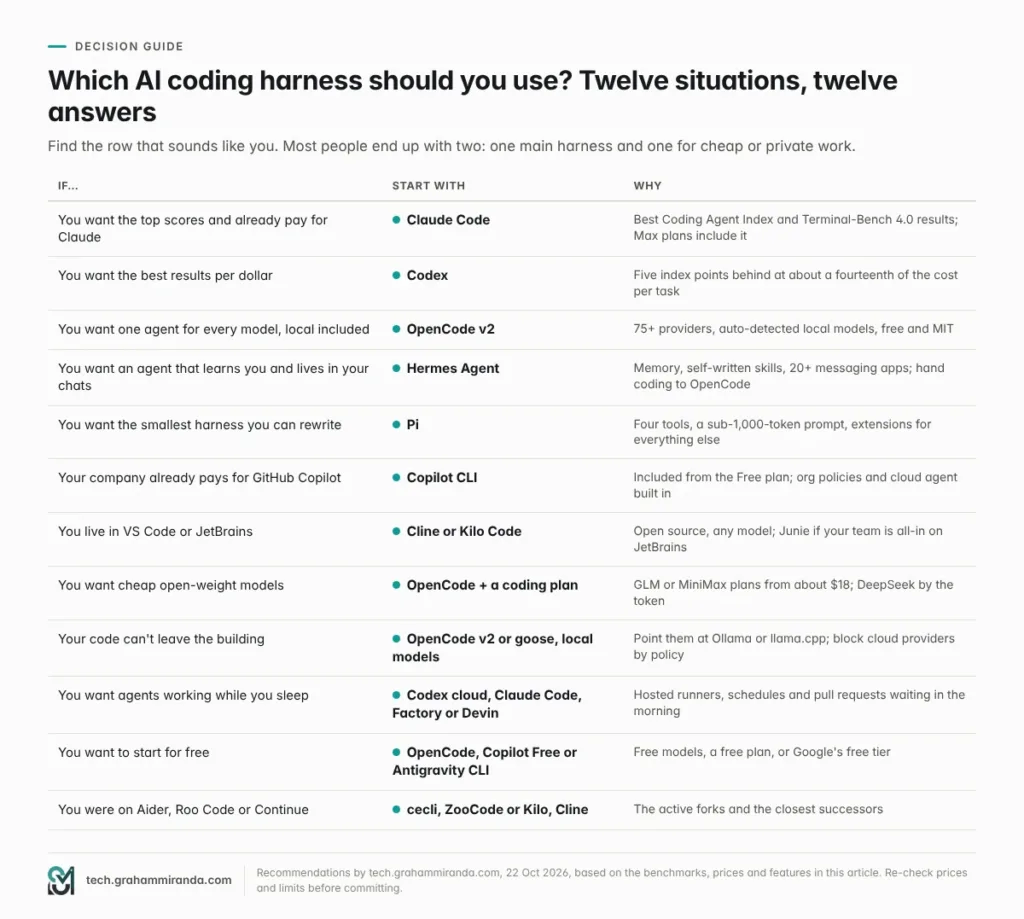
Part 17 — What to Watch Next
- LSP in OpenCode v2. Version 2 still accepts language-server configuration but doesn’t run the servers. Whether that changes is the biggest open question for anyone working in a typed codebase.
- ACP v2. The draft published in July reworks how messages, diffs and permission requests flow. When it stabilises, expect editors to show richer agent output from every harness at once.
- Antigravity CLI’s licence. Google hasn’t said whether
agyis open source. Gemini CLI’s community will be watching. - Anthropic’s subscription rules. The January restriction and the June Agent SDK credit show the policy can move in both directions. Any change will ripple through OpenCode, OpenClaw and every other third-party harness.
- Cursor under SpaceX. The Grok-bundled plans appeared on Cursor’s pricing page in mid-October without a formal announcement in the sources I found. Watch how frontier non-Grok models are priced and whether Origin, its GitHub rival, ships.
- DeepSeek Harness 0.2 stable. Every npm build since launch has been an alpha or a release candidate. A first stable release would make it a serious option for teams.
- goose 2.0 leaving beta, and what the Agentic AI Foundation does with it.
- Better harness benchmarks. Artificial Analysis’s harness-comparison section still reads “coming soon”, and its public comparison pages show a single OpenCode row and nothing for Hermes, Pi or Copilot. More harnesses on the same suite would settle a lot of arguments.
- Sandbox defaults. Codex and Cursor isolate shell commands by default; Claude Code, OpenCode, Hermes and Pi don’t. The next serious exploit may force the issue.
- The Aider question. Either the original project wakes up, or cecli becomes its de facto successor.
- Prices. Nearly every plan in this article changed at least once in 2026. Re-check before you renew.
Domande frequenti
What is an AI coding harness?
An AI coding harness, sometimes called an agent harness, is the software wrapped around a language model that turns it into a coding agent: the loop that plans and acts, the tools that edit files and run commands, context management and memory, permissions and sandboxing, and the interface — a terminal, an editor, a desktop app or the cloud. Claude Code, Codex, OpenCode, Hermes Agent and Pi are harnesses; Claude Opus 5.5 and GPT-6.1 Sol are models they run.
What is the best AI coding harness in 2026?
It depends on what you optimise for; there’s no single best AI coding agent for everyone. Claude Code has the top independent scores (68 on Artificial Analysis’s Coding Agent Index), Codex has the best results per dollar (63 for $1.04 a task), and OpenCode v2 is the best open-source harness for running any model, including local ones. Many developers use two: one for the hardest work and an open one for everything else.
Is Claude Code better than Codex?
Claude Code scores higher — 68 versus 63 on the Coding Agent Index, and 64.8% versus 58.2% on the Terminal-Bench 4.0 board — but Codex does the work far more cheaply: $1.04 and 15.5 minutes per task, against $14.19 and 1.5 hours for Claude Code at maximum effort. At its “xhigh” effort setting, Claude Code matches Codex’s 63 for $3.33 a task. Codex is also open source and ships with a sandbox switched on.
Is OpenCode better than Claude Code?
For raw results with Claude models, no — Claude Code is Anthropic’s own harness and tops the benchmarks. OpenCode’s strengths are freedom and cost: it’s MIT-licensed, works with more than 75 providers and local models, and with GLM-5.3 it scores 54 on the Coding Agent Index for $4.37 a task. Claude subscriptions don’t work in OpenCode, so you’d use Claude there through an API key.
Can I use my Claude Pro or Max subscription in OpenCode or other harnesses?
Not directly. Since January 2026, Claude subscription logins only work in Anthropic’s own apps, including Claude Code. Since 15 June, Pro and Max plans include a monthly Agent SDK credit — $20, $100 or $200 — that covers claude -p, GitHub Actions and third-party tools built on Anthropic’s Agent SDK. Other harnesses, such as OpenCode, need an Anthropic API key.
Can I use my ChatGPT subscription in other coding agents?
Yes, in several. OpenAI supports “Sign in with ChatGPT” in third-party harnesses such as OpenCode and Pi, and Devin Desktop and Amp let you link a ChatGPT plan too. OpenAI’s public statements about this aren’t contractual, so check the current terms if your workflow depends on it.
What happened to Gemini CLI?
On 18 June 2026 Google stopped serving Gemini CLI to free users, Google AI Pro and Ultra subscribers and individual Gemini Code Assist users, and moved them to the new Antigravity CLI, whose command is agy. Gemini CLI remains open source under Apache-2.0 and still works with paid Gemini API keys and Gemini Code Assist Standard or Enterprise licences; version 0.65.0 shipped on 20 October.
What happened to Roo Code, Continue and Aider?
Roo Code shut down on 15 May 2026 and points users to the ZooCode fork and to Cline. Continue was acqui-hired by Cursor in June, and its code remains available under Apache-2.0. Aider hasn’t published a release since 12 February 2026, and most active development has moved to its community fork, cecli.
Which coding harness is best for local models?
OpenCode v2 is the easiest: it detects Ollama, LM Studio and vLLM on their default ports automatically. Hermes Agent adds one-click local models through llama.cpp, Codex has an --oss mode, Copilot CLI lists local Ollama models in its model picker, and goose, Qwen Code, Cline, Kilo Code, Factory Droid and Pi all work with local OpenAI-compatible servers. Strong local coding models need a lot of memory.
Which AI coding agents are free?
OpenCode, Pi, Cline, Kilo Code, goose, Qwen Code, Kimi Code, Mistral Vibe, Hermes Agent, DeepSeek Harness, Crush and the Codex CLI are free to use — you pay only for the model, or nothing with local models. OpenCode also includes free, time-limited models, Copilot has a Free plan that includes its CLI, and Antigravity CLI has a free tier.
Does the harness matter more than the model?
For pass rates at the frontier, not much: Claude Opus 5.5 resolves 64.8% of Terminal-Bench 4.0 tasks inside Claude Code and 65.2% inside a harness with a single bash tool. The harness matters more for weaker models — Grok Build lifts Grok 4.7 by 8.8 points — and it decides cost, speed and safety. On Artificial Analysis’s index, the same score of 63 costs $1.04 a task in one setup and $3.33 in another.
Is Hermes Agent a coding agent?
Hermes Agent is a general personal agent from Nous Research, but it codes well: it runs real language servers and feeds their diagnostics back after each edit, keeps checkpoints you can roll back, supports git worktrees and ships skills for handing coding jobs to OpenCode, Claude Code or Codex. Its main strengths are long-term memory and access from more than 20 messaging apps.
What is DeepSeek Harness?
DeepSeek Harness is DeepSeek’s open-source agent, released on 13 August 2026 alongside DeepSeek V4-Pro. It’s MIT-licensed, runs as a local web app (npx @deepseek-ai/dsh web), and treats everything — models, tools, skills, sandboxes and even the agent loop — as a plug-in. It gathered about 252,000 GitHub stars in ten weeks but is still pre-release, at version 0.2.1-rc.2.
Which AI coding agent is the most secure by default?
Codex is the only big-lab harness that ships with an operating-system sandbox switched on, and Cursor’s default mode sandboxes shell commands where it can. Claude Code has a strong sandbox, but you must switch it on with /sandbox. OpenCode v2 relies on permission rules and Pi has no permission system, so run those in a container for untrusted work. Whatever you use, update weekly and never use auto-approve modes outside a disposable environment.
What is ACP, the Agent Client Protocol?
ACP is an open protocol, started by Zed, that lets any coding agent run inside any compatible editor or host, such as Zed, JetBrains IDEs or Devin Desktop. Its official registry lists 44 agents, including OpenCode, Copilot CLI, Cursor, Gemini CLI, Cline, Kilo and Junie, with Claude Code and Codex available through adapters. A version 2 draft was published in July 2026.
Can I use more than one coding harness on the same project?
Yes, and it’s increasingly easy. Put project rules in AGENTS.md, reusable procedures in .agents/skills, and tools behind MCP servers; most harnesses read all three. Many developers pair a subscription harness such as Claude Code or Codex with an open one such as OpenCode, and cockpits such as Orca or Herdr run several harnesses side by side in separate git worktrees.
In sintesi
Two years ago, the question was which model to use. In 2026 it’s which harness to run it in — and the honest answer is two.
Claude Code is the most capable and most complete harness, and the one the benchmarks crown — at a price in tokens, and with a subscription that only works in Anthropic’s own apps. Codex is the efficient one: nearly as good, open source, sandboxed by default and a fraction of the cost per task. OpenCode v2 is the open harness that runs everything and keeps your options open while the model leaderboard churns. Hermes Agent is what you put in your chat apps if you want an agent that knows you. Pi is the minimalist that a surprising amount of the ecosystem quietly runs on. And the open-model labs’ own harnesses — DeepSeek’s, Qwen’s, Kimi’s and Mistral’s — have made capable AI coding cheaper than it has ever been.
The standards — MCP, ACP, AGENTS.md and Agent Skills — mean you no longer have to marry any of them. So don’t. Pick a main harness for the hardest work and an open one for everything else, keep your instructions in AGENTS.md, turn the sandbox on, and update every week. Then let the harnesses compete for your attention. They’re not slowing down.
Using a harness I didn’t cover, or seeing different numbers on your own projects? I’d like to hear which harness and model you run, what it costs you each month, and where it breaks. Corrections and counter-evidence are welcome — this article gets updated when the picture changes.
Informativa: This article contains one affiliate link, to Z.ai’s GLM Coding Plan. Subscribing through it gets you 10% off and may earn me a commission at no extra cost to you. No other product in this article is sponsored, and none of the companies, labs or foundations mentioned reviewed it before publication.
Facts checked: 22 October 2026.