

If you have been looking for a practical, self-hosted AI agent that lives inside the apps you already use, OpenClaw deserves your attention.
Most people do not need “another chatbot tab.” They need an AI assistant they can actually reach in the middle of real life: in Discord while managing a community, in Telegram while away from a desk, in a browser dashboard while working through code, and in a secure self-hosted environment that does not lock them into one company’s model or one narrow workflow.
That is exactly why OpenClaw is interesting.
OpenClaw is not just a chatbot. It is a gateway layer for AI agents. It sits between your messaging platforms and your chosen AI models, which means you can message an agent from Discord, Telegram, WhatsApp, iMessage, and other surfaces, while keeping control over routing, sessions, approvals, memory boundaries, and model choice. That changes the conversation completely. Instead of adapting your life to a single AI app, you adapt AI to the places where your life and work already happen.
This guide is a deep, practical, SEO-friendly breakdown of what OpenClaw is, how it works, how to use it with Discord and Telegram, which hidden features are worth learning early, how to use free or very cheap models with it, and why MiniMax coding plans can be smarter than plain pay-as-you-go billing for some users.
Quick note before you publish: provider prices, limits, and free tiers change often. The strategy in this article is solid, but you should still verify model pricing before publishing if you want every number to stay fresh.
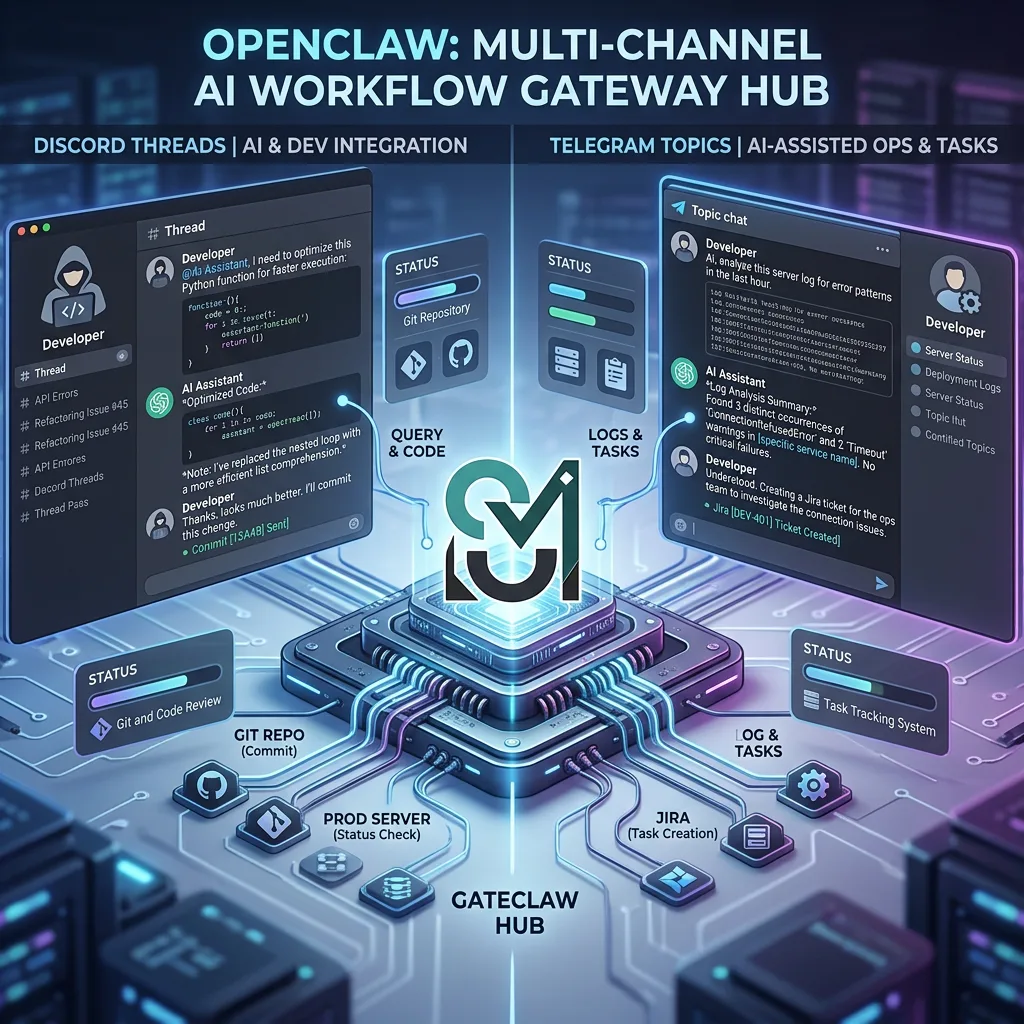
Table of contents
- What is OpenClaw?
- Why OpenClaw matters in the AI agent era
- How OpenClaw actually works
- How to install OpenClaw fast
- How to use OpenClaw with Discord
- Why Discord is one of the best OpenClaw surfaces
- Basic Discord setup
- Important Discord setup tip: enable the right intents
- DMs and pairing
- Best practice: use a private server first
- Discord channels stay cleanly isolated
- Forum channels and thread creation
- Thread-bound sessions are a hidden power move
- Discord tips and tricks
- How to use OpenClaw with Telegram
- Telegram threads, topics, and “activation” explained
- OpenClaw tips, tricks, and hidden features
- 1. openclaw dashboard should be part of your normal workflow
- 2. Learn these slash commands early
- 3. Use different agents for different types of thinking
- 4. Use a premium model only where it matters
- 5. Telegram voice-note mention detection is a sleeper feature
- 6. Discord thread bindings are a serious productivity tool
- 7. Exec approvals are a must if your agent can do anything powerful
- 8. Be careful with /verbose and /reasoning in groups
- 9. Use openclaw models list before guessing model IDs
- 10. ClawHub is worth exploring
- 11. Cheap hosting options make OpenClaw more accessible than people think
- 12. Keep the gateway private by default
- Best free models for OpenClaw
- Best cheap models for OpenClaw
- MiniMax in OpenClaw: why many builders are watching it closely
- Coding Plans vs Pay As You Go
- Best model stacks for different OpenClaw users
- Why OpenClaw feels like the future of AI agents
- Common mistakes to avoid
- OpenClaw FAQ
- Is OpenClaw good for beginners?
- Is OpenClaw only for coding?
- Is OpenClaw better than just using ChatGPT or Claude in a browser?
- Can I use OpenClaw with free models only?
- Can I use OpenClaw on a cheap server?
- Which channel should I set up first: Discord or Telegram?
- Does Telegram support topic-based workflows?
- Can Discord threads stay tied to one task?
- What is the best cheap model for OpenClaw right now?
- When should I choose MiniMax over pay-as-you-go alternatives?
- Should I use one OpenClaw agent or multiple?
- What is the smartest first advanced feature to learn?
- Final thoughts
What is OpenClaw?
OpenClaw is a self-hosted, open-source AI gateway that connects messaging apps and interfaces to agent-style AI workflows. In plain English, that means you run one gateway process on your machine or server, and that gateway becomes the bridge between your chosen models and the places you like to communicate.
That sounds abstract until you picture the real-world use case.
Imagine this:
- You ask your coding agent a question in Telegram while commuting.
- Later, you continue the same kind of workflow from a Discord channel or thread.
- Back at your desk, you open the browser dashboard and review sessions, switch models, inspect context, or approve actions.
- Under the hood, the gateway controls the flow rather than each app becoming its own isolated AI silo.
That is the OpenClaw idea in one paragraph.
A lot of AI products today are either:
- cloud-only black boxes,
- single-surface chat tools, or
- “AI agent” demos that look exciting but are awkward to live with day to day.
OpenClaw is more grounded than that. It focuses on operational reality: routing, channels, sessions, permissions, delivery, tool use, multi-agent isolation, and the simple fact that people already spend their time in Discord, Telegram, WhatsApp, and browsers.
The best way to think about OpenClaw is this:
OpenClaw is not the model. It is the operating layer that makes models usable across your digital life.
That distinction matters because it gives you freedom:
- freedom to switch models,
- freedom to change providers,
- freedom to separate work and personal agents,
- freedom to keep sensitive workflows self-hosted,
- freedom to build a system that grows with you rather than forcing you into one vendor’s roadmap.
Why OpenClaw matters in the AI agent era
We are moving from “ask a chatbot a question” to “run a persistent AI helper that participates in work.” That shift is bigger than it looks.
The next generation of AI value is not only about who has the smartest model. It is about who makes intelligence accessible, portable, and dependable across real channels.
That is why OpenClaw matters.
1. It turns AI from an app into infrastructure
With OpenClaw, your assistant is no longer trapped inside a single web app. It becomes infrastructure you can reach from multiple surfaces. That makes AI feel less like a novelty and more like a layer of computing.
2. It respects user control
A lot of AI products want you to hand over your prompts, your workflow, your authentication, your messaging habits, and your long-term dependence. OpenClaw takes a different path. It is self-hosted first. That gives developers, founders, tinkerers, and privacy-minded users a rare thing in AI: agency.
3. It matches how people already communicate
People do not suddenly stop using Discord, Telegram, iMessage, or browsers because an AI startup launches a shiny new chat interface. Real adoption happens when tools meet users where they already are. OpenClaw gets this right.
4. It separates the gateway from the model
This is one of its biggest strategic advantages. If one model becomes too expensive, too slow, too censored, too weak at coding, or simply less competitive next quarter, you can swap it. Your agent layer does not have to collapse just because your provider choice changes.
5. It is built for agent workflows, not just replies
There is a major difference between a chat app that can answer questions and a system that can manage sessions, use tools, route work, handle approvals, and keep channel behavior deterministic. OpenClaw leans into the second category.
That is why serious users should care.
How OpenClaw actually works
At the center of OpenClaw is the Gateway.
The Gateway is the single source of truth for:
- channel connections,
- routing,
- sessions,
- model access,
- tooling,
- and control-plane interfaces like the dashboard or companion surfaces.
Instead of every messaging app implementing its own scattered logic, OpenClaw keeps the important state in one place.
The mental model
Here is the simple version:
- A message enters from Discord, Telegram, WhatsApp, or another supported channel.
- OpenClaw normalizes that message into a shared internal format.
- It figures out which agent and which session should handle it.
- It sends the request to your configured model/provider.
- It returns the response back to the same surface, preserving channel context.
That may sound obvious, but it solves several annoying problems at once:
- no random channel hopping,
- no confusing “which bot answered me?” moments,
- cleaner session isolation,
- easier model switching,
- and better long-term maintainability.
Sessions are a bigger deal than most people realize
OpenClaw’s session model is one of its underrated strengths.
Direct messages can collapse into a main session, while groups, rooms, channels, and topics can remain isolated. That means your personal Telegram DM does not accidentally pollute a public Discord channel session. It also means a Telegram forum topic can behave like its own mini workspace.
This is exactly the kind of design detail that separates “cool demo bot” from “tool you can actually trust.”
Multi-agent routing changes everything
A lot of users will start with one main agent and stop there. That is fine.
But if you keep going, OpenClaw becomes much more powerful:
- one agent for coding,
- one for research,
- one for internal operations,
- one for personal notes,
- one for support or community replies.
Because agents are isolated, you can give them different models, different workspaces, different permissions, and different personalities without blending everything into one giant context soup.
The browser dashboard is not just a nice extra
Many people think the browser Control UI is a convenience feature. It is more than that.
It is the control tower for your agent system:
- open chats,
- inspect sessions,
- review config,
- connect nodes,
- handle approvals,
- and keep an eye on the system as a whole.
If you want OpenClaw to feel like a real operating layer rather than a pile of scripts, the dashboard is part of that magic.
How to install OpenClaw fast
If your goal is to go from zero to a working first chat without wasting an afternoon, keep it simple.
Option 1: install from the CLI
npm install -g openclaw@latest
openclaw onboard --install-daemon
openclaw dashboard
That is the fast path.
The onboarding wizard is the easiest way to set up:
- auth,
- gateway settings,
- channels,
- workspace defaults,
- and model/provider access.
Option 2: use the install script
curl -fsSL https://openclaw.ai/install.sh | bash
openclaw onboard --install-daemon
openclaw dashboard
What you need first
In practical terms, most users need only three things:
- Node 22 or newer,
- one model provider key,
- and a few minutes.
My recommendation for new users
Do not start by connecting every channel and every model.
Start with this sequence:
- install OpenClaw,
- complete onboarding,
- open the dashboard,
- send a first test message in the browser,
- only then add Discord or Telegram.
That order reduces confusion dramatically.
First commands worth learning
openclaw dashboard
openclaw models list
openclaw models set <provider/model>
openclaw configure
openclaw gateway status
If you learn just those five early, you will avoid most beginner friction.
How to use OpenClaw with Discord
If you want OpenClaw in Discord, the setup is straightforward once you know the few details that matter.
Why Discord is one of the best OpenClaw surfaces
Discord is ideal for OpenClaw because it supports several high-value patterns:
- DMs for private back-and-forth,
- guild channels for team or community workflows,
- forum channels for topic-based posting,
- threads for focused follow-up work,
- slash commands for operational control,
- and approval buttons for specific actions.
If you run communities, dev teams, research spaces, or founder groups, Discord can become one of the best homes for an AI agent.
Basic Discord setup
You will create a Discord application, add a bot, enable the right intents, invite it to your server, and connect it to OpenClaw.
A minimal config looks like this:
{
  "channels": {
    "discord": {
      "enabled": true,
      "token": "YOUR_BOT_TOKEN"
    }
  }
}
If you prefer environment variables, use your bot token there and let OpenClaw read it.
Important Discord setup tip: enable the right intents
For most real setups, you should enable:
- Message Content Intent
- and, if you want richer member or role-based behavior, Server Members Intent
This is one of the classic “why is nothing happening?” problems for Discord bots. If the bot is technically connected but cannot see what it needs, you will spend time debugging the wrong thing.
DMs and pairing
OpenClaw uses pairing for Discord DMs by default. That is a security feature, not friction for the sake of friction.
When someone unknown messages the bot:
- they can receive a short code,
- their request is not processed until approved,
- and you explicitly control who gets access.
That matters a lot once your agent is connected to tools, context, or real execution pathways.
Best practice: use a private server first
Before you add OpenClaw to a busy community server, test it in:
- your own private server,
- a dev guild,
- or a small internal workspace.
That gives you time to validate:
- routing,
- permissions,
- mention behavior,
- channel isolation,
- and model quality.
Discord channels stay cleanly isolated
One of the things OpenClaw gets right is that guild channels remain isolated. That is exactly what you want. A bot helping in #engineering should not quietly blend that session with a DM conversation from another user.
Forum channels and thread creation
This is one of the coolest features for Discord-heavy users.
Discord forum and media channels only accept thread posts. OpenClaw supports two smart ways to handle this:
Method 1: send to the forum parent and auto-create a thread
openclaw message send --channel discord --target channel:<forumId> \
  --message "Topic title

Body of the post"
The first non-empty line becomes the thread title.
Method 2: create a thread directly
openclaw message thread create --channel discord --target channel:<forumId> \
  --thread-name "Topic title" --message "Body of the post"
This is useful if you want more explicit control.
Thread-bound sessions are a hidden power move
If you do serious AI work in Discord, thread bindings are one of the most valuable OpenClaw features.
With thread bindings enabled, you can:
- bind a Discord thread to a session or sub-agent,
- keep follow-up messages routed to the same session,
- and avoid losing continuity during longer tasks.
The commands worth knowing are:
/focus <target>/unfocus/agents/session idle <duration|off>/session max-age <duration|off>
This matters especially for coding, investigations, debugging, or multi-step work. Instead of treating every reply like a disconnected chatbot turn, you let the thread act like a real working context.
Discord tips and tricks
1. Use slash commands instead of memorizing everything
Commands like /status, /model, /whoami, /context, and /approve are genuinely useful in day-to-day operation.
2. Use roles for routing if your server is more complex
OpenClaw supports role-based routing, which means you can steer different types of members to different agent behaviors.
That opens up interesting patterns:
- moderators get one agent,
- developers get another,
- founders get a higher-capability private route,
- community members get a safer public-facing assistant.
3. Be careful with channel-level approvals
Discord can post exec approval prompts in DMs or the originating channel. That is powerful, but do not turn channel delivery on casually. If command text is visible in-channel, you want that only in trusted places.
4. Use Discord for collaborative AI, not just personal AI
Telegram is often better for personal access. Discord shines when AI becomes a team surface.
How to use OpenClaw with Telegram
Telegram is arguably one of the most practical OpenClaw channels because it is fast, mobile-native, and flexible enough for both personal and group-based workflows.
Why Telegram works so well with OpenClaw
Telegram is great for:
- personal AI DMs,
- team groups,
- forum-style supergroups,
- threaded topics,
- bot commands,
- media exchange,
- and quick access from any phone.
If your goal is “I want my AI agent in my pocket,” Telegram is one of the best ways to get there.
Basic Telegram setup
Start by creating a bot with @BotFather and saving the bot token.
A clean minimal config looks like this:
{
  "channels": {
    "telegram": {
      "enabled": true,
      "botToken": "123:abc",
      "dmPolicy": "pairing",
      "groups": {
        "*": { "requireMention": true }
      }
    }
  }
}
This setup does a few smart things at once:
- enables Telegram,
- keeps DMs in pairing mode,
- and makes group replies mention-gated by default.
That is exactly how most people should start.
Telegram DMs and pairing
Just like on other supported channels, Telegram can use pairing to avoid random strangers getting direct access to your agent.
If you need to approve a request:
openclaw pairing list telegram
openclaw pairing approve telegram <CODE>
This is excellent for owner-controlled setups and any workflow that might expose tools, model costs, or important context.
Telegram group behavior: understand mention gating
This is where many new users get confused.
By default, group behavior is intentionally conservative:
- groups are restricted,
- replies usually require a mention,
- and allowlists matter.
That is a feature, not a bug.
You do not want your AI replying to every line of chat in a group unless you explicitly choose that behavior. The safest default is to let people wake it with a mention.
Letting OpenClaw always respond in a Telegram group
If you want a group where OpenClaw responds without requiring a mention, you can override the group setting.
Example:
{
  "channels": {
    "telegram": {
      "groups": {
        "-1001234567890": { "requireMention": false }
      }
    }
  }
}
That is useful for:
- dedicated AI channels,
- support groups,
- private ops rooms,
- or sandbox environments.
Telegram live stream preview is underrated
OpenClaw supports partial reply preview in Telegram via message edits. That means users can start seeing the answer while the model is still generating.
This sounds like a small UI detail, but in practice it changes the feel of the system:
- it reduces dead-air,
- makes longer replies feel more responsive,
- and gives Telegram conversations a more polished, “real product” feeling.
Telegram custom commands are useful for real workflows
OpenClaw can register command menu entries in Telegram. That is a subtle but valuable feature if you want to turn Telegram into more than a casual chat surface.
For example, you might register commands such as:
/backup/generate/deploy/review
Even if the actual logic lives in skills or downstream tooling, command discoverability matters. Good command menus lower the barrier for both you and anyone else using the bot.
Telegram threads, topics, and “activation” explained
This deserves its own section because a lot of users ask about “activating Telegram threads,” but the real answer is slightly more nuanced.
Telegram forum topics are first-class in OpenClaw
Telegram forum supergroups attach a message_thread_id to messages. OpenClaw uses that to keep topics isolated. In practice, each topic becomes its own session lane.
That is incredibly useful because it means:
- one topic can be for coding,
- another for ops,
- another for support,
- another for research,
- and they do not all melt together into one shared conversation.
Per-topic routing is where Telegram gets exciting
You can route different topics to different agents.
Example:
{
  "channels": {
    "telegram": {
      "groups": {
        "-1001234567890": {
          "topics": {
            "1": { "agentId": "main" },
            "3": { "agentId": "coder" },
            "5": { "agentId": "research" }
          }
        }
      }
    }
  }
}
This is not a gimmick. This is a real architecture pattern.
Instead of building three separate bots, you can run one OpenClaw gateway and use Telegram topics as agent-specific workspaces.
Topic inheritance is a quiet superpower
Topic settings inherit from the parent group unless you override them. That means you can define sane defaults once, then customize only the topics that need special behavior.
For example:
- keep mentions required everywhere by default,
- disable mention gating only in one AI-only topic,
- assign a different model/agent only for one coding topic,
- or add topic-specific system behavior.
That is elegant system design.
So what about “activation”?
Here is the important nuance:
OpenClaw’s /activation owner-only toggle is documented for WhatsApp groups. Other surfaces, including Telegram, currently do not use that same command flow.
For Telegram, the equivalent concept is handled through:
- group allowlists,
requireMention,- topic overrides,
- and routing config.
So if someone says “How do I activate Telegram threads in OpenClaw?” the practical answer is:
You do not usually use /activation there. You enable the group/topic and set the reply behavior you want in config.
The best Telegram pattern for most users
Here is the setup I recommend most often:
- Personal DM: pairing enabled
- Public or semi-public group: allowlisted, mention required
- Dedicated AI topic: allowlisted, mention optional or disabled
- Coding topic: separate agent
- Research topic: separate agent
- Sensitive workflows: approvals enabled
That pattern gives you flexibility without chaos.
OpenClaw tips, tricks, and hidden features
This is the section most people skip at first and then wish they had read earlier.
OpenClaw has more depth than the initial setup suggests. If you want to get real value from it, the following features are worth knowing.
1. openclaw dashboard should be part of your normal workflow
A lot of users treat OpenClaw like a headless bot layer only. That works, but you leave a lot on the table.
The dashboard helps you:
- inspect sessions,
- review the active model,
- check state,
- manage approvals,
- and understand what your system is actually doing.
When people say self-hosted AI is hard, it is often because they try to operate everything blind. The dashboard reduces that pain.
2. Learn these slash commands early
You do not need the full command catalog on day one. Start with these:
/status/model/whoami/context/export-session/approve/help/commands
That small set gives you a surprising amount of control.
Why /status matters
It is one of the fastest ways to understand whether the system is healthy and what provider/model state you are dealing with.
Why /model matters
Model switching is not a niche feature in OpenClaw. It is a core habit. Serious users swap models for cost, quality, speed, or workflow fit.
Why /context matters
If you ever wonder why the agent is acting a certain way, context inspection can save you from guessing.
3. Use different agents for different types of thinking
This is one of the biggest practical upgrades you can make.
Instead of one mega-agent that does everything badly, split responsibilities:
mainfor general use,coderfor code and repo work,researchfor synthesis,opsfor admin workflows,privatefor sensitive notes.
This improves:
- clarity,
- performance,
- context discipline,
- and cost control.
4. Use a premium model only where it matters
OpenClaw docs recommend using the strongest latest-generation model you can afford for high-stakes work, and cheaper models for routine tasks. That is exactly right.
Practical pattern:
- Premium model for coding, planning, architecture, and important analysis
- Cheap model for summaries, quick answers, repetitive instructions, or background chatter
This is how you keep AI useful without turning every conversation into a billing event.
5. Telegram voice-note mention detection is a sleeper feature
This one is genuinely cool.
If a Telegram group or topic is mention-gated, OpenClaw can transcribe a voice message first and then check whether the voice note included the mention pattern. That means voice notes can still wake the bot in properly configured setups.
Why this matters:
- it feels more natural,
- it works with how people actually use Telegram,
- and it makes OpenClaw feel less like a rigid bot and more like a participant in the medium.
6. Discord thread bindings are a serious productivity tool
If you do not use thread bindings, Discord can still be helpful. If you do use them, Discord turns into a much stronger AI workspace.
Bind a thread to a session or sub-agent and let that thread become the home for a single task. That is incredibly effective for:
- bug hunts,
- code reviews,
- feature planning,
- and multi-step implementation work.
7. Exec approvals are a must if your agent can do anything powerful
As soon as your AI can touch the real world in any meaningful way, approvals stop being optional.
OpenClaw lets you:
- require approval on risky exec actions,
- route approval prompts to Discord or Telegram,
- approve once, always allow, or deny,
- and keep per-agent allowlists.
That is exactly the kind of feature responsible AI tooling needs more of.
8. Be careful with /verbose and /reasoning in groups
This is a practical warning, not a theoretical one.
If you turn on features that expose too much detail in group settings, you can accidentally leak internal logic, tool outputs, or information that was only meant for operators. Keep those modes conservative in shared spaces.
9. Use openclaw models list before guessing model IDs
This sounds obvious, but it saves time. Providers change fast. Model names change. Preview names change. OpenClaw builds evolve.
Instead of assuming:
openclaw models listThen choose from what your actual install can see.
10. ClawHub is worth exploring
If you want to extend what your agent can do, ClawHub is the public skill registry for OpenClaw. It is a good way to discover reusable skills instead of reinventing every workflow yourself.
That becomes more important as your setup matures.
11. Cheap hosting options make OpenClaw more accessible than people think
A lot of users assume self-hosted AI automatically means expensive infrastructure. Not really.
You can run OpenClaw on:
- a Raspberry Pi,
- an always-free Oracle ARM instance,
- a low-cost Hetzner box,
- a simple $5–$6 VPS,
- or your own desktop.
Because the gateway itself is lightweight compared to model inference, the cost barrier is lower than many people expect.
12. Keep the gateway private by default
One of the smartest operational habits you can build is simple:
- do not expose admin surfaces publicly unless you truly need to,
- prefer localhost, Tailscale, or SSH tunnels,
- and treat your gateway like real infrastructure.
OpenClaw becomes much better when you stop thinking of it as a toy bot and start treating it like part of your system.
Best free models for OpenClaw
“Free models” is a phrase people use loosely, so let’s make it practical.
There are really three useful categories:
- models with genuine free API tiers,
- provider trial/free access suitable for testing,
- local models with no per-token bill.
1. Google Gemini free-tier models
For many users, Google is one of the strongest starting points.
Why?
Because Google’s Gemini API pricing includes free-tier access on several models, especially in the Flash and Flash-Lite family, and even Gemini 2.5 Pro has a free tier for standard usage.
That makes Google attractive for:
- new OpenClaw users,
- hobby projects,
- experimental agent setups,
- and anyone who wants to test real capabilities before opening the wallet wide.
Why Flash-Lite stands out
Gemini Flash-Lite is one of the best budget/freemium choices because it is designed for cost efficiency and high throughput. It is the kind of model that makes sense for:
- lightweight agent chats,
- summaries,
- quick routing tasks,
- internal automations,
- and day-to-day low-stakes interactions.
How to use Google models in OpenClaw
Set your Gemini key, run onboarding, and then list available Google models:
export GEMINI_API_KEY="YOUR_KEY"
openclaw onboard --auth-choice gemini-api-key
openclaw models list | grep google
openclaw models set google/gemini-3-flash-preview
If your build shows different Google model IDs, use the ones your install exposes.
One important caveat
On Google’s pricing pages, free-tier usage is often marked as being used to improve products, while paid-tier usage is not. If privacy matters, read that carefully and choose accordingly.
2. NVIDIA free API access for prototyping
NVIDIA is another interesting route, especially for users who want to experiment with open or semi-open model ecosystems through hosted endpoints.
NVIDIA’s Build/NIM ecosystem offers free API trial access on many models for prototyping. That makes it useful for:
- testing,
- research,
- development,
- benchmarking,
- and trying a model without committing to a production bill immediately.
How to use NVIDIA in OpenClaw
export NVIDIA_API_KEY="nvapi-..."
openclaw onboard --auth-choice skip
openclaw models set nvidia/nvidia/llama-3.1-nemotron-70b-instruct
You can then use openclaw models list to inspect what else is available in your environment.
Important caveat
NVIDIA’s free access language is aimed at prototyping and development. Production NIM usage has enterprise licensing considerations. In other words, it is great for testing and learning, but do not assume “free forever production” unless the provider explicitly says so.
3. Ollama and local open-source models
If you want “free” in the sense of “no per-token API bill,” local models are still extremely relevant.
OpenClaw supports Ollama, which means you can route to local models for:
- privacy-heavy workflows,
- offline-ish experimentation,
- routine tasks,
- or a cost ceiling that is mostly hardware and electricity instead of token charges.
That will not always match the best cloud models on raw intelligence, but it can be fantastic for:
- drafts,
- local note processing,
- internal tools,
- and anything where privacy matters more than maximum benchmark performance.
Best way to think about local models in OpenClaw
Use them strategically, not ideologically.
A smart hybrid setup looks like this:
- local model for basic chat or private notes,
- cloud premium model for hard reasoning and coding,
- cheap cloud model for summaries and automations.
That is where OpenClaw shines: you are not forced into a one-model religion.
Best cheap models for OpenClaw

Now let’s talk about realistic low-cost choices that are still useful.
“Cheap” is not just about token price. It is about the balance of:
- price,
- latency,
- reliability,
- and whether the model is actually good enough for the job.
1. Gemini 2.5 Flash-Lite
If you care about price-performance, Gemini 2.5 Flash-Lite is hard to ignore.
It is designed as a cost-efficient model for scale, which makes it ideal for:
- background automations,
- bulk transformations,
- summaries,
- triage,
- support-style responses,
- and fast general interactions.
For OpenClaw, this makes Flash-Lite a strong candidate for:
- a low-cost daily driver,
- a fallback model,
- or an agent dedicated to cheap repetitive work.
2. Gemini 2.5 Flash
If you need a bit more strength than Flash-Lite but still want a relatively economical option, standard Flash is a very solid middle ground. For many users, this is where “cheap enough but still feels capable” begins.
3. OpenAI GPT-4.1 nano
GPT-4.1 nano is OpenAI’s cheapest and fastest model in that line. If you already like OpenAI’s ecosystem, it can be an excellent low-cost workhorse for:
- structured tasks,
- routing,
- tool calling,
- classification,
- formatting,
- and lightweight chat.
It is not the model you reach for when the task is mission-critical architecture or a difficult debugging marathon, but it can be great for daily operational glue.
4. MiniMax M2.5
MiniMax is getting attention because its pricing is aggressive and its coding-oriented positioning is clear. In an OpenClaw environment, that makes it attractive for builders who want a coding-capable model without defaulting to more expensive incumbents every time.
5. Z.AI / GLM budget routes
OpenClaw’s own FAQ points budget-conscious users toward Z.AI / GLM-style options. Even when a model is not your premium choice, it can still be the right choice for:
- low-stakes tasks,
- first-pass drafts,
- summarization,
- or cheaper sub-agent workflows.
My honest rule of thumb
Use cheap models for:
- summaries,
- first drafts,
- routine Q&A,
- repetitive transforms,
- chat routing,
- lower-stakes assistant interactions.
Use premium models for:
- code that matters,
- architecture,
- important planning,
- untrusted-input tool use,
- and decisions that could waste hours if the model underperforms.
That split alone can cut costs dramatically without making your setup feel worse.
MiniMax in OpenClaw: why many builders are watching it closely
MiniMax matters because it sits at an interesting intersection:
- coding focus,
- aggressive economics,
- decent model breadth,
- and direct relevance to agent workflows.
OpenClaw has dedicated provider guidance for MiniMax, which tells you something: this is not a fringe integration. It is part of the ecosystem serious users are likely to evaluate.
Why MiniMax is appealing in an OpenClaw setup
1. It is clearly aiming at coding users
That matters because OpenClaw users often care about agentic code workflows more than generic chatbot fluff.
2. It offers a normal pay-as-you-go path
That is useful if you want clean token-based billing.
3. It also offers a coding subscription model
That is where MiniMax gets especially interesting. Instead of forcing every user into pure token metering, it has a coding-plan subscription structure that can make more sense for active builders.
4. It supports a speed tier
MiniMax Highspeed options are useful when responsiveness matters more than squeezing every last drop of output quality.
How to use MiniMax in OpenClaw
You can configure it interactively with the wizard or configure it directly.
A practical flow is:
export MINIMAX_API_KEY="YOUR_KEY"
openclaw configure
openclaw models list | grep minimax
openclaw models set minimax/MiniMax-M2.5
If you want faster interaction loops:
openclaw models set minimax/MiniMax-M2.5-highspeedWhen MiniMax is a smart pick
MiniMax makes sense if:
- your primary use case is coding,
- you want a cheaper or more experimental alternative to default premium choices,
- you do a lot of iterative prompting,
- or you want more predictable economics through a coding plan.
Coding Plans vs Pay As You Go
This is one of the most important pricing questions in the whole OpenClaw ecosystem.
A lot of people assume pay-as-you-go is always the cheaper, more rational option. That is not necessarily true.
The key difference
Pay As You Go charges by tokens.
Coding Plan charges as a subscription with prompt allowances measured per 5-hour window.
That difference is huge.
If your workflow is an occasional request here and there, pay-as-you-go is often simpler and can absolutely be cheaper.
If your workflow is more like this:
- ask,
- refine,
- re-run,
- patch,
- diff,
- compare,
- explain,
- re-check,
- continue,
- then re-prompt twenty more times,
the subscription logic can become very attractive.
Why the coding plan can be cheaper than pay-as-you-go
Because coding work is not just one prompt. It is usually a loop.
Real coding-agent usage often means:
- large files or summaries being sent back in,
- repeated context windows,
- frequent short refinements,
- many conversational turns,
- and long work sessions.
MiniMax’s plan pricing is based on prompt allowances per 5-hour block, not only raw token count. That can favor heavy interactive users.
A practical way to think about it
Let’s say you are on a plan that gives you 300 prompts per 5 hours.
If you actually use OpenClaw heavily during your workday, that is a lot of iterative headroom. And because AI coding tends to be bursty rather than evenly distributed, a time-window subscription can feel better than watching token bills rise turn by turn.
When pay-as-you-go still wins
Pay-as-you-go is usually better if:
- your prompts are infrequent,
- your prompts are short,
- you mainly use the agent for occasional debugging or chat,
- you are testing before committing,
- or your workload is too inconsistent for a recurring plan.
A simple crossover intuition
Here is the practical intuition without pretending there is one universal formula:
- Low volume + short prompts → pay-as-you-go is often cheaper
- High volume + repeated coding loops → coding plan can become cheaper or at least easier to budget
- Need predictable monthly cost → coding plan is psychologically and operationally easier
- Need maximum flexibility with no commitment → pay-as-you-go is still the safest starting point
Example scenario
Suppose you use OpenClaw for coding on 20 workdays in a month and average 300 prompt turns per day. That is 6,000 prompts in the month.
If your prompts are code-heavy and context-heavy, pay-as-you-go token billing can add up faster than people think. A fixed coding plan can look much better in that situation, especially if the alternative is repeatedly sending large code contexts back to the model.
If, on the other hand, you only fire a few light prompts a day, the subscription is probably unnecessary.
My honest recommendation
Start here:
- Casual or uncertain user → Pay As You Go first
- Daily OpenClaw coding user → test the Coding Plan
- Heavy interactive builder or solo dev → Coding Plan deserves serious evaluation
- Budget-sensitive but frequent user → Plus or Max style plans can be easier to live with than raw token anxiety
This is one of the reasons MiniMax is so interesting in OpenClaw. It is not just “another model provider.” It offers a different economic model for agent-heavy coding.
Best model stacks for different OpenClaw users
One of the best parts of OpenClaw is that you do not have to think in terms of one perfect model. You can build a stack.
1. Best free-start stack
- Primary: Google Gemini free-tier option
- Secondary: NVIDIA free trial model for testing
- Private/local fallback: Ollama
Best for:
- hobbyists,
- early experimentation,
- students,
- and first-time OpenClaw users.
2. Best budget stack
- Primary cheap workhorse: Gemini Flash-Lite or GPT-4.1 nano
- Coding-focused alternative: MiniMax M2.5
- Fallback: local Ollama model for privacy/basic tasks
Best for:
- indie hackers,
- solo founders,
- lean internal tools,
- and cost-aware operators.
3. Best coding stack
- Primary: premium model for important coding tasks
- Secondary: MiniMax M2.5 or highspeed variant for iterative loops
- Support agent: cheap model for summarizing logs, commits, PR notes, or issue triage
Best for:
- developers,
- small teams,
- agencies,
- and power users.
4. Best private stack
- Primary: local Ollama or privacy-focused provider route
- Secondary: a paid external model only for tasks that truly require it
- Approvals: enabled
- Channels: private DMs only, at least initially
Best for:
- security-conscious users,
- internal documents,
- and teams with stricter data concerns.
5. Best community stack
- Discord public helper: cheaper model
- Discord moderator or internal thread agent: stronger model
- Telegram owner DM: premium or coding-specialist model
- Approvals: operator-only
Best for:
- communities,
- SaaS founders,
- and creator-led teams.
Why OpenClaw feels like the future of AI agents
A lot of people say “X is the future of AI agents” with very little substance behind it. I want to be more specific.
OpenClaw feels future-facing for structural reasons.
1. It treats channels as first-class citizens
The future of AI agents is not one tab in one browser. It is intelligence available through the communication layers people already trust and use every day.
OpenClaw is built around that idea.
2. It separates intelligence from distribution
This may be the single most important architectural idea in the space.
Models will keep changing. Providers will rise and fall. Prices will move. Policies will shift. What remains valuable is the layer that:
- routes,
- organizes,
- secures,
- and delivers intelligence where it is needed.
That is where OpenClaw lives.
3. It is compatible with a multi-model future
The future is almost certainly not “everyone uses one model forever.” It is:
- premium models for hard tasks,
- cheap models for repetitive work,
- local models for privacy,
- and specialized models for niche jobs.
OpenClaw is already designed for that reality.
4. It makes self-hosted AI actually usable
A lot of self-hosted AI projects are technically impressive but operationally awkward. OpenClaw closes that gap by focusing on the experience layer: channels, sessions, routing, approvals, and the control UI.
That makes self-hosted AI more usable for normal humans, not just experts.
5. It lowers the barrier to persistent AI
When an agent is reachable in the same places you talk to people, it stops feeling like a separate application and starts feeling like part of your environment.
That is where lasting adoption comes from.
Can OpenClaw change the world?
Big claim. But here is the grounded version.
OpenClaw can help move AI from centralized, locked-down consumption toward user-owned, modular, channel-native intelligence. If more people control their own agent layer, choose their own models, route their own workflows, and keep AI close to their real communication patterns, that is a meaningful shift in the direction of more open computing.
That is not hype. That is infrastructure philosophy.
Common mistakes to avoid
1. Starting with too many channels at once
Get the dashboard working first. Then add one channel. Then add a second.
2. Using one model for everything
That is usually how people overspend or underperform. Split by task type.
3. Letting group chats run without mention gating
That gets noisy fast. Start conservative.
4. Ignoring approvals
If your agent can execute anything meaningful, approvals are not optional.
5. Exposing the dashboard carelessly
Treat admin surfaces like infrastructure, not toys.
6. Forgetting that topics and threads are separate contexts
This is a feature. Lean into it.
7. Chasing benchmark hype instead of workflow fit
A model that looks great on paper can still be the wrong daily driver for your actual OpenClaw workflow.
OpenClaw FAQ
Is OpenClaw good for beginners?
Yes, if you are comfortable following a setup guide and willing to think in terms of channels, agents, and models. The onboarding wizard lowers the initial barrier significantly.
Is OpenClaw only for coding?
No. It is very friendly to coding-agent workflows, but it is also good for research, summaries, operations, support flows, and personal assistant use cases.
Is OpenClaw better than just using ChatGPT or Claude in a browser?
It depends on what you value. If you want the simplest possible chat experience, a normal browser app is easier. If you want:
- self-hosting,
- multi-channel access,
- model portability,
- routing,
- approvals,
- and system-level control,
OpenClaw is playing a very different game.
Can I use OpenClaw with free models only?
Yes, at least to start. Google’s free-tier Gemini access, NVIDIA’s free prototyping routes, and local Ollama models make that possible. The experience may not match the strongest premium models, but it is more than enough for testing and many everyday tasks.
Can I use OpenClaw on a cheap server?
Absolutely. One of the underrated things about OpenClaw is that the gateway itself does not require massive infrastructure. Many users can run it on a cheap VPS, a Raspberry Pi, or an always-free cloud instance.
Which channel should I set up first: Discord or Telegram?
If you want a personal assistant in your pocket, start with Telegram.
If you want a collaborative or community-facing AI workflow, start with Discord.
Does Telegram support topic-based workflows?
Yes, and this is one of the best reasons to use Telegram with OpenClaw. Topics can be isolated, can inherit parent settings, and can route to different agents.
Can Discord threads stay tied to one task?
Yes. Thread bindings let you keep follow-up messages attached to the same session or sub-agent target.
What is the best cheap model for OpenClaw right now?
There is no single universal answer, but the best cheap categories usually include:
- Gemini Flash-Lite for cost efficiency,
- GPT-4.1 nano for inexpensive structured work,
- MiniMax M2.5 for coding-oriented value,
- and local Ollama models for zero per-token billing.
When should I choose MiniMax over pay-as-you-go alternatives?
MiniMax becomes especially interesting when your OpenClaw usage is coding-heavy, iterative, and frequent enough that a coding-plan subscription is easier to budget or cheaper than token-based billing.
Should I use one OpenClaw agent or multiple?
Start with one. Add more once you notice clear boundaries in your workflow. The best time to create multiple agents is when one agent starts feeling overloaded by mixed roles.
What is the smartest first advanced feature to learn?
For most users:
- Telegram topics if you live in Telegram,
- Discord thread bindings if you live in Discord,
- or approvals if your agent can take meaningful action.
Final thoughts
OpenClaw is one of those projects that becomes more impressive the longer you think about the problem it solves.
Anyone can build a chatbot.
What is harder is building a reliable bridge between:
- human messaging habits,
- multiple AI providers,
- agent workflows,
- session control,
- privacy,
- and operational sanity.
That is the problem OpenClaw is solving.
And that is why it matters.
If you want a self-hosted AI assistant that feels less like a toy and more like a real system, OpenClaw is one of the strongest platforms to watch and use right now. It gives you model freedom, channel freedom, architecture freedom, and a path toward AI agents that feel native to the way humans actually communicate.
That is not just useful. That is the direction the space is heading.








 English
  Deutsch
  Español
  Italiano
  Français