
As we step into 2026, managed service providers and small to medium-sized businesses face unprecedented pressure to streamline operations, strengthen security, and scale efficiently without breaking the budget. The landscape of MSP tools has evolved dramatically, with unified platforms, AI-driven automation, and intelligent monitoring becoming not just nice-to-have features but essential requirements for staying competitive. This comprehensive guide explores the essential MSP software solutions, ERP systems like Odoo, and industry-leading tools that are shaping how modern businesses operate.
Table of contents
- Understanding MSP Tools: The Foundation of Modern IT Management
- Remote Monitoring and Management (RMM): The First Line of Defense
- Professional Services Automation (PSA): Business Management for Service Providers
- Unified RMM+PSA Platforms: Consolidation is King in 2026
- ERP Solutions: Beyond IT—Managing Your Entire Business
- Specialized Tools: Filling Critical Gaps
- Pricing Models: Understanding What You’ll Actually Pay
- The 2026 MSP Technology Landscape: Key Trends
- Implementation Strategy: Getting Started Right
- Real-World ROI: What Businesses Actually Save
- Conclusion: Your MSP Tool Strategy for 2026 and Beyond
Understanding MSP Tools: The Foundation of Modern IT Management
MSP tools have become the backbone of IT service delivery for businesses of all sizes. Unlike the fragmented approach of the past, modern MSP solutions integrate remote monitoring and management (RMM), professional services automation (PSA), ticketing, billing, and automation into cohesive platforms. This integration matters because it eliminates manual handoffs, reduces human error, and allows technicians to focus on strategic work rather than repetitive administrative tasks.
For businesses evaluating MSP tools in 2026, the decision hinges on three critical factors: scalability to grow with your business, affordability that doesn’t compromise functionality, and ease of implementation that gets your team productive quickly. The tools we’re about to explore have been selected based on their market adoption, feature depth, transparent pricing, and real-world performance across SMBs.

Remote Monitoring and Management (RMM): The First Line of Defense
RMM platforms form the foundation of proactive IT management, continuously monitoring endpoints, servers, and network devices to detect issues before they impact business operations. In 2026, the RMM market has consolidated around several powerful players, each offering distinct advantages.
NinjaOne: The Industry Leader in Simplicity and Automation
NinjaOne has established itself as the most widely adopted RMM solution for MSPs of all sizes. The platform combines ease of use with powerful automation capabilities, making it particularly attractive for smaller teams that need to manage large endpoint populations efficiently. NinjaOne’s pay-per-device pricing model provides transparency—you know exactly what you’ll pay regardless of how many endpoints you manage under each license.
The platform excels in automated patch management, with intelligent scheduling that minimizes disruption to users. Real-time monitoring provides immediate visibility into system health, and the pre-built automation scripts handle routine maintenance tasks that would otherwise consume technician time. Integration with third-party tools like Splashtop for remote access and various PSA platforms makes it easy to build a customized tech stack around NinjaOne.
Pricing: NinjaOne uses per-device pricing with volume discounts available for larger installations. While exact pricing requires a custom quote, industry sources suggest per-endpoint costs typically range from moderate to mid-tier levels when scaled appropriately. Annual contracts often provide 15-20% savings compared to monthly billing.
Best For: MSPs of all sizes, particularly those managing 100-5000+ endpoints who want a reliable, intuitive platform without overwhelming complexity.
SuperOps: The Modern Unified Platform with AI Integration
SuperOps represents a new generation of MSP tools that combine RMM and PSA in a single cloud-native architecture. Launched in 2020, SuperOps has quickly gained traction among MSPs seeking to consolidate their toolstacks and reduce switching between applications.
What sets SuperOps apart is its intelligent alerting system and Monica, their AI-powered assistant that helps with automation, ticket summarization, and script generation. The platform includes Splashtop bundled directly, eliminating the need for separate remote access licensing. Project management, IT documentation, and deep integrations with backup and antivirus solutions create a comprehensive ecosystem.
The user interface is notably intuitive, designed specifically for modern MSP workflows rather than forcing teams to adapt to complex legacy systems. This thoughtful design translates to faster onboarding and higher team adoption rates.
Pricing: SuperOps offers flexible pricing starting at $79 per technician per month for RMM-only plans, with unified PSA+RMM plans beginning at $129 per user per month. Advanced automation tiers reach $159 per technician monthly. A 21-day free trial lets teams evaluate the platform risk-free.
Best For: Growing MSPs (10-100+ users) transitioning from break-fix models to managed services, particularly those wanting AI-driven automation without complexity.
Atera: The Affordable All-in-One Platform
Atera positions itself as the accessible entry point for small MSPs and IT departments wanting an all-in-one solution combining RMM, PSA, remote access, and billing in a single per-technician pricing model. For MSPs managing multiple small and medium-sized clients, Atera’s unlimited endpoints per technician approach can deliver significant cost advantages.
The platform includes Windows, Mac, and Linux monitoring, automated patching, scripting capabilities, and an integrated help desk with ticketing. API access enables custom integrations, and the mobile app allows technicians to manage systems on the go. Network monitoring, asset discovery, and security features like data recovery tools add depth to the platform.
However, prospective users should note that Atera charges separately for advanced features like AI Copilot ($95 per technician monthly) and network discovery tools, which can materially impact total cost of ownership. Despite transparent base pricing, add-on costs merit careful evaluation when calculating your overall investment.
Pricing: Atera’s MSP plans start at $129 per technician monthly (billed annually) or $139 monthly. Growth plans are $179 annually or $189 monthly, including integrations with QuickBooks and Xero. Power plans reach $209 annually ($249 monthly), and custom enterprise pricing is available for larger deployments.
Best For: Small to medium MSPs (1-50 users) wanting an affordable, feature-rich all-in-one platform without complex setup requirements.
Syncro: Per-Tech Pricing with Unlimited Endpoints
Syncro delivers a compelling value proposition with truly flat per-technician pricing and unlimited endpoints. This model particularly benefits MSPs with large client bases relative to their technician count, making the economics work regardless of how much you grow.
The unified RMM+PSA platform includes powerful scripting, automated remediation for RMM alerts, payment processing via Worldpay or Stripe, and 50+ pre-built integrations. Network discovery, asset warranty tracking, and security assessments come standard in higher tiers. The guided ticket resolution feature helps technicians resolve issues faster, while automated ticket creation and assignment reduce manual overhead.
Setup complexity is minimal—most teams get productive within days. The mobile app provides technicians with full functionality on the go, and the customer portal gives clients visibility into their service status.
Pricing: Syncro Core starts at $129 per user annually or $139 monthly, with unlimited endpoints. Team Plan (their best-value tier) is $179 annually or $189 monthly, including network discovery and enhanced automation. No contracts required—cancel anytime.
Best For: Small to mid-sized MSPs (5-100+ users) wanting predictable, scalable economics as they grow, particularly those with large endpoint populations.
Professional Services Automation (PSA): Business Management for Service Providers
While RMM handles technical monitoring, PSA platforms manage the business side—ticketing, time tracking, invoicing, project management, and resource allocation. The best modern PSA tools integrate seamlessly with RMM platforms to create unified workflows where technical work automatically generates billable time.
HaloPSA: Feature-Rich and Flexible
HaloPSA has established itself as a modern alternative to legacy PSA platforms like ConnectWise Manage and Autotask PSA. The platform offers comprehensive service desk functionality with extensive automation capabilities, highly customizable workflows, and robust integration options with Microsoft 365, Azure AD, and accounting software.
Setup does involve a steeper learning curve due to extensive configuration options, and the interface can feel cluttered without careful customization. However, once properly configured, HaloPSA delivers powerful capabilities for ticketing, automation, and workflow management. The all-inclusive per-user pricing model with no feature restrictions appeals to MSPs wanting transparency.
Strong UK-based support and self-hosting options provide additional flexibility. The platform scales effectively from small MSPs through mid-market providers.
Pricing: HaloPSA starts at $35 per user per month with all-inclusive pricing—no features locked behind higher tiers. This accessibility makes it particularly attractive for SMBs seeking comprehensive PSA functionality at reasonable cost.
Best For: Small to medium MSPs (10-100+ users) seeking comprehensive PSA functionality without vendor lock-in, particularly those preferring on-premises or self-hosted options.
DeskDay: Next-Generation PSA Design
DeskDay represents a new wave of PSA platforms emphasizing simplicity and user-first design. Rather than overwhelming teams with options, DeskDay focuses on essential PSA capabilities delivered through an intuitive interface. The platform includes ticketing, help desk, project management, and billing.
This design philosophy resonates with MSPs tired of clunky legacy systems. Implementation is faster, user adoption is higher, and the learning curve is gentler than traditional PSA platforms. However, advanced customization options are more limited compared to platforms like HaloPSA or ConnectWise Manage.
Pricing: DeskDay pricing starts at $50-70 per user per month for most tiers, making it competitive with other modern PSA platforms while maintaining simplicity.
Best For: Small to growing MSPs (1-50 users) prioritizing ease of use and quick implementation over maximum customization.
Unified RMM+PSA Platforms: Consolidation is King in 2026
The clear trend in 2026 is consolidation. Rather than maintaining separate RMM and PSA systems that don’t talk to each other, forward-thinking MSPs are adopting unified platforms that handle both functions. This eliminates duplicate data entry, provides single-pane-of-glass visibility, and dramatically improves workflow efficiency.

ConnectWise: The Enterprise Option
ConnectWise offers a complete ecosystem through separate but deeply integrated tools—ConnectWise Automate (RMM), ConnectWise Manage (PSA), and ConnectWise Control (remote access). While this modular approach allows customization, it also introduces complexity.
ConnectWise Automate provides deep automation through PowerShell scripting, data views for rapid investigation, and extensive monitoring capabilities. However, the interface can be unintuitive, and setup requires significant technical expertise. For larger MSPs (50+ users) with dedicated technical staff, the platform’s depth is valuable. For smaller teams, the complexity often exceeds their needs.
Pricing is quote-based per endpoint with volume discounts, making exact costs difficult to compare. Industry sources suggest costs range from mid to premium tiers depending on deployment scale and feature scope.
Best For: Large, established MSPs (50+ users) with technical expertise willing to invest in setup and training to achieve maximum customization and integration depth.
Datto RMM and Autotask PSA: The Kaseya Family
Datto, now owned by Kaseya, provides RMM capabilities that integrate well with Autotask PSA, particularly around backup and disaster recovery integration. The combination offers a mature, proven solution popular among established MSPs.
However, both platforms show their age compared to newer competitors. Autotask’s interface feels dated, implementation timelines are lengthy (often 8-12 weeks), and the learning curve is steep. While the automation capabilities are comprehensive, they require significant configuration effort. Pricing is enterprise-level, making Datto solutions less accessible for smaller MSPs.
Best For: Mid-to-large MSPs already invested in Kaseya/Datto ecosystem or specifically requiring advanced backup and disaster recovery integration.
ERP Solutions: Beyond IT—Managing Your Entire Business
While RMM and PSA tools manage IT service delivery, Enterprise Resource Planning (ERP) systems handle broader business operations—accounting, inventory, CRM, project management, and reporting. For growing MSPs and SMBs, the right ERP prevents data silos and enables data-driven decision-making.
Odoo: The Flexible, Modular Choice for SMBs
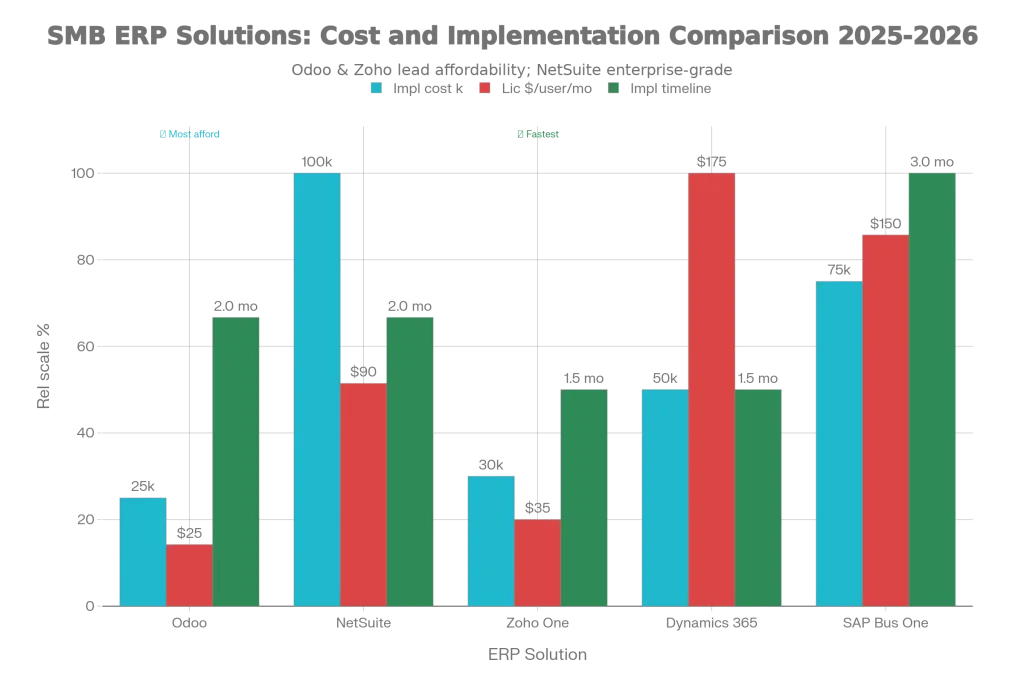
Odoo has emerged as the standout ERP solution for small to medium businesses in 2026, offering modularity, affordability, and remarkable flexibility. Unlike traditional ERPs requiring massive upfront investments and lengthy implementations, Odoo allows businesses to start with essential modules and expand as they grow.
The platform includes integrated apps for accounting, sales, CRM, inventory, manufacturing, project management, and more. Each module works independently or integrates seamlessly, allowing businesses to customize their system to their specific operations. Open-source availability means businesses can either use Odoo’s hosted cloud solution or deploy on-premises for maximum control.
Implementation timelines typically range from 1-3 months for SMBs, far shorter than traditional ERPs. The modular licensing means you pay only for the functionality you use, avoiding expensive enterprise bloat. A free tier with single-app access lets businesses test Odoo before committing financially.
Pricing: Odoo’s transparent pricing includes a free plan with one app, Standard plans at $24.90 per user per month (billed annually) or higher, and Custom plans at $37.40 per user monthly with advanced features like Odoo Studio and multi-company support. First-year implementation typically costs $5,000-$50,000 depending on complexity, with licensing around $14,400-$30,000 annually for small businesses (30-50 users). Premium support and hosting add $3,000-$5,000 yearly.
Best For: SMBs (5-100 users) wanting an affordable, scalable ERP without vendor lock-in, particularly those needing CRM, accounting, inventory, and project management integration.
NetSuite: Enterprise Power with Cloud Advantages
Oracle NetSuite serves as the market’s most scalable cloud ERP, handling growth from startup through enterprise. The multi-tenant cloud architecture eliminates IT infrastructure overhead, and comprehensive functionality covers virtually every business function.
Implementation is relatively fast (24 hours to 4 weeks), and SuiteAnalytics, SuiteCommerce, and OneWorld modules address complex global and multi-subsidiary requirements. However, entry costs are significantly higher than Odoo, with pricing typically starting around $40,000 annually and scaling to $300,000+ for enterprise deployments.
Best For: Mid-to-large SMBs (20-500+ users) ready to invest in comprehensive ERP functionality and scalable architecture supporting rapid growth or complex operations.
Zoho One: Affordable All-in-One Suite
Zoho One provides an integrated business suite including CRM, accounting, projects, inventory, HR, and analytics at significantly lower cost than NetSuite or traditional ERPs. Pricing starts at just $35 per user monthly, making it highly accessible for SMBs.
The ecosystem is remarkably comprehensive, with over 50 integrated applications. However, compared to Odoo’s modularity and NetSuite’s enterprise depth, Zoho One can feel like a compromise. The learning curve is moderate, and while Zoho offers strong integrations within its ecosystem, external integrations sometimes require workarounds.
Best For: Budget-conscious SMBs (10-200 users) wanting comprehensive business management software without massive implementation costs, particularly those comfortable with the Zoho ecosystem.
Microsoft Dynamics 365 Business Central
For businesses already invested in Microsoft products, Dynamics 365 Business Central provides seamless integration with Office 365, Teams, and Power BI. The platform excels at project management, planning, and job costing—capabilities critical for manufacturing and consulting operations.
At $175 per user monthly, Business Central sits at the premium end for SMB ERPs but delivers enterprise-grade capabilities with rapid implementation (typically 4-8 weeks) and strong customization options through Power Apps.
Best For: SMBs (10-300+ users) heavily invested in Microsoft ecosystem wanting advanced project management and job costing capabilities.
Specialized Tools: Filling Critical Gaps
Beyond the major RMM, PSA, and ERP platforms, specialized tools address specific critical functions.
Network Monitoring: Auvik vs. PRTG vs. UniFi
Auvik leads modern network monitoring with cloud-based deployment, automated network mapping, and intelligent alerting. The platform discovers and visualizes your entire network in minutes, provides real-time performance data, and integrates directly with PSA systems for automated ticket creation. Per-critical-device pricing means you don’t pay for routine monitoring of standard equipment.
PRTG Network Monitor offers powerful capabilities but requires manual configuration, on-premises deployment, and sensor-based pricing that can escalate with complexity. Auvik has captured significant market share from PRTG by offering faster deployment and clearer pricing.
Ubiquiti UniFi provides affordable network management if you’re standardized on Ubiquiti equipment, offering excellent “single pane of glass” for networks using their infrastructure. However, it lacks the advanced performance analysis and SNMP monitoring depth that Auvik and PRTG provide for heterogeneous networks.
Pricing Comparison: Auvik uses per-critical-device pricing (typically $10-20 per device monthly); PRTG is on-premises with sensor-based pricing; UniFi is hardware + software licensing.
Recommendation: For MSPs managing diverse client networks, Auvik is the clear winner for ease of deployment, intelligent alerting, and integration with PSA systems.
Remote Access and Support: Splashtop vs. TeamViewer
Splashtop has disrupted the remote access market with affordable pricing and superior performance. Starting at just $60 annually for basic access versus TeamViewer’s $610.80, Splashtop offers the same core features—fast remote control, multi-monitor support, file transfer—at a fraction of the cost.
Performance is genuinely impressive, with low-latency connections even on slower networks. Splashtop integrates directly with most RMM platforms, and the mobile app is excellent. The platform supports Windows, Mac, Linux, iOS, Android, and Chromebook.
TeamViewer remains the volume leader but charges premium prices for commercial use. The free version comes with usage restrictions and can be blocked if TeamViewer suspects commercial activity. For IT professionals who need remote access, Splashtop offers equivalent or superior value.
Pricing: Splashtop Remote Access starts at $60/year; Splashtop Remote Support (on-demand) starts at $259/year. TeamViewer commercial plans start at $610.80/year.
Recommendation: For cost-conscious MSPs, Splashtop is the obvious choice. You’ll save 50% or more versus TeamViewer while getting faster performance and superior integrations.
Backup and Disaster Recovery: Essential for Every Business
Datto SIRIS remains popular with MSPs, offering instant virtualization, hardware-independent restores, and cloud-based replication. However, pricing is premium, limiting accessibility for smaller MSPs.
Veeam Backup & Replication provides reliable recovery solutions with instant VM recovery and broad platform support (VMware, Hyper-V, cloud). Performance is excellent, but like Datto, pricing is enterprise-oriented.
Acronis Cyber Backup offers a more budget-friendly option with user-friendly interfaces, ransomware protection, and blockchain-based data authentication. It works across physical, virtual, and cloud environments.
BDRShield specifically targets MSPs with flexible, scalable solutions offering multi-tenant management, automated backups, and strong ransomware defense. Pricing is more accessible than Datto.
Recommendation: For SMBs and small MSPs, Acronis offers the best balance of features and cost. For larger MSPs, Datto or Veeam justify the premium through advanced capabilities. BDRShield is excellent if you want to offer backup as a white-label service.
Security and Threat Detection: The 2026 Imperative
In 2026, cybersecurity is no longer optional—it’s fundamental to every service offering. SentinelOne for endpoint detection and response (EDR), Huntress for managed detection and response (MDR), and Okta Workforce Identity for identity and access management represent essential additions to any MSP stack.
Sophos Central provides integrated endpoint and server protection with strong anti-malware and firewall capabilities. CrowdStrike Falcon delivers enterprise-grade EDR for MSPs protecting critical environments.
Pricing: These tools typically run $3-$15 per endpoint monthly depending on features and endpoints under management.
Recommendation: Identity and access management (Okta, OneLogin) should be foundational. Layer endpoint detection (SentinelOne) and managed detection (Huntress) for comprehensive protection.
Pricing Models: Understanding What You’ll Actually Pay
One challenge with MSP tools is that pricing models vary significantly. Understanding these models is critical to accurate budgeting.
Per-Endpoint Pricing: You pay based on the number of endpoints managed (e.g., NinjaOne, some Datto implementations). This works well for MSPs managing many small clients but can become expensive as endpoint counts grow.
Per-Technician Pricing: You pay based on the number of technicians using the platform (e.g., Atera, Syncro, SuperOps). This model advantages MSPs with large client bases relative to technician count and simplifies scaling.
Per-User Pricing: Similar to per-technician but typically for office-based tools like PSA and ERP solutions. HaloPSA, Odoo, and others use this model.
Custom Pricing: Enterprise platforms like ConnectWise Automate and NetSuite require individual quotes. This allows maximum customization but makes comparison difficult.
Hidden Costs: Watch for add-ons that aren’t included in base pricing. Atera’s AI Copilot ($95/tech/month), network discovery tools, and security features add real cost. Verify what’s actually included before signing agreements.
The 2026 MSP Technology Landscape: Key Trends
Three major forces are reshaping the MSP industry heading into 2026:
AI and Intelligent Automation
87% of MSPs plan to increase AI investments by 2026. Service desk automation powered by AI is expected to reduce ticket volume by 40-60% through intelligent ticket triage, automated remediation, and self-service resolution. Forward-thinking MSPs are deploying AI agents in platforms like SuperOps (Monica), Atera (Autopilot), and ConnectWise Automate to handle routine work automatically.
The impact is dramatic: MSPs using AI agents report 3x faster resolution times, allowing teams to focus on strategic work rather than repetitive tasks.
Outcome-Based Service Models
The shift from “hours worked” to “business outcomes achieved” is accelerating. Clients increasingly want risk reduction, security posture improvement, and clear visibility into their systems’ health. MSPs building service offerings around these outcomes—tracked through platforms’ advanced analytics and reporting—are commanding premium pricing.
Consolidated Tool Stacks
The best-performing MSPs are deliberately consolidating around unified platforms rather than maintaining multiple point solutions. The efficiency gains, reduced training overhead, and improved workflow integration justify the move away from best-of-breed multi-vendor environments.
Implementation Strategy: Getting Started Right
Successful MSP tool adoption follows these principles:
1. Assess Current Operations: Document existing workflows, pain points, and team skillsets before selecting new tools. Tools don’t fix broken processes—they scale them.
2. Prioritize Integration: Choose platforms that integrate well with your existing stack. Unified platforms (RMM+PSA) reduce integration complexity, but make sure the combination serves your specific needs.
3. Plan Training: Even intuitive platforms require training. Allocate time and resources for comprehensive onboarding. The platforms we’ve discussed include onboarding support, but your team needs time to learn.
4. Start with Core Functionality: You don’t need every feature on day one. Start with the fundamentals, master them, then expand as comfort increases.
5. Monitor and Adjust: The first 90 days are critical for course correction. Track adoption metrics, gather feedback, and don’t hesitate to adjust configurations or workflows.
Real-World ROI: What Businesses Actually Save
An MSP that consolidated from multiple tools to a unified platform (Syncro) reported:
- 30-50% reduction in time spent on administrative tasks
- 25-30% improvement in first-contact resolution rates
- 40% faster ticket closure times
- Ability to manage 70% more tickets without adding technicians
A manufacturing SMB implementing Odoo ERP reported:
- 20% reduction in administrative overhead
- Improved inventory accuracy, reducing carrying costs by $80,000 annually
- Better financial visibility enabling faster decision-making
- Single system replacing previously disconnected accounting, CRM, and inventory tools
A services firm adopting AI-powered automation through SuperOps experienced:
- Automatic handling of 60% of routine support requests
- Reduction from 5 to 1.5 days average ticket age
- Technicians shifted 40% of time from ticket resolution to client advisory work
Conclusion: Your MSP Tool Strategy for 2026 and Beyond
The MSP and business software landscape in 2026 rewards clarity of purpose and thoughtful consolidation. Rather than adopting every new tool, successful organizations standardize around platforms that serve their core needs exceptionally well.
For small to medium businesses, the clearest path forward combines a unified RMM+PSA platform (SuperOps, Syncro, or Atera for affordability and simplicity; ConnectWise for maximum customization) with specialized tools addressing specific critical needs: network monitoring (Auvik), remote access (Splashtop), backup (Acronis or Datto depending on budget), and security (identity management plus endpoint protection).
For businesses needing broader ERP capabilities, Odoo offers the most compelling value proposition—modular, affordable, and scalable without vendor lock-in. Growing businesses with more complex operations benefit from NetSuite’s enterprise capabilities or Dynamics 365’s Microsoft integration.
The defining characteristic of successful 2026 implementations isn’t using the newest, flashiest tools. It’s strategic consolidation around platforms that work together seamlessly, eliminate manual handoffs, and free teams to focus on strategic value rather than administrative drudgery. Choose thoughtfully, implement systematically, and you’ll position your organization for genuine competitive advantage heading into 2026 and beyond.
The tools detailed in this guide represent the current state of the art in MSP and business management software. Evaluate them based on your specific operational needs, budget constraints, and strategic priorities. The right choice isn’t necessarily the most expensive or feature-rich platform—it’s the one that solves your actual problems, integrates with your existing systems, and enables your team to operate at their best.







 English
  Deutsch
  Español
  Italiano
  Français