

Table of contents
- Tools vs. Skills: Building Blocks of the Agent
- 1. Inbox Cleanup and Message Triage
- 2. Calendar Management and Time‑Blocking
- 3. Daily Briefings and Morning Digests
- 4. Research Assistant and Background Sub‑Agents
- 5. GitHub Automation and Development Workflows
- 6. Smart Home and Personal Life Automation
- 7. Financial Tracking and Expense Split
- 8. Content Generation and Summarization
- 9. Health and Wellbeing Coach
- 10. Multi‑Channel Communication Hub
- What Is an Agent Bot?
- Safety and Best Practices
- Conclusion
OpenClaw is more than just another chatbot – it is a programmable AI agent that can read files, execute commands, browse the web and perform multistep workflows on your behalf. Released in late 2025, OpenClaw quickly gained hundreds of thousands of GitHub stars and a passionate community of tinkerers who built personal assistants that automate everything from managing calendars and inboxes to building websites and monitoring servers. Many users describe it as having a digital co‑worker who never sleeps. In this guide we’ll explore ten practical ways to use OpenClaw to lighten your workload, whether you’re a knowledge worker, developer, entrepreneur or busy parent. We’ll also explain how the agent bot concept works and why it can transform the way you interact with your computer.
Throughout this article we’ll reference official documentation and community showcases to provide evidence for each use case. Remember that OpenClaw is modular: you enable tools to grant capabilities and skills to teach the agent how to use them. Understanding this distinction helps you configure your assistant safely.
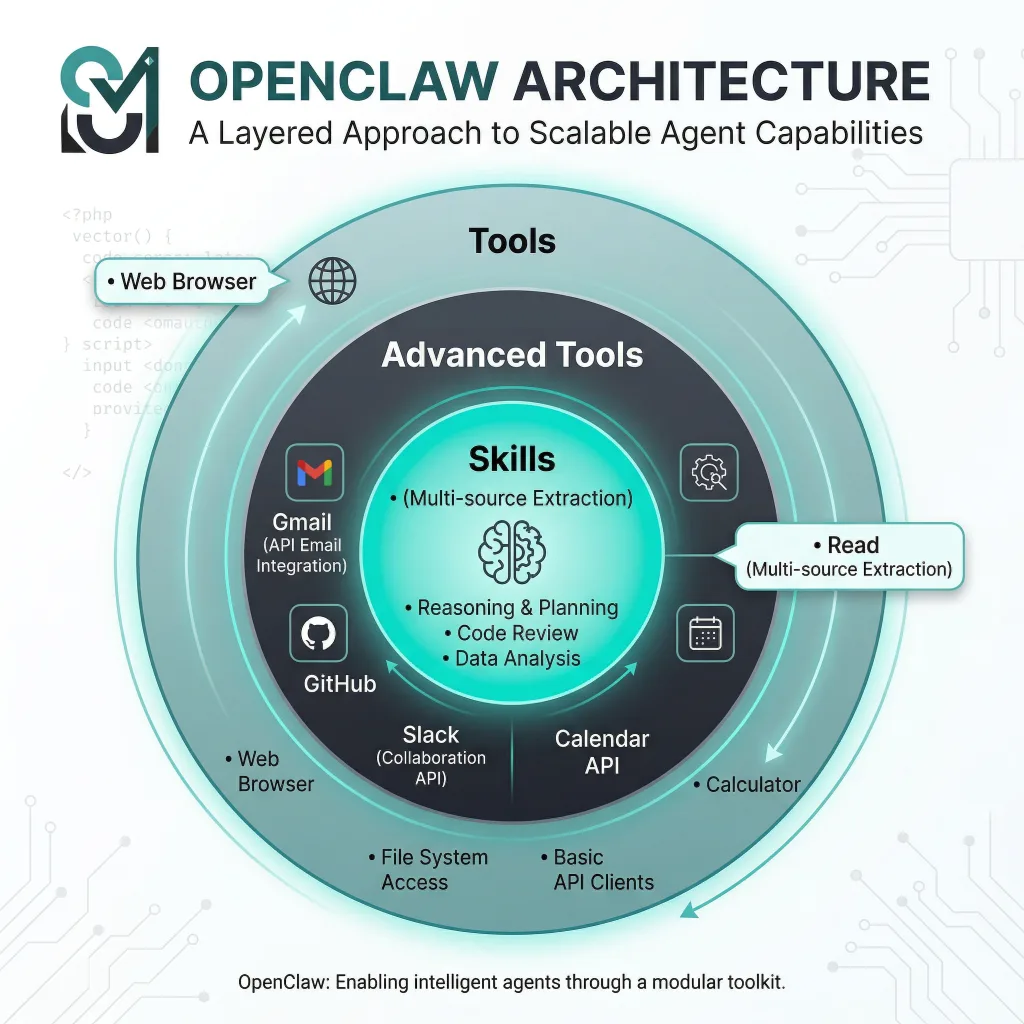
Tools vs. Skills: Building Blocks of the Agent
The first step to harnessing OpenClaw is understanding its architecture. The platform distinguishes between tools and skills. Tools are the fundamental operations the agent can perform, such as reading and writing files (read, write, edit, apply_patch), executing shell commands (exec), or browsing the web (web_search, browser). Without a tool, the agent cannot perform the corresponding action – it is like having no hands. Skills, on the other hand, are manuals that teach the agent how to combine tools to accomplish specific tasks. For example, the github skill teaches the agent how to create branches, commit changes and open pull requests using the GitHub API. Installing a skill alone does not grant new permissions; you still need to enable the underlying tool (e.g., exec and web_fetch for network requests). This modular design allows you to gradually expand the agent’s abilities while maintaining control and security.
OpenClaw organizes its capabilities into concentric layers:
- Layer 1 – Core Tools: Basic file operations, command execution and web search. These eight tools are the foundation and nearly everyone enables them. Without them, the agent cannot read or write files, run scripts or access the internet.
- Layer 2 – Advanced Tools: Seventeen tools that add browser control, memory, automation, and multi‑session management. Examples include
browserfor controlling Chrome,canvasfor drawing diagrams, andmemoryfor persisting context. - Layer 3 – Skills: Official skills cover domains like Gmail, calendar, social media, development and smart home. Third‑party skills on ClawHub expand this universe further.
Understanding the difference between these layers will help you decide which capabilities to enable based on your needs. For each use case below we’ll mention the relevant tools and skills.
1. Inbox Cleanup and Message Triage
An overflowing inbox is one of the biggest productivity drains. OpenClaw can read your emails or messages (via Gmail, Fastmail, or aggregated services like Beeper) and filter out spam, draft replies, or archive messages you no longer need. In the community showcase, user @dreetje lists “Check my incoming mail and remove spam” and “Check my incoming messages (through Beeper)” among the tasks their agent performs daily. To replicate this, enable the gmail or fastmail skill and grant the agent permission to read your inbox. Add a filterSpam routine that uses rules or machine learning to detect unwanted emails, then call the delete or archive tool. Combine this with a daily digest skill to generate summaries of important messages and send them to your preferred channel.
Tip: Always enable approvals for the exec tool when working with email to ensure the agent asks before deleting or forwarding sensitive data.
2. Calendar Management and Time‑Blocking
Scheduling tasks and meetings is another area where OpenClaw shines. User @danpeguine notes that their agent “timeblocks tasks in my calendar based on importance”. By combining the gog skill (Google Workspace) with the calendar tool, the agent can look at your task list, assign priorities, and create blocks of time in your calendar for focused work. To implement this, write a script or teach the agent rules such as: high‑priority tasks get a one‑hour slot in the morning; medium priority tasks go to the afternoon; low priority tasks fill leftover slots. The agent then calls the Google Calendar API to create events accordingly.
You can extend this system with weekly reviews. The same user reports that their agent “leads me through a weekly review based on meeting transcriptions and notes”. After reviewing your calendar and notes (via the obsidian or notion skills), the assistant can prompt you with questions like “What went well this week?” and “What needs improvement?” It then updates tasks or schedules follow‑up meetings as necessary.
3. Daily Briefings and Morning Digests
Imagine waking up to a personalized briefing containing your agenda, weather forecast, health statistics, trending news, reminders and inspiring quotes. In the showcase, @danpeguine describes receiving a morning daily brief that includes weather, objectives, health stats, meeting agendas and relevant reading suggestions. To build this, you can chain together several skills: the weather skill fetches local forecasts, the health skill pulls data from wearables, the tasks skill summarizes your to‑dos, and the news or tavily skill aggregates articles relevant to your objectives. The agent compiles this information into a single message and sends it via your preferred channel each morning, using the built‑in scheduler or an external cron job.
4. Research Assistant and Background Sub‑Agents
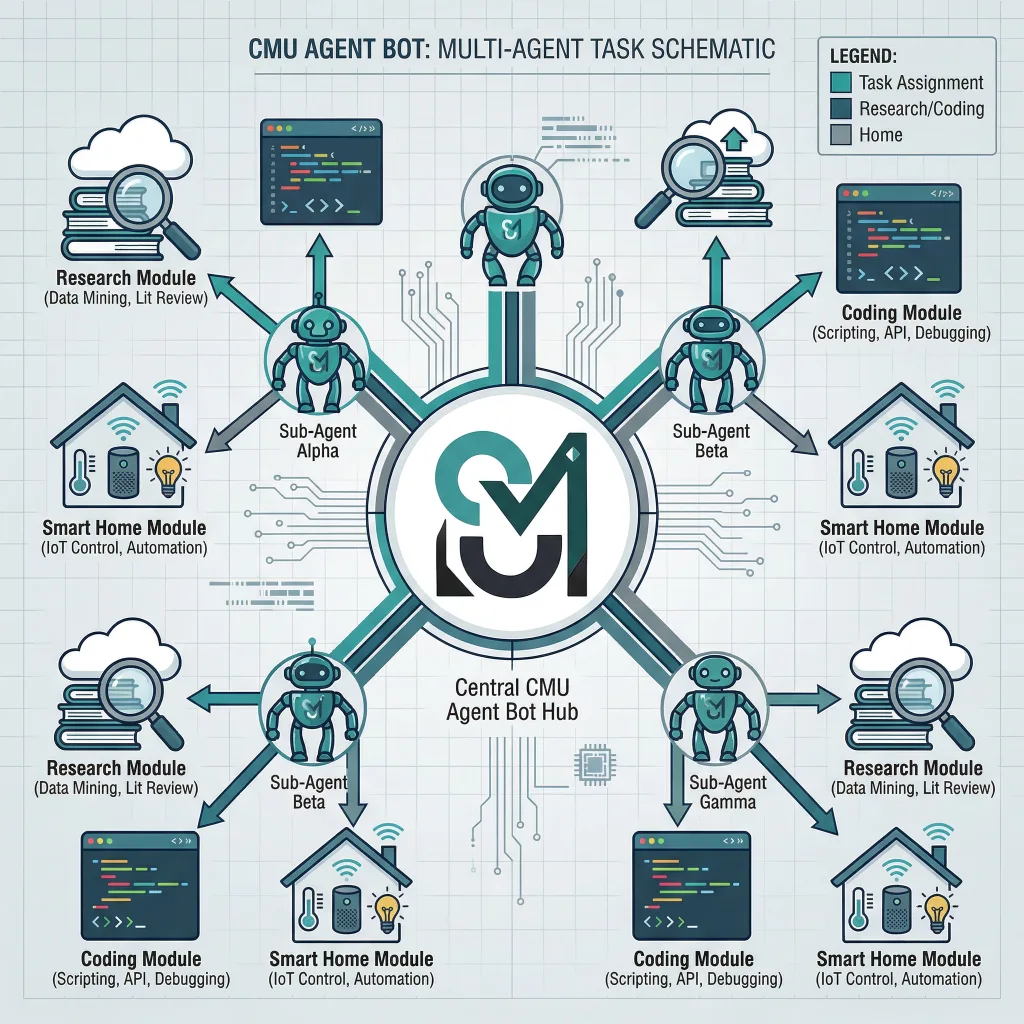
OpenClaw can spawn sub‑agents to research topics while you focus on other work. In the showcase, @danpeguine mentions that their assistant “spawns background sub‑agents to research business ideas”. This is possible because OpenClaw allows agents to call each other: you can define a research agent with specialized skills (web_search, tavily, memory) and have your primary agent delegate tasks to it. For example, your primary agent might say, “Find three competitors in the home automation market and provide a summary.” The research sub‑agent collects web articles, extracts key data and writes a report. It then returns the results to the main agent, which schedules follow‑up actions or drafts proposals.
This delegation model mirrors how a human would ask a colleague for research. It keeps your main agent responsive while resource‑intensive tasks run concurrently. Use the agents feature to configure maximum concurrency and memory usage to avoid overloading your server.
5. GitHub Automation and Development Workflows
Developers often spend time performing repetitive tasks like creating issues, reviewing pull requests or deploying code. Several users in the showcase mention that their agents create issues on GitHub, build sites and even submit pull requests automatically. To enable this, install the github skill. The agent can:
- Create and assign issues: When you encounter a bug or feature request, simply describe it to the agent. It will call the GitHub API to create an issue and tag relevant teammates.
- Review pull requests: Use the agent to fetch a PR’s diff, run tests via
exec, and post review comments. It can even suggest improvements. - Automate deployments: Combine the
exectool with your CI/CD scripts to deploy the latest branch after tests pass. The agent can notify you on Telegram or Slack with the results.
One developer in the showcase rebuilt their entire website via Telegram while watching Netflix. They migrated 18 posts from Notion to a static site generator and changed DNS records — all by conversing with their agent. This demonstrates how far automation can go when you trust the agent to run system commands and handle external APIs.
6. Smart Home and Personal Life Automation
OpenClaw isn’t limited to work tasks. Users integrate it with smart home devices and personal routines. In the showcase, @iannuttall notes that they “bought @openclaw his first home”, while @stevecaldwell built a weekly meal planning system in Notion that automatically generates shopping lists sorted by store and aisle, inserts weather forecasts and reminds them to plan dinner. These examples illustrate how the homeassistant or homey skills can control smart devices, adjust lighting, manage thermostats and remind you of chores.
For families, you can set up the agent to notify both parents about upcoming school tests or to send bedtime stories via voice synthesis. The combination of memory tools and scheduling makes it easy to build personalized routines that adapt over time.
7. Financial Tracking and Expense Split
OpenClaw can help you stay on top of expenses. In the showcase, @dreetje notes that their assistant “keeps track of costs and splits them after trips”. By connecting the sheet skill (Google Sheets or Excel) and a finance skill like ynab or tiller, the agent can record every purchase you mention in chat. It then calculates how much each person owes and sends payment reminders. For more advanced setups, the agent can analyze spending trends and suggest budget adjustments.
8. Content Generation and Summarization
Large language models are naturally good at summarizing articles, generating drafts and even creating diagrams. One developer built a skill to programmatically create Excalidraw diagrams from natural language instructions. Another user’s agent reads bookmarks from X (formerly Twitter) and discusses them with the user. You can also ask your agent to generate blog outlines, expand bullet points into paragraphs or write LinkedIn posts. Install the writer skill or connect to tools like Notion or Obsidian. For visuals, integrate midjourney or use the canvas tool to draw charts and diagrams.
9. Health and Wellbeing Coach
With the right integrations, OpenClaw can become a personal health advisor. The daily briefing use case already pulls health metrics; you can take this further by analyzing patterns and offering recommendations. For instance, connect the applehealth or whoop skill to track sleep and heart rate. Your agent could then schedule workouts based on your calendar, suggest meals aligned with your nutritional goals and remind you to take breaks if it detects long periods of inactivity. As @stevecaldwell noted, including weather forecasts in the meal plan helps decide when to grill or make soup.
10. Multi‑Channel Communication Hub
Finally, OpenClaw can unify your communications across Telegram, Slack, Discord, WhatsApp and email. Many users route all their messages through one agent. @dreetje mentions that their agent “impersonates me in a group chat with friends”. Another user rebuilt their site and managed the entire project via Telegram. By enabling multiple channel skills and setting up appropriate dmPolicy and groupPolicy settings, you can talk to your agent wherever you are. The agent keeps context across channels thanks to its shared memory and thread‑specific session keys.
What Is an Agent Bot?
The term agent bot refers to running OpenClaw as a persistent process, connected to your preferred channels, that can accept tasks asynchronously and act on them. Unlike traditional chatbots that simply answer questions, an agent bot can execute long‑running workflows, spawn sub‑agents and call external tools. For example, you might tell your bot to “monitor my competitor’s website and email me when they launch a new feature.” The agent will run a background process, perform periodic checks using the browser tool, and send a notification when conditions are met.
To set up your own agent bot:
- Install OpenClaw on a server or local machine.
- Enable the necessary tools (e.g.,
exec,browser,memory,web_search) and skills (Google Workspace, GitHub, Home Assistant, etc.). - Configure channels such as Telegram, Slack or WhatsApp with appropriate
dmPolicyandgroupPolicysettings. - Write or install skills that teach the agent how to perform tasks like sending emails, creating calendar events, or controlling smart devices.
- Define workflows and routines using scripts or natural language instructions. You can instruct the agent to schedule tasks at specific times or when certain triggers occur.
By running the agent continuously, you transform it into a bot that proactively helps you instead of waiting for commands. Many users in the community have described how this changed their productivity: after a few weeks of usage, they rely on their bot to check logs, fix build errors, plan meals and more.
Safety and Best Practices
Because OpenClaw can run shell commands and access sensitive data, safety is paramount. The official setup guide warns that exec can “install dependencies for you, but it can also rm -rf your entire machine”. To mitigate risks:
- Enable approvals: Configure
approvalsso that the agent must ask before executing commands. This adds a confirmation step and prevents accidental damage. - Limit scope: Only enable the tools and skills you need. Leave advanced tools disabled until you trust the agent.
- Use version control: Keep your
openclaw.jsonunder version control to track changes. Back up your config and workspace regularly. - Sandbox tasks: For untrusted operations (e.g., running arbitrary code from the internet), create a container or separate VM to isolate the agent.
- Monitor logs: Regularly check the agent’s logs to see what commands it executed and which websites it accessed.
Conclusion
OpenClaw’s power comes from its combination of modular tools, flexible skills and the ability to run as an autonomous agent. By understanding how these pieces fit together and following best practices, you can build an assistant that manages your inbox, schedules your time, provides daily briefings, conducts research, automates development tasks, controls your smart home and more. The agent bot paradigm allows you to delegate repetitive work and focus on high‑value tasks. As the community showcase shows, people are already using OpenClaw to handle everything from meal planning to PR reviews. The possibilities continue to grow as new skills and tools are released. Try one of the use cases above, and soon you may wonder how you ever worked without your AI co‑pilot.









 English
  Deutsch
  Español
  Italiano
  Français